
Mdxtog Mdxtog-001
Mdxtog 2000W Pure Sine Wave Power Inverter User Manual
Model: Mdxtog-001
1. Introduction
Thank you for choosing the Mdxtog 2000W Pure Sine Wave Power Inverter. This device is designed to convert DC 12V or 24V power from your vehicle battery into stable AC 220V household power, allowing you to operate various electronic devices and appliances on the go. Its pure sine wave output ensures compatibility with sensitive electronics, providing a reliable power source for outdoor activities, camping, or as a backup power supply.
2. Safety Precautions
Please read and understand all safety instructions before operating the inverter. Failure to follow these instructions may result in electric shock, fire, or serious injury.
- Ventilation: Ensure adequate ventilation around the inverter. Do not block ventilation openings.
- Dry Environment: Do not expose the inverter to water, rain, snow, or spray. Operate it in a dry environment.
- Correct Voltage: Connect the inverter only to a DC power source with the correct voltage (12V or 24V) as specified on the inverter.
- Avoid Short Circuits: Do not short-circuit the output terminals.
- Proper Grounding: Ensure the inverter is properly grounded according to local electrical codes.
- Load Capacity: Do not exceed the rated power of the inverter. Overloading can damage the unit and connected devices.
- Children and Pets: Keep the inverter out of reach of children and pets.
- Flammable Materials: Do not operate the inverter near flammable liquids, gases, or other combustible materials.
- Professional Installation: For permanent installations, it is recommended to consult a qualified electrician.
3. Package Contents
Verify that all items are present in the package:
- 1 x Mdxtog 2000W Pure Sine Wave Power Inverter
- 1 x User Manual
- Battery connection cables (typically included)
4. Product Overview
The Mdxtog 2000W Power Inverter features a robust design with an aluminum alloy shell for enhanced durability and protection. It incorporates a silent cooling fan system that adjusts speed based on load and temperature, ensuring efficient heat dissipation and reduced noise.
Key Features:
- Pure Sine Wave Output: Provides clean and stable power suitable for sensitive electronics.
- Advanced Protection: Built-in intelligent protection system for stable, reliable, and safe electricity use.
- Efficient Cooling: Equipped with a silent cooling fan that automatically adjusts speed.
- Durable Construction: Aluminum alloy shell for anti-drop and anti-collision protection.
- Portable Design: Lightweight and compact for easy transport.

Figure 4.1: Front view of the Mdxtog 2000W Pure Sine Wave Power Inverter, showing the AC output sockets and power switch.

Figure 4.2: Detailed view of the inverter's input side, highlighting the input positive and negative terminals, and the dual cooling fan.

Figure 4.3: Diagram illustrating the eight security protection features: Overcharge, Overload, Overvoltage, Overheat, Undervoltage, Overcurrent, Undercurrent, and Short circuit protection.
5. Setup Guide
Follow these steps to properly set up your power inverter:
- Preparation: Ensure your vehicle's engine is off and the area is well-ventilated. Gather your inverter, battery connection cables, and the device(s) you intend to power.
- Connect to Battery:
- Connect the red (positive) cable to the positive (+) terminal of the inverter.
- Connect the black (negative) cable to the negative (-) terminal of the inverter.
- Ensure connections are tight and secure.
- Connect the other end of the red (positive) cable to the positive (+) terminal of your vehicle's battery.
- Connect the other end of the black (negative) cable to the negative (-) terminal of your vehicle's battery.
Important: Always connect the inverter to the battery before connecting any AC devices. Ensure correct polarity to prevent damage to the inverter or battery.
- Mounting (Optional): If desired, secure the inverter in a stable, dry location using the mounting brackets. Ensure it is away from direct sunlight, heat sources, and moisture.
- Initial Check: Before plugging in any devices, turn on the inverter's power switch. The indicator light should illuminate, indicating the inverter is receiving power.

Figure 5.1: Side view of the inverter showing the DC input terminals for battery connection.
6. Operating Instructions
Once the inverter is properly set up, follow these steps for operation:
- Power On: Ensure the inverter is connected to the DC power source. Flip the main power switch on the inverter to the 'ON' position. The power indicator light should turn on.
- Connect AC Devices: Plug your AC appliances or devices into the 220V AC output sockets on the inverter.
- Monitor Load: Pay attention to the total wattage of the devices connected. Do not exceed the inverter's rated continuous power (1000W) or peak power (2000W). Overloading can trigger protection mechanisms or damage the inverter.
- Power Off: When you are finished using the inverter, first turn off all connected AC devices. Then, flip the main power switch on the inverter to the 'OFF' position. Finally, disconnect the inverter from the DC power source.
Note on Cooling Fan: The built-in cooling fan will automatically activate and adjust its speed based on the internal temperature and load. This is normal operation and helps maintain optimal performance and longevity of the inverter.
7. Maintenance
Regular maintenance ensures the longevity and optimal performance of your inverter:
- Cleaning: Keep the inverter clean and free from dust and debris. Use a dry, soft cloth to wipe the exterior. Do not use liquid cleaners or solvents.
- Ventilation: Periodically check that the ventilation openings are not blocked by dust or foreign objects. Clean them gently if necessary.
- Connections: Regularly inspect the battery connection cables and terminals for any signs of corrosion, wear, or loose connections. Tighten connections as needed.
- Storage: When not in use for extended periods, store the inverter in a cool, dry place, away from direct sunlight and extreme temperatures. Disconnect it from the battery.
8. Troubleshooting
If you encounter issues with your inverter, refer to the following table for common problems and solutions:
| Problem | Possible Cause | Solution |
|---|---|---|
| Inverter not turning on / No output | Loose battery connections; Low battery voltage; Blown fuse; Inverter switch off. | Check and tighten battery cables; Recharge or replace battery; Check and replace internal/external fuses (if applicable); Ensure inverter switch is ON. |
| Overload alarm / Inverter shuts down | Connected load exceeds inverter's rated power; Short circuit in connected device. | Reduce the total wattage of connected devices; Disconnect faulty device; Restart inverter. |
| Overheat alarm / Inverter shuts down | Poor ventilation; High ambient temperature; Overloaded for extended period. | Ensure clear ventilation around the inverter; Move to a cooler environment; Reduce load; Allow inverter to cool down. |
| Low voltage alarm / Inverter shuts down | Battery voltage is too low. | Recharge the battery. |
| Fan not running | Inverter is not hot enough to activate fan; Fan malfunction. | This is normal if the inverter is cool; If inverter is hot and fan is not running, contact support. |
9. Technical Specifications
Detailed specifications for the Mdxtog 2000W Power Inverter:
| Parameter | Value |
|---|---|
| Input Voltage | DC 12V / 24V (Model Dependent) |
| Output Voltage | AC 220V |
| Output Frequency | 50Hz |
| Peak Power | 2000W |
| Rated Power | 1000W |
| Item Weight | 3.31 pounds (approx. 1.5 kg) |
| Package Dimensions | 1.18 x 0.79 x 0.39 inches (approx. 3 x 2 x 1 cm) |
| Model Name | Mdxtog-001 |
| Manufacturer | Mdxtog |
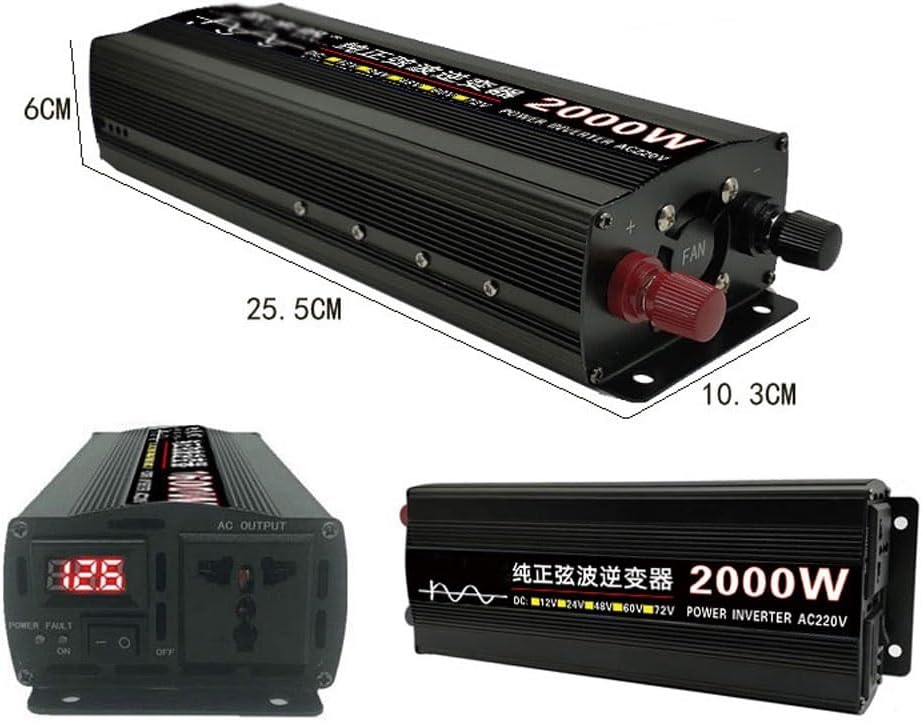
Figure 9.1: Dimensions of the Mdxtog 2000W Pure Sine Wave Power Inverter (25.5cm x 10.3cm x 6cm).
10. Warranty and Support
Warranty Information: Please refer to your purchase documentation or the product listing on the retailer's website for specific warranty terms and conditions. Mdxtog products typically come with a manufacturer's warranty covering defects in materials and workmanship.
Customer Support: For technical assistance, troubleshooting beyond this manual, or warranty claims, please contact Mdxtog customer support through the retailer's platform or the contact information provided with your purchase. Have your product model number (Mdxtog-001) and purchase date ready when contacting support.
Ask a question about this manual
Ask about setup, troubleshooting, compatibility, parts, safety, or missing instructions. Manuals+ will review the question and use this page’s manual context to help answer it.