
JZAQ BT40
JZAQ BT40 Motorcycle Helmet Bluetooth Headset User Manual
Model: BT40
Introduction
Thank you for choosing the JZAQ BT40 Motorcycle Helmet Bluetooth Headset. This manual provides detailed instructions for the proper installation, operation, and maintenance of your device. Please read this manual thoroughly before use to ensure optimal performance and safety.
Package Contents
Verify that all items listed below are included in your package:
- 1 x Helmet Headset (BT40)
- 6 x Headphone VELCRO (Adhesive Pads)
- 1 x USB Charging Cable
- 1 x User Manual
- 2 x Noise Reducing Sponge Heads (Microphone Covers)

Image: The JZAQ BT40 Helmet Bluetooth Headset, including the main unit with speakers and microphone, USB charging cable, and various adhesive pads and microphone covers.
Specifications
| Model Name | BT40 |
| Bluetooth Version | V5.0+EDR |
| Bluetooth Distance | Up to 10 meters (33 feet) |
| Battery Type | 3.7V/600mA Lithium Battery |
| Charging Time | Approximately 2 hours |
| Standby Time | Up to 500 hours |
| Working Time (Playtime/Talk Time) | Up to 90 hours |
| Water Resistance | IP67 Deep Waterproof Technology |
| Headphone Thickness | 0.35 inches (approx. 9mm) |
| Noise Control | DSP Noise Cancelling Technology |
| Compatible Devices | Smartphones, MP3 Players, GPS Devices |

Image: A diagram illustrating the dimensions of the headset's earpieces, speaker, microphone, and control unit, highlighting the 0.35-inch thickness of the earpieces.
Setup and Installation
Follow these steps to properly install the BT40 headset into your helmet:
- Prepare Earphones: Take the helmet headphones from the box. Attach the "Magic Tape" (Velcro adhesive pads) to the back of both earphones.
- Position Earphones: Remove the protective tape paper from the Velcro on the earphones. Carefully position and stick the earphones into the helmet's ear recesses on both sides. Ensure proper alignment before pressing firmly.
- Secure Headset: Once the Velcro is attached to the helmet, secure the headset earphones to these Velcro pads.
- Microphone Placement: Position the microphone arm so that the microphone is close to your mouth for clear communication.
- Final Check: Ensure all components are securely attached and comfortable within the helmet.
Important Note: Before ordering, please check the inner size of your helmet to ensure a comfortable fit for the headset. The headset's ultra-thin design (0.35 inches) is suitable for most helmets without causing discomfort.

Image: The BT40 headset featuring its ultra-thin speakers, designed to fit comfortably within helmet ear spaces without squeezing the ears.

Image: A motorcycle helmet with the JZAQ BT40 headset microphone arm visible, demonstrating typical installation.
Operating Instructions
Power On/Off and Pairing
- Power On: Press and hold the Power button (usually the middle button on the control unit) until the indicator light illuminates.
- Power Off: Press and hold the Power button until the indicator light turns off.
- Pairing: When powered on for the first time or when entering pairing mode, the headset will automatically search for Bluetooth devices. On your smartphone or other Bluetooth-enabled device, search for "BT40" in the Bluetooth settings and select it to connect.
- Automatic Connection: After initial pairing, the headset will automatically connect to the last paired device when powered on, if the device is within range.
Call Management
- Answer Call: The headset supports automatic answering of incoming calls.
- End Call: Press the Power button once to end an active call.
- Reject Call: Press and hold the Power button for approximately 2 seconds to reject an incoming call.
Music Playback
- Play/Pause: Press the Power button once to play or pause music.
- Volume Up: Press the "+" button to increase volume.
- Volume Down: Press the "-" button to decrease volume.
- Next Song: Press and hold the "+" button for approximately 2 seconds to skip to the next track.
- Previous Song: Press and hold the "-" button for approximately 2 seconds to go to the previous track.
Voice Assistant
- Activate Voice Assistant: Double-click the Power button to activate your smartphone's voice assistant (e.g., Siri, Google Assistant).

Image: A detailed view of the headset's control unit, showing the volume up (+), power/play/pause, and volume down (-) buttons, along with the microphone.
Video: An overview of the JZAQ Motorcycle Helmet Bluetooth Headset BT40, demonstrating its components and basic features.
Maintenance
- Cleaning: Use a soft, dry cloth to clean the headset. Avoid using harsh chemicals or abrasive materials.
- Water Exposure: While the headset is IP67 waterproof, prolonged submersion or exposure to high-pressure water jets should be avoided. Ensure the charging port cover is securely closed when not charging.
- Storage: Store the headset in a cool, dry place away from direct sunlight and extreme temperatures.
- Battery Care: To prolong battery life, avoid fully discharging the battery frequently. Charge the headset regularly, even if not in use for extended periods.
- Microphone Sponge: Replace the noise-reducing sponge head on the microphone if it becomes worn or damaged to maintain optimal voice clarity.
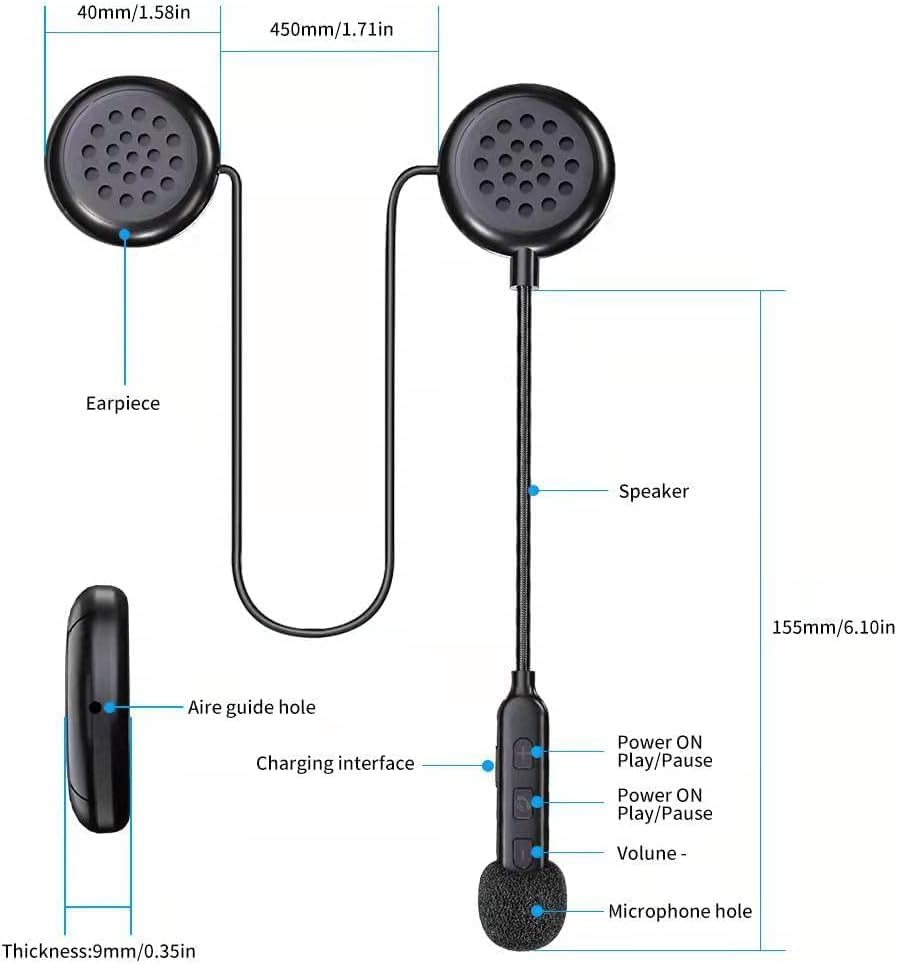
Image: The BT40 headset with water droplets, demonstrating its IP67 deep waterproof capability, suitable for use in rainy or snowy conditions.
Troubleshooting
| Problem | Possible Cause | Solution |
|---|---|---|
| Headset does not power on. | Low battery. | Charge the headset for at least 2 hours using the provided USB cable. |
| Cannot pair with device. | Bluetooth is off on the device; headset is not in pairing mode; too far from device. | Ensure Bluetooth is enabled on your device. Make sure the headset is powered on and in pairing mode. Move the headset closer to the device (within 10 meters). Try restarting both devices. |
| No sound or low volume. | Volume too low on headset or connected device; improper connection. | Increase volume using the "+" button on the headset and on your connected device. Re-pair the headset with your device. |
| Microphone not picking up voice clearly. | Microphone not positioned correctly; damaged sponge cover. | Adjust the microphone arm so the microphone is close to your mouth. Replace the noise-reducing sponge head if it is worn. |
| Intermittent connection. | Interference; device too far; low battery. | Move away from sources of strong electromagnetic interference. Ensure the headset is within 10 meters of the connected device. Charge the headset. |
Warranty and Support
For warranty information or technical support, please refer to the contact details provided with your purchase or visit the official JZAQ website. If you experience any dissatisfaction or issues, please contact customer service for assistance.
Contact: Please refer to your purchase documentation or the seller's information on the platform where you purchased the product.
Related documentsBT40


Ask a question about this manual
Ask about setup, troubleshooting, compatibility, parts, safety, or missing instructions. Manuals+ will review the question and use this page’s manual context to help answer it.