Introduction
Thank you for choosing the LarkLeaves L10-Pro-BK Ergonomic Office Chair. This manual provides detailed instructions for assembly, operation, maintenance, and troubleshooting to ensure optimal use and longevity of your chair. Please read this manual thoroughly before assembly and use, and retain it for future reference.

Image: The LarkLeaves L10-Pro-BK ergonomic office chair positioned at a desk in a modern office environment.
Safety Information
Please observe the following safety guidelines to prevent injury or damage to the chair:
- Ensure all components are securely fastened before use.
- Do not stand on the chair.
- Do not use the chair as a step stool.
- Avoid placing heavy objects on the chair's backrest or armrests.
- Keep children away from the chair during assembly and adjustment.
- Do not sit on the edge of the seat or armrests.
- Maximum weight recommendation: 140 kg (300 lbs).
Package Contents
Before assembly, verify that all parts are present and undamaged. The package typically includes:
- Backrest assembly
- Seat assembly with armrests
- Headrest
- Gas lift cylinder
- Star base
- Casters (wheels)
- Footrest assembly
- Neck cushion
- Assembly hardware (screws, washers)
- Assembly tool (Allen wrench)
Assembly Instructions
Assembly typically requires approximately 90 minutes. Follow the step-by-step instructions provided in the separate assembly guide included with your chair. Ensure all fasteners are tightened securely. A dedicated tool is provided for assembly.
- Attach the casters to the star base by pushing them firmly into the sockets.
- Insert the gas lift cylinder into the center hole of the star base.
- Attach the control mechanism to the underside of the seat using the provided screws.
- Connect the backrest to the seat assembly using the designated screws.
- Place the assembled seat and backrest onto the gas lift cylinder.
- Attach the headrest to the top of the backrest.
- Install the retractable footrest mechanism to the underside of the seat.
- Secure the neck cushion to the headrest or backrest as desired.
Note: Some fasteners may include a pre-applied thread-lock compound for enhanced security. Do not overtighten screws.
Operating Instructions
The LarkLeaves L10-Pro-BK chair offers multiple adjustment options for personalized comfort. Familiarize yourself with these features to optimize your seating experience.
1. Seat Height Adjustment
Locate the lever on the right side, beneath the seat. Pull the lever upwards to raise the seat. To lower the seat, pull the lever upwards while seated.

Image: The seat height adjustment lever and the tilt lock/unlock mechanism are visible on the underside of the seat. The image also illustrates the chair tilting back to 145 degrees.
2. Backrest Tilt and Tension Adjustment
The backrest can recline up to 145 degrees with 3 distinct locking positions. Use the lever on the left side, beneath the seat, to unlock and lock the tilt function. Rotate the round knob at the front, beneath the seat, to adjust the tilt tension, allowing for easier or firmer reclining.
The chair also features a 5-level height adjustable backrest for optimal spinal alignment.

Image: A side view of the chair highlighting the flexible 2D lumbar support and the mechanism for adjusting the backrest height through 5 levels.
3. Adaptive 3D Headrest
The headrest offers multi-directional adjustments:
- Height Adjustment: Move the headrest up or down by 6 cm (2.4 inches).
- Depth Adjustment: Move the headrest forward or backward by 4 cm (1.6 inches).
- Angle Adjustment: Tilt the headrest back by 45 degrees.
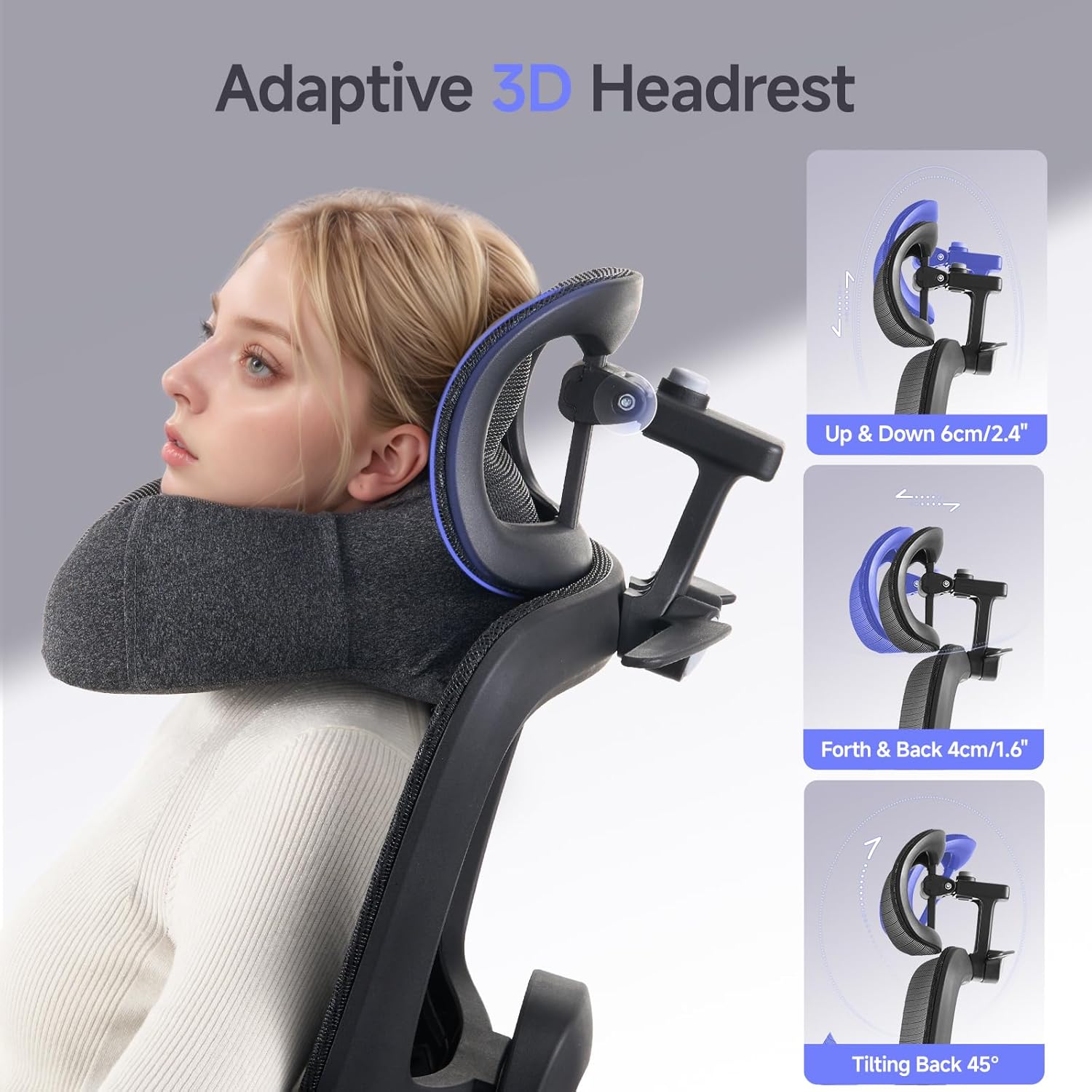
Image: Close-up of the headrest, illustrating its ability to move up/down, forth/back, and tilt, providing comprehensive neck support.
4. Flexible 2D Lumbar Support
The chair features adaptive 2D lumbar support designed to conform to the natural curve of your spine, providing targeted support and reducing back strain. This support automatically adjusts with your posture.
5. 3D Armrests
The armrests are adjustable in three dimensions (height, depth, and pivot) to support your arms and shoulders in various working positions.
6. Retractable Footrest
Pull out the footrest from beneath the seat when you wish to recline and elevate your legs. Push it back in when not in use.

Image: A user reclining in the chair with the footrest extended, demonstrating the chair's comfort for extended periods and its 360-degree swivel capability.
7. 360° Swivel
The chair base allows for a full 360-degree rotation, providing flexibility and ease of movement.
8. Non-Slip Coat Hangers
The backrest is equipped with integrated non-slip coat hangers, providing a convenient place to hang garments.

Image: A close-up of the chair's backrest, illustrating the built-in non-slip coat hangers with a small bag hanging from one.
Maintenance
Regular maintenance will help preserve the appearance and functionality of your chair.
- Cleaning: Wipe mesh and plastic surfaces with a damp cloth and mild soap. Avoid harsh chemicals. For the neck cushion, spot clean as needed.
- Fasteners: Periodically check all screws and bolts to ensure they remain tight. Retighten if necessary.
- Casters: Clean casters regularly to remove dust and debris that may hinder smooth movement.
- Mesh Fabric: While durable, avoid sharp objects that could damage the mesh.
Troubleshooting
| Problem | Possible Cause | Solution |
|---|---|---|
| Chair does not raise or lower | Gas lift cylinder malfunction or lever not engaged. | Ensure the height adjustment lever is fully engaged. If the issue persists, the gas lift may need replacement. |
| Chair wobbles | Loose screws or uneven floor. | Check and tighten all assembly screws. Ensure the chair is on a flat, even surface. |
| Casters do not roll smoothly | Debris in casters or damaged casters. | Remove any hair or debris from the caster wheels. Replace damaged casters if necessary. |
| Backrest does not tilt or lock | Tilt mechanism locked or tension too high. | Ensure the tilt lock lever is disengaged. Adjust the tilt tension knob to a lower setting. |
Specifications

Image: A technical diagram illustrating the various dimensions of the chair, including seat height, backrest height, and overall width and depth, along with the maximum weight capacity.
- Model Number: L10-Pro-BK
- Color: Black
- Material: Polyethylene (Mesh), Plastic (Frame)
- Product Dimensions (L x W x H): 48.01 x 50.04 x 121.92 cm (18.9 x 19.7 x 48.0 inches)
- Item Weight: 19 Kilograms (41.9 lbs)
- Maximum Weight Recommendation: 140 Kilograms (300 lbs)
- Back Style: Mesh Back
- Components Included: Arm support, Headrest, Lumbar Support, Footrest, Neck Cushion
Warranty and Support
LarkLeaves is committed to providing high-quality products. For specific warranty details, please refer to the warranty card included with your purchase or contact LarkLeaves customer support directly. If you encounter any issues or have questions regarding your L10-Pro-BK chair, please reach out to our customer service team for assistance.
Contact information can typically be found on the product packaging or the official LarkLeaves website.


