
Introduction
Welcome to your Genérico JESBT In-Ear Wireless Bluetooth Headphones. These headphones are designed to provide a high-fidelity audio experience with advanced Bluetooth connectivity and ergonomic comfort. This manual will guide you through the setup, operation, and maintenance of your device, ensuring you get the most out of its features.
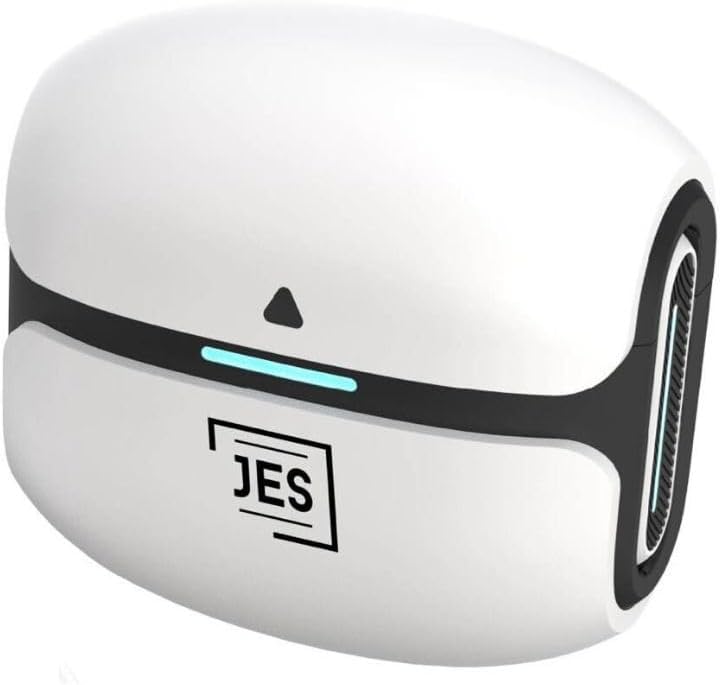
Image: The Genérico JESBT In-Ear Wireless Bluetooth Headphones charging case. The compact white case features a black band and a blue LED indicator, with the 'JES' logo prominently displayed.
Setup
Package Contents
- JESBT In-Ear Wireless Bluetooth Headphones
- Charging Case
- Charging Cable
- Ear Tips (various sizes)
Charging the Headphones
- Place the earbuds into the charging case. Ensure they are correctly seated.
- Connect the charging cable to the charging case and a compatible USB power source.
- The indicator light on the charging case will show the charging status. A full charge for the earbuds takes approximately 1.5 hours.
- The charging case provides up to 22.5 hours of additional battery life, extending the total listening time to approximately 30 hours.

Image: A graphic depicting the JESBT charging case with a large '30h' symbol, indicating up to 30 hours of total usage time with the charging case.
Pairing with a Device
- Ensure the headphones are charged.
- Open the charging case. The headphones will automatically enter pairing mode.
- On your device (smartphone, tablet, etc.), go to the Bluetooth settings.
- Search for available devices and select "JESBT" from the list.
- Once connected, you will hear an audible confirmation, and the indicator light on the headphones may change.
The JESBT headphones utilize Bluetooth 5.3 technology for a stable and efficient connection.

Image: A stylized graphic of a microchip labeled 'Bluetooth 5.3', representing the advanced dual Bluetooth 5.3 technology for stable and efficient wireless transmission.
Operating Instructions
Power On/Off
- Power On: Open the charging case, and the headphones will automatically power on and attempt to connect to the last paired device.
- Power Off: Place the headphones back into the charging case and close the lid. They will automatically disconnect and power off.
Touch Controls
The JESBT headphones feature intuitive touch controls on each earbud for managing audio playback and calls.
- Play/Pause: Single tap on either earbud.
- Next Track: Double tap the right earbud.
- Previous Track: Double tap the left earbud.
- Answer/End Call: Single tap on either earbud during an incoming call or active call.
- Reject Call: Press and hold either earbud for 2 seconds during an incoming call.
- Activate Voice Assistant: Triple tap on either earbud (functionality depends on your device).
Passive Noise Cancellation
The headphones are designed with passive noise cancellation, which physically blocks out ambient sound for a more immersive listening experience. Ensure a proper fit with the correct ear tip size for optimal noise isolation.

Image: A close-up of a JESBT earbud, highlighting its design for passive noise cancellation to provide clear sound by blocking external noise.
Maintenance
Cleaning
- Use a soft, dry, lint-free cloth to clean the earbuds and charging case.
- Gently remove any earwax or debris from the ear tips and speaker mesh using a small, soft brush or cotton swab.
- Do not use abrasive cleaners, alcohol, or chemical solvents.
Storage
- When not in use, store the headphones in their charging case to protect them and keep them charged.
- Store in a cool, dry place away from direct sunlight and extreme temperatures.
Battery Care
- Avoid fully discharging the battery frequently. Charge the headphones regularly.
- If storing for an extended period, charge the headphones to about 50% before storage.
Water Resistance
These headphones are not water resistant. Avoid exposure to water, sweat, rain, or excessive moisture to prevent damage.
Troubleshooting
| Problem | Possible Cause | Solution |
|---|---|---|
| Headphones do not power on. | Low battery. | Charge the headphones and charging case fully. |
| Cannot pair with device. | Bluetooth is off on device; headphones not in pairing mode; interference. | Ensure Bluetooth is enabled on your device. Place headphones in case, close, then open to re-enter pairing mode. Move closer to your device. |
| No sound or intermittent sound. | Headphones not connected; low battery; volume too low; ear tips not sealed. | Check Bluetooth connection. Charge headphones. Adjust volume on device and headphones. Ensure ear tips provide a good seal. |
| One earbud has no sound. | Earbuds not properly synced; low battery in one earbud. | Place both earbuds back in the charging case, close the lid, then open again. Ensure both earbuds are charged. |
| Charging case not charging. | Faulty cable or power source. | Try a different charging cable and power adapter. Ensure connections are secure. |
Specifications
- Model Name: JESBT
- Connectivity Technology: Wireless, Bluetooth
- Wireless Communication Technology: Bluetooth 5.3
- Control Type: Touch Control
- Noise Control: Passive Noise Cancellation
- Frequency Response: 20Hz - 20KHz
- Sensitivity: 107 dB
- Impedance: 16 Ohms
- Earbud Battery Life: Up to 7.5 hours
- Total Battery Life (with charging case): Up to 30 hours
- Earbud Charging Time: Approximately 1.5 hours
- Maximum Operating Distance: 10 meters
- Material: Plastic
- Product Dimensions: 5 x 1.5 x 4 cm
- Product Weight: 300 g
- Water Resistance Level: Not water resistant
- Compatible Devices: iOS and Android devices
- Included Components: Ear tips, Charging Cable, Charging Case
Warranty and Support
For warranty information, please refer to the terms and conditions provided by your retailer at the time of purchase. If you encounter any issues or require technical assistance, please contact the seller or manufacturer directly through the platform where the product was purchased.
Please retain your proof of purchase for any warranty claims.