
1. Introduction
This manual provides essential information for the safe and efficient operation of your Felicity 8 kW Single-Phase Off-Grid Inverter, Model IVEM8048. This inverter is designed for standalone power systems, converting DC power from solar panels or batteries into AC power for residential and commercial applications. Please read this manual thoroughly before installation and operation.
2. Safety Instructions
Important Safety Information:
- Installation must be performed by qualified personnel in accordance with local electrical codes.
- Do not attempt to repair or disassemble the inverter. Refer all servicing to authorized service personnel.
- Ensure proper grounding of the inverter.
- Keep the inverter away from flammable materials, moisture, and direct sunlight.
- Verify all connections are secure and correct before applying power. Incorrect wiring can cause damage or injury.
- Wear appropriate personal protective equipment (PPE) during installation and maintenance.
3. Product Overview
The Felicity 8 kW Single-Phase Off-Grid Inverter is a high-efficiency power solution featuring robust safety protections and quiet operation. It is designed for easy installation and low maintenance.
Key Features:
- Rated Power: 8 kW, suitable for residential and commercial off-grid applications.
- Off-Grid Technology: Designed for standalone power systems.
- High Efficiency: Operates with an efficiency between 90% and 95%.
- Monitoring and Control: Integrated monitoring systems allow performance tracking via LCD screens or mobile applications.
- Safety Protections: Includes safeguards against overloads, short circuits, overheating, and overvoltages.
- Compact and Lightweight Design: Facilitates easier handling and installation.
- Quiet Operation: Ensures minimal noise disturbance.
- Pure Sine Wave Output: Provides clean and stable power suitable for sensitive electronics.
Inverter Components:
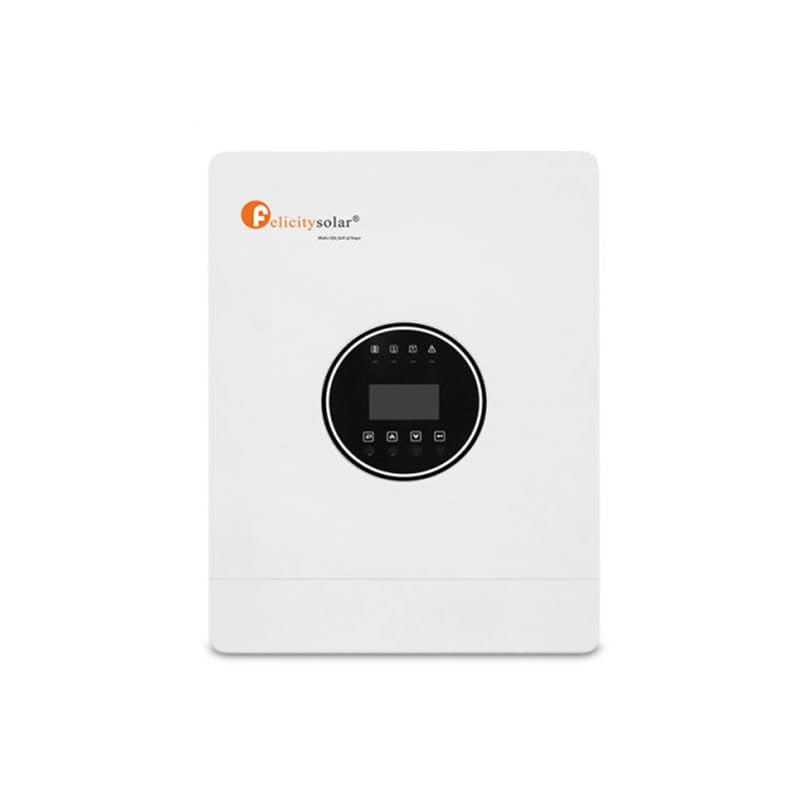
Figure 3.1: Front view of the Felicity 8 kW Off-Grid Inverter. This image shows the main unit with its display panel and indicators.
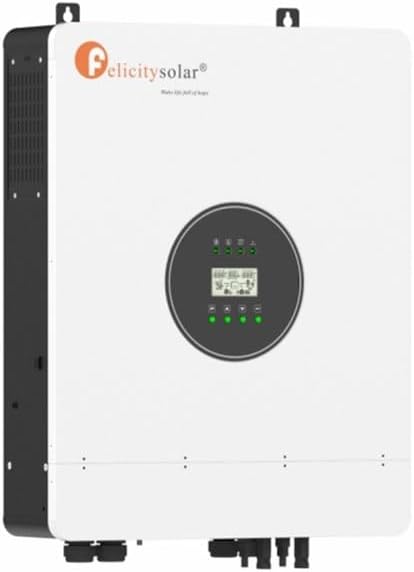
Figure 3.2: Close-up of the Felicity 8 kW Off-Grid Inverter's display and control buttons. The display provides real-time operational data.

Figure 3.3: Side view of the Felicity 8 kW Off-Grid Inverter, showing ventilation grilles and mounting points.

Figure 3.4: Back view of the Felicity 8 kW Off-Grid Inverter, illustrating the connection terminals and mounting brackets.
4. Setup and Installation
Proper installation is crucial for the safe and efficient operation of your inverter. Ensure all steps are followed carefully.
4.1 Site Selection and Mounting
- Choose a cool, dry, and well-ventilated area, away from direct sunlight and heat sources.
- Mount the inverter vertically on a non-flammable surface, ensuring adequate clearance for airflow around the unit.
- Use appropriate mounting hardware to secure the inverter firmly.
4.2 Wiring Connections
Before making any connections, ensure all power sources (solar panels, batteries, AC grid if applicable) are disconnected.
- Battery Connection: Connect the battery bank to the inverter's DC input terminals. Ensure correct polarity (+ to + and - to -). Use appropriately sized cables and fuses. The inverter supports a 200 Ampere-hour battery capacity.
- Solar Panel Connection: Connect your solar panel array to the inverter's PV input terminals. Observe correct polarity and ensure the total open-circuit voltage and current of the array do not exceed the inverter's maximum input ratings.
- AC Output Connection: Connect your AC loads (appliances, lighting, etc.) to the inverter's AC output terminals. Ensure the total load does not exceed the inverter's 8 kW output capacity.
- Grounding: Connect the inverter's grounding terminal to a reliable earth ground.

Figure 4.1: Example of a compatible Felicity battery unit. Ensure your battery bank meets the inverter's specifications.

Figure 4.2: Illustration of a battery module, indicating connections for a larger battery bank.
5. Operating Instructions
5.1 Powering On the Inverter
- Ensure all wiring connections are secure and correct.
- Switch on the battery breaker.
- Switch on the solar panel breaker (if applicable).
- Switch on the inverter's main power switch. The inverter will perform a self-test and the display will illuminate.
- Finally, switch on the AC output breaker to supply power to your loads.
5.2 Monitoring and Display
The inverter features an integrated LCD display and indicators for monitoring system performance. Refer to the specific display section in the full manual for detailed interpretations of codes and readings.

Figure 5.1: An external wattmeter or similar monitoring device can be used to track energy consumption and production. The inverter's built-in display provides similar data.
Mobile applications may also be available for remote monitoring and control. Consult the manufacturer's website for compatible apps.
5.3 Powering Off the Inverter
- Switch off the AC output breaker to disconnect loads.
- Switch off the inverter's main power switch.
- Switch off the solar panel breaker.
- Switch off the battery breaker.
6. Maintenance
The Felicity inverter is designed for low maintenance. Regular checks ensure optimal performance and longevity.
- Cleaning: Periodically clean the exterior of the inverter with a dry, soft cloth. Ensure ventilation openings are free from dust and debris. Do not use liquid cleaners.
- Connection Checks: Annually, inspect all electrical connections for tightness and signs of corrosion. Ensure all cables are intact and not damaged.
- Environmental Inspection: Ensure the installation environment remains cool, dry, and free from obstructions to airflow.
- Battery Maintenance: Follow the battery manufacturer's maintenance guidelines for your specific battery bank to ensure its health and lifespan.
7. Troubleshooting
This section provides solutions to common issues. For problems not listed here, contact technical support.
| Problem | Possible Cause | Solution |
|---|---|---|
| Inverter does not power on. | No battery connection, low battery voltage, or main switch off. | Check battery connections and voltage. Ensure the main power switch is ON. |
| No AC output. | Overload, short circuit, or AC output breaker off. | Reduce load. Check for short circuits. Ensure AC output breaker is ON. |
| Low battery alarm. | Insufficient solar charging, excessive load, or battery degradation. | Check solar panel connections and sunlight. Reduce load. Consider battery inspection or replacement. |
| Overload alarm. | Connected loads exceed inverter's capacity. | Disconnect some loads immediately. The inverter will attempt to restart after a cool-down period. |
8. Specifications
Technical specifications for the Felicity 8 kW Single-Phase Off-Grid Inverter (Model IVEM8048).
| Parameter | Value |
|---|---|
| Brand | Felicity (Manufacturer), Sun World Energy (Seller) |
| Model Name | Monofásico |
| Model Number | IVEM8048 |
| Rated Power | 8 kW (8000 Watts) |
| Output Voltage | 230 Volts (AC) |
| Output Waveform | Pure Sine Wave |
| Efficiency | 90% - 95% |
| Power Source | Solar Powered |
| Recommended Use | Home |
| Battery Capacity (Supported) | 200 Ampere-hours |
| Color | White |
| Certifications | CE |
9. Warranty and Support
For warranty information, technical support, or service inquiries, please refer to the official Felicity website or contact your authorized dealer. Keep your purchase receipt as proof of purchase for warranty claims.
Note: Specific warranty terms and conditions may vary by region and retailer.


