
Introduction
The BOBLOV W4 2K Mini Body Camera is a compact and lightweight device designed for capturing personal moments in high resolution. Weighing only 50g, it offers convenient, hands-free recording with versatile wearing options. This manual provides detailed instructions for setting up, operating, maintaining, and troubleshooting your W4 camera to ensure optimal performance.

Image: The BOBLOV W4 2K Mini Body Camera shown with its various accessories, including the rotatable clip, magnetic neck strap, USB cables, and a 128GB memory card.
What's in the Box
Upon opening the package, verify that all the following items are included:
- 1x BOBLOV W4 Body Camera
- 1x Back Clip (360° Rotatable)
- 1x Magnetic Neck Strap
- 1x USB-C Data Cable
- 1x USB-C to USB-A Adapter
- 1x Card Reader
- 1x User Manual

Image: A visual representation of all items included in the BOBLOV W4 package, laid out neatly.
Product Overview
The BOBLOV W4 camera features a minimalist design with essential components for easy operation.
- Video Button: Located on the front, this button is used to start and stop recording from standby mode with a short press. The camera vibrates and blinks blue to indicate recording status.
- Low Battery Warning: When the battery life drops below 15 minutes, a low battery warning is activated. The red indicator light will flash 5 times every 5 minutes.
- USB-C Port: For charging and data transfer.
- MicroSD Card Slot: For inserting the memory card (128GB included).
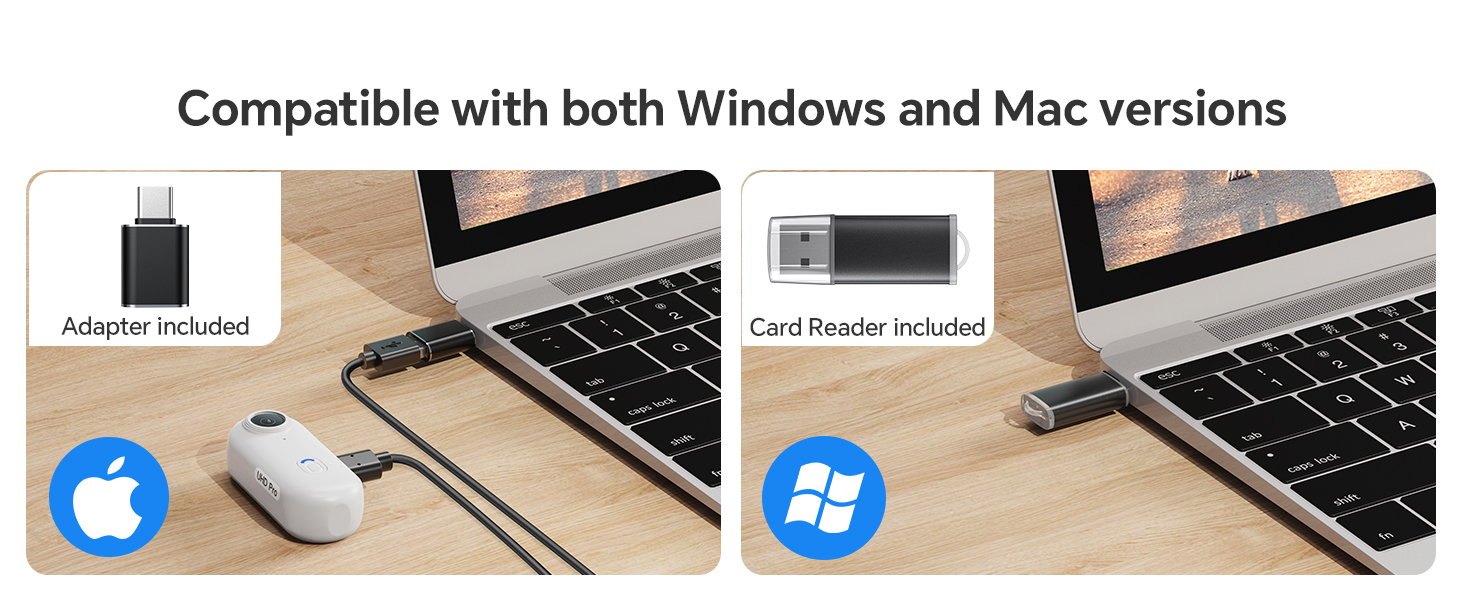
Image: A detailed diagram highlighting the video button and low battery warning indicator on the BOBLOV W4 camera.
Setup
1. Charging the Camera
Before first use, fully charge the camera. Connect the provided USB-C cable to the camera's USB-C port and the other end to a USB power adapter (not included) or a computer's USB port. The charging indicator light will show the charging status.
2. Inserting the MicroSD Card
Locate the MicroSD card slot on the side of the camera. Gently insert the provided 128GB MicroSD card until it clicks into place. Ensure the card is inserted correctly to avoid damage.
3. Setting Time and Date (Initial Setup)
To set the correct time and date for your recordings, connect the camera to a computer. A text file for time synchronization will appear on the camera's storage. Edit this file according to the instructions in the included user manual to set the current date and time. Disconnect the camera safely after saving changes.
Operating Instructions
Power On/Off
- To Power On: Press and hold the Video Button for a few seconds until the camera vibrates and the indicator light turns on.
- To Power Off: Press and hold the Video Button again until the camera vibrates and the indicator light turns off.
Recording Video
- Start Recording: From standby mode, short press the Video Button. The camera will vibrate and the blue indicator light will blink, indicating recording has started.
- Stop Recording: While recording, short press the Video Button again. The camera will vibrate and the blue indicator light will stop blinking, returning to standby mode.

Image: An illustration demonstrating the simplicity of one-click recording with the BOBLOV W4 camera.
Loop Recording
The W4 camera supports loop recording. When the memory card is full, the camera will automatically overwrite the oldest video files to continue recording. This ensures continuous operation without manual deletion of files.
Wearing Options
The BOBLOV W4 offers two primary methods for hands-free recording:
1. With the 360° Rotatable Back Clip
Attach the rotatable back clip to the camera. This clip allows you to securely fasten the camera to clothing, backpack straps, or other suitable surfaces. The 360° rotation provides flexibility in adjusting the recording angle.
2. With the Adjustable Magnetic Neck Strap
For a more discreet and comfortable wearing experience, use the magnetic neck strap. Place the magnetic plate under your shirt or jacket, and the camera will securely attach to it on the outside. This method is ideal for capturing first-person perspective footage during various activities.

Image: A visual guide demonstrating how to use the 360° rotatable back clip and the magnetic neck strap for wearing the BOBLOV W4 camera.

Image: Examples of hands-free recording, including a person running, a business transaction, and signing documents, illustrating the versatility of the W4 camera.
Data Transfer
To access your recorded videos, connect the BOBLOV W4 camera to your computer using the provided USB-C cable. The camera will appear as a removable storage device. You can then drag and drop video files (MP4 format) to your computer. The camera is compatible with both Windows and Mac operating systems.

Image: The BOBLOV W4 camera connected to a laptop via USB-C, demonstrating its compatibility with both Windows and Mac systems for file transfer.
Maintenance
- Cleaning: Use a soft, dry cloth to clean the camera body. For the lens, use a specialized lens cleaning cloth and solution. Avoid abrasive materials or harsh chemicals.
- Storage: Store the camera in a cool, dry place away from direct sunlight and extreme temperatures.
- Battery Care: To prolong battery life, avoid fully discharging the battery frequently. Charge the camera regularly, even if not in use for extended periods.
- Water Resistance: The BOBLOV W4 is not waterproof. Avoid exposing it to water or high humidity.
Troubleshooting
| Problem | Possible Cause | Solution |
|---|---|---|
| Camera does not power on. | Low battery; camera frozen. | Charge the camera fully. If unresponsive, try resetting by holding the power button for an extended period (e.g., 10-15 seconds). |
| Camera not recording. | Memory card full or not inserted correctly; low battery. | Check memory card insertion. Ensure sufficient space or allow loop recording to overwrite old files. Charge the camera. |
| Video quality is shaky. | Lack of image stabilization; excessive movement during recording. | The W4 does not feature built-in image stabilization. Minimize sudden movements during recording for smoother footage. |
| Camera does not record when connected to computer. | Connected to a data USB port. | The camera is designed to record only when connected to a power-only USB port (e.g., wall charger), not a data port. Disconnect from computer to record. |
| Magnetic clip not holding securely. | Thick clothing or improper placement. | Ensure the magnetic plate is directly against the camera with minimal fabric in between. Use thinner clothing or the back clip for more secure attachment. |
Specifications
| Feature | Detail |
|---|---|
| Model Name | W4 |
| Brand | BOBLOV |
| Video Capture Resolution | 2K (2560x1440) |
| Video Capture Format | MP4 |
| Photo Sensor Technology | CMOS |
| Battery Capacity | 800mAh Lithium Polymer |
| Recording Time | 90-120 minutes (1.5-2 hours) continuous recording |
| Item Weight | 50g (approx. 1.76 oz) |
| Connectivity Technology | USB-C |
| Special Feature | Portable, One-Click Recording, Loop Recording, 360° Rotatable Clip, Magnetic Neck Strap |

Image: A visual comparison showing the BOBLOV W4 camera's lightweight design, weighing approximately 50g, similar to an egg.
Warranty and Support
BOBLOV provides product coverage for its supporters. The W4 Mini Body Camera typically comes with a 24-month product coverage period. For technical support, product inquiries, or warranty claims, please refer to the contact information provided in the original packaging or visit the official BOBLOV website. Quick response within 24 hours and lifetime technical support are generally offered.
For further assistance, you may also refer to the BOBLOV store on Amazon: BOBLOV Amazon Store.


