
1. Introduction
This manual provides detailed instructions for the setup, operation, and maintenance of your Beelink SER5 MAX Mini PC. This compact desktop computer is equipped with an AMD Ryzen 7 7735HS processor, 24GB LPDDR5 RAM, and a 1TB NVMe PCIe 4.0 SSD, designed for efficient performance in various applications including home entertainment, office tasks, and light gaming. It supports 4K triple screen display, WiFi 6, and Bluetooth 5.2 connectivity.

2. Package Contents
Verify that all items are present in the package:
- 1 x Beelink SER5 MAX Mini PC
- 1 x HDMI Cable
- 1 x Power Adapter (Type A - 2 pin, North American)
- 1 x User Manual (this document)
- 1 x VESA-mounted bracket with screws

3. Product Overview
The Beelink SER5 MAX Mini PC features a compact design with various ports for connectivity and an efficient cooling system.
3.1 Front Ports
- 1 x Power Button
- 1 x RTC Key (CLR CMOS)
- 2 x USB 3.2 Gen2 (10Gbps) ports
- 1 x USB 2.0 port
- 1 x Type-C port (Data & Video output)
- 1 x Headphone Jack (HP&MIC)

3.2 Rear Ports
- 1 x RJ45 2.5G LAN port
- 1 x USB 3.2 Gen2 (10Gbps) port
- 1 x USB 2.0 port
- 1 x DP 1.4 port (4K 144Hz)
- 1 x HDMI 2.0 port (4K 60Hz)
- 1 x DC Jack port (Power Input)

3.3 Internal Components
The internal structure includes a motherboard, CPU, M.2 PCIe SSD slots, and a cooling system with a heat pipe, silent fan, and heat fins for efficient heat dissipation.

4. Setup Instructions
Follow these steps to set up your Beelink SER5 MAX Mini PC:
- Connect Peripherals: Connect your monitor(s) to the HDMI, DP, or Type-C ports. Connect your keyboard, mouse, and other USB devices to the available USB ports.
- Connect Power: Plug the power adapter into the DC Jack port on the rear of the Mini PC, then plug the adapter into a power outlet.
- Power On: Press the power button located on the front panel. The power LED will illuminate.
- Initial Boot: The system will boot into Windows 11 Pro. Follow the on-screen instructions for initial setup, including language, region, and network configuration.
4.1 VESA Mount Installation
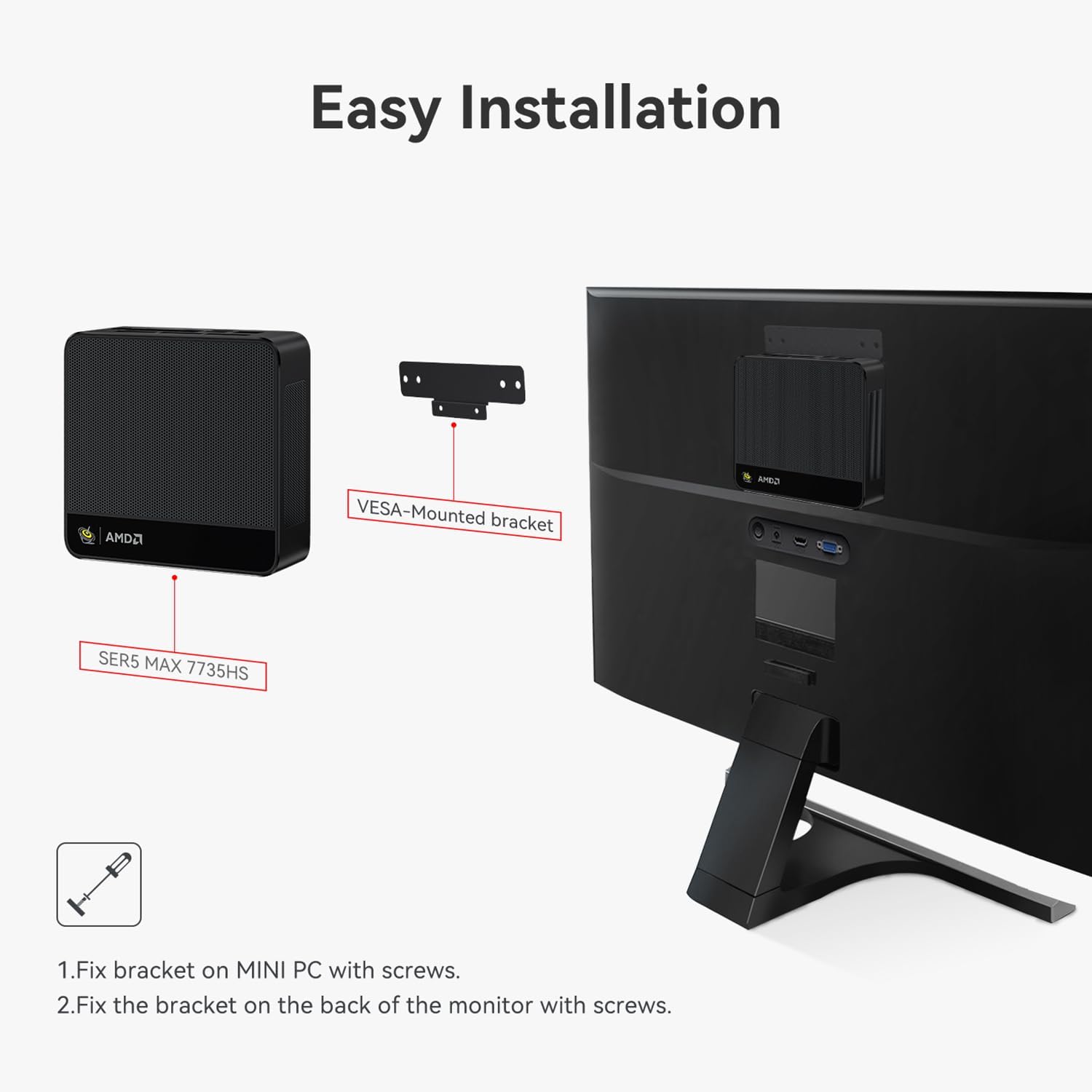
The Mini PC can be mounted to the back of a compatible monitor using the included VESA bracket.
- Fix the VESA bracket to the Mini PC using the provided screws.
- Fix the assembled Mini PC and bracket to the VESA mounting holes on the back of your monitor using the appropriate screws.

5. Operating Instructions
5.1 Basic Operation
- Power On/Off: Press the power button to turn the device on. To turn off, use the Windows shutdown option or press and hold the power button for 5 seconds.
- Restart: Use the Windows restart option.
- Sleep Mode: Use the Windows sleep option or briefly press the power button.
5.2 Storage Expansion
The Beelink SER5 MAX Mini PC supports dual M.2 2280 PCIe 4.0 SSD slots, allowing for storage expansion up to 4TB per slot. Refer to the video below for instructions on how to add an additional hard drive.

5.3 Auto Power On Feature
The Mini PC supports an auto power-on feature. Consult the following video for guidance on enabling and configuring this setting.
5.4 System Reinstallation (Windows 11)
If you need to reinstall the operating system, follow the instructions provided in the video below. This process typically involves creating a bootable USB drive and accessing the boot menu.
5.5 Triple Screen Display Configuration
The Beelink SER5 MAX Mini PC supports connecting up to three monitors simultaneously via HDMI, DP, and Type-C ports, enabling enhanced multitasking and productivity. Configure your display settings within Windows to extend or duplicate your desktop across multiple screens.
6. Maintenance
To ensure optimal performance and longevity of your Mini PC, consider the following maintenance tips:
- Cleaning: Regularly clean the exterior of the Mini PC with a soft, dry cloth. Ensure ventilation holes are free from dust and obstructions.
- Software Updates: Keep your operating system and drivers updated to the latest versions for security and performance improvements.
- Ventilation: Place the Mini PC in a well-ventilated area to prevent overheating. Avoid blocking the air vents.
- Power Management: Use the recommended power adapter. Unplug the device during electrical storms or when not in use for extended periods.
7. Troubleshooting
If you encounter issues with your Beelink SER5 MAX Mini PC, try the following basic troubleshooting steps:
- No Power:
- Ensure the power adapter is securely connected to both the Mini PC and a working power outlet.
- Verify the power outlet is functional by plugging in another device.
- No Display:
- Check that the monitor is powered on and the correct input source is selected.
- Ensure display cables (HDMI, DP, Type-C) are securely connected to both the Mini PC and the monitor.
- Try connecting to a different display or using a different cable.
- System Unresponsive:
- Press and hold the power button for 5-10 seconds to force a shutdown, then restart the device.
- If the issue persists, consider reinstalling the operating system (refer to Section 5.4).
- Peripheral Not Detected:
- Ensure the peripheral is properly connected to a functional USB port.
- Try connecting the peripheral to a different USB port.
- Update or reinstall the drivers for the peripheral.
- Bluetooth/Wi-Fi Issues:
- Ensure Wi-Fi and Bluetooth are enabled in Windows settings.
- Restart the Mini PC and your router/Bluetooth device.
- Check for updated wireless drivers on the Beelink support website.
For further assistance, please contact Beelink customer support.
8. Specifications
| Feature | Detail |
|---|---|
| Brand | Beelink |
| Model Name | Beelink SER5 MAX |
| Operating System | Windows 11 Pro |
| CPU Model | AMD Ryzen 7 7735HS |
| CPU Speed | Up to 4.75 GHz (Max. Boost Clock) |
| Processor Cores/Threads | 8 Cores / 16 Threads |
| Cache Size | 16 MB |
| Graphics Coprocessor | AMD Radeon 680M (12core 2200 MHz) |
| RAM Memory Installed Size | 24 GB LPDDR5 |
| Memory Speed | 5600 MHz |
| Hard Disk Description | 1 TB M.2 2280 NVMe PCIe 4.0 x4 SSD |
| Storage Expansion | Dual M.2 2280 PCIe 4.0 x4 SSD slots (up to 4TB each) |
| Video Output Interface | HDMI 2.0, DisplayPort 1.4, Type-C (Data & Video) |
| Display Resolution Maximum | 3840x2160 (4K UHD) |
| Wireless Connectivity | Wi-Fi 6, Bluetooth 5.2 |
| LAN | 2.5G RJ45 Ethernet |
| USB Ports | 3 x USB 3.2 Gen2, 2 x USB 2.0 |
| Additional Ports | 1 x Type-C (Data & Video), 1 x Audio Jack (HP&MIC), 1 x DC Jack |
| Cooling Method | Air (Heat pipe, silent fan, heat fins) |
| Color | Grey |
| Dimensions | 126 x 113 x 42 mm (approximate) |
9. Warranty and Support
The Beelink SER5 MAX Mini PC comes with a 3-year manufacturer's warranty. For technical assistance, troubleshooting, or warranty claims, please contact Beelink customer service. Online support is available 7 days a week, 24 hours a day.
For the most up-to-date support information and driver downloads, please visit the official Beelink website.


