
Tstiti C20
Tstiti 4000A Car Battery Jump Starter (Model C20) Instruction Manual
Model: C20 | Brand: Tstiti
1. Introduction
This manual provides essential information for the safe and effective operation of your Tstiti 4000A Car Battery Jump Starter, Model C20. Please read all instructions carefully before use and retain this manual for future reference.
2. What's in the Box
- 1 x Tstiti 4000A Car Battery Jump Starter (Model C20)
- 1 x Smart Jump Cables
- 1 x USB Type-C Charging Cable
- 1 x Storage Box
- 1 x User Manual

Figure 2.1: Package Contents
3. Product Overview
3.1 Components and Ports
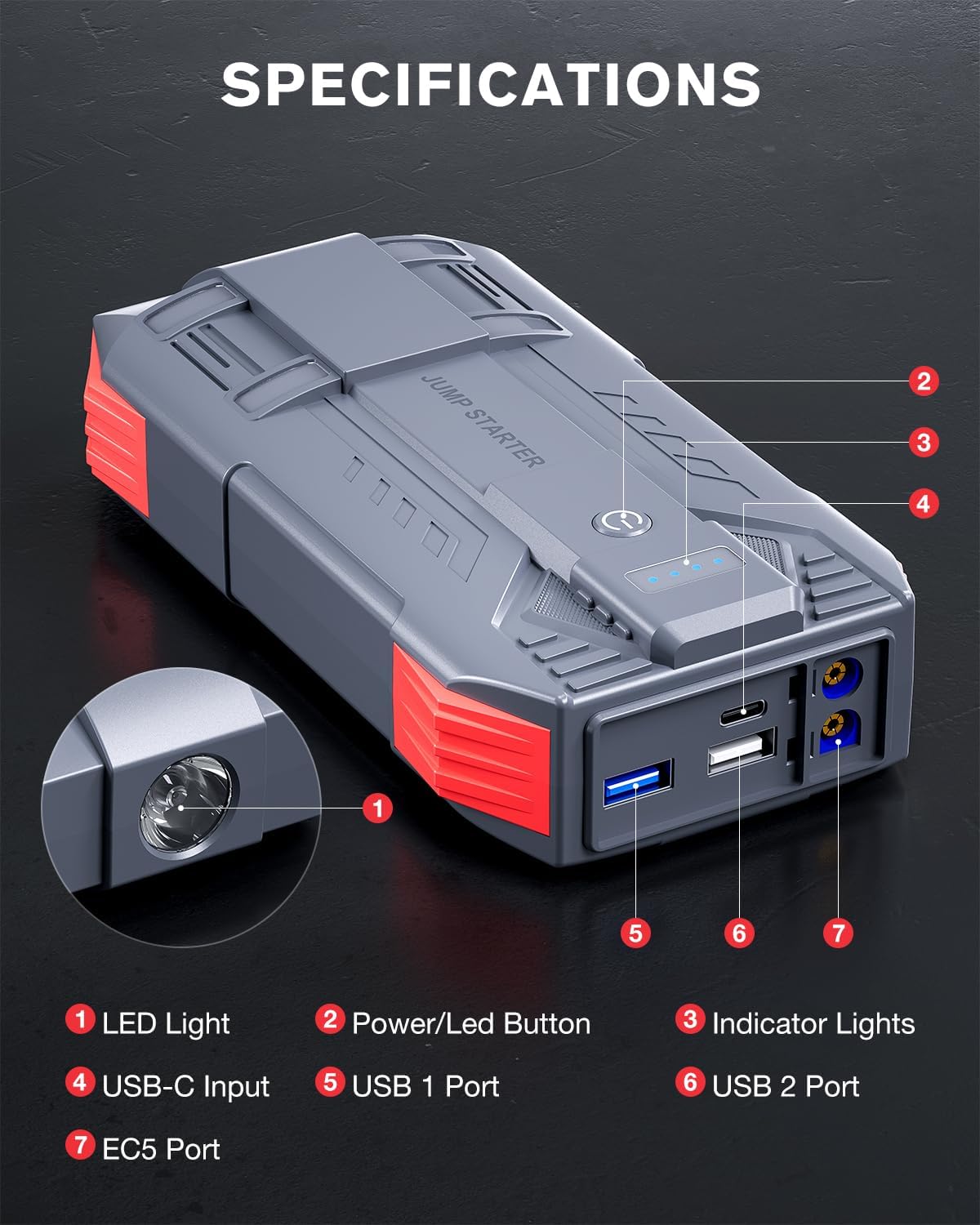
Figure 3.1: Jump Starter Components
- LED Light
- Power/LED Button
- Indicator Lights (Battery Status)
- USB-C Input (for charging the jump starter)
- USB 1 Port (Output)
- USB 2 Port (Output)
- EC5 Port (for Smart Jump Cables)
3.2 Key Features
- Powerful Jump Starting: 4000A peak current, suitable for 12V vehicles with up to 10L gas and 8.0L diesel engines. Provides up to 60 jump starts on a single charge.
- Multifunctional Power Bank: 16000mAh capacity with two 5V/2A USB output ports for charging smartphones, tablets, and other USB devices.
- LED Emergency Light: 400-lumen flashlight with three modes: steady, strobe, and SOS.
- Advanced Safety Protection: 10 intelligent safety features including short circuit, over-temperature, over-charge, over-discharge, and reverse polarity protection.
- Wide Operating Temperature: Functions reliably from -22℉ to 140℉.
- Long Standby Time: Up to 24 months standby time.
4. Setup
4.1 Charging the Jump Starter
Before first use, fully charge the jump starter. Use the provided USB Type-C charging cable to connect the jump starter's USB-C input port to a compatible USB charger (not included). The indicator lights will show the charging progress. All four lights will be solid when fully charged.
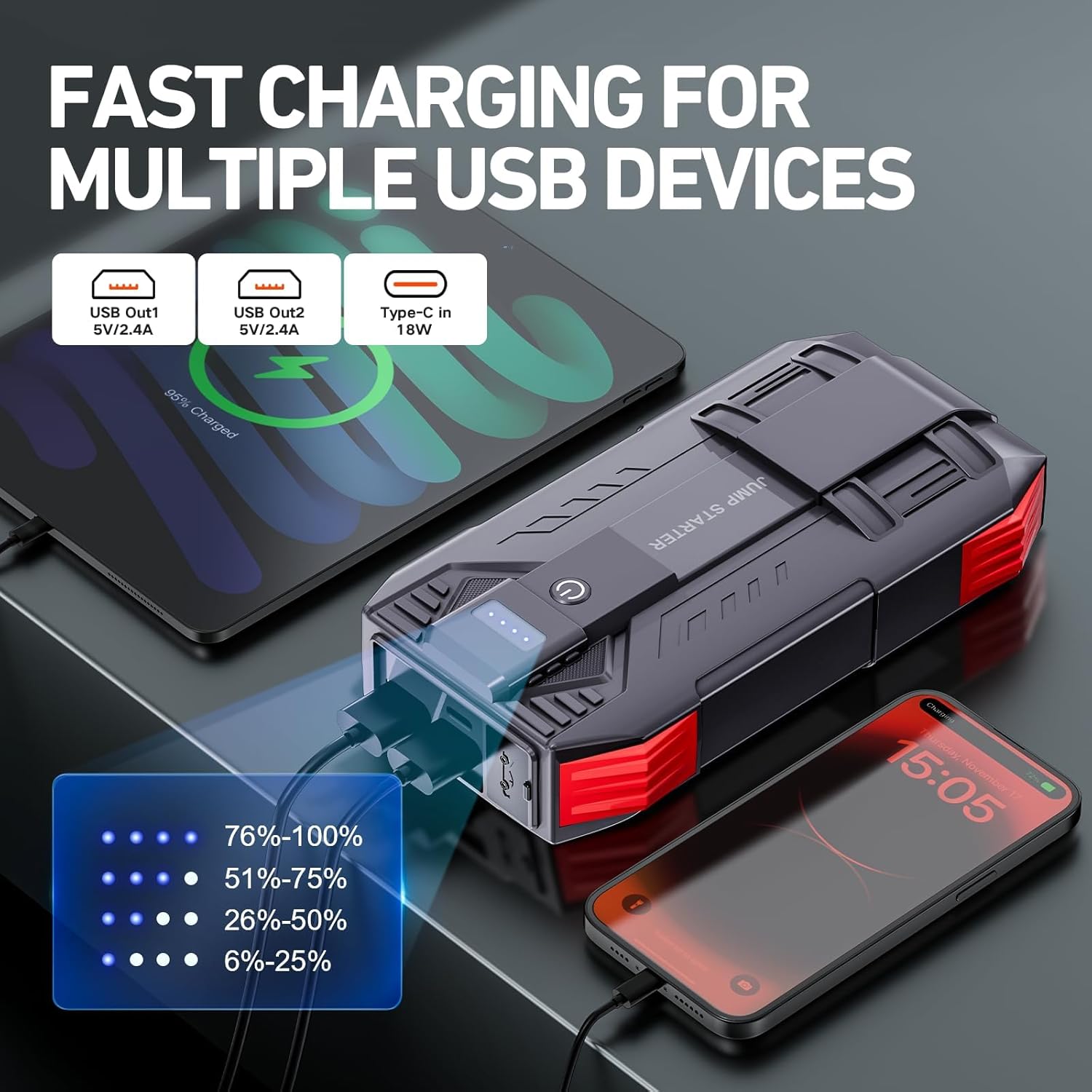
Figure 4.1: Charging the Jump Starter and External Devices
5. Operating Instructions
5.1 Jump Starting a Vehicle
- Connect Smart Jump Cables: Insert the blue plug of the Smart Jump Cables into the EC5 port of the jump starter. Ensure a secure connection.
- Connect to Car Battery: Attach the red clamp to the positive (+) terminal of the car battery and the black clamp to the negative (-) terminal.
- Check Indicator: The indicator on the Smart Jump Cables will show readiness. A solid green light indicates it's safe to proceed. If the battery voltage is below 9V, press the "RST" button on the jumper clip to activate override mode and attempt to start again.
- Start Vehicle: Go into your vehicle and start the engine.
- Remove Cables: Once the engine starts, immediately remove the Smart Jump Cables from the car battery, then disconnect them from the jump starter.

Figure 5.1: Jump Starting Process
Video 5.1: Demonstration of Jump Starter in Use (Preview)
Video 5.2: Important Tips for Using the Jump Starter
5.2 Using as a Portable Power Bank
The jump starter can charge your electronic devices. Connect your device's USB charging cable to either of the USB output ports (USB 1 or USB 2) on the jump starter. The device will begin charging automatically.

Figure 5.2: Portable Power Bank Functionality
5.3 Using the LED Flashlight
Press and hold the Power/LED Button (2) for approximately 3 seconds to turn on the LED flashlight. Short press the button to cycle through the light modes: steady, strobe, and SOS. Press and hold again to turn off the flashlight.

Figure 5.3: LED Flashlight Modes
6. Safety Precautions
- Always read the vehicle's owner's manual before attempting to jump start.
- Ensure proper polarity when connecting the clamps (red to positive, black to negative). Incorrect connection can cause damage.
- Do not connect the red and black clamps together.
- Do not attempt to jump start a frozen battery.
- Keep the jump starter away from children.
- Store in a cool, dry place when not in use.
- Do not disassemble the unit.
- Operate within the specified temperature range (-22℉ to 140℉).

Figure 6.1: Integrated Safety Features
7. Maintenance
- Clean the unit with a dry, soft cloth. Do not use harsh chemicals or abrasive materials.
- Recharge the jump starter every 3-6 months, even if not used, to maintain optimal battery health.
- Store the jump starter in its protective case in a cool, dry environment.
8. Troubleshooting
| Problem | Possible Cause | Solution |
|---|---|---|
| Vehicle does not start after connecting. | Car battery is extremely low (below 9V). | Press the "RST" button on the Smart Jump Cables to activate override mode and attempt to start again. |
| Jump starter does not turn on. | Battery is depleted. | Recharge the jump starter fully. |
| Smart Jump Cables indicator shows red/error. | Incorrect connection (reverse polarity) or short circuit. | Disconnect all cables, check connections for correct polarity, and reconnect. Refer to safety precautions. |
9. Specifications
- Model: C20
- Peak Output Current: 4000 Amps
- Engine Compatibility: Up to 10L Gas and 8.0L Diesel Engines (12V vehicles)
- Battery Type: Lithium Polymer
- USB Output 1: 5V/2A
- USB Output 2: 5V/2A
- USB-C Input: 18W (for charging jump starter)
- Operating Temperature: -22℉ to 140℉ (-30℃ to 60℃)
- Standby Time: Up to 24 months
- Item Weight: 1.79 pounds
- Package Dimensions: 8.27 x 4.92 x 4.33 inches
10. Warranty and Support
The Tstiti 4000A Car Battery Jump Starter comes with a 2-year full service warranty. For any questions, concerns, or technical support, please contact our customer support team. We are committed to your satisfaction.
For further assistance, please visit the Tstiti Store on Amazon.

Figure 10.1: Tstiti Customer Support
Ask a question about this manual
Ask about setup, troubleshooting, compatibility, parts, safety, or missing instructions. Manuals+ will review the question and use this page’s manual context to help answer it.