
Introduction
Thank you for choosing the MOVE SPEED MSP03 15W Qi2 Certified MagSafe Portable Power Bank. This device is designed to provide ultra-fast and convenient charging for your compatible devices, featuring both wireless MagSafe and wired USB-C charging capabilities, along with a built-in kickstand for enhanced usability. Please read this manual carefully before use to ensure optimal performance and safety.
Package Contents
- MOVE SPEED Qi2 Certified MagSafe Battery Pack
- Built-in Kickstand
- USB-C Fast Charging Cable
- User Manual
Product Features
- Qi2 Certified MagSafe Technology: Provides effortless and secure magnetic attachment for wireless charging of iPhone 12-16 series.
- 15W Ultra-Fast Wireless Charging: Delivers rapid wireless power to compatible devices.
- 30W USB-C Fast Charging Port: Offers high-speed wired charging and recharging for the power bank itself.
- 10,000mAh High Capacity: Ensures multiple charges for your devices throughout the day.
- Built-in Kickstand: Allows for hands-free viewing and use while charging.
- Advanced Safety Features: Includes overcurrent, overvoltage, short-circuit, overpower, and overcharge protection.
- Compact and Portable Design: Easy to carry for on-the-go power.

Image: The Qi2 logo on the power bank, highlighting its official certification for faster and more efficient wireless charging.

Image: An exploded view diagram illustrating the sophisticated security features, including overcurrent, overvoltage, short-circuit, overpower, and overcharge protection.
Setup
1. Charging the Power Bank
- Connect the provided USB-C cable to the USB-C port on the power bank.
- Connect the other end of the USB-C cable to a compatible 30W (or higher) USB-C power adapter (not included).
- The LED indicator lights on the side of the power bank will illuminate to show the charging status. When all lights are solid, the power bank is fully charged.

Image: The power bank being recharged using a USB-C cable connected to a wall adapter, demonstrating 30W wired charging and recharging capabilities.
2. Checking Battery Level
Press the small button on the side of the power bank to view the current battery level indicated by the LED lights.

Image: A close-up of the MOVE SPEED power bank showing its smart charging indicator lights, which provide a quick visual of the remaining battery life.
Operating Instructions
1. Wireless (MagSafe) Charging
- Ensure your device is MagSafe compatible (iPhone 12-16 series) or has a MagSafe-compatible case.
- Align your iPhone with the magnetic charging area on the power bank. The magnets will snap into place, and charging will begin automatically.
- The power bank provides up to 15W wireless fast charging.

Image: An iPhone magnetically attached to the MOVE SPEED power bank, illustrating 15W fast wireless charging via MagSafe.

Image: A person holding an iPhone with the power bank magnetically attached, emphasizing the strong N56 magnets and secure connection.
2. Wired Charging
- Connect your device's USB-C charging cable to the USB-C port on the power bank.
- Connect the other end of the cable to your device. The power bank supports up to 30W wired fast charging.
- Note: Wireless charging and wired charging cannot be used simultaneously for the same device. However, you can charge one device wirelessly and another via the USB-C port simultaneously.

Image: The power bank simultaneously charging an iPhone wirelessly and an Apple Watch via its USB-C port, demonstrating its ability to power two devices at once.
3. Using the Built-in Kickstand
- Gently pull out the kickstand located on the back of the power bank.
- Position your phone (with the power bank attached) on a flat surface to enjoy hands-free viewing in either portrait or landscape mode.
- Push the kickstand back into its slot when not in use.

Image: An iPhone with the power bank attached, using the built-in kickstand to stand upright on a surface, enabling hands-free viewing while charging.

Image: The power bank with its kickstand supporting a phone on a wooden table in an outdoor setting, ideal for watching videos during a picnic.
4. Compatibility
The power bank is compatible with iPhone 12, 13, 14, 15, 16 series (all models) for MagSafe wireless charging. It also supports AirPods with MagSafe charging cases and other Qi-enabled devices (without magnetic alignment).

Image: An illustration showing the power bank's compatibility with magnetic cases and iPhone 12-16 series, as well as AirPods 3/Pro 2 and other non-magnetic cases.
Maintenance
- Keep the power bank away from water, fire, and high temperatures.
- Avoid dropping or subjecting the device to strong impacts.
- Clean the surface with a soft, dry cloth. Do not use harsh chemicals or abrasive materials.
- Store in a cool, dry place when not in use.
Troubleshooting
| Issue | Possible Solution |
|---|---|
| Device not charging wirelessly | Ensure your device is MagSafe compatible or has a MagSafe-compatible case. Check for proper alignment. |
| Device not charging via USB-C | Verify the USB-C cable is securely connected to both the power bank and your device. Try a different cable or device. |
| Power bank not recharging | Ensure the USB-C cable is connected to a working power adapter. Try a different power adapter or cable. |
| LED indicators not working | Press the power button to activate the indicators. If still unresponsive, the power bank may be fully discharged or require service. |
Specifications
- Model Number: MSP03
- Capacity: 10,000mAh
- Wireless Charging Output: 15W (Max)
- Wired Charging Output: 30W (Max)
- Input: USB Type C
- Product Dimensions: 3.98 x 0.65 x 2.54 inches
- Item Weight: 9.6 ounces
- Color: Black
- Special Features: Qi2 Certified MagSafe Technology, Built-In Kickstand, 30W USB-C Ultra-Fast Charging Port, High-Capacity 10,000mAh Power Bank, Safety and Reliability
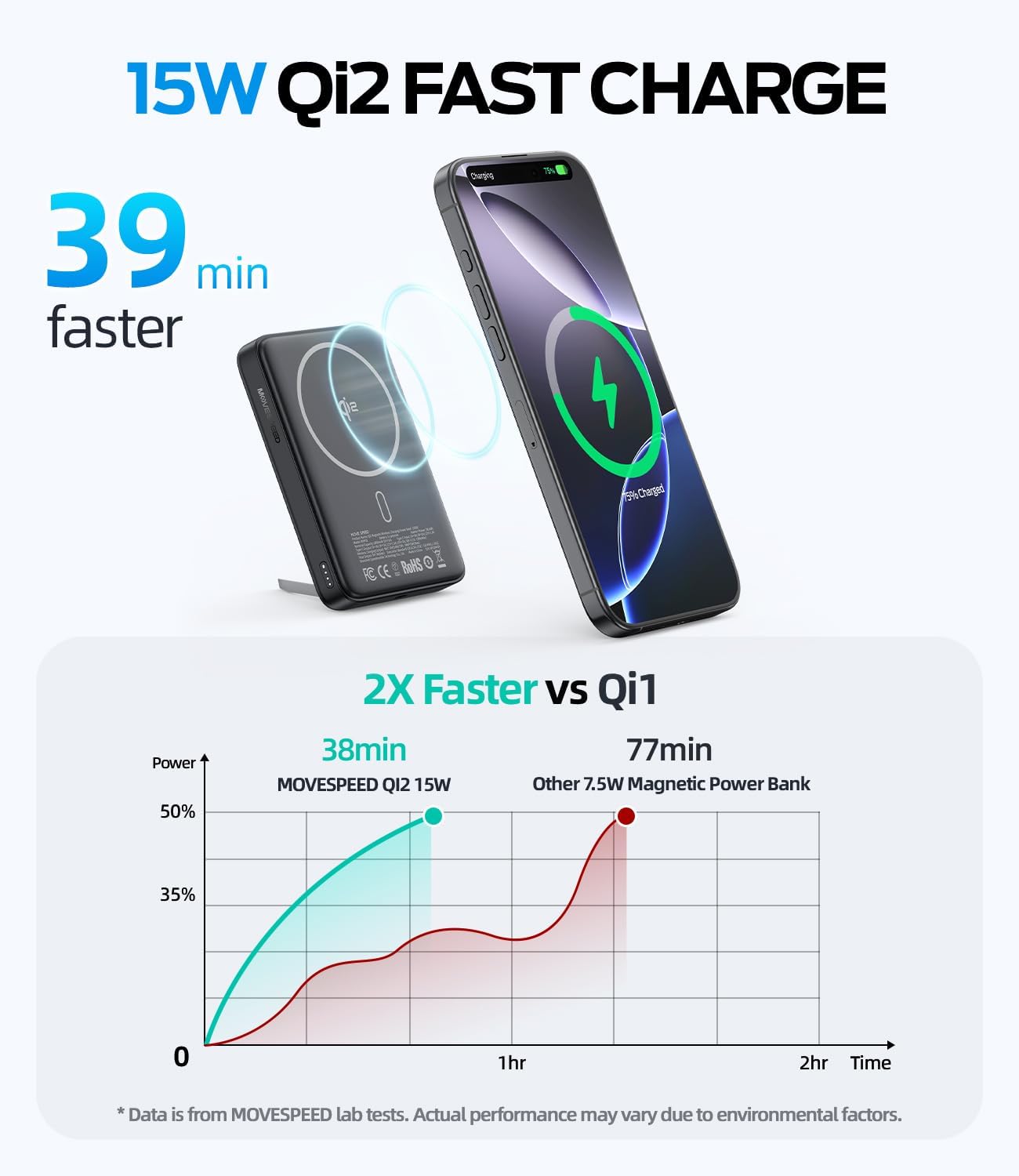
Image: A front view of the MOVE SPEED MSP03 15W Qi2 Certified MagSafe 10,000mAh Portable Power Bank, showcasing its sleek design.

Image: A person holding the 10,000mAh power bank, highlighting its travel-ready capacity and TSA compliance.

Image: A hand placing the compact MOVE SPEED power bank into a small handbag, emphasizing its ultra-portable and lightweight design.
Safety Information
- Do not disassemble, modify, or repair the device.
- Do not expose to extreme temperatures or direct sunlight.
- Keep out of reach of children.
- Dispose of the product according to local regulations.
- Avoid using the power bank in wet environments.
Official Product Video
Video: An official product overview of the MOVE SPEED Qi2 MagSafe Battery Pack, highlighting its 10,000mAh capacity and built-in kickstand. This video demonstrates the product's key features and design.
Warranty and Support
For warranty information and customer support, please refer to the contact details provided on the product packaging or visit the official MOVE SPEED website. Keep your purchase receipt for warranty claims.


