
1. Product Overview
The Gochanmi UG210 is a professional 2-channel UHF wireless microphone system designed for various audio applications, including singing, karaoke, presentations, and classroom use. It features adjustable frequencies, robust anti-interference capabilities, and a long transmission range for reliable performance.
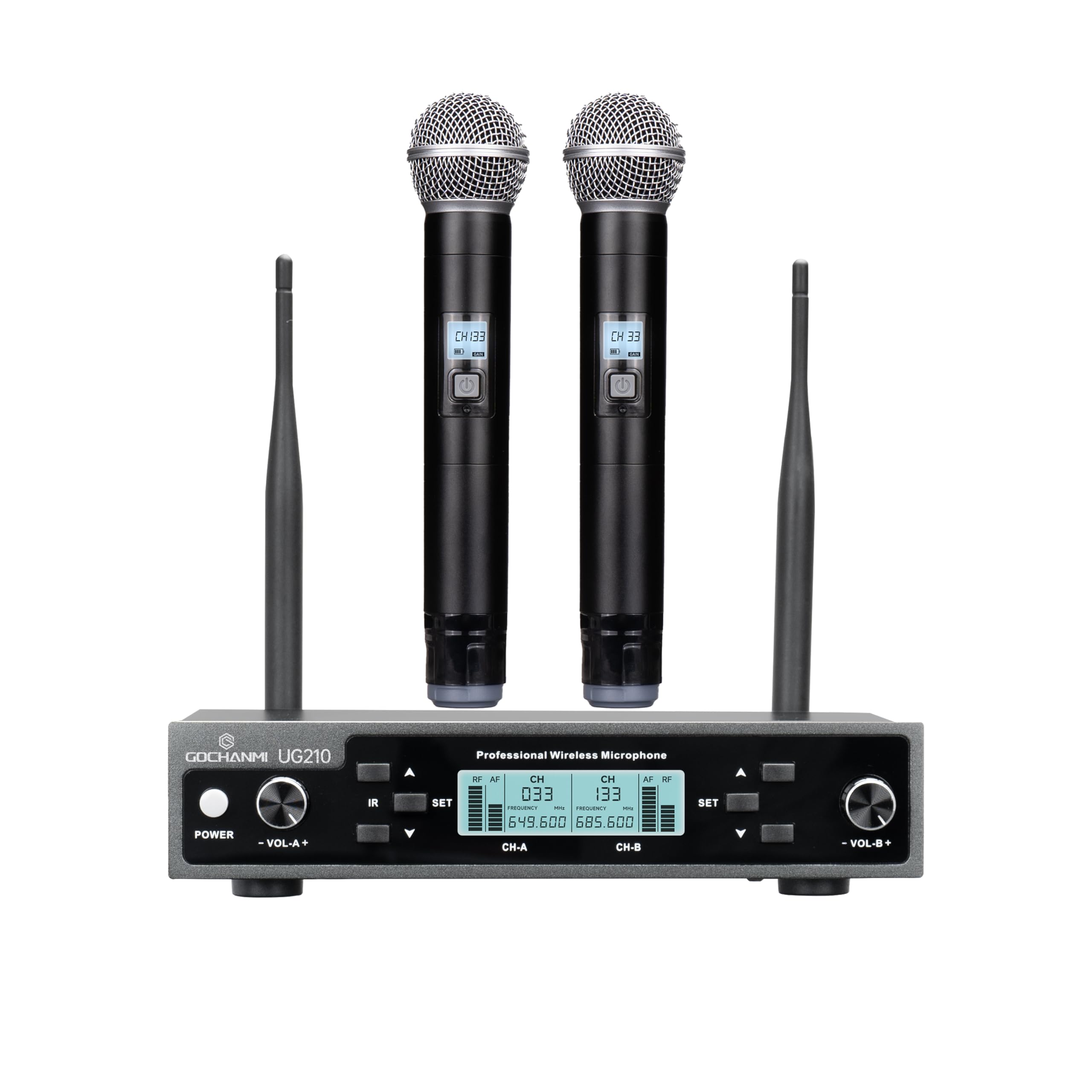
Image: The Gochanmi UG210 wireless microphone system, showing the receiver unit with two antennas and two handheld microphones.
Key Features:
- Adjustable UHF Frequencies: Offers 200 selectable UHF frequency points (640 MHz and 690 MHz bands) for optimal signal clarity and to avoid interference.
- Anti-Interference Function: Automatic scanning for less interfered channels and ID encryption lock enhance anti-interference capabilities.
- Dual Channel Operation: Two channels can operate simultaneously without interference.
- Long Transmission Range: Effective operating distance of up to 80 meters (265 feet) without interruption.
- High-Quality Dynamic Microphones: Handheld microphones with metal construction, high-definition LCD display, and cardioid pickup pattern for clear sound reproduction.
- Versatile Connectivity: Receiver features 2 XLR outputs and one 1/4" (6.35mm) audio output jack for compatibility with various audio equipment.
2. Safety Instructions
Please read and follow these safety instructions carefully to ensure safe operation and to prevent damage to the device.
- Do not expose the unit to rain or moisture to avoid fire or electric shock.
- Do not open the casing. There are no user-serviceable parts inside. Refer all servicing to qualified personnel.
- Use only the power adapter supplied with the unit.
- Ensure proper ventilation. Do not block ventilation openings.
- Avoid placing the unit near heat sources or in direct sunlight.
- Keep the unit away from strong magnetic fields.
- Dispose of batteries properly according to local regulations. Do not mix old and new batteries or different types of batteries.
- Do not use the microphone system near water or in excessively humid environments.
3. Package Contents
Verify that all items listed below are included in your package:
- 1 x Receiver Unit
- 2 x Handheld Microphones
- 1 x 6.35mm TS Cable
- 1 x Power Adapter
- 1 x User Manual
- (Note: 2 AA 1.5V batteries for each microphone are not included.)
4. Product Components
4.1 Receiver Unit
The receiver unit processes the audio signals from the microphones and outputs them to your sound system. It features a robust metal casing and clear display for easy monitoring.
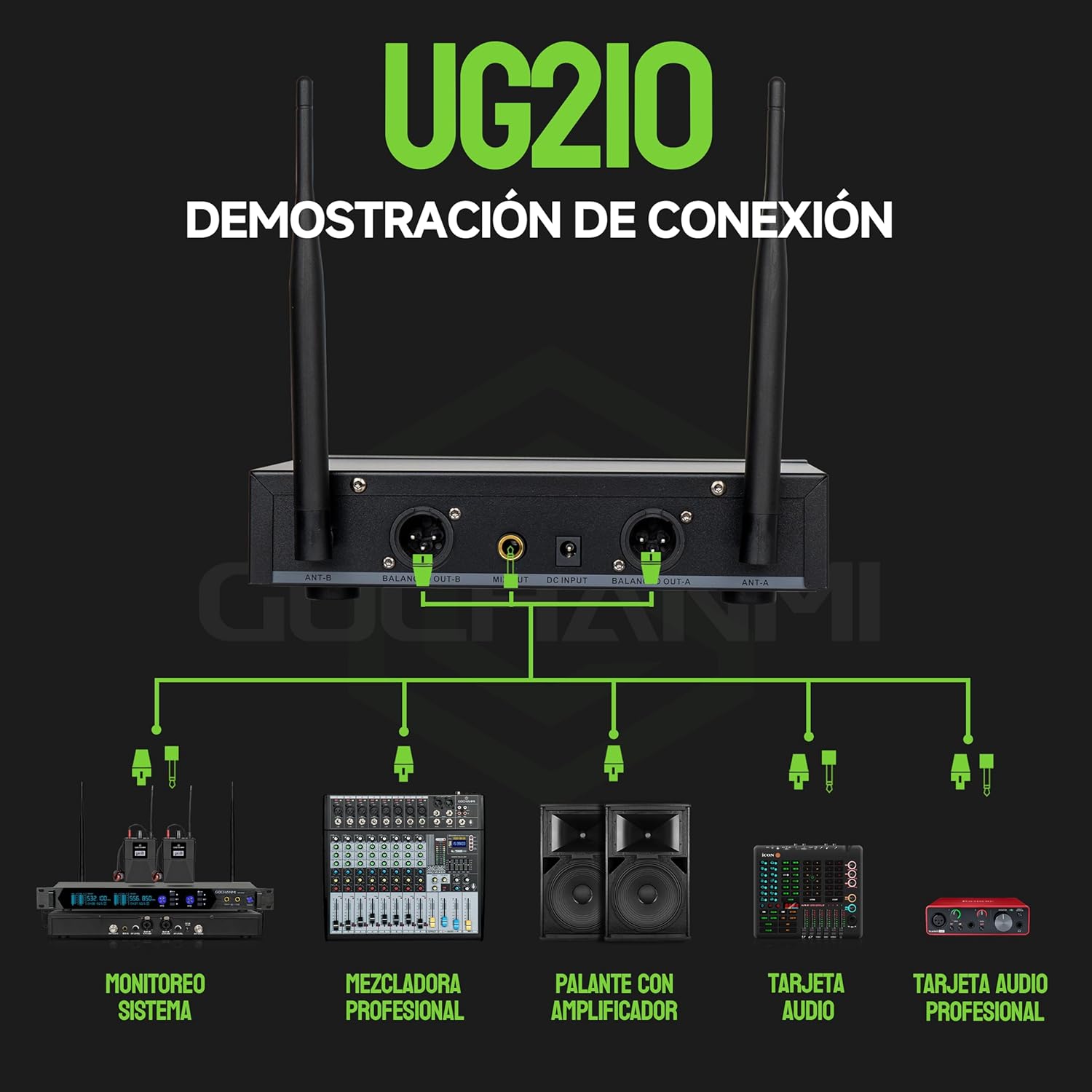
Image: Front and rear panels of the Gochanmi UG210 receiver, illustrating controls and connection ports.
Front Panel Controls:
- Power Button: Turns the receiver on or off.
- Volume Control (VOL A+, VOL B+): Adjusts the individual volume for each channel. Rotate clockwise to increase, counter-clockwise to decrease.
- IR Sensor: For infrared frequency synchronization with the microphones.
- SET Button: Used to change frequencies and initiate pairing. Press to confirm selection.
- LCD Display: Shows frequency number, channel status (CH-A, CH-B), and other operational information.
Rear Panel Connections:
- Antenna Interface (ANT-A, ANT-B): Connect the included antennas for optimal signal reception.
- Balanced XLR Outputs (BALANCED OUT-A, BALANCED OUT-B): Professional audio outputs for connecting to mixers or amplifiers.
- Mixed 1/4" (6.35mm) Output (MIX OUT): Combines both microphone signals into a single output.
- DC Input: Connect the power adapter here.
4.2 Handheld Microphones
The system includes two dynamic handheld microphones with durable metal construction and a high-fidelity moving coil capsule for clear, sensitive sound.

Image: Detailed view of the Gochanmi UG210 handheld microphone, highlighting its mesh head, LCD display, and durable body.
Microphone Features:
- Mesh Head: Made of impact-resistant alloy, corrosion-resistant.
- High-Definition LCD Display: Provides clear visualization of the frequency and battery status.
- High-Hardness Alloy Body: Resistant to fading and scratches.
- IR Sync Switch: For infrared frequency synchronization with the receiver.
- Battery Compartment: Requires 2 AA 1.5V batteries (not included).
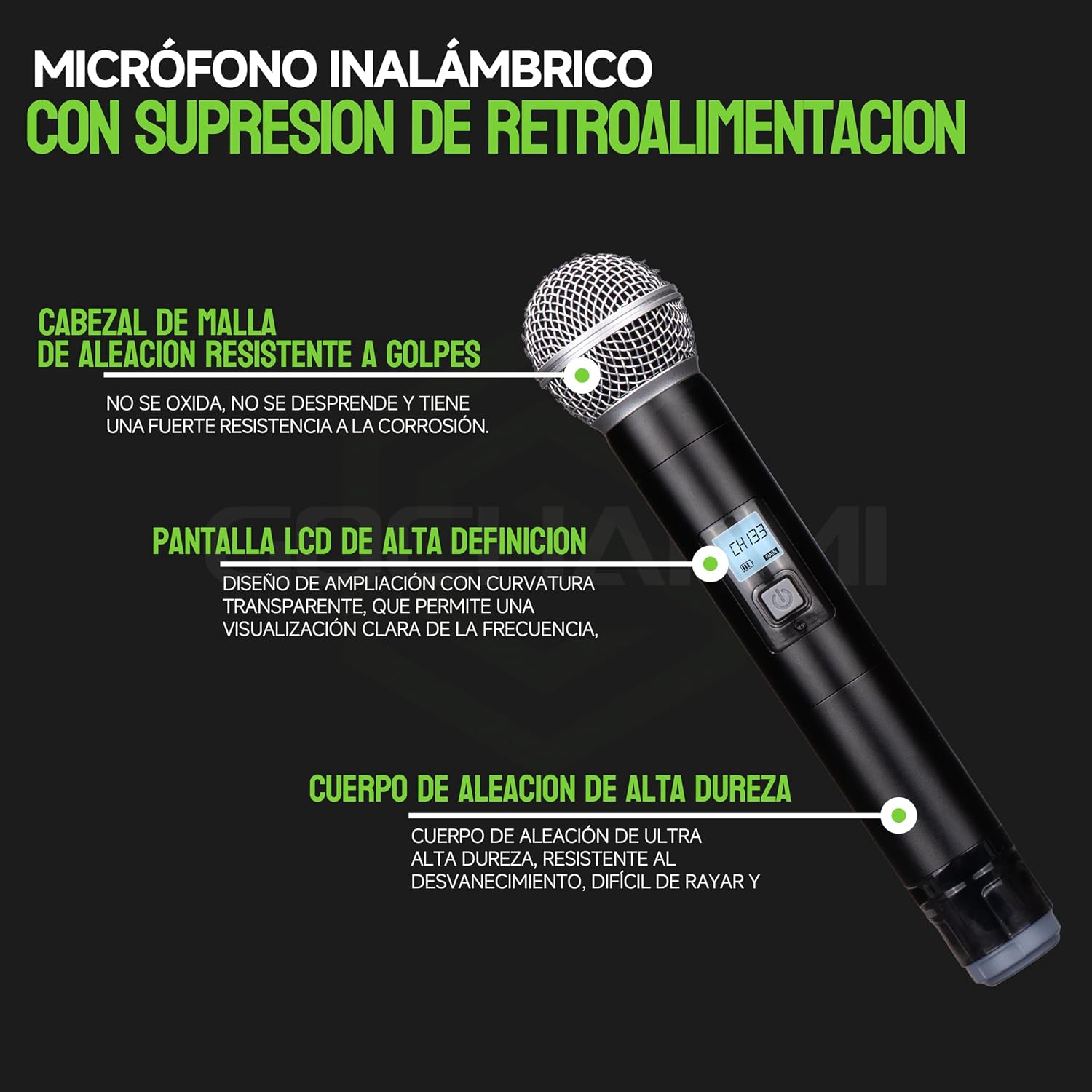
Image: Close-up of the microphone capsule, showing its high-fidelity moving coil design and frequency response graph.
5. Setup Instructions
5.1 Receiver Setup
- Placement: Place the receiver on a stable surface, away from potential sources of interference (e.g., Wi-Fi routers, other wireless devices). Ensure good line of sight to the area where microphones will be used.
- Connect Antennas: Screw the two antennas into the ANT-A and ANT-B ports on the rear panel of the receiver. Position them vertically for best reception.
- Connect Power: Connect the supplied power adapter to the DC Input port on the receiver and plug it into a power outlet.
- Audio Output Connection:
- For individual channel output, use XLR cables (not included) to connect the BALANCED OUT-A and BALANCED OUT-B ports to your mixer or amplifier.
- For a combined output of both microphones, use the included 6.35mm TS cable to connect the MIX OUT port to your audio equipment.
- Power On: Press the POWER button on the receiver's front panel. The LCD display should light up.

Image: Diagram illustrating various connection options for the Gochanmi UG210 receiver with audio systems like mixers, amplifiers, and audio interfaces.
5.2 Microphone Setup
- Install Batteries: Unscrew the bottom part of each handheld microphone. Insert two AA 1.5V batteries into each microphone, ensuring correct polarity. Screw the bottom part back on securely.
- Power On Microphone: Press and hold the power button on the microphone until its LCD screen lights up.
- Frequency Synchronization (IR Sync):
- On the receiver, select the desired channel (CH-A or CH-B) using the corresponding SET button.
- Press the SET button on the receiver to initiate IR sync mode. The display will show "IR---".
- Align the IR sensor on the microphone (usually near the bottom of the display) with the IR sensor on the receiver (labeled "IR"). Keep them within a few centimeters of each other.
- The microphone and receiver will automatically synchronize frequencies. Once successful, the microphone's display will show the same frequency as the receiver, and the RF indicator on the receiver will light up.
- Repeat for the second microphone on the other channel.
6. Operating Instructions
6.1 Power On/Off
- To Power On: Press the POWER button on the receiver. Press and hold the power button on each microphone.
- To Power Off: Press the POWER button on the receiver. Press and hold the power button on each microphone.
6.2 Adjusting Volume
Use the individual VOL A+ and VOL B+ knobs on the receiver's front panel to adjust the output volume for each microphone channel. Rotate clockwise to increase volume, counter-clockwise to decrease.
6.3 Changing Frequencies
If you experience interference, you can change the operating frequency:
- On the receiver, press the SET button for the desired channel (CH-A or CH-B). The frequency number will start blinking.
- Use the UP/DOWN arrows (often integrated with the SET button or separate buttons) to cycle through available frequencies.
- Once a new frequency is selected, press SET again to confirm.
- Perform an IR synchronization as described in Section 5.2 to pair the microphone with the new frequency.

Image: Explanation of UHF technology and its benefits in terms of communication distance, audio quality, penetration, and anti-interference capabilities compared to other frequency bands.
6.4 Operating Range
The Gochanmi UG210 system offers a maximum transmission distance of up to 100 meters (265 feet) in optimal conditions. Actual range may vary depending on environmental factors, obstacles, and interference.

Image: Visual representation of the 100-meter maximum transmission distance for the Gochanmi UG210 wireless microphone system.
7. Maintenance
7.1 Cleaning
- Wipe the receiver and microphones with a soft, dry cloth.
- Do not use abrasive cleaners, solvents, or chemical sprays, as these may damage the finish or internal components.
- For microphone grilles, gently clean with a soft brush if necessary.
7.2 Battery Care
- Remove batteries from the microphones if they will not be used for an extended period to prevent leakage.
- Replace batteries when the low battery indicator appears on the microphone's LCD display.
- Use high-quality AA alkaline batteries for optimal performance and battery life (up to 6 hours).
7.3 Storage
- Store the system in a cool, dry place, away from direct sunlight and extreme temperatures.
- Keep components in their original packaging or a protective case to prevent damage.
8. Troubleshooting
| Problem | Possible Cause | Solution |
|---|---|---|
| No sound from microphone | Microphone not powered on; Low batteries; Microphone not paired with receiver; Receiver volume too low; Audio cable disconnected or faulty; Audio equipment input incorrect. | Ensure microphone is powered on; Replace batteries; Perform IR sync (Section 5.2); Increase receiver volume; Check all audio cable connections; Verify audio equipment input settings. |
| Interference or static noise | Other wireless devices operating on similar frequencies; Obstacles blocking signal; Receiver too far from microphone. | Change the operating frequency (Section 6.3) and re-sync; Ensure clear line of sight between microphone and receiver; Reduce distance between microphone and receiver. |
| Short operating range | Environmental interference; Antennas not properly positioned; Low microphone battery. | Ensure antennas are vertical and unobstructed; Replace microphone batteries; Avoid using near large metal objects or dense walls. |
| Microphone LCD not displaying | Microphone not powered on; Dead batteries. | Press and hold power button; Replace batteries. |
9. Specifications
Receiver:
- Frequency Bands: 640 MHz and 690 MHz (selectable)
- Available Frequencies: 200 UHF points
- Power Supply: DC 12-18 V 1 A
- Audio Output: 2 x XLR connectors, 1 x 1/4" (6.35mm) jack
- Display: TFT screen with menu configuration, frequency scanning, and spectrum display
- Anti-interference: Unique ID pilot technology, automatic infrared frequency synchronization
- Material: Metal
- Dimensions: 39.1 x 34.9 x 8.9 cm (Package dimensions, actual unit dimensions not specified but inferred to be smaller)
- Weight: 2.65 kg (Product weight)
Handheld Microphone:
- Frequency Switch: IR Synchronization
- Output Power: 10 mW
- Harmonic Radiation: < -50dBc
- Battery: 2 x AA 1.5V batteries (not included)
- Battery Life: Up to 6 hours
- Microphone Core: High-quality, sensitive, and clear sound
- Material: Metal
- Pickup Pattern: Unidirectional
General:
- Model: UG210
- Brand: Gochanmi
- Connectivity Technology: UHF
- Recommended Uses: Singing, Karaoke, Broadcasting, Videoconferencing
- GTIN/UPC: 742404391376
10. Warranty and Support
This product comes with a 30-day seller warranty. For any issues or support inquiries, please contact your seller directly.
Please note that the overall sound effect depends on the stereo equipment used. Better equipment will generally result in better microphone performance.