
1. Introduction
This manual provides essential information for the installation, operation, and maintenance of your Seasonic Focus V4 GX-1000-1000W power supply. Please read these instructions carefully before installing and using the product to ensure proper functionality and safety. The Seasonic Focus V4 GX-1000 is a high-efficiency, fully modular power supply designed for desktop computers, offering stable power delivery and advanced features.
2. Safety Information
- Always disconnect the AC power cord from the wall outlet before installing or removing the power supply.
- This power supply is designed for use in desktop computer systems only. Do not use it for any other purpose.
- Do not open the power supply unit. High voltages are present inside, and opening the casing will void the warranty.
- Ensure proper grounding of your computer system.
- Install the power supply in a well-ventilated area, away from heat sources, humidity, and direct sunlight.
- Use only the modular cables provided with your Seasonic power supply. Using third-party cables may cause damage to the PSU or connected components.
3. Product Features
The Seasonic Focus V4 GX-1000 power supply incorporates several advanced features for optimal performance and reliability:
- High Efficiency: 80 PLUS Gold Certified, ensuring reduced energy waste and lower operating temperatures.
- ATX 3 and 16-Pin PCIe Gen 5 Cable (12V-2x6): Designed for compatibility with modern hardware, including Nvidia RTX 30/40 Super & AMD GPUs.
- OptiSink Design: Enhances thermal conductivity for improved cooling and long-term reliability.
- Fully Modular Cabling Design: Allows for cleaner cable management and improved airflow within the PC case.
- Compact Size (140 mm): Facilitates easier installation in various PC chassis.
- 135 mm Fluid Dynamic Bearing (FDB) Fan: Provides quiet operation and extended lifespan.
- Seasonic Hybrid Silent Fan Control: Offers silent operation at low loads by stopping the fan.
- Highly Reliable Japanese 105 °C Aluminum Electrolytic Capacitors: Ensures durability and stable performance.
- Tight Voltage Regulation (12 V, 5 V and 3.3 V) [± 3 %]: Delivers consistent and stable power to components.
- Ample +12 V Output: Supports high-performance components requiring significant 12V power.
4. Package Contents
Upon opening the Seasonic Focus V4 GX-1000 package, you should find the following items:
- Seasonic Focus V4 GX-1000 Power Supply Unit
- Modular Cable Set (Motherboard, CPU, PCIe, SATA, Molex, 12V-2x6 cables)
- AC Power Cable
- Mounting Screws
- PSU Tester
- Velcro Cable Ties
- Disposable Cable Ties
- PSU and Cable Storage Bags
- Installation Guide
- User Manual
Video: Unboxing the Seasonic Focus V4 GX-1000 power supply, showing all included components and accessories.

Image: Rear view of the Seasonic Focus V4 GX-1000 power supply, displaying the power switch, AC inlet, and the Hybrid Mode switch for fan control.

Image: The modular cable connection panel of the Seasonic Focus V4 GX-1000 power supply, clearly labeled for motherboard, CPU, PCIe, and peripheral connections to facilitate easy installation.
5. Setup and Installation
5.1 Pre-Installation Checklist
- Ensure your computer case is compatible with ATX form factor power supplies.
- Verify that your system's power requirements do not exceed the 1000W capacity of this PSU.
- Gather all necessary tools, including a Phillips head screwdriver.
5.2 Physical Installation
- Prepare the Case: Open your computer case and locate the power supply mounting area, typically at the top or bottom rear.
- Mount the PSU: Carefully slide the Seasonic Focus V4 GX-1000 into the designated slot. Ensure the fan is oriented correctly for optimal airflow (usually facing downwards if there's a bottom vent, or upwards if not).
- Secure the PSU: Align the screw holes on the PSU with those on the case and secure it using the provided mounting screws.
5.3 Cable Connection
As a fully modular power supply, you only need to connect the cables required for your components.
- Motherboard Power: Connect the 24-pin ATX cable to the motherboard.
- CPU Power: Connect the 4+4-pin or 8-pin CPU power cable(s) to the motherboard.
- PCIe Power: Connect the appropriate 6+2-pin PCIe cables to your graphics card(s). For modern GPUs, use the dedicated 12V-2x6 (16-pin) PCIe Gen 5 cable if applicable.
- Peripheral Power: Connect SATA power cables to SSDs/HDDs and Molex cables to other peripherals as needed.
- Cable Management: Route cables neatly to improve airflow and aesthetics. Use the provided Velcro or disposable cable ties.
5.4 Initial Power-Up
- Connect AC Power: Plug the AC power cord into the power supply and then into a grounded wall outlet.
- Power Switch: Ensure the power switch on the PSU is in the 'ON' (I) position.
- System Power: Power on your computer system.
6. Operating Instructions
6.1 Hybrid Silent Fan Control
Your Seasonic Focus V4 GX-1000 features a Hybrid Silent Fan Control switch on the rear of the unit. This switch allows you to choose between two fan operating modes:
- Normal Mode (Switch OFF): The fan operates continuously, adjusting its speed based on the power supply's temperature and load.
- Hybrid Mode (Switch ON): The fan remains off during low power loads (typically below 30-40% of maximum output) for silent operation. It will automatically spin up as the load increases to maintain optimal temperatures.
Select the mode that best suits your preference for noise levels and cooling performance.
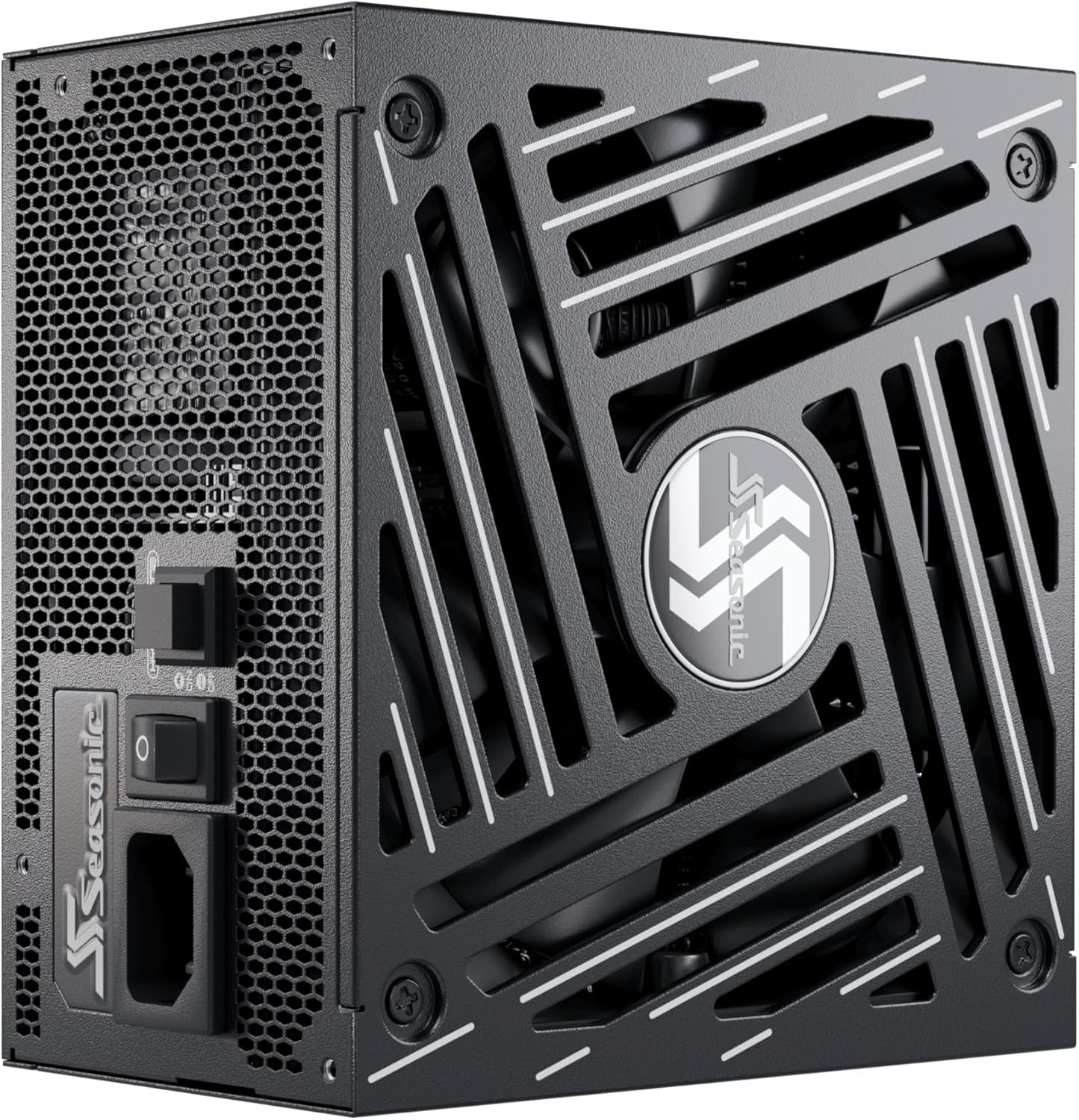
Image: An angled view of the Seasonic Focus V4 GX-1000 power supply, showing the fan grille and the Hybrid Mode switch located near the AC inlet.
7. Maintenance
To ensure the longevity and optimal performance of your Seasonic Focus V4 GX-1000 power supply, periodic maintenance is recommended:
- Dust Removal: Regularly clean dust from the power supply's fan grille and intake vents using compressed air. Ensure the system is powered off and unplugged before cleaning.
- Cable Check: Periodically inspect all modular cable connections to ensure they are securely seated.
- Environment: Maintain a clean, cool, and dry environment for your computer system to prevent dust buildup and overheating.
8. Troubleshooting
If you encounter issues with your power supply, refer to the following common troubleshooting steps:
8.1 No Power to System
- Check AC Connection: Ensure the AC power cord is securely plugged into both the power supply and a working wall outlet.
- PSU Switch: Verify that the power switch on the rear of the PSU is in the 'ON' (I) position.
- Internal Connections: Double-check all modular cable connections, especially the 24-pin motherboard and CPU power cables, to ensure they are fully seated.
- PSU Tester: Use the included PSU tester to check if the power supply is functioning independently. Connect the 24-pin motherboard cable to the tester and power on the PSU. If the fan spins (in Normal Mode) or the LED lights up, the PSU is likely functional.
- Wall Outlet: Test the wall outlet with another device to confirm it is supplying power.
8.2 System Instability or Random Shutdowns
- Overload: Ensure your system's power draw does not exceed the PSU's 1000W capacity. Consider using a power calculator if unsure.
- Component Issues: Instability can also be caused by other components (CPU, GPU, RAM). Test components individually if possible.
- Ventilation: Ensure adequate airflow within your PC case to prevent the PSU and other components from overheating.
8.3 Excessive Fan Noise
- Hybrid Mode: If the fan is constantly spinning at low loads, ensure the Hybrid Mode switch is in the 'ON' position if you desire silent operation.
- Dust: Clean any dust buildup from the fan and grille.
- Obstructions: Ensure no cables or other objects are obstructing the fan blades.
9. Specifications
Key technical specifications for the Seasonic Focus V4 GX-1000-1000W Power Supply:
| Brand | Seasonic |
| Series | FOCUS V4 GX-1000 |
| Model Name | FOCUS V4 GX-1000 |
| Output Wattage | 1000 Watts |
| Form Factor | ATX |
| Efficiency | 80 PLUS Gold Certified |
| Cooling Method | Air (135 mm Fluid Dynamic Bearing Fan) |
| Dimensions (L x W x H) | 5.5 x 5.9 x 3.4 inches (140 x 150 x 86 mm) |
| Item Weight | 6.6 Pounds (3 kg) |
| Connector Type | ATX, PCI Express (Full-Modular) |
| Compatible Devices | Desktop |

Image: An internal view of the Seasonic Focus V4 GX-1000 power supply, illustrating the high-quality components and efficient layout that contribute to its performance and reliability.
10. Warranty and Support
The Seasonic Focus V4 GX-1000-1000W power supply comes with a 10-year warranty, reflecting Seasonic's commitment to quality and durability. For warranty claims, technical support, or further assistance, please refer to the contact information provided in your product's official user manual or visit the official Seasonic website.
Always retain your proof of purchase for warranty purposes.


