
Introduction
The Casfuy F26-L Automatic Pet Feeder is designed to provide scheduled meals for your cats and small dogs, accommodating both wet and dry food. This feeder features a whisker-friendly design, precise portion control, and a battery-operated system for flexible placement. This manual provides detailed instructions for setup, operation, maintenance, and troubleshooting to ensure optimal performance and the well-being of your pet.
Safety Information
- Ensure that all 4 AA batteries are new and of the same specifications. Using batteries with different specifications or varying lifespans may affect the device's normal operation.
- The feeder is equipped with an anti-pinch sensor that halts and retracts the food tray if a paw is detected during rotation, ensuring your pet's safety.
- The top cover and food tray are crafted from food-grade, BPA-free ABS material.
- When cleaning, ensure electronic components remain dry. The control board is not detachable or waterproof.
Package Contents
Verify that all items are present in the package:
- Casfuy F26-L Auto Feeder (1 unit)
- Plastic Food Bowl (1 unit)
- Ice Packs (2 units)
- Top Lid (1 unit)
- User Manual (1 unit)
Product Overview
The Casfuy F26-L Automatic Pet Feeder consists of a main unit with a control panel, a removable food tray with four compartments, a top lid, and a battery compartment on the underside.

Image: The Casfuy F26-L Automatic Pet Feeder in use, showing its compact design and a cat feeding from one of the compartments.
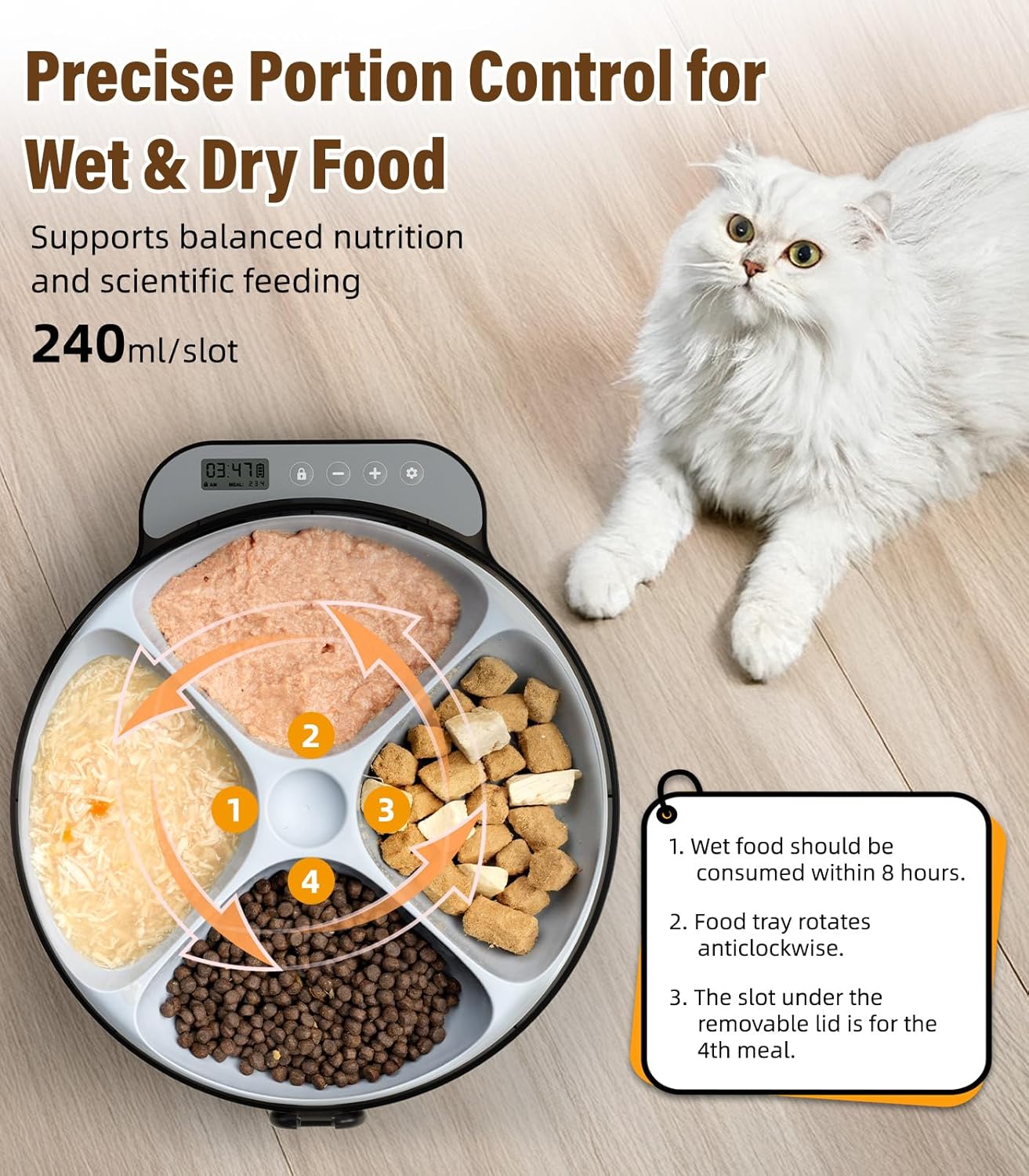
Image: A top-down view of the feeder's food tray, illustrating the four distinct compartments for precise portion control of wet and dry food.
Setup
1. Battery Installation
The feeder operates on 4 AA batteries (not included). Install them into the battery compartment located on the underside of the unit.

Image: The battery compartment on the underside of the feeder, indicating where to insert 4 AA batteries.
Video: A demonstration of how to set up the Casfuy F26-L Automatic Pet Feeder, including battery installation and initial programming steps.
2. Food Tray Preparation
Fill the four compartments of the food tray with your pet's desired wet or dry food. The extra-wide, shallow slots are designed to prevent whisker fatigue.
- For wet food, place the two reusable ice packs (frozen for a minimum of 6 hours at -18 °C) into the designated slots beneath the food tray to help keep food fresh.
- Wet food is recommended to be consumed within 8 hours for optimal freshness and safety.

Image: The feeder with its food tray removed, showing the placement of the two ice packs to keep wet food cool.
Operating Instructions
1. Setting Current Time
After installing batteries, the display will show the current time. Use the control buttons to set the correct time (12H/24H format toggle available).

Image: A close-up of the feeder's LCD display and control panel, demonstrating how to configure the time format and unlock the device for programming.
2. Programming Meal Times
You can program up to 4 flexible meal times per day. The feeder repeats the schedules daily as long as it is powered on.

Image: The feeder's display showing how to program up to four distinct meal times within a 24-hour period.
3. Manual Feeding
To dispense a meal manually, use the designated button on the control panel. This will rotate the tray to the next available compartment.
Video: A demonstration of the manual feeding function and the paw protection test, showing the feeder's safety mechanism.
4. Enable/Disable Feeding Beep
The feeder has an optional feeding beep. You can enable or disable this sound to suit your pet's sensitivity or your preference.

Image: The control panel displaying the option to toggle the feeding beep sound on or off.
5. Canceling a Meal
If you need to cancel a programmed meal, follow the instructions on the control panel. Long press the appropriate button to save and exit if fewer than 4 meals are needed.
Video: A short guide on how to cancel a scheduled meal on the Casfuy F26-L Automatic Pet Feeder.
6. Reset to Factory Settings
To reset the feeder to its original factory settings, refer to the specific button combination in the video below.
Video: Instructions on how to perform a factory reset on the Casfuy F26-L Automatic Pet Feeder.
Maintenance and Cleaning
Regular cleaning is essential to maintain hygiene, especially when using wet food.
- Remove the food bowl and top lid.
- Wash these parts with warm, soapy water.
- Ensure all parts are completely dry before reassembling.
- Important: The control board is not detachable or waterproof. Do not immerse the main unit in water.

Image: The detachable food tray and lid of the feeder being washed in a sink, highlighting the ease of cleaning.
Troubleshooting
Meal Icons Not Displaying After Programming?
If meal icons do not appear on the display after programming, consider the following:
- The feeder does not dispense food at 12:00 AM (12-hour format) or 00:00 (24-hour format).
- The meal number icon disappears once the feeding is complete and will light up again the next day.
- The feeder repeats the schedules as long as it's powered on. Any duplicate meal times will reset to 12:00 AM/00:00.

Image: The feeder's display illustrating common issues with meal icon visibility and their explanations.
General Issues
- Feeder not turning/Error Code: Ensure batteries are correctly installed and have sufficient charge. Replace all 4 AA batteries with new ones if issues persist.
- Food not staying fresh: Ensure ice packs are fully frozen and placed correctly. Wet food should be consumed within 8 hours.
- Pet knocking over feeder: The feeder is lightweight. Consider placing it in a corner or against a wall to prevent tipping.
Specifications
| Feature | Detail |
|---|---|
| Product Dimensions | 11.57"L x 10.47"W x 3.07"H (29.39 x 26.59 x 7.8 cm) |
| Item Weight | 1.37 Kilograms (3.02 Pounds) |
| Material | Acrylonitrile Butadiene Styrene (ABS) |
| Power Source | 4 AA Batteries (not included) |
| Target Species | Cats, Small Dogs |
| Number of Meal Slots | 4 |
| Special Feature | Whisker-friendly, Anti-pinch sensor |
| Included Components | Feeder unit, Plastic food bowl, 2 Ice packs, Top lid, User manual |
Warranty and Support
For any product inquiries, technical support, or warranty claims, please contact Casfuy customer service. Refer to the contact information provided on the product packaging or the official Casfuy website.
Manufacturer: Casfuy
