
Introduction
This manual provides comprehensive instructions for the safe and effective use of your coobeast 1/4 Drive Digital Torque Wrench. Please read this manual thoroughly before operation and retain it for future reference. This digital torque wrench offers precise torque measurement with a range of 0.33-22.1 Ft.lbs (0.45-30 Nm), featuring a large LCD screen, audible buzzer, LED alerts, and vibration feedback for accurate application.

Figure 1: Product Composition Description. This image illustrates the main components of the digital torque wrench, highlighting the high-definition display, control buttons, quick-release mechanism, and reversible ratchet head.
Safety Information
Always wear appropriate personal protective equipment, such as safety glasses, when using this tool. Ensure the workpiece is securely fastened. Do not exceed 120% of the maximum torque value to prevent sensor damage. Keep the tool clean and dry. Remove batteries during prolonged periods of non-use.
Package Contents
- 1 x coobeast 1/4 Drive Digital Torque Wrench
- 1 x 100mm Extension Bar
- 1 x 1/4 to 3/8 Adapter
- 3 x AAA Batteries
- 1 x Storage Case
- 1 x Instruction Manual (this document)

Figure 2: Package Contents. The image displays the digital torque wrench along with its included accessories: an extension bar and a 1/4 to 3/8 inch adapter, all housed within a protective storage case.
Setup
1. Battery Installation
- Locate the battery cover at the base of the handle.
- Manually rotate the battery cover counter-clockwise to open.
- Insert 3 AAA batteries, ensuring correct polarity (+/-).
- Replace the battery cover and rotate clockwise to secure.
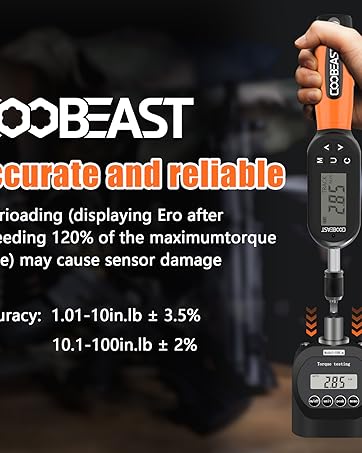
Figure 3: Battery Installation Steps. This image provides a visual guide for opening the battery cover, inserting three AAA batteries, and securing the cover.
2. Attaching Sockets and Adapters
The wrench features a quick-release head for easy accessory changes. Press the quick-release button on the ratchet head to attach or detach sockets and the included 1/4 to 3/8 adapter or extension bar.

Figure 4: Quick-Release and Reversible Ratchet Head. This image illustrates how to use the quick-release button for rapid socket replacement and highlights the reversible nature of the ratchet head.
Operating Instructions
1. Power On/Off
Press the C button to power on the device. To power off, press and hold the C button.
2. Unit Selection
Press the U button to cycle through the available measurement units: ft-lbs, in-lbs, Nm, kg-cm, and kg-m.

Figure 5: Five Units of Measure. This image displays the various torque units that can be selected on the wrench's screen.
3. Mode Selection (Peak/Track)
Press the P/T button to switch between Peak (P) mode and Track (T) mode.
- Track Mode (T): Displays the torque value in real-time as force is applied. The value returns to zero once the force is removed.
- Peak Mode (P): Displays and holds the maximum torque value achieved during the application for 10 seconds after the force is released.

Figure 6: Track Mode and Peak Mode. This image visually differentiates between the real-time display of Track Mode and the peak value retention of Peak Mode.
4. Setting Preset Torque Values (P0-P9)
The wrench allows for storing up to 9 preset torque values (P0-P9).
- Use the Up or Down arrow buttons to select the desired preset group (P0-P9).
- Press the M button to enter torque value adjustment mode.
- Use the Up or Down arrow buttons to adjust the torque value.
- Press the C button to save the adjusted value to the selected group.

Figure 7: Setting Preset Torque Values. This image provides a step-by-step visual guide for selecting a preset group, adjusting the torque value, and saving it.
5. Torque Application and Alerts
When applying torque, the wrench provides visual, audible, and tactile alerts as you approach and reach the preset value:
- LED Indicator:
- Green light: 85%-90% of the preset torque value.
- Red light: 100% of the preset torque value.
- Buzzer: An audible alert will sound as the preset value is approached and reached.
- Vibration: The wrench will vibrate as the preset value is approached and reached.

Figure 8: Torque Value Triple Warning. This image demonstrates the three types of alerts (beeping, vibration, and LED lighting) that activate when the preset torque value is approached and reached.

Figure 9: High Visibility LED Indicator. This image illustrates how the LED indicator changes color to signal proximity to the target torque (green for 80-90%, red for 100%).
6. Data Storage
The wrench can store up to 500 groups of historical data. To check stored data, refer to the detailed instructions in the full user manual (not provided here, but implied by the feature bullet).
Maintenance
- Cleaning: Wipe the tool with a clean, dry cloth after each use. Do not use abrasive cleaners or solvents.
- Storage: Store the torque wrench in its protective case in a dry environment.
- Battery Care: For prolonged periods of non-use, remove the batteries to prevent leakage and damage to the device.
- Calibration: It is recommended to verify the torque wrench calibration after 12 months or 5000 uses to maintain accuracy.
Troubleshooting
| Problem | Possible Cause | Solution |
|---|---|---|
| Wrench does not power on. | Dead or incorrectly installed batteries. | Check battery polarity. Replace with new AAA batteries. |
| Inaccurate torque readings. | Tool needs calibration; exceeding maximum torque. | Ensure loading torque does not exceed 120% of max value. Consider professional calibration if accuracy issues persist. |
| Alerts (buzzer/LED/vibration) not functioning. | Low battery; alert settings disabled (if applicable). | Replace batteries. Check user manual for alert setting adjustments. |
Specifications
| Feature | Detail |
|---|---|
| Drive Size | 1/4 inch |
| Torque Range | 0.33-22.1 Ft.lbs (0.45-30 Nm) |
| Accuracy | ±2% (clockwise) |
| Measurement Units | ft-lbs, in-lbs, Nm, kg-cm, kg-m |
| Ratchet Head | 72-Tooth, Quick Release, Reversible |
| Display | Large LCD with High Backlight |
| Alerts | Buzzer, LED Indicator (Green 85-90%, Red 100%), Vibration |
| Data Storage | 500 groups |
| Power Source | 3 x AAA Batteries (included) |
| Material | Chrome Vanadium Steel |
| Item Length | 12 inches |
| Item Weight | 1.8 pounds |

Figure 10: Accuracy and Measuring Range. This image highlights the ±2% accuracy of the torque wrench and its measuring range of 0.33-22.1 Ft-lbs (0.45-30 Nm).
Warranty and Support
Your coobeast 1/4 Drive Digital Torque Wrench is backed by a 1-year warranty. For any questions, technical assistance, or warranty claims, please contact coobeast customer support through the retailer where the product was purchased or visit the official coobeast website.
Official Product Video
Video 1: coobeast Digital Torque Wrench Overview. This video provides a general overview of the coobeast digital torque wrench, demonstrating its features and basic operation.