
1. Introduction
The INSMART Smart Body Fat Scale provides advanced body composition analysis with a large color display and high-precision ITO technology. This digital bathroom scale accurately measures various body metrics and seamlessly integrates with a dedicated health application for comprehensive tracking and management of your fitness journey.

Image: INSMART Smart Body Fat Scale showcasing its features and design.
2. Package Contents
Please check the box for the following items:
- 1 x INSMART Smart Body Fat Scale
- 1 x User Manual
- 3 x AAA Batteries
3. Setup Instructions
3.1. Battery Installation
- Locate the battery compartment on the underside of the scale.
- Insert the 3 AAA batteries, ensuring correct polarity (+/-).
- Close the battery compartment cover securely.
3.2. App Download and Pairing
- Download the INSMART Health app from the App Store (iOS) or Google Play Store (Android).
- Ensure your smartphone's Bluetooth and GPS are enabled.
- Open the INSMART Health app and follow the on-screen instructions to add a new device.
- Step onto the scale to activate it and allow the app to automatically recognize and pair with the device.

Image: The INSMART Health app supports integration with other popular health platforms.
3.3. Important Usage Notes
- Always place the scale on a hard, flat floor for accurate measurements.
- Ensure your feet are dry, bare, and touching all 4 electrode areas on the scale.
- Do not use this device if you are pregnant.
- Measurements are for reference only and are not suitable for diagnosing medical conditions.
- Enter correct personal information in the app before use for accurate body composition analysis.
4. Operating Instructions
4.1. Taking a Measurement
- Gently tap the scale with your foot to activate it. Wait for the display to show "0.0".
- Step onto the scale barefoot, ensuring your feet are positioned on the electrode areas.
- Stand still until your weight and other metrics are displayed on the scale's screen.
- The data will automatically sync with the INSMART Health app if your phone is nearby and connected via Bluetooth.

Image: Accurate weight measurement displayed on the INSMART Smart Scale.
4.2. Understanding the Display
The large color screen directly displays key metrics such as:
- Weight
- Heart Rate
- Heart Index
- Body Balance Rate

Image: The scale's display provides an overview of various body metrics.
4.3. App Features and Tracking
The INSMART Health app provides a detailed overview and tracking capabilities:
- 18 Body Data Points: Track weight, BMI, body fat, fat-free body weight, subcutaneous fat, visceral fat, body water, skeletal muscle rate, muscle mass, bone mass, proteins, BMR, and biological age.
- Progress Trends: Automatic chart generation monitors your fitness trends over time.
- Goal Setting: Set and track personal health goals within the app.
- Unlimited Users: Supports tracking for an unlimited number of users, making it suitable for the entire family.
- Offline Measurements: The scale can store and synchronize data with the app through its built-in memory chip, allowing for measurements even when your phone is offline.

Image: The INSMART Health app allows for multiple user profiles to track individual progress.
5. Key Features
- Large Color Screen Display: Directly shows Heart rate, Heart index, and Body balance rate without needing the app.
- 18 Body Data Analysis: Provides comprehensive body composition metrics for detailed health insights.
- High-Precision ITO Technology: Offers a larger sensing area for accurate measurements (accurate to 0.05kg, up to 500lb/227kg).
- Fitness App Compatibility: Syncs with INSMART Health, Apple Health, Fitbits, and Google Fit.
- Unlimited User Profiles: Supports tracking for all family members.
- Safe and Stable Design: Features rounded corners, anti-slip mat, and 6mm tempered glass for durability and safety.
- Multiple Modes: Includes Athlete Mode, Baby Mode, and Standard Mode to cater to different user needs.
- Unit Switching: Easily switch between pounds (lb), kilograms (kg), and stones (st).

Image: The INSMART Smart Scale utilizes ITO technology for enhanced precision compared to traditional scales.

Image: The scale offers different modes for various users, including athletes and babies.
6. Maintenance
- Clean the scale surface with a soft, damp cloth. Avoid abrasive cleaners or harsh chemicals.
- Do not immerse the scale in water or any other liquid.
- Store the scale in a cool, dry place away from direct sunlight and extreme temperatures.
- If the scale will not be used for an extended period, remove the batteries to prevent leakage.
7. Troubleshooting: No Bluetooth Connection to My Scale
If you are experiencing issues connecting your scale to the app via Bluetooth, please follow these steps:
- Ensure your phone's network is enabled (for registered users).
- Make sure that both Bluetooth and GPS connections are enabled on your phone.
- Pair the device and take a measurement when the app is open.
- If the connection still fails, proceed as below:
- Tap the "Setting" button in the app.
- Then tap "Device Binding".
- Tap "+" to search and pair the Bluetooth Scale.
- Go back to the home page, tap the "Measure" button to start weighing.
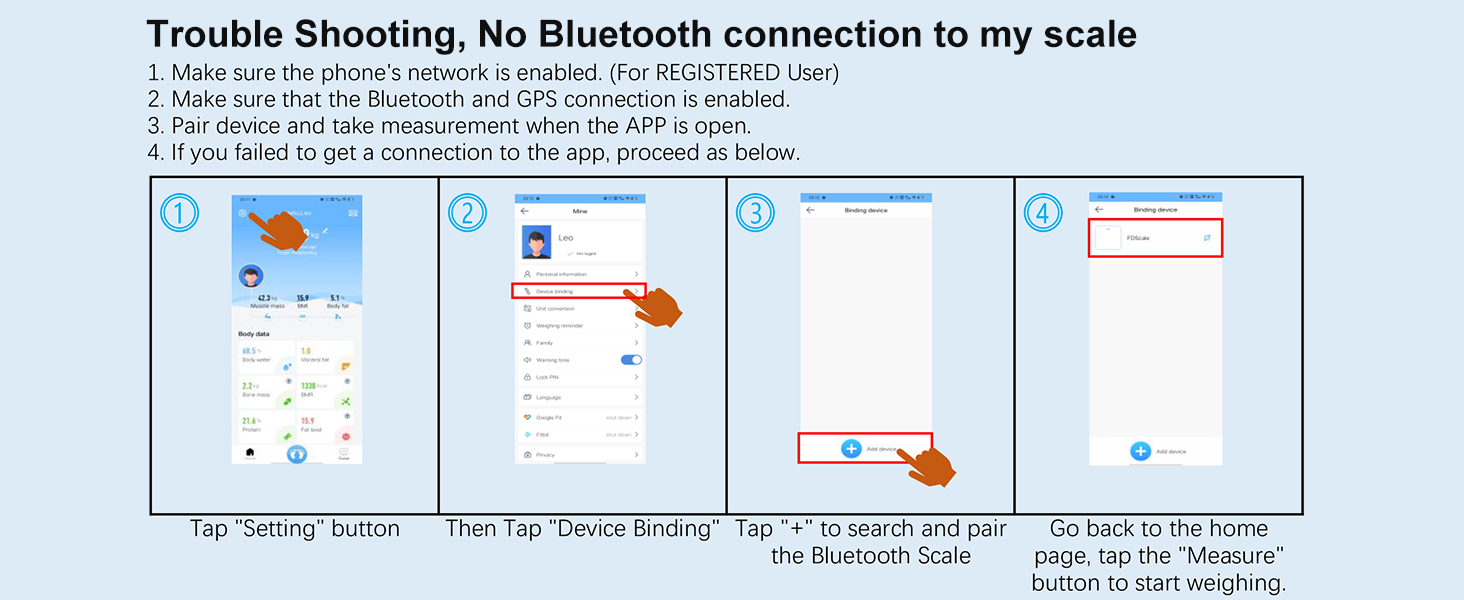
Image: Visual guide for troubleshooting Bluetooth connectivity with the INSMART Smart Scale.
8. Specifications
| Brand | INSMART |
| Model Number | Square |
| Manufacturer | INSMART |
| Item Weight | 1.6 kg |
| Product Dimensions | 30.48 x 30.48 x 2.54 cm |
| Colour | Black |
| Material | Glass |
| Maximum Weight Capacity | 500 Pounds / 227 kg |
| Measurement Accuracy | +/-0.05kg |
| Display Style | LCD |
| Special Features | Auto Shut Off, Body Fat, Bodyweight, Heart Rate, Large Display |
| Included Components | Body fat scale, User Manual, AAA batteries |
9. Warranty and Support
For warranty activation, please visit the INSMART website or scan the QR code provided in the packaging within 15 days of purchase.
For any questions or concerns regarding your INSMART Smart Body Fat Scale, please refer to the contact information provided in your user manual or on the INSMART official website.


