1. Introduction
Thank you for choosing the Tenlike Portable Power Station M100. This device is designed to provide reliable power for your electronic devices during outdoor activities, travel, or power outages. Please read this manual carefully before use to ensure safe and optimal operation.

Image 1.1: Tenlike Portable Power Station M100. This image shows the compact black power station with its integrated orange USB-C cable and digital display.
2. Package Contents
Verify that all items are present in your package:
- Tenlike 99.9WH Power Station x1
- Type-C Power Cable x1 (Built-in)
- 20W Power Adapter x1
- User Manual + Quick Start Guide x1
3. Product Features
- High Capacity: 99.9Wh LiCoO2 Lithium Battery, airline-compliant for carry-on luggage.
- Multiple Outputs: 1 AC Port (80W rated, 120W peak), 2 Type-C PD 60W Ports, 2 USB-A 15W Ports, 1 DC 9-12V/10A Port.
- Fast Charging: Type-C PD 60W for rapid device charging.
- Built-in Cable: Integrated 60W PD fast charging Type-C cable for convenience.
- Compact Design: Measures 6.5 x 3.2 x 1.9 inches and weighs 1.65 lbs, making it highly portable.
- Advanced Safety: Smart BMS Protection (5E 2.0) against overcharge, overdischarge, overcurrent, short circuit, and overheating. Real-time temperature monitoring.
- Durable Material: Constructed with UL94 V-0 CLASS ABS fireproof material.
- Smart Display: Digital display shows power information, charging speed, and port status.
4. Setup
4.1 Initial Charging
Before first use, fully charge your Tenlike Portable Power Station M100. Use the included 20W power adapter and Type-C cable, or a 60W adapter (not included) for faster charging.
- Connect the Type-C power cable to the power station's input port.
- Connect the other end of the cable to the 20W power adapter.
- Plug the power adapter into a wall outlet.
- The digital display will show charging progress. A full charge typically takes about 2 hours with a 60W adapter, or longer with the included 20W adapter.

Image 4.1: Charging the Tenlike Power Station. This image illustrates connecting the power station to a wall outlet for charging, highlighting the built-in Type-C cable.
5. Operating Instructions
5.1 Powering On/Off
- To activate USB-A/USB-C/DC output: Short press the power button.
- To activate AC output: Long press the power button.
- To turn off: Long press the power button until the display turns off.
5.2 Charging Devices
The M100 offers various output ports to charge different devices:
- AC Output: Plug devices requiring 110V AC power (rated under 80W, peak under 120W) into the AC outlet. Examples include laptops, fans, and mini-fridges.
- Type-C PD 60W Output: Use the built-in Type-C cable or one of the Type-C ports to fast charge compatible smartphones, tablets, and laptops.
- USB-A 15W Output: Connect standard USB devices for charging.
- DC Output: Use the DC port for devices requiring 9-12V/10A.

Image 5.1: Charging multiple devices simultaneously. This image shows the power station connected to a laptop, drone, camera, tablet, and smartphone, demonstrating its multi-port charging capability.
5.3 Important Usage Notes
- AC and DC outputs cannot be used simultaneously.
- The AC outlet supports 80W rated power and 120W peak power. Ensure continuous use is within 80W to prevent overload.
- The digital display provides real-time information on power levels, active ports, and charging status. A fast-flashing percentage indicates PD fast charging, while a slow-flashing percentage indicates standard charging.

Image 5.2: Smart Display Information. This image highlights the digital display on the power station, showing how it indicates power percentage, AC output, 12V output, and USB output status.
5.4 AC Output Compatibility
Refer to the table below for suitable and unsuitable AC devices:
| Category | Device Examples | Power Consumption |
|---|---|---|
| AC Suitable Devices (<80W rated) | MacBook Pro (M4) charger, DJI Mavic Pro Charger, Portable Car Refrigerators, Camping String Lights | 70W, 50W, 40-70W, 10-50W |
| AC Not Suitable Devices (>80W rated) | Gaming Laptop, Blenders, Electric Pot, Induction Cookers | 200-300W+, 600W+, 600W+, 1000W+ |
| DC Output (9-12V, 10A) | Wireless Routers, Small LCD Monitors, Car Audio Systems, Surveillance Cameras | 10-50W, 20-60W, 30-100W, 5-20W |
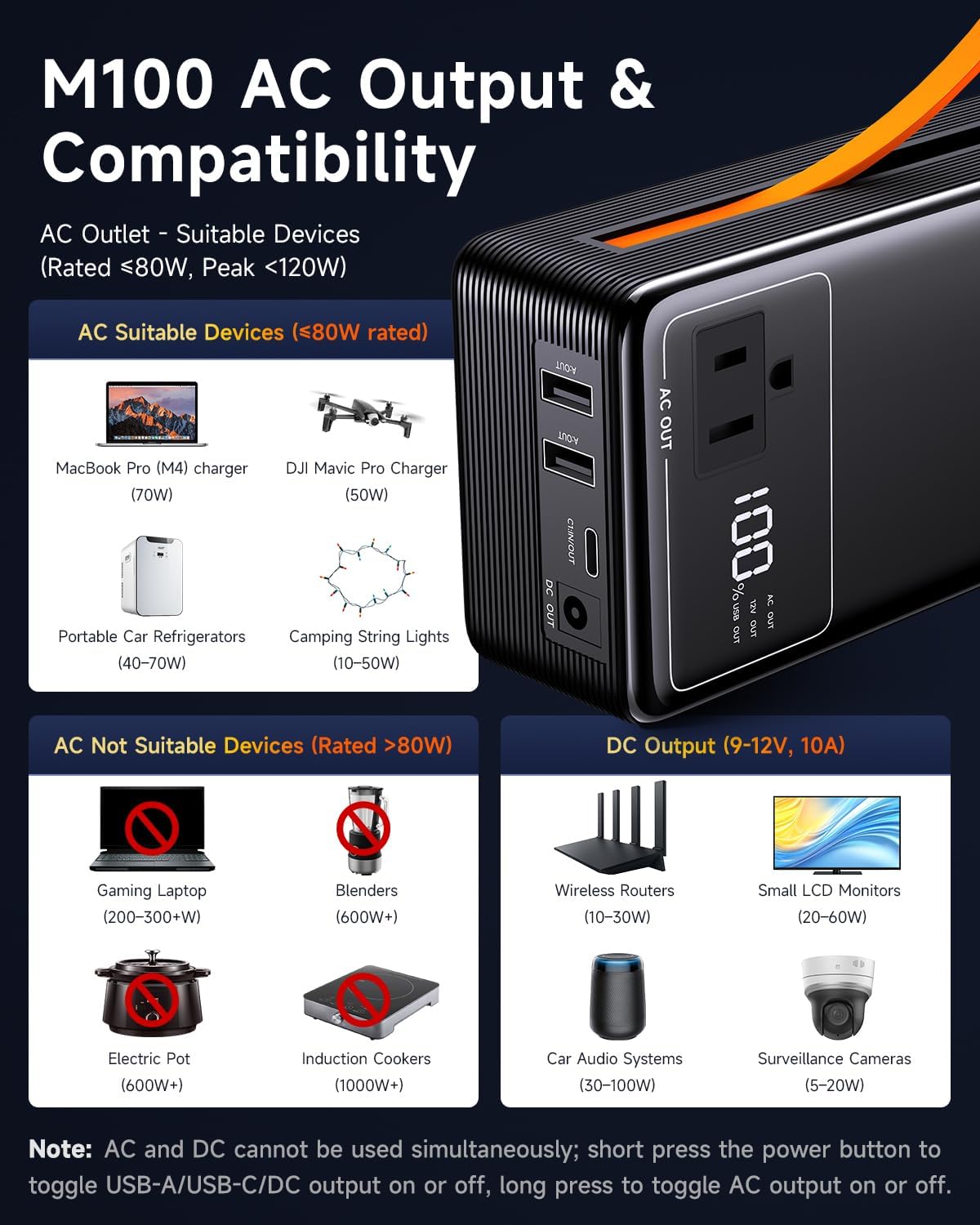
Image 5.3: M100 AC Output & Compatibility Chart. This graphic visually categorizes devices suitable and unsuitable for the AC output, along with examples for DC output.
6. Maintenance
6.1 Battery Care
- To prolong battery life, avoid fully discharging the power station regularly.
- Recharge the unit at least once every 3-6 months if not in frequent use to maintain battery health.
- The LiCoO2 battery has a cycle life of 1000+ charges, indicating long-term durability under proper care.
6.2 Storage
- Store the power station in a cool, dry place away from direct sunlight and extreme temperatures.
- Keep out of reach of children.
6.3 Cleaning
- Use a soft, dry cloth to clean the exterior of the power station.
- Do not use abrasive cleaners or immerse the unit in water.
7. Troubleshooting
7.1 Common Issues and Solutions
- Device not charging:
- Ensure the power station is sufficiently charged.
- Verify the correct output port is activated (short press for USB/DC, long press for AC).
- Check if the device's power consumption exceeds the port's maximum output or the power station's overall capacity.
- Confirm that AC and DC outputs are not being used simultaneously.
- Power station not turning on:
- Ensure the battery is not completely depleted. Charge the unit.
- Long press the power button to attempt activation.
- Overload Protection: If a device draws too much power, the power station may automatically shut down to prevent damage. Disconnect the high-power device and restart the power station.
- E4 Alarm Safety: The unit features an E4 alarm for safety. If this alarm activates, refer to the specific error code in the quick start guide or contact customer support.
- 30-second Power-Off Protection: If no device is connected or drawing power, the unit may automatically power off after 30 seconds to conserve energy.
8. Specifications
| Feature | Specification |
|---|---|
| Brand | Tenlike |
| Model Number | M100 |
| Battery Capacity | 99.9Wh |
| Battery Type | LiCoO2 Lithium Battery |
| AC Output | 110V, 80W (Rated), 120W (Max) |
| Type-C Output (x2) | PD 60W |
| USB-A Output (x2) | 15W |
| DC Output | 9-12V/10A |
| Product Dimensions | 6.4"L x 3.2"W x 1.9"H |
| Item Weight | 1.65 lbs (26.4 oz) |
| Material | UL94 V-0 CLASS ABS |
| Charging Time (20W Adapter) | Approx. 4-5 hours (full charge) |
| Charging Time (60W Adapter) | Approx. 2 hours (full charge) |
| UPC | 810186882815 |
9. Warranty and Support
9.1 Warranty Information
The Tenlike Portable Power Station M100 comes with a 2-year warranty from the date of purchase. This warranty covers manufacturing defects and issues arising from normal use. It does not cover damage caused by misuse, accidents, unauthorized modifications, or natural disasters.
9.2 Customer Support
If you encounter any issues with your Tenlike Portable Power Station M100 or have questions not covered in this manual, please contact our customer support team. We are committed to resolving any concerns within 24 hours.
For support, please visit the official Tenlike store on Amazon or contact us through the platform where you purchased the product.


