
FINGERS ANC-Paradise
FINGERS ANC-Paradise TWS Earbuds User Manual
Model: ANC-Paradise
1. Introduction
This manual provides detailed instructions for the FINGERS ANC-Paradise TWS Earbuds. Please read this manual carefully before using the product to ensure proper operation and to maximize your listening experience.
The FINGERS ANC-Paradise TWS Earbuds offer high-quality audio with Active Noise Cancellation (ANC) and Surround Noise Cancellation (SNC™) technologies. They feature a sleek design, extended playtime, and intuitive controls for calls and music.
2. Package Contents
Verify that all items listed below are present in your product package:
- 1 x FINGERS ANC-Paradise TWS Earbuds (Charging Case + TWS Pods)
- 1 x USB Charging Cable
- 2 x Extra Eargels (pairs)
- 1 x Quick Start Guide
- 1 x Brand Note
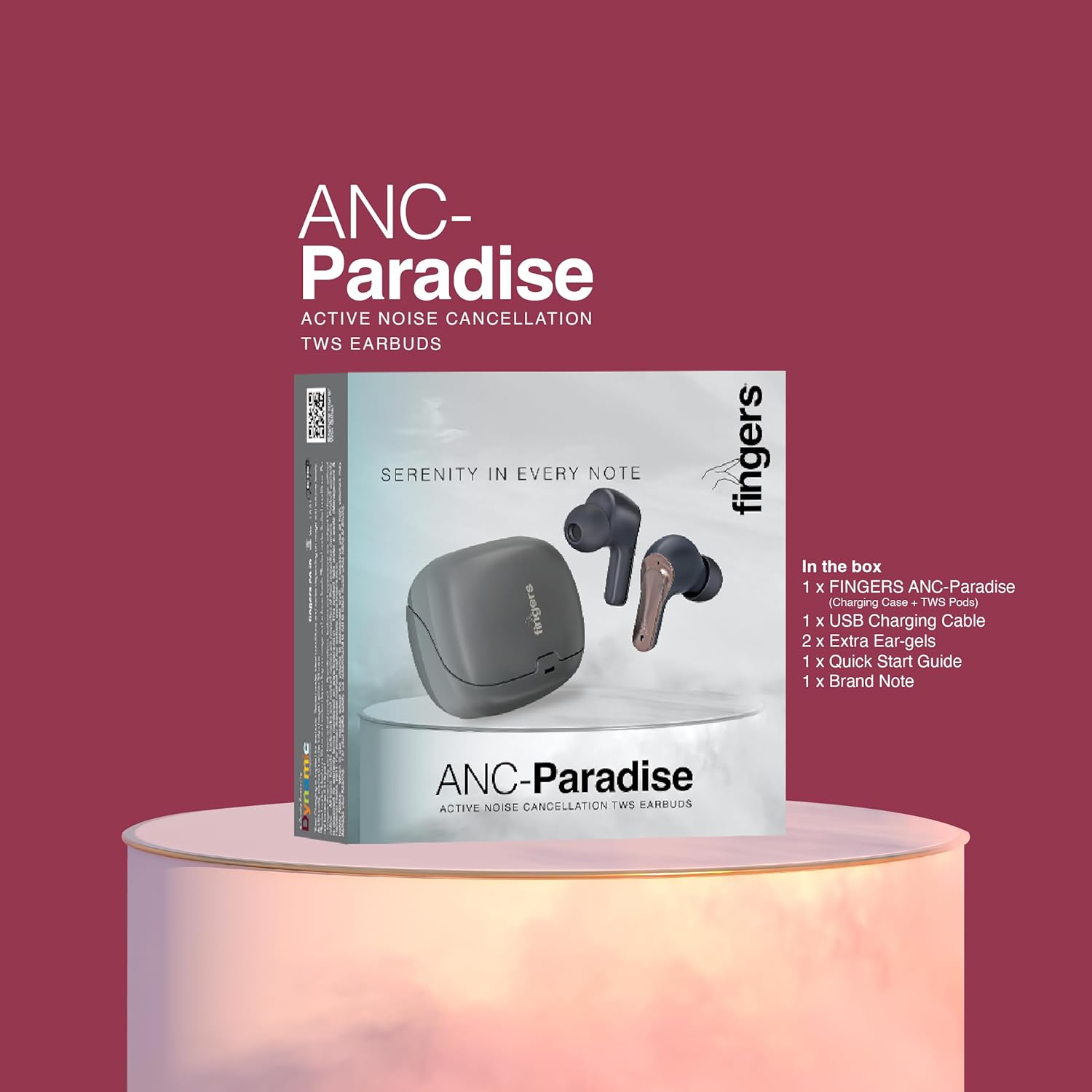
Image 2.1: Contents of the FINGERS ANC-Paradise TWS Earbuds package, including earbuds, charging case, USB cable, extra eargels, quick start guide, and brand note.
3. Product Overview
The FINGERS ANC-Paradise TWS Earbuds consist of two wireless earbuds and a portable charging case. Each earbud is equipped with a built-in microphone and touch controls.

Image 3.1: The FINGERS ANC-Paradise TWS Earbuds shown with their charging case. The earbuds are dark silver and gun metal in color.
4. Setup and First Use
4.1 Charging the Earbuds and Case
- Place the earbuds into the charging case. Ensure they are correctly seated.
- Connect the USB charging cable to the charging port on the case and to a power source (e.g., USB wall adapter, computer USB port).
- The indicator lights on the case will show the charging status.
- A 10-minute charge provides approximately 1.5 hours of playtime. A full charge offers up to 32 hours of total playtime with the charging case.

Image 4.1: Visual representation of the 32-hour playtime and fast charging capability (10 minutes charge for 1.5 hours playtime).
4.2 Bluetooth Pairing
- Open the charging case. The earbuds will automatically enter pairing mode.
- On your device (smartphone, tablet, laptop), enable Bluetooth.
- Search for available Bluetooth devices and select "FINGERS ANC-Paradise" from the list.
- Once connected, you will hear a confirmation tone, and the earbuds will be ready for use.
- The earbuds can be used as a single unit or as a pair.
5. Operating Instructions
5.1 Touch Controls
The earbuds feature intuitive touch controls for managing calls and music playback.
- Play/Pause: Single tap on either earbud.
- Next Track: Double tap on the right earbud.
- Previous Track: Double tap on the left earbud.
- Answer/End Call: Single tap on either earbud during an incoming call.
- Reject Call: Press and hold either earbud for 2 seconds during an incoming call.
- Activate Voice Assistant: Triple tap on either earbud (on default OS).

Image 5.1: Overview of the earbud features including sweat resistance, voice assistant, intuitive touch controls, and flexibility for single or dual earbud use.
5.2 Active Noise Cancellation (ANC)
ANC technology reduces ambient noise, providing a more immersive audio experience.
- Enable/Disable ANC: Use the dedicated switch or touch control (refer to quick start guide for specific gesture) to toggle ANC on or off.

Image 5.2: The earbuds showcasing the built-in dual microphones, Active Noise Cancellation (ANC) for pure sound, and Surround Noise Cancellation (SNC™) for advanced voice clarity.
5.3 Surround Noise Cancellation (SNC™)
SNC™ technology enhances call clarity by filtering out surrounding ambient noise, focusing on your voice. This feature is automatically active during calls.
5.4 Sound Effects
The earbuds offer three distinct sound effects to customize your listening experience.
- Available Modes: Hi-Fi, Bass, Rock.
- Switching Modes: Refer to the quick start guide for the specific touch control gesture to cycle through these sound effects.

Image 5.3: The earbuds illustrating the three exceptional sound effects: Hi-Fi, Bass, and Rock, allowing users to choose their preferred audio profile.
6. Maintenance and Care
- Cleaning: Use a soft, dry cloth to clean the earbuds and charging case. Avoid using abrasive materials or harsh chemicals.
- Water Resistance: The earbuds have an IPX4 sweat-resistant rating. This means they are protected from splashing water from any direction. Do not submerge them in water or expose them to heavy rain.
- Storage: When not in use, store the earbuds in their charging case to protect them and keep them charged.
- Temperature: Avoid exposing the earbuds to extreme temperatures (hot or cold).
7. Troubleshooting
| Problem | Possible Solution |
|---|---|
| Earbuds not pairing |
|
| No sound from one earbud |
|
| ANC not working effectively |
|
| Earbuds not charging |
|
8. Specifications
| Feature | Detail |
|---|---|
| Model Name | ANC-Paradise |
| Connectivity Technology | Wireless |
| Wireless Communication | Bluetooth |
| Noise Control | Active Noise Cancellation (ANC) |
| Microphone Technology | Dual Mic with SNC™ (Surround Noise Cancellation) |
| Battery Life | Up to 32 Hours (with charging case) |
| Fast Charging | 10 mins charge for 1.5 hours playtime |
| Water Resistance | IPX4 Sweat Resistant |
| Control Method | Touch, Voice Assistant |
| Sound Effects | Hi-Fi, Bass, Rock |
| Compatible Devices | Smartphones, Tablets, Laptops |
| Item Weight | 43 Grams |
| Product Dimensions | 1.7 x 2.4 x 3.2 cm |
| Impedance | 32 Ohm |
| Ear Placement | In Ear |
| Form Factor | In Ear |
9. Warranty and Support
For warranty information and customer support, please refer to the "Brand Note" included in your package or visit the official FINGERS website.
You can also contact FINGERS customer service for assistance with product issues or inquiries.
Manufacturer: Dynamic Conglomerate Pvt. Ltd.
Country of Origin: India
Related documentsANC-Paradise


Ask a question about this manual
Ask about setup, troubleshooting, compatibility, parts, safety, or missing instructions. Manuals+ will review the question and use this page’s manual context to help answer it.