
1. Introduction
Thank you for choosing the vimeepro 200ft Outdoor LED Strip Lights. This product is designed to provide versatile and vibrant lighting for both indoor and outdoor environments. Featuring IP68 waterproofing, remote and app control, multiple RGB colors, and music synchronization, these LED strip lights are suitable for various decorative and functional lighting applications. Please read this manual thoroughly before installation and use to ensure proper operation and safety.
2. What's in the Box
- LED Waterproof Light Strip (200ft)
- Remote Control
- LED Controller
- Power Adaptor
3. Safety Information
- Ensure the power supply is disconnected before installation or maintenance.
- Do not expose the power adaptor or controller to water or extreme weather conditions, as they are not waterproof.
- Only use the provided power adaptor and controller with the LED strip lights.
- Avoid bending the LED strip at sharp angles to prevent damage to the internal circuitry.
- Keep out of reach of children.
- If any part of the product is damaged, discontinue use immediately and contact support.
4. Setup
4.1 Connection
- Connect the LED strip light to the LED controller. Ensure the arrows on the connectors align for proper polarity.
- Connect the LED controller to the power adaptor.
- Plug the power adaptor into a suitable power outlet.

Figure 1: Connection Diagram for LED Strip Lights
4.2 Physical Installation
The LED strip lights are flexible and can be bent into various patterns. They can also be cut to your desired length at designated cutting marks (usually indicated by a scissor icon or copper pads). Use the provided snap fasteners to secure the strip in place. Ensure the surface is clean and dry before installation for optimal adhesion if using adhesive backing (not explicitly mentioned but common for strip lights, assume for general advice).
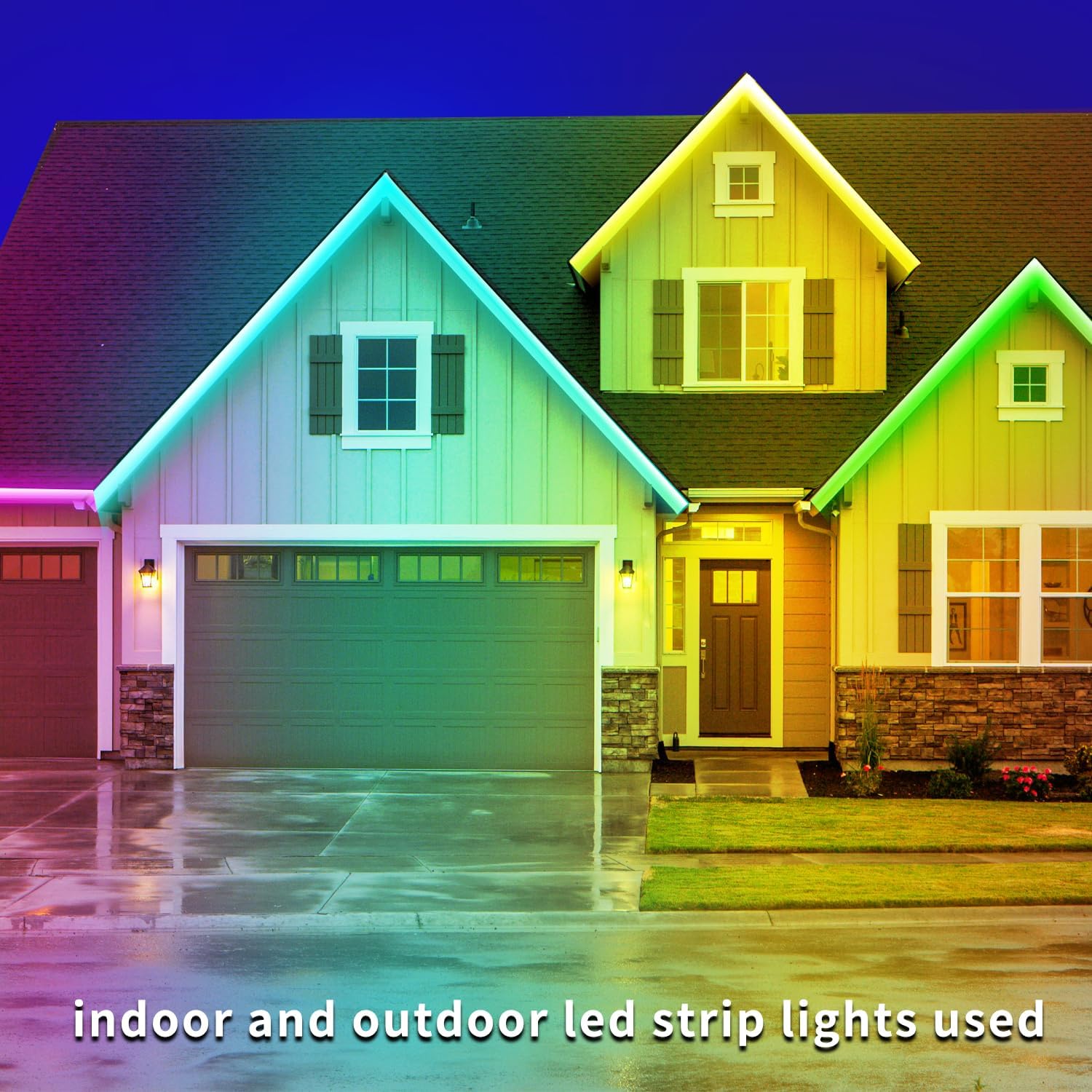
Figure 2: Example of LED Strip Light Installation on a House Exterior
4.3 App Control Setup
Download the corresponding app (refer to the QR code on the controller or packaging for the specific app). Follow the in-app instructions to pair your device with the LED controller. This typically involves turning on Bluetooth on your smartphone and selecting the device from the app's discovery list.
5. Operating
5.1 Control Methods
The LED strip lights can be controlled using either the included IR remote control or the dedicated smartphone app.

Figure 3: Remote and App Control Options
5.2 Remote Control Functions
The IR remote allows for basic control:
- Power On/Off: Turn the lights on or off.
- Color Selection: Choose from various preset RGB colors.
- Brightness Adjustment: Increase or decrease the light intensity.
- Dynamic Modes: Select from various flashing, fading, or jumping light patterns.
5.3 App Control Functions
The app provides advanced control features:
- Full RGB Color Palette: Access a wider range of colors and fine-tune color selection.
- Brightness Control: Precise adjustment of light brightness.
- Dynamic Modes: Choose from 29 dynamic modes.
- Music Synchronization: Lights can change color and rhythm in sync with music played through your device.
- Timing Mode: Set schedules for the lights to turn on or off automatically.

Figure 4: Music Synchronization Feature

Figure 5: Timing Mode Functionality
6. Maintenance
6.1 Cleaning
To clean the LED strip lights, gently wipe them with a soft, damp cloth. Do not use harsh chemicals or abrasive cleaners. Ensure the lights are unplugged before cleaning.
6.2 Waterproofing
The LED strip lights feature an IP68 waterproof rating, meaning they are protected against dust ingress and continuous immersion in water under specified conditions. This makes them suitable for outdoor use and exposure to rain or splashes. However, the power adaptor and controller are not waterproof and must be protected from moisture.

Figure 6: IP68 Waterproof Design
7. Troubleshooting
- Lights not turning on: Check all connections (strip to controller, controller to adaptor, adaptor to power outlet) to ensure they are secure. Verify the power outlet is functional.
- Remote control not working: Ensure the remote's battery is functional and correctly inserted. Point the remote directly at the LED controller's IR receiver.
- App connectivity issues: Ensure Bluetooth is enabled on your smartphone and the app has the necessary permissions. Try restarting the app or your phone.
- Incorrect colors or flickering: Check the connection between the LED strip and the controller. Ensure the arrows on the connectors are aligned.
- Lights not syncing with music: Ensure the app has microphone access (if required for music sync) and that music is playing through your device.
8. Specifications
| Feature | Detail |
|---|---|
| Brand | vimeepro |
| Model Number | vimeepro-ledFS5M02 |
| Item Length | 200 Feet |
| Color | RGB (Red, Green, Blue) |
| Indoor/Outdoor Usage | Outdoor |
| Water Resistance Level | IP68 Waterproof |
| Light Source Type | LED |
| Power Source | Corded Electric |
| Voltage | 24 Volts |
| Wattage | 15 watts |
| Control Method | Remote, App |
| Connectivity Technology | Infrared |
| Material Type | Plastic |
| Item Weight | 1.52 Kilograms |
9. Warranty
This vimeepro product comes with a 1-year manufacturer's warranty from the date of purchase. This warranty covers defects in materials and workmanship under normal use. It does not cover damage caused by misuse, accidents, unauthorized modifications, or improper installation. Please retain your proof of purchase for warranty claims.
10. Support
For technical assistance, troubleshooting, or warranty inquiries, please contact vimeepro customer support. Refer to the product packaging or the official vimeepro website for contact information.