
ELECCTV C366SP-W-1PC
ELECCTV C366SP-W-1PC 2K Solar Camera Outdoor Wireless Instruction Manual
Model: C366SP-W-1PC | Brand: ELECCTV
1. Introduction
This manual provides comprehensive instructions for the installation, operation, and maintenance of your ELECCTV C366SP-W-1PC 2K Solar Camera. This outdoor wireless security camera features 2.4/5 GHz WiFi connectivity, a 130-degree wide view, color night vision, IP66 waterproofing, and two-way audio. It is designed to provide reliable home security with continuous power from its integrated solar panel and large 8000mAh battery.
Please read this manual thoroughly before using the product to ensure proper setup and optimal performance.
2. Package Contents
Verify that all items listed below are included in your package:
- ELECCTV C366SP-W-1PC 2K Solar Camera
- Solar Panel (integrated or external, depending on model variant)
- Mounting Bracket and Screws
- USB Charging Cable
- User Manual
3. Product Overview
Familiarize yourself with the components of your ELECCTV solar camera.
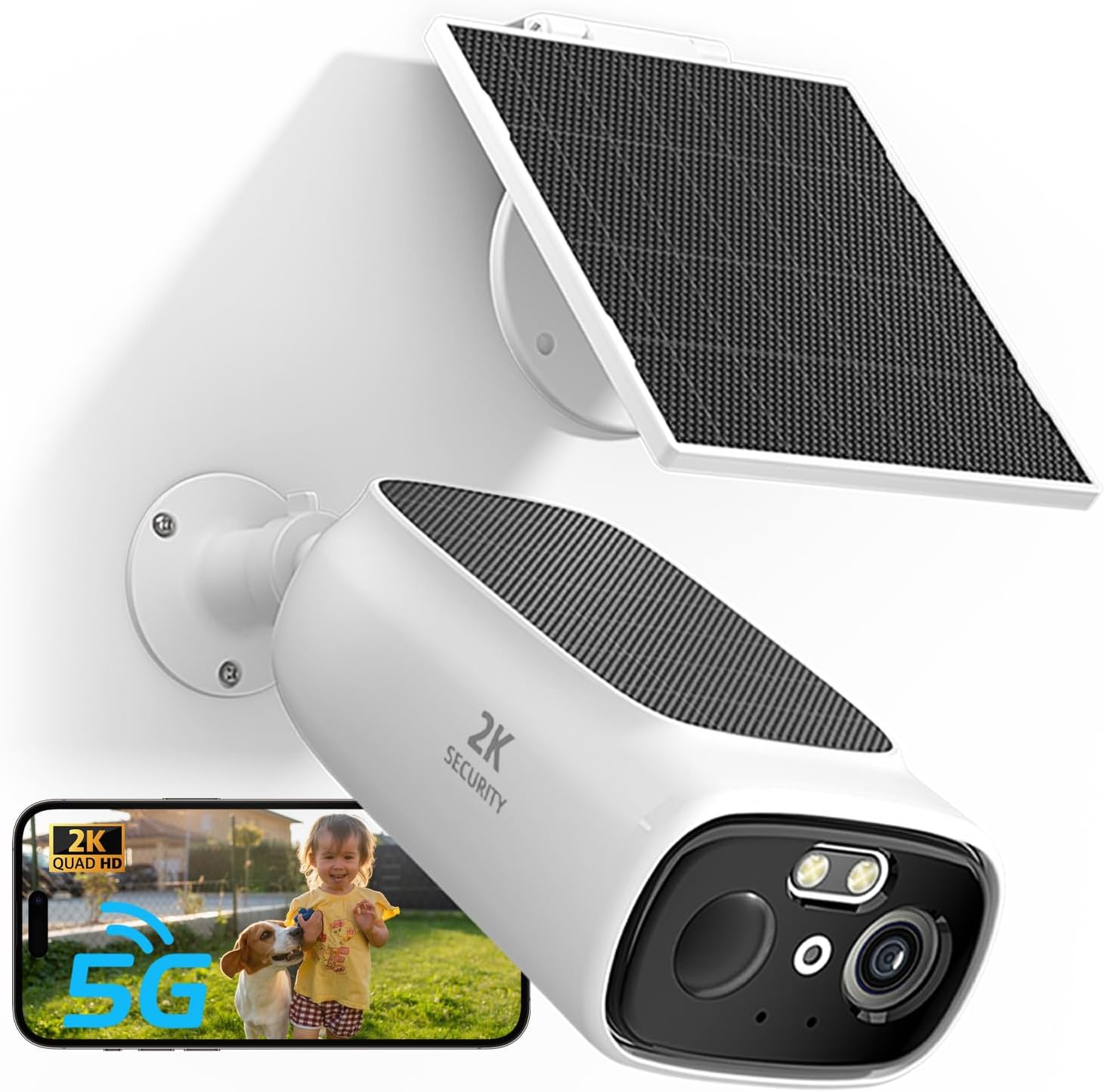
Figure 3.1: Front view of the ELECCTV C366SP-W-1PC Solar Camera with its solar panel and a smartphone displaying the live feed.

Figure 3.2: Internal components highlighting the built-in 9000mAh battery and solar panel charging mechanism.

Figure 3.3: Rear view of the ELECCTV C366SP-W-1PC Solar Camera, showing the Tuya logo and sensor placement.
4. Setup and Installation
4.1 Charging the Camera
Before initial use, ensure the camera's internal battery is sufficiently charged. While the solar panel provides continuous power, a full charge via the USB cable is recommended for the first setup.
4.2 App Download and Account Creation
The ELECCTV camera operates with the O-KAM Pro APP. Download the app from your device's app store (iOS App Store or Google Play Store). Follow the on-screen instructions to create an account or log in if you already have one.
4.3 Connecting to Wi-Fi
The camera supports both 2.4GHz and 5GHz Wi-Fi bands for a stable and fast connection. The one-click connection feature simplifies the pairing process.
- Open the O-KAM Pro APP and select "Add Device".
- Follow the in-app prompts to connect the camera to your Wi-Fi network. The camera uses Bluetooth for initial pairing, making the process seamless.
- Ensure your camera is within range of your Wi-Fi router for optimal performance.

Figure 4.1: Illustration of 2.4GHz and 5GHz Wi-Fi support for extended coverage and lower latency.

Figure 4.2: One-click connect feature using Bluetooth for seamless camera setup.
4.4 Mounting the Camera
The camera is designed for wall mounting outdoors. Choose a location that provides a clear view of the area you wish to monitor and receives adequate sunlight for the solar panel.
- Mark the drilling points using the mounting bracket as a template.
- Drill holes and insert wall anchors if necessary.
- Secure the mounting bracket to the wall with screws.
- Attach the camera to the mounting bracket and adjust its angle for optimal coverage.

Figure 4.3: The camera mounted on an outdoor wall, showcasing its dual-solar panel design.
5. Operation
5.1 Live View and Recording
Access the live feed of your camera through the O-KAM Pro APP. The camera captures video in 2K QHD (2304x1296) resolution, providing clear and detailed images.

Figure 5.1: Visual comparison demonstrating the superior clarity of 2K QHD resolution over 720P.
5.2 Night Vision
The camera features smart color night vision, utilizing two large LED light sources to provide clear, full-color images even in low-light conditions. It also has a night vision range of 33 feet.

Figure 5.2: Illustrates the difference between color night mode and regular night vision, showing enhanced detail and color in low light.
5.3 Motion Detection and Alerts
The camera is equipped with AI motion detection, capable of quickly identifying movement. You can customize detection areas within the app to reduce unnecessary alerts and focus on critical zones.
- Receive instant notifications on your mobile device when motion is detected.
- Set specific detection zones to monitor only relevant areas.
- The camera can activate a siren upon detecting intruders at night to deter intrusion.

Figure 5.3: Example of customizing smart detection zones to focus on specific areas like a gate.

Figure 5.4: The camera's night guard security feature, activating a siren to deter intruders.
5.4 Two-Way Audio
Communicate with visitors or deter intruders using the built-in microphone and speaker. This feature allows for clear, real-time remote calls.

Figure 5.5: Enhanced two-way talk feature with a louder speaker and more sensitive microphone for clear communication.
5.5 Multi-User Sharing
Share camera access with family members or trusted individuals through the app, allowing multiple users to view live feeds simultaneously.

Figure 5.6: Effortless sharing of camera access with family members for collaborative home security management.
5.6 Smart Home Integration
The camera is compatible with Alexa and Google Assistant, allowing for voice control and integration into your smart home ecosystem.

Figure 5.7: Seamless integration with Alexa and Google Assistant for voice-controlled monitoring.
6. Maintenance
6.1 Solar Panel Care
To ensure continuous power, periodically clean the solar panel to remove dust, dirt, or debris that may obstruct sunlight absorption. A soft, damp cloth is recommended.
6.2 Weather Resistance
The camera has an IP66 waterproof rating, making it resistant to rain, snow, and extreme temperatures (-4°F to 113°F). While designed for outdoor use, avoid submerging the camera in water.

Figure 6.1: The camera's IP66 weatherproof design, capable of withstanding various outdoor conditions.
7. Troubleshooting
If you encounter issues with your ELECCTV solar camera, refer to the following common problems and solutions:
| Problem | Possible Cause / Solution |
|---|---|
| Camera not connecting to Wi-Fi | Ensure the camera is within Wi-Fi range. Verify correct Wi-Fi password. Try restarting your router and the camera. Confirm you are connecting to a 2.4GHz or 5GHz network. |
| Poor video quality | Check Wi-Fi signal strength. Ensure the camera lens is clean. Adjust camera placement to avoid glare or obstructions. |
| Battery not charging | Ensure the solar panel is clean and receiving direct sunlight. Check the USB charging cable connection. Extreme cold or heat can affect battery performance. |
| Motion alerts are too frequent or not triggering | Adjust motion detection sensitivity in the app. Refine custom detection zones to exclude irrelevant areas (e.g., busy roads). Ensure the camera is positioned correctly. |
| Two-way audio is unclear | Check your device's microphone and speaker settings. Ensure there are no obstructions near the camera's microphone or speaker. Reduce background noise. |
If the problem persists, please contact ELECCTV customer support for further assistance.
8. Specifications
| Feature | Detail |
|---|---|
| Model Name | C366 |
| Indoor/Outdoor Usage | Outdoor |
| Power Source | Solar Powered |
| Battery Capacity | 7800 Milliamp Hours |
| Connectivity Protocol | Wi-Fi (2.4GHz & 5GHz) |
| Compatible Devices | Alexa & O-KAM Pro APP, Google Assistant |
| Video Capture Resolution | 3 MP (2K QHD) |
| Viewing Angle | 130 Degrees |
| Night Vision Range | 33 Feet (Color Night Vision) |
| Water Resistance Level | IP66 Waterproof |
| Two-Way Audio | Yes |
| Product Dimensions | 12 x 6 x 15 inches |
| Item Weight | 1.41 pounds |
9. Warranty and Support
ELECCTV products are designed for reliability and performance. For any technical assistance, warranty claims, or product inquiries, please contact ELECCTV customer support through their official website or the contact information provided with your purchase.
For more information, visit the ELECCTV Store on Amazon.
Related documentsC366SP-W-1PC

Ask a question about this manual
Ask about setup, troubleshooting, compatibility, parts, safety, or missing instructions. Manuals+ will review the question and use this page’s manual context to help answer it.