
1. Introduction
Thank you for purchasing the VILTROX AF 28mm F4.5 FE Lens. This ultra-thin, lightweight, and wide-angle full-frame auto focus lens is designed for Sony E-Mount cameras, offering exceptional image quality and versatile performance. Its compact design makes it an ideal choice for on-the-go shooting and vlogging. This manual provides detailed instructions for proper use and maintenance of your lens.
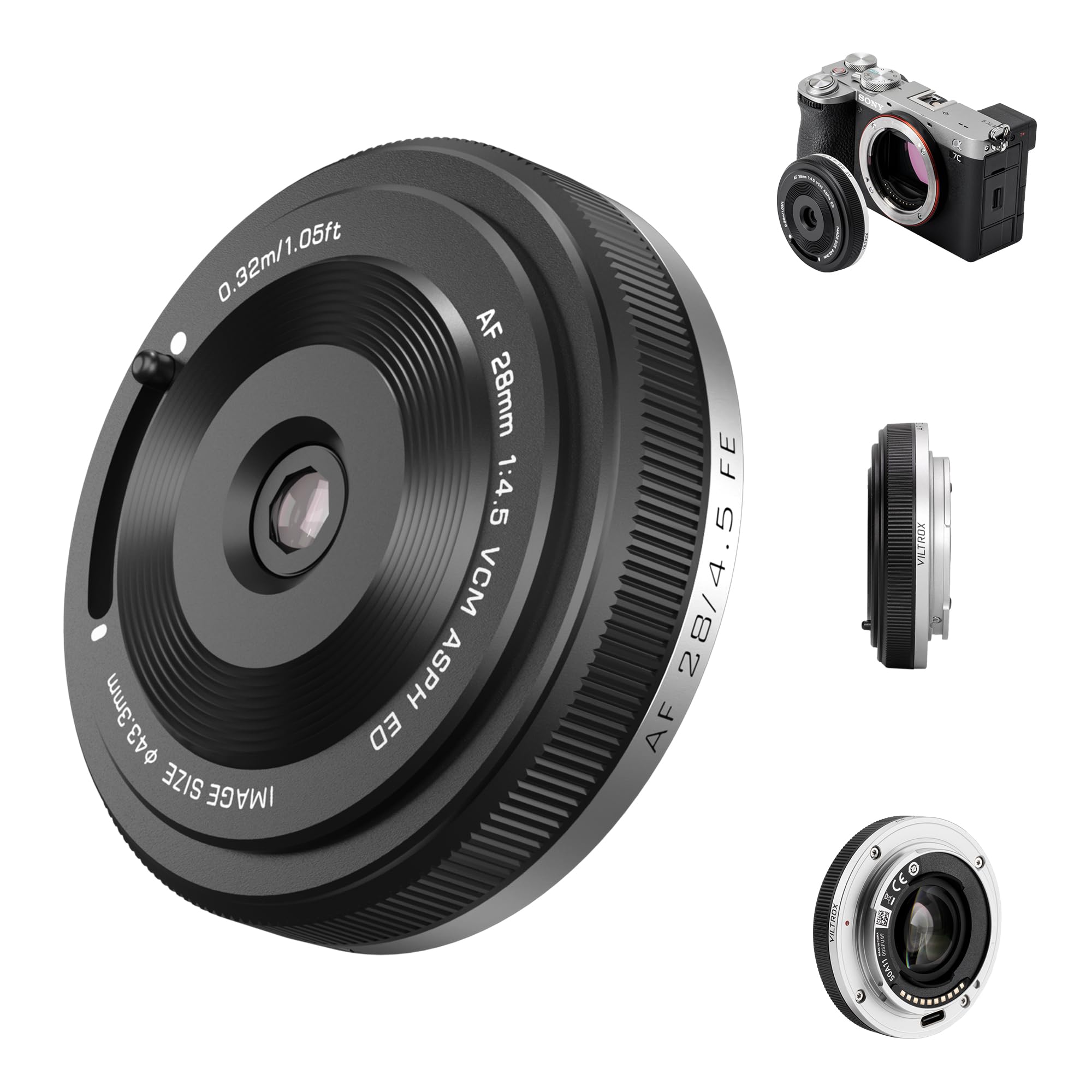
Image: The VILTROX AF 28mm F4.5 FE Lens mounted on a Sony E-Mount camera, showcasing its compact profile.
2. What's in the Box
- VILTROX 28mm F4.5 AF Lens for Sony E Mount
- Lens Cap
- Rear Lens Cap
- User Manual
- Warranty Card

Image: A visual representation of the standard package contents, including the lens, caps, and documentation.
3. Product Overview
The VILTROX AF 28mm F4.5 FE lens features a robust aluminum alloy mount for durability and a sleek, ultra-thin design. It incorporates a unique slide lever cap for quick and convenient lens protection and access.
Key Components:
- Front Element: Features HD Nano Coating for reduced reflections.
- Aperture Ring: Fixed at F4.5.
- Focus Ring: For manual focus adjustments.
- Lens Mount: Durable aluminum alloy for secure attachment to Sony E-Mount cameras.
- USB-C Port: For firmware updates.
- Slide Lever Cap: Innovative design for quick lens cover operation.

Image: A close-up view highlighting the lens's F4.5 constant aperture, aluminum alloy mount, multi-layer HD coating, and USB-C firmware upgrade port.
4. Setup
Attaching the Lens:
- Align the white index dot on the lens barrel with the corresponding white index dot on your camera's lens mount.
- Rotate the lens clockwise until it clicks into place, indicating it is securely locked.
Detaching the Lens:
- While holding down the lens release button on your camera body, rotate the lens counter-clockwise until it stops.
- Gently remove the lens from the camera body.
Using the Innovative Slide Cap:
The lens features an innovative slide lever cap design. To use the lens, simply slide the lever to open the cap. This transforms the cap into a lens hood, protecting the front element from dust and dirt while preparing it for shooting.

Image: A user demonstrating how to open the lens cap using the slide lever, revealing the lens element.
5. Operating the Lens
Autofocus Performance:
The VILTROX AF 28mm F4.5 FE lens is equipped with a built-in VCM motor, ensuring precise and efficient autofocus. This system supports advanced features like face and eye recognition, allowing for quick and effortless subject tracking without complex manual adjustments.

Image: Demonstrating the lens's eye/face autofocus capabilities for both human portraits and animal photography.
Aperture:
This lens features a constant aperture of F4.5, providing consistent exposure and depth of field across your shots. This is particularly beneficial for maintaining a uniform look in video recordings or when shooting in varying light conditions.
Video: An official VILTROX video showcasing the AF 28mm F4.5 Constant Aperture Pancake Lens in use, highlighting its compact size and constant aperture for various shooting scenarios.
6. Image Quality and Optical Design
The VILTROX AF 28mm F4.5 FE lens is constructed with 6 elements in 6 groups, including 2 ED (Extra-low Dispersion) lenses and 2 aspherical lenses. This advanced optical design ensures sharp, vibrant images by effectively suppressing dispersion and chromatic aberration, while controlling distortion. The unique front element design also allows for charming starburst effects when capturing backlit point light sources.

Image: A diagram showing the internal optical structure of the lens, highlighting the ED low-dispersion lenses and aspherical lenses, alongside an MTF graph.

Image: A sample photograph showcasing the unique starburst effect when the lens is pointed towards a backlit light source.
7. Specifications
| Feature | Description |
|---|---|
| Model | AF 28/4.5 FE |
| Lens Mount | E-Mount (Sony FE) |
| Lens Configuration | 6 elements in 6 groups |
| Focal Length | 28mm |
| Aperture | F4.5 (Constant) |
| Viewing Angle | 73.42° |
| Shooting Distance | 0.32m ~ ∞ |
| Focus System | Full Lens Focusing System |
| Focus Motor | VCM |
| Focus Type | Automatic (supports face and eye recognition) |
| Max. Magnification | 0.11X |
| Outer Diameter | Φ 60.3 x 15.3 mm |
| Weight | ≈ 60g |
| Product Dimensions | 0.6 x 2.4 x 2.4 inches |
| Item Weight | 7.4 ounces |
8. Firmware Updates
The VILTROX AF 28mm F4.5 FE lens is equipped with a USB-C port for convenient firmware updates. Regularly checking for and installing the latest firmware ensures optimal performance and compatibility with new camera models or features. Please visit the official VILTROX website for the latest firmware and update instructions.
9. Maintenance
- Cleaning the Lens: Use a soft, lint-free cloth to gently wipe dust and smudges from the lens surfaces. For stubborn marks, use a lens cleaning solution specifically designed for optical elements.
- Storage: When not in use, always attach the front and rear lens caps to protect the optical elements. Store the lens in a cool, dry place away from direct sunlight and extreme temperatures.
- Handling: Avoid dropping or subjecting the lens to strong impacts. The aluminum alloy mount provides durability, but proper handling is essential to maintain optical alignment and functionality.
- Protection: The front lens coating protects against water, dust, and smudges, but it is not fully weather-sealed. Exercise caution in harsh weather conditions.
10. Troubleshooting
- Autofocus Issues: Ensure the lens is securely mounted to the camera. Check camera settings for autofocus mode and ensure sufficient light for the autofocus system to operate effectively.
- Image Quality Concerns: Verify that the lens elements are clean and free from dust or smudges. Ensure proper camera settings (ISO, shutter speed, aperture) for the shooting conditions.
- Lens Not Recognized: Detach and reattach the lens to the camera. Ensure the camera's firmware is up to date. If the issue persists, check for available lens firmware updates via the USB-C port.
11. Warranty and Support
For warranty information, technical support, or service inquiries, please refer to the Warranty Card included in your product package or visit the official VILTROX website. Keep your purchase receipt as proof of purchase for warranty claims.


