1. Product Overview
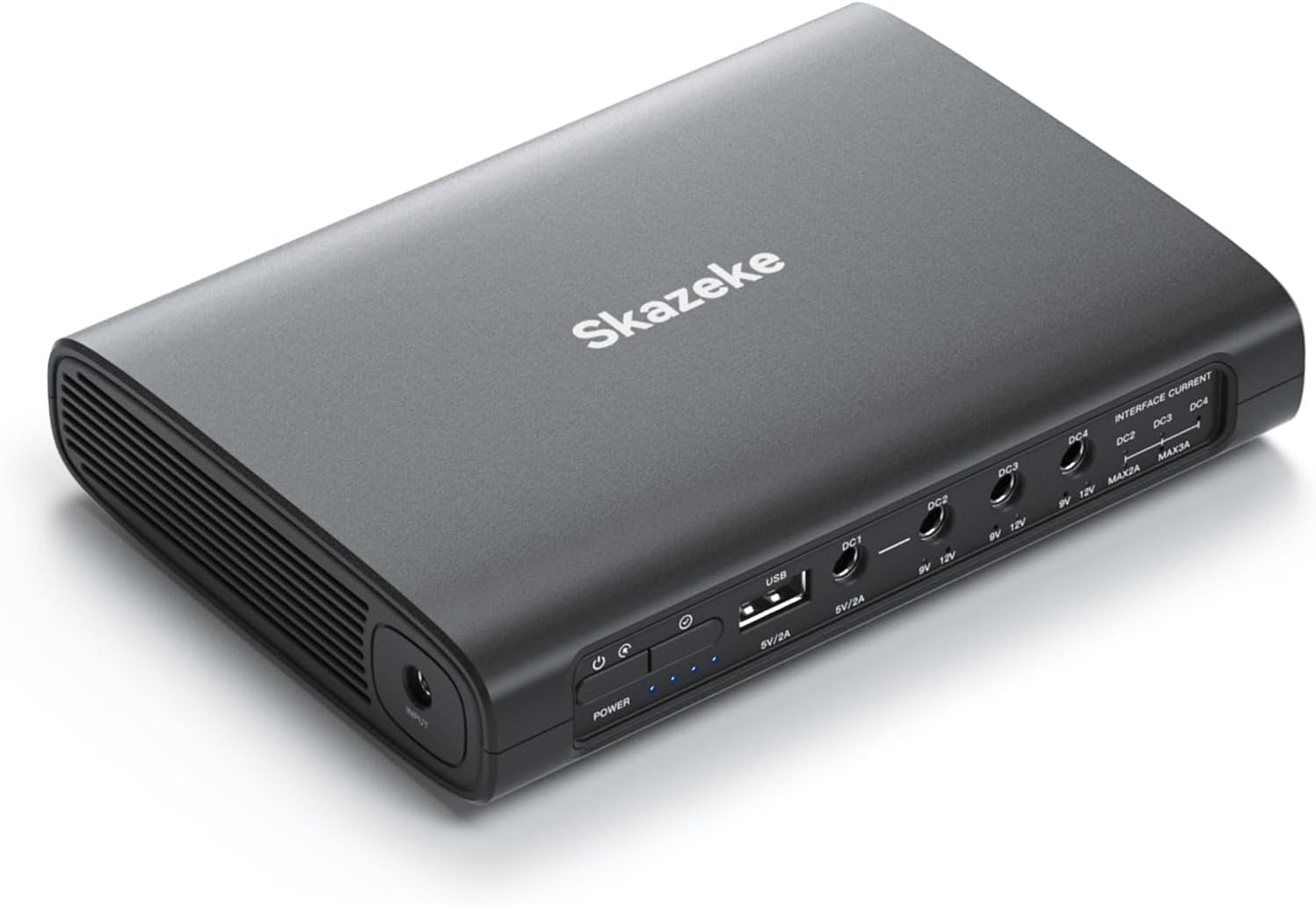
The Skazeke MD1 Pro is a versatile 25600mAh (94.72Wh) Lithium-ion Uninterruptible Power Supply (UPS) designed to provide backup power and surge protection for various small DC-powered devices. It features multiple output ports, including USB 5V/2A, DC 5V/2A, DC 9V/2A, and two DC 12V/6A outputs, making it compatible with a wide range of electronics such as routers, modems, security cameras, and smartphones.

2. Package Contents
The package includes the following items:
- 1 x Skazeke MD1 Pro 25600mAh Battery Pack
- 4 x DC Cables
- 1 x Charger (Max 12.6V/2A)
- 9 x DC Adapters
- 1 x User Manual
3. Setup Instructions
3.1 Identify Device Power Requirements
Before connecting any device to the MD1 Pro, it is crucial to identify its voltage (V) and amperage (A) requirements. This information is typically found on the device's power adapter or on the device itself. Ensure that your device's voltage matches one of the MD1 Pro's output options (5V, 9V, 12V) and that its current draw is within the specified limits (e.g., up to 6A total for 12V outputs).

3.2 Connecting Your Device
- Select the Correct DC Adapter: Choose one of the provided DC adapters that matches the barrel plug size of your device.
- Connect DC Cable: Attach the selected DC adapter to one end of a DC cable.
- Connect to MD1 Pro: Plug the other end of the DC cable into the appropriate DC output port on the MD1 Pro (5V, 9V, or 12V) that matches your device's voltage requirement.
- Connect to Device: Plug the adapter end of the DC cable into your device's power input port.
- Power On: Press the power button on the MD1 Pro to turn it on.
3.3 Power Sharing (for DC2, DC3, DC4)
The DC2, DC3, and DC4 interfaces can share a total current of up to 6A. If you are connecting multiple devices to these ports, ensure their combined current draw does not exceed 6A. The voltage for DC2, DC3, and DC4 can be switched between 9V and 12V. Refer to the interface current markings on the device.

4. Operating Instructions
4.1 Power On/Off and LED Indicators
To power on the MD1 Pro, press the 'POWER' button. The LED indicator lights will illuminate to show the current battery level. Each light typically represents 25% of the battery capacity. To power off, press and hold the 'POWER' button.
4.2 Charging the MD1 Pro
Connect the provided charger to the 'INPUT' port on the MD1 Pro and plug it into a wall outlet. The LED indicators will show the charging progress. Once all lights are solid, the device is fully charged.

5. Maintenance and Safety
5.1 General Maintenance
- Keep the device in a cool, dry place away from direct sunlight and extreme temperatures.
- Clean the exterior with a soft, dry cloth. Avoid using harsh chemicals or abrasive materials.
- Charge the device fully at least once every 3 months if not in regular use to maintain battery health.
5.2 Safety Protections
The MD1 Pro is equipped with multiple safety features to ensure reliable operation and protect your devices:
- Short Circuit Protection: Prevents damage from electrical shorts.
- Voltage Fluctuation Protection: Stabilizes output voltage.
- Restoration Protection: Helps recover from certain fault conditions.
- Overcharge Protection: Prevents battery damage from excessive charging.
- Overcurrent Protection: Safeguards against excessive current draw.
- Timed Shutdown Protection: Automatically turns off under certain conditions.
- Temperature Protection: Monitors and regulates internal temperature.
- Over Discharge Protection: Prevents battery from draining too low.

6. Troubleshooting
6.1 Device Not Powering On
- Ensure the MD1 Pro is sufficiently charged. Check the LED indicators.
- Verify that the correct voltage output (5V, 9V, or 12V) is selected for your device.
- Confirm that all cables and adapters are securely connected.
- Check your device's power requirements against the MD1 Pro's output capabilities. Some devices, like the Eero Pro 6e mentioned in a user review, may have specific power delivery requirements (e.g., USB-C PD) that are not directly compatible with standard DC barrel outputs, even if voltage matches.
6.2 Short Backup Time
- The backup time depends on the power consumption of the connected devices. Higher power draw will result in shorter backup times.
- Ensure the MD1 Pro is fully charged before use.
7. Specifications
| Feature | Specification |
|---|---|
| Model Number | MD1 Pro |
| Battery Capacity | 25600mAh (94.72Wh) |
| USB Output | 5V/2A |
| DC Output 1 | 5V/2A |
| DC Output 2 | 9V/2A |
| DC Output 3 & 4 | 12V/6A (shared) |
| Dimensions | 6.2 x 4.3 x 1.1 inches |
| Item Weight | 1 pound |
| Special Features | LED Indicator Lights, Multiple Safety Protections |
8. Warranty and Support
For any questions regarding the use of your Skazeke MD1 Pro or if you encounter any product issues, please contact Skazeke customer support. Refer to the contact information provided in your product packaging or on the official Skazeke website for assistance.


