
BGQHO800
Generic Desktop Bookshelf and Desk Hutch Organizer BGQHO800 User Manual
Model: BGQHO800 | Brand: Generic
1. Introduction
This manual provides comprehensive instructions for the assembly, operation, and maintenance of your Generic Desktop Bookshelf and Desk Hutch Organizer (Model: BGQHO800). This adjustable storage unit is designed to enhance your workspace with its 8 shelves and 4 drawers, offering versatile organization for books, documents, and decorative items. Please read these instructions carefully before assembly and use to ensure safe and proper operation.

Figure 1: Generic Desktop Bookshelf and Desk Hutch Organizer (Model BGQHO800)
2. Safety Information
- Placement: Do not place the unit in a damp environment or near an ignition source.
- Assembly: Assemble the unit strictly according to the provided instructions to ensure safe and stable use.
- Weight Capacity: Do not exceed the maximum weight capacity of 6.6 pounds per shelf. Distribute weight evenly.
- Stability: Ensure all connections are securely tightened. Periodically check and re-tighten fasteners as needed.
- Children: Keep small parts and assembly tools away from children.
3. Package Contents
Before beginning assembly, please verify that all components are present and undamaged. If any parts are missing or damaged, please contact customer support.
- Wooden Panels (various sizes for shelves, sides, and back)
- 4 Drawer Units
- Assembly Hardware (screws, dowels, cam locks, drawer slides, handles)
- Instruction Manual (this document)

Figure 2: Components and Hardware Overview
4. Assembly Instructions
Assembly requires careful attention to detail. It is recommended to have a clear, spacious work area. Refer to the included diagrams and the official installation video for guidance.
4.1. Video Guide
Video 1: Official Installation Video for the Desktop Bookshelf. This video demonstrates the step-by-step assembly process for the unit.
4.2. General Steps
- Unpack and Identify: Carefully unpack all components. Lay them out and identify each part using the provided diagrams. Pay close attention to part numbers or markings, as some may be subtle.
- Assemble Base Structure: Begin by connecting the main base panels. Ensure all dowels and screws are properly aligned and tightened.
- Install Vertical Dividers: Attach the vertical dividers to create the shelf compartments. These may be adjustable or fixed depending on the design.
- Insert Shelves: Place the horizontal shelves into their designated slots or attach them to the dividers.
- Assemble Drawers: Construct the four drawers according to their specific instructions. Install drawer slides if applicable.
- Integrate Drawers: Insert the assembled drawers into their compartments.
- Final Checks: Once assembled, gently move the unit to its desired location. Ensure all connections are secure and the unit is stable.
Important Note: Some users have reported difficulties with unclear or small diagrams in the past. We recommend cross-referencing the video guide with the printed instructions and carefully examining each piece before assembly. If a part does not seem to fit, do not force it. Re-evaluate the step and ensure correct orientation.
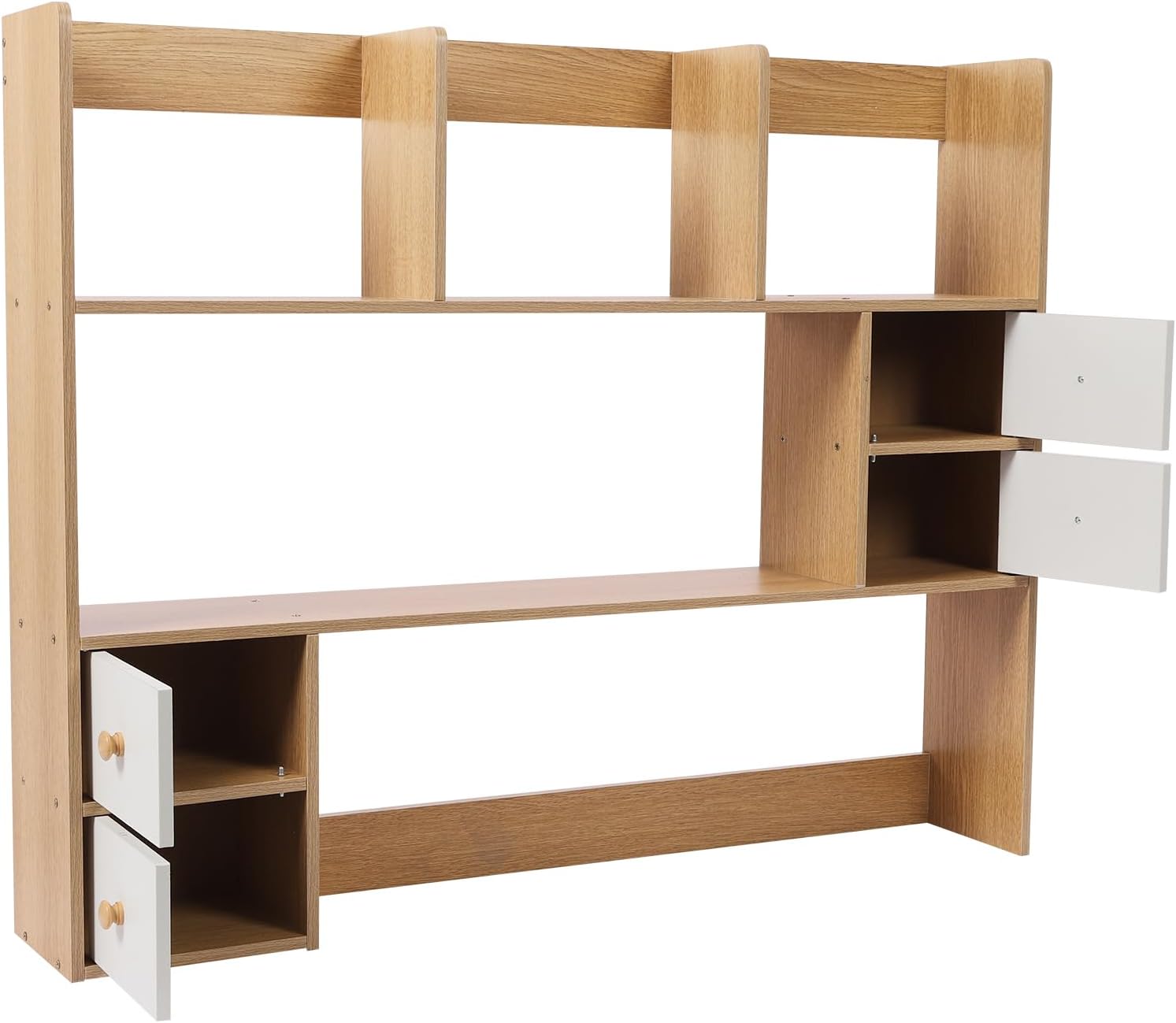
Figure 3: Rear View of Assembled Unit
5. Operating Instructions
Your Desktop Bookshelf and Desk Hutch Organizer is designed for flexible storage and organization.
- Adjustable Compartments: The unit features removable compartments, allowing you to customize the shelf layout to fit items of various sizes. Simply lift and reposition the dividers as needed.
- Drawer Use: The four integrated drawers provide enclosed storage for smaller items, keeping your desk tidy. Pull the handles gently to open and push to close.
- Placement: The expandable design allows for versatile placement. It can be used as a single unit or extended to fit wider desk spaces.

Figure 4: Versatile Placement Options
6. Maintenance
- Cleaning: Wipe surfaces with a soft, damp cloth. Avoid abrasive cleaners or harsh chemicals that could damage the PVC veneer finish.
- Dusting: Regularly dust the unit to prevent buildup.
- Inspections: Periodically check all screws and fasteners to ensure they remain tight. Re-tighten if necessary to maintain stability.
- Spills: In case of spills, wipe immediately with a dry cloth to prevent water damage, as the unit is water-resistant but not waterproof.

Figure 5: Durable Construction Details
7. Troubleshooting
| Problem | Possible Cause | Solution |
|---|---|---|
| Difficulty with assembly instructions. | Diagrams may be small or unclear; parts not clearly marked. | Refer to the official installation video (Video 1). Carefully identify all parts before starting. Do not rush. If a part doesn't fit, re-check the step and orientation. |
| Unit feels unstable or wobbly. | Screws or fasteners are not fully tightened; uneven surface. | Ensure all screws and connections are securely tightened. Place the unit on a flat, level surface. |
| Drawers do not slide smoothly. | Drawer slides are misaligned or improperly installed. | Verify that drawer slides are installed correctly and are aligned on both sides. Ensure no debris is obstructing the slides. |
| Missing parts or damaged components. | Packaging damage during transit; manufacturing error. | Immediately contact the seller or manufacturer with details of the missing/damaged parts. Provide your purchase information. |
8. Specifications
| Feature | Detail |
|---|---|
| Model Number | BGQHO800 |
| Brand | Generic |
| Material | Engineered Wood (MDF) with PVC Veneer |
| Color | Oak (4 Drawer+ Oak variant) |
| Product Dimensions (W x D x H) | 39.4" x 6.7" x 31.5" (100cm x 17cm x 80cm approx.) |
| Item Weight | 17.6 pounds (8 kg) |
| Number of Shelves | 8 (including adjustable compartments) |
| Number of Drawers | 4 |
| Maximum Shelf Weight Capacity | 6.6 pounds (3 kg) per individual shelf/section (Note: Distribute weight evenly) |
| Special Features | Expandable, Adjustable Compartments, Water-resistant, Scratch-resistant, Impact-resistant |
| Mounting Type | Tabletop Mount |
9. Warranty and Support
For warranty information, product support, or to report missing/damaged parts, please contact the seller or manufacturer directly through your purchase platform. Please have your order number and product model (BGQHO800) available when contacting support.
Ask a question about this manual
Ask about setup, troubleshooting, compatibility, parts, safety, or missing instructions. Manuals+ will review the question and use this page’s manual context to help answer it.