
1. Introduction
The OREI USB3-EX330R-K is a high-performance USB 3.2 extender designed to deliver fast and reliable connectivity over long distances. This device extends USB signals up to 330 feet (100 meters) using a single CAT6, CAT6A, or CAT7 cable. It supports data transfer speeds up to 5Gbps, ensuring seamless operation with high-bandwidth devices such as webcams, storage drives, printers, keyboards, and mice. The extender is fully backward compatible with USB 3.0, USB 2.0, and USB 1.1 devices, offering broad compatibility across various operating systems including Windows, MacOS, Android, and Linux.
A key feature is its Power Over Cable (PoC) technology, which requires only a single power adapter at either the transmitter or receiver end, simplifying installation and reducing cable clutter. The durable metal housing provides long-lasting protection and passive cooling for optimal performance.
2. What's in the Box
- 1x USB 3.2 Extender Transmitter Unit
- 1x USB 3.2 Extender Receiver Unit
- 1x Power Adapter (DC 24V)
- 1x Instruction Manual
- Mounting Brackets (for installation)

Image: OREI USB 3.2 Extender kit contents, showing the sender and receiver units, power adapter, and user manual.
3. Product Overview
3.1. Sender Unit (Transmitter)
The sender unit connects to your computer. It features a DC 24V power input, an HDbaseT-USB3 LAN port for connection to the receiver unit, and a USB HOST port for connecting to your computer. The front panel includes Power, Link, and USB indicator lights. Ventilation slots are present on the sides for heat dissipation.

Image: OREI USB 3.2 Extender Sender Unit, highlighting the DC 24V power input, LAN port, USB HOST port, and indicator lights.
3.2. Receiver Unit
The receiver unit connects to your USB peripherals. It also features a DC 24V power input, an HDbaseT-USB3 LAN port for connection to the sender unit, and four USB-A ports. Two of these USB-A ports provide 1.5A power, and the other two provide 1A power. The front panel includes Power, Link, and USB indicator lights, identical to the sender unit. Ventilation slots are also present on the sides.
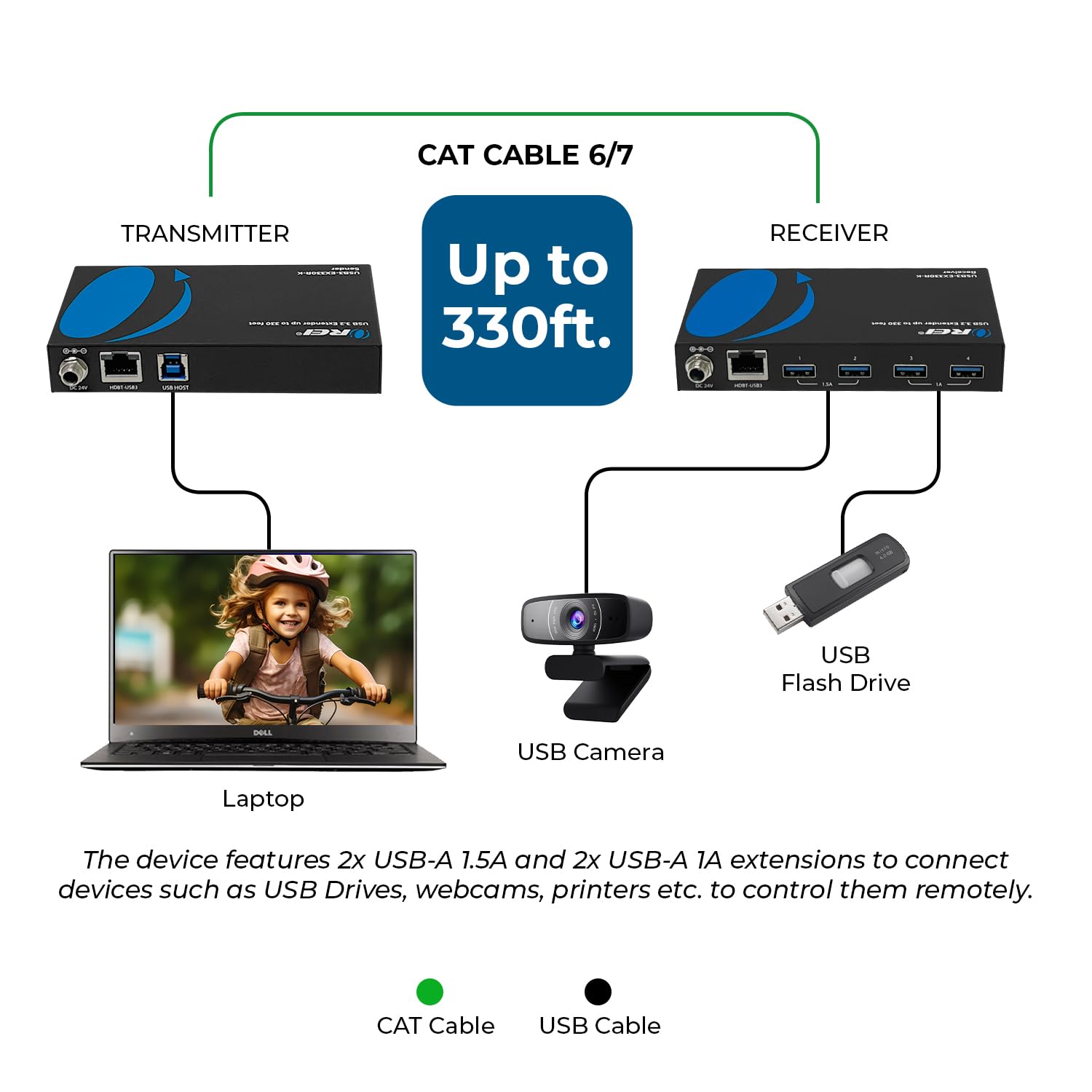
Image: OREI USB 3.2 Extender Receiver Unit, showing the DC 24V power input, LAN port, and four USB-A ports (two 1.5A, two 1A).
3.3. Indicator Lights
- Power: Indicates the unit is receiving power.
- Link: Indicates a successful connection between the sender and receiver units via the LAN cable.
- USB: Indicates active USB data transmission.
4. Setup
The OREI USB3-EX330R-K extender is designed for plug-and-play setup with no software or drivers required. Follow these steps for installation:
- Connect Sender to Computer: Use a USB 3.2 Type-B to Type-A cable (not included) to connect the USB HOST port on the sender unit to an available USB 3.2 port on your computer.
- Connect Sender to Receiver: Connect one end of a CAT6/6A/7 Ethernet cable (not included) to the HDbaseT-USB3 LAN port on the sender unit. Connect the other end of the Ethernet cable to the HDbaseT-USB3 LAN port on the receiver unit. Ensure the cable is securely connected at both ends. For optimal performance, use a shielded CAT6/7 cable.
- Connect USB Peripherals to Receiver: Plug your USB devices (e.g., webcam, printer, keyboard, mouse, storage drives) into the USB-A ports on the receiver unit. Note the different amperage ratings (1.5A and 1A) for the ports.
- Apply Power: Connect the included DC 24V power adapter to either the sender unit or the receiver unit. Due to Power Over Cable (PoC) technology, only one power adapter is needed to power both units.
- Verify Connection: Check the indicator lights on both units. The Power, Link, and USB lights should illuminate, indicating successful connection and data transmission.

Image: Setup diagram illustrating the connection flow from a laptop to the sender unit, then via a CAT6/7 cable to the receiver unit, which connects to USB peripherals like a camera and flash drive.
Video: Official OREI guide on how to use the USB 3.2 Over Cat6 Adapter, demonstrating the connection process.
5. Operating the Extender
Once properly set up, the OREI USB3-EX330R-K extender operates transparently, allowing your computer to recognize and interact with connected USB devices as if they were directly plugged into the computer.
- High-Speed Data Transfer: The extender supports USB 3.2 speeds up to 5Gbps, ensuring fast data transfer for compatible devices.
- Backward Compatibility: It is fully backward compatible with USB 3.0, USB 2.0, and USB 1.1, allowing you to use a wide range of older and newer USB devices.
- Power Over Cable (PoC): A single power adapter provides power to both the sender and receiver units, eliminating the need for a power outlet at the remote location.
- Multiple Device Support: The receiver unit acts as a 4-port USB hub, enabling simultaneous connection of multiple USB peripherals.
Video: Official OREI video highlighting the main features of the USB 3.2 Over Ethernet Extender, including data speeds and PoC.
6. Specifications
| Feature | Detail |
|---|---|
| Model Number | USB3-EX330R-K |
| USB Standard | USB 3.2 (Backward compatible with USB 3.0, 2.0, 1.1) |
| Data Transfer Rate | Up to 5Gbps |
| Extension Distance | Up to 330 feet (100 meters) |
| LAN Cable Type | CAT6, CAT6A, CAT7 (Shielded recommended for optimal performance) |
| Receiver USB Ports | 4x USB-A (2 ports @ 1.5A, 2 ports @ 1A) |
| Power Supply | DC 24V (Single adapter for PoC) |
| Housing Material | Durable Metal |
| Product Dimensions | 5 x 3 x 0.8 inches (approximate for each unit) |
| Item Weight | 12 ounces (approximate for each unit) |

Image: Detailed technical specifications and dimensions for the OREI USB3-EX330R-K sender and receiver units.
7. Troubleshooting
- No Power Indicator Light: Ensure the DC 24V power adapter is securely connected to either the sender or receiver unit and plugged into a working power outlet.
- No Link Indicator Light: Verify that the CAT6/6A/7 Ethernet cable is securely connected to the HDbaseT-USB3 LAN ports on both the sender and receiver units. Try using a different Ethernet cable to rule out cable issues.
- USB Devices Not Recognized:
- Ensure the USB HOST cable from the sender unit is connected to a working USB 3.2 port on your computer.
- Check that the USB indicator light is on, indicating active USB transmission.
- Try connecting the USB device to a different port on the receiver unit.
- If using high-power devices, ensure they are connected to the 1.5A ports on the receiver.
- Compatibility Note: OREI HDBaseT models are designed to work exclusively with their matching transmitter and receiver. They are not interchangeable with other OREI HDBaseT models and are not compatible with HDBaseT devices from other brands due to chipset differences. Always use the included or recommended pair from the same model.
- Slow Data Transfer Speeds:
- Ensure you are using a high-quality CAT6, CAT6A, or CAT7 Ethernet cable, preferably shielded, especially for longer distances.
- Verify that your computer's USB port and the connected USB device support USB 3.2 speeds.
8. Warranty & Support
The OREI USB3-EX330R-K comes with a 12-Month Manufacturer's Warranty. OREI also provides Lifetime Full OREI Support. If you encounter any issues or have questions, please contact OREI customer support. OREI is based in the US for full local support.