
SEUNKWANG EWEADN-X87
EWEADN X87 Wireless Mechanical Keyboard User Manual
Model: EWEADN-X87 | Brand: SEUNKWANG
Introduction
The EWEADN X87 is an 80% layout, 87-key wireless mechanical keyboard designed for both work and gaming. It features a versatile tri-mode connection, a five-layer gasket structure for enhanced typing feel, a large-capacity battery, hot-swappable switches, and vibrant RGB backlighting. This manual provides detailed instructions to help you get the most out of your keyboard.

Image: EWEADN X87 Wireless Mechanical Keyboard showcasing its design and RGB lighting.
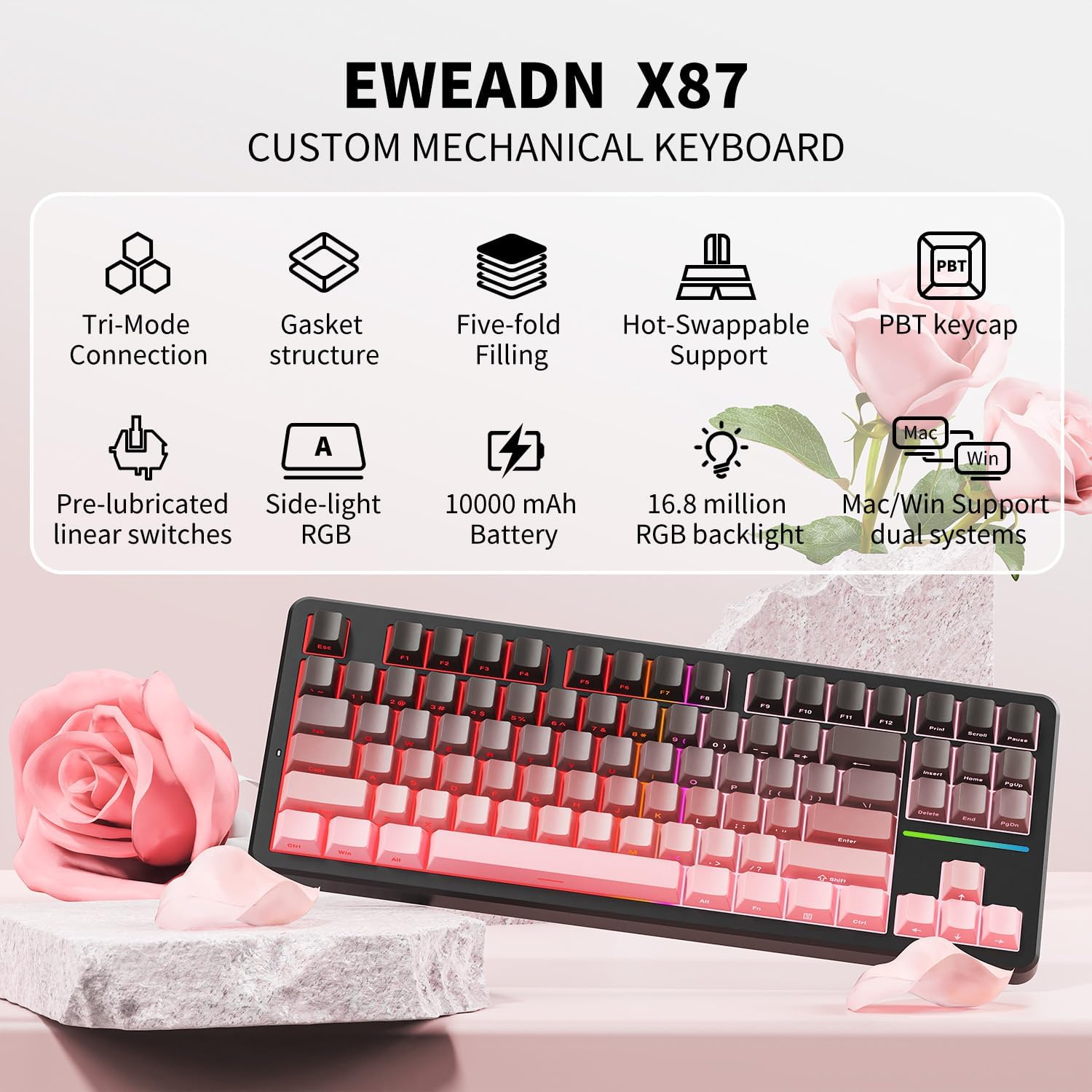
Image: Overview of EWEADN X87's key features, highlighting its tri-mode connectivity, gasket structure, hot-swappable design, PBT keycaps, and RGB backlighting.
Setup
1. Unboxing and Initial Charge
Carefully remove the keyboard and its accessories from the packaging. Before first use, it is recommended to fully charge the keyboard using the provided USB-C cable. Connect the cable to the keyboard's USB-C port and a power source (e.g., computer USB port, wall adapter).
2. Connection Modes
The EWEADN X87 supports three connection modes: Bluetooth (BT5.0), 2.4GHz wireless, and USB-C wired.
- USB-C Wired Mode: Connect the USB-C cable from the keyboard to your device. The keyboard will automatically switch to wired mode.
- 2.4GHz Wireless Mode:
- Locate the 2.4G USB receiver (usually found in a slot on the keyboard or packaging).
- Plug the receiver into an available USB port on your device.
- On the keyboard, press and hold FN + R to switch to 2.4G mode. The indicator light will confirm the connection.
- Bluetooth Mode (BT1/BT2/BT3): The keyboard can connect to up to three Bluetooth devices.
- On the keyboard, press and hold FN + Q for BT1, FN + W for BT2, or FN + E for BT3. The indicator light will flash, indicating pairing mode.
- On your device (PC, laptop, tablet, mobile phone), search for Bluetooth devices and select "EWEADN X87" to pair.
- Once paired, the indicator light will become solid. You can switch between paired Bluetooth devices by pressing FN + Q/W/E briefly.

Image: Diagram illustrating the three connection methods: USB-C wired, 2.4G wireless with receiver, and Bluetooth, compatible with various devices.
3. System Compatibility Switch
The X87 features a shortcut button to easily switch between Windows and Mac systems, ensuring optimal key mapping for your operating system.
Operating Instructions
1. RGB Backlighting
The keyboard features 16.8 million RGB colors and 19 lighting effects. Use the FN key combinations to cycle through effects and adjust brightness/speed.
- FN + |\: Cycle through RGB lighting effects.
- FN + ↑/↓: Adjust brightness.
- FN + ←/→: Adjust lighting speed.
Video: Demonstration of the EWEADN X87 Wireless Mechanical Keyboard's various RGB lighting effects and typing sound.
Video: Showcasing the ultimate typing feel and sound of the EWEADN X87 Wireless Keyboard, highlighting its responsive keys and satisfying acoustics.
2. Macro Customization and N-key Rollover
All keys support macro-customization, allowing you to record and edit macros and customize key functions for enhanced productivity or gaming. The N-key rollover feature ensures that all simultaneous key presses are registered accurately, which is crucial for fast-paced gaming or complex hotkey commands.
3. Battery Management
The X87 is equipped with a 5,000mAh battery. Battery life varies based on RGB usage:
- Up to 40-46 hours with RGB on.
- Up to 460 hours with RGB off.
Recharge the keyboard when the battery indicator is low. Charging time is approximately 10-12 hours for a full charge.

Image: Information on the EWEADN X87's 5000mAh battery, detailing usage times with and without RGB lighting, and fast charging capability.
4. Keycap Features
The keyboard features double-shot, side-printed PBT keycaps. These keycaps are durable, fade-resistant, sweat-proof, and soft to touch, ensuring longevity and comfort. The classic Cherry profile conforms to your fingertips for extended typing and gaming sessions.

Image: Close-up view of the EWEADN X87's WUMEIZI switches and double-shot PBT keycaps, illustrating their construction and operational characteristics.
Maintenance
1. Cleaning
To clean your keyboard, disconnect it from power. Use a soft, dry cloth to wipe down the keycaps and chassis. For deeper cleaning, you may use a keycap puller to remove keycaps and clean underneath with compressed air or a small brush.
2. Hot-Swappable Switches
The EWEADN X87 features a hot-swappable base, supporting both 3-pin and 5-pin switches. This allows for easy customization and replacement of switches without soldering.
- To remove a switch, use the provided switch puller to gently grip the switch and pull upwards.
- To install a new switch, align the pins of the switch with the holes on the PCB and press down firmly until it clicks into place. Ensure the pins are straight to avoid bending.
Video: Demonstration of the hot-swappable feature of the Eweadn X87 Mechanical Keyboard, showing how to remove and replace switches.
Troubleshooting
| Problem | Possible Solution |
|---|---|
| Keyboard not responding in wireless mode. |
|
| RGB lighting not working. |
|
| Keys not registering or double-typing. |
|
| Bluetooth connection unstable. |
|
Specifications
- Model: EWEADN-X87
- Product Dimensions: 14.4 x 5.5 x 1.77 inches
- Item Weight: 3.19 pounds
- Connectivity: Bluetooth (BT5.0), 2.4GHz Wireless, USB-C Wired
- Keyboard Type: Mechanical
- Number of Keys: 87
- Switches: Hot-swappable (3-pin/5-pin compatible), Huano Arctic Switch (for Black Berry WUMEIZI Switch variant)
- Keycaps: Double-shot, Side-printed PBT, Cherry profile
- Backlighting: 16.8 Million RGB colors, 19 effects
- Battery: 5000mAh Lithium Ion (included)
- Battery Life: 40-46 hours (RGB on), up to 460 hours (RGB off)
- Compatibility: PC, Laptops, Tablets, Mobile Phones, PS, XBOX (Windows/Mac switch)
- Country of Origin: China
Warranty and Support
For warranty information and technical support, please refer to the product packaging or contact SEUNKWANG customer service directly. Keep your purchase receipt for warranty claims.
For further assistance, visit the official SEUNKWANG store on Amazon: SEUNKWANG Store
Related documentsEWEADN-X87


Ask a question about this manual
Ask about setup, troubleshooting, compatibility, parts, safety, or missing instructions. Manuals+ will review the question and use this page’s manual context to help answer it.