1. Introduction
This manual provides essential information for the safe and efficient operation, installation, and maintenance of your new HOOVER H-WASH 500 HW 28AM/1-S front-load washing machine. Please read these instructions carefully before using the appliance and keep them for future reference. Proper use and care will ensure optimal performance and extend the lifespan of your washing machine.

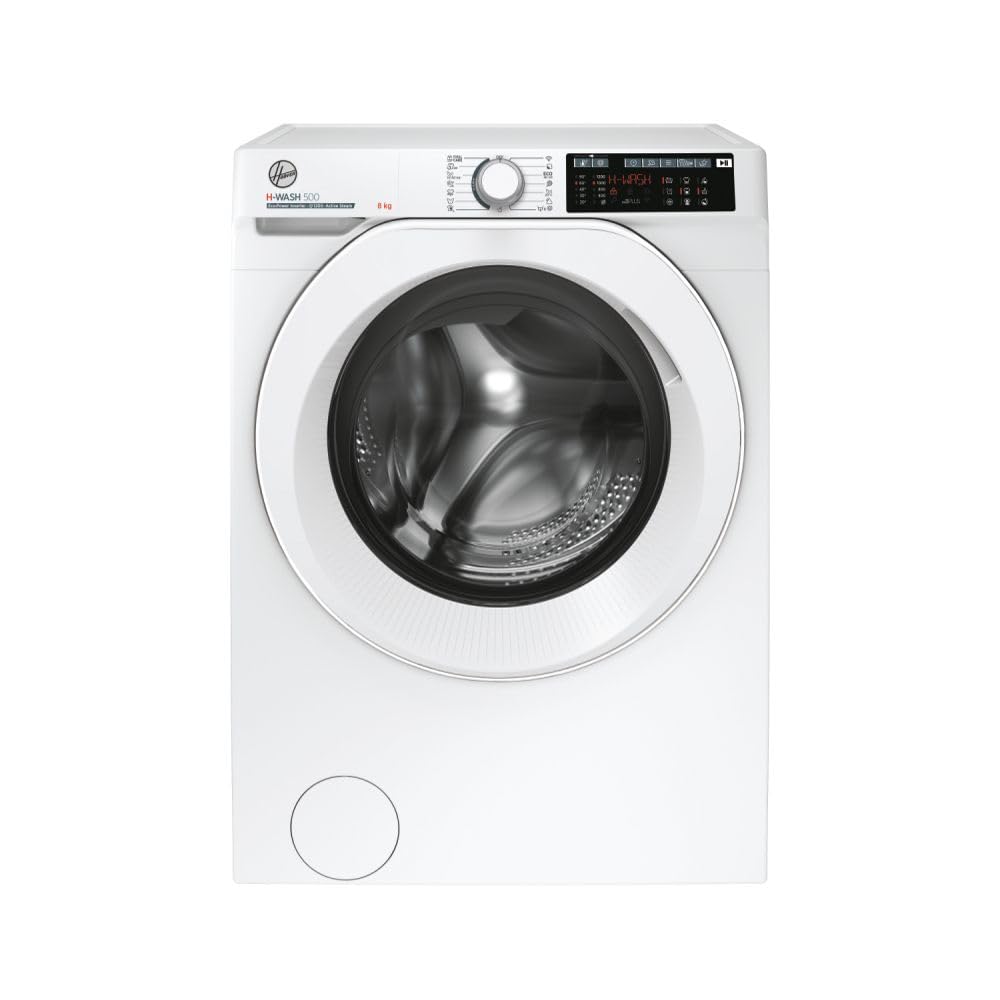
The HOOVER H-WASH 500 HW 28AM/1-S washing machine in a typical home environment.
2. Safety Information
Always follow basic safety precautions when using electrical appliances to reduce the risk of fire, electric shock, or injury to persons.
- Electrical Safety: Ensure the appliance is properly grounded. Do not use extension cords or adapters. Disconnect from power before cleaning or servicing.
- Water Connections: Use new hose sets provided with the appliance. Do not reuse old hose sets. Check for leaks after installation.
- Children and Vulnerable Persons: This appliance can be used by children aged 8 years and above and persons with reduced physical, sensory or mental capabilities or lack of experience and knowledge if they have been given supervision or instruction.
- Installation: Install the appliance on a firm, level floor. Remove all transit bolts before use.
- Flammable Materials: Do not wash items that have been cleaned in, washed in, soaked in, or spotted with combustible or explosive substances.
3. Setup and Installation
3.1 Unpacking
Carefully remove all packaging materials, including the polystyrene base and any protective film. Inspect the appliance for any damage. Keep packaging materials out of reach of children.
3.2 Removing Transit Bolts
Before operating the washing machine, remove all transit bolts located at the rear of the appliance. These bolts secure the drum during transport and must be removed to prevent damage during operation. Use the provided wrench to loosen and remove them. Insert the plastic caps supplied into the holes.
3.3 Location and Leveling
Place the washing machine on a solid, flat, and stable floor. Avoid placing it on carpets or other soft surfaces that could obstruct ventilation. Adjust the adjustable feet at the bottom of the appliance to ensure it is perfectly level. A level machine reduces vibration and noise during operation.

Ensure the washing machine is level for stable operation.
3.4 Water Connection
- Connect the water inlet hose to a cold water tap with a 3/4" thread. Ensure the connection is tight to prevent leaks.
- Position the drain hose into a standpipe or over the edge of a sink, ensuring it is securely fixed to prevent displacement during draining. The height of the drain hose should be between 60 cm and 100 cm from the floor.
3.5 Electrical Connection
Plug the power cord into a properly grounded electrical outlet. Ensure the voltage and frequency match the specifications on the appliance's rating plate. Do not use adapters or extension cords.
3.6 First Use
Before washing laundry for the first time, run an empty wash cycle at 60°C without detergent to clean the drum and remove any manufacturing residues.
4. Operating Instructions
4.1 Control Panel Overview
The control panel features a program selector dial, a digital display, and various function buttons. The dial is used to select the desired wash program, while the display shows cycle information and remaining time. Function buttons allow for additional options like steam, spin speed, and delay start.

The control panel with program dial and digital display.
4.2 Loading Laundry
Open the washing machine door. Load laundry into the drum, ensuring not to overload the machine. Overloading can reduce washing efficiency and cause excessive wear. Close the door firmly.
The washing machine drum with the door open, ready for loading.
4.3 Adding Detergent
Pull out the detergent dispenser drawer. Add the appropriate amount of detergent and fabric softener to the designated compartments. The HOOVER H-WASH 500 features a dual-compartment dispenser for advanced features. Refer to your detergent packaging for recommended dosages.
4.4 Selecting a Program
Turn the program selector dial to choose one of the 9 available wash cycles. Common cycles include Normal, Delicate, Bulky, and Eco. The display will show the default settings for the selected program.
4.5 Special Functions
- Steam Function: Activates a steam treatment to refresh clothes and reduce wrinkles.
- Connected Features: Utilize the appliance's connectivity for remote control and additional program options via a compatible app.
- Induction Motor: Provides quiet and efficient operation.
4.6 Starting, Pausing, and Stopping a Cycle
- Start: Press the Start/Pause button to begin the selected wash cycle.
- Pause: Press the Start/Pause button during a cycle to temporarily stop it. Press again to resume.
- Stop/Cancel: To stop a cycle completely, press and hold the Start/Pause button for a few seconds, or turn the program dial to the 'OFF' position.
5. Maintenance
Regular maintenance ensures the longevity and optimal performance of your washing machine.
5.1 Cleaning the Detergent Dispenser
Remove the detergent dispenser drawer by pressing the release lever (if present) and pulling it out. Rinse it under running water to remove any detergent residue. Clean the housing of the dispenser with a brush. Reinsert the drawer.
5.2 Cleaning the Drum
Periodically run a maintenance wash cycle (e.g., a hot wash at 90°C) with a washing machine cleaner or a small amount of detergent, without any laundry, to prevent odors and buildup.
5.3 Cleaning the Drain Pump Filter
Locate the drain pump filter, usually at the bottom front of the machine. Place a shallow container underneath to catch any residual water. Unscrew the filter cover and carefully remove any lint, coins, or foreign objects. Clean the filter under running water and reassemble securely.
5.4 Exterior Cleaning
Wipe the exterior surfaces of the washing machine with a soft, damp cloth. Do not use abrasive cleaners or solvents.
6. Troubleshooting
Before contacting service, check the following common issues:
| Problem | Possible Cause | Solution |
|---|---|---|
| Machine does not start | No power, door not closed, program not selected. | Check power supply, ensure door is latched, select a program and press Start. |
| Water not filling | Water tap closed, inlet hose kinked, water pressure too low. | Open water tap, straighten hose, check water supply. |
| Water not draining | Drain hose kinked, drain pump filter blocked. | Straighten drain hose, clean drain pump filter. |
| Excessive vibration/noise | Transit bolts not removed, machine not level, uneven load. | Remove transit bolts, level the machine, redistribute laundry. |
7. Specifications
Key technical specifications for the HOOVER H-WASH 500 HW 28AM/1-S washing machine:
| Feature | Specification |
|---|---|
| Model Number | HW 28AM/1-S |
| Capacity | 8 Kilograms |
| Maximum Spin Speed | 1200 rpm |
| Energy Efficiency Class | A |
| Product Dimensions (D x W x H) | 53 x 60 x 85 cm |
| Product Weight | 66 Kilograms |
| Drum Material | Stainless Steel |
| Number of Wash Cycles | 9 |
| Special Features | Steam Function, Induction Motor, Connected |

The energy efficiency label for the washing machine, indicating Class A.
8. Warranty and Support
Your HOOVER H-WASH 500 HW 28AM/1-S washing machine is covered by a manufacturer's warranty. Please refer to the warranty card included with your purchase for specific terms and conditions. For technical assistance, spare parts, or to schedule a service appointment, please contact your local authorized HOOVER service center. Keep your proof of purchase for warranty claims.
Note: Information regarding spare parts availability is not provided in the product details.


