
Introduction
This manual provides detailed instructions for the installation, operation, and maintenance of your MISONDA Android 14 Car Stereo system, model BX-5E2-D05-128G. This unit is designed for Mazda CX-5 vehicles manufactured between 2012 and 2015. Please read this manual thoroughly before installation and use to ensure proper functionality and safety.
Package Contents
Verify that all items listed below are present in your package:
- MISONDA Android 14 Head Unit (10-inch IPS display)
- 4 LED Backup Camera
- External Microphone
- Power Adapter
- RCA Cable Set (A & B)
- USB Cable
- GPS Antenna
- Radio Antenna
- Installation Brackets
- Instruction Manual (this document)
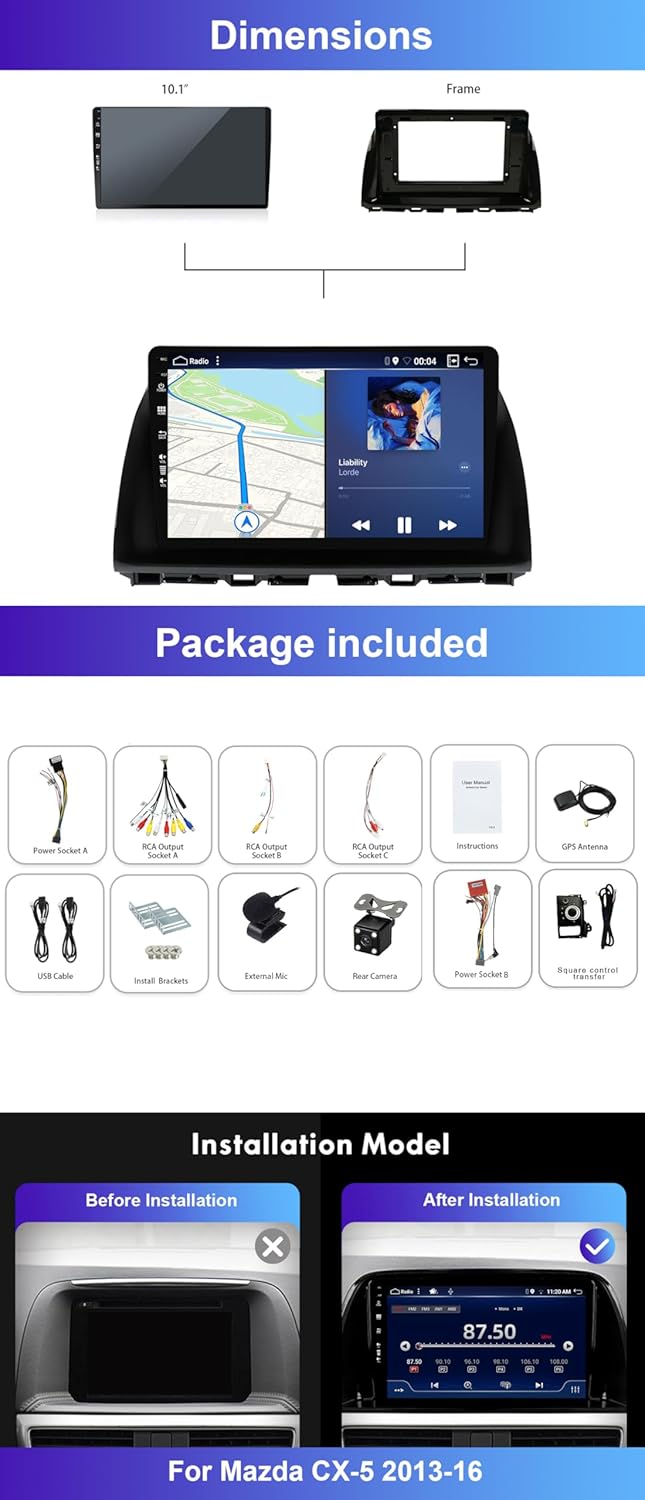
Setup and Installation
Professional installation is recommended for this car stereo system. Incorrect installation may damage the unit or your vehicle's electrical system. Ensure the vehicle's battery is disconnected before beginning installation.
1. Pre-Installation Check
Before installing the unit into the dashboard, connect all necessary cables (power, speakers, GPS antenna, radio antenna, USB, external microphone, backup camera) to the head unit. Power on the unit to perform a basic functionality test. Verify the display, touch response, audio output, and basic system boot-up.

2. Wiring Connections
- Power Adapter: Connect the main power harness to the vehicle's wiring harness. Ensure correct polarity.
- RCA Cables: Connect RCA cables for audio output (e.g., to an external amplifier) or video input/output as required.
- USB Cable: Route the USB cable to a convenient location for connecting USB devices.
- GPS Antenna: Mount the GPS antenna in a location with a clear view of the sky, typically on the dashboard or under the windshield.
- Radio Antenna: Connect the vehicle's radio antenna.
- External Microphone: Connect the external microphone and route it to a suitable position for clear voice pickup (e.g., near the rearview mirror or sun visor).
- Backup Camera: Connect the backup camera to the dedicated input. Ensure the trigger wire is connected to the vehicle's reverse light circuit for automatic activation.
3. Mounting the Head Unit
- Carefully insert the head unit into the dashboard opening.
- Secure the unit using the provided installation brackets and screws.
- Reassemble the dashboard trim panels.
Operating Instructions
System Overview
The MISONDA car stereo runs on Android 14, providing a familiar smartphone-like interface. The 10-inch IPS touchscreen allows for intuitive control.

Wireless CarPlay & Android Auto
Connect your smartphone wirelessly via Bluetooth to access CarPlay or Android Auto functionalities. This allows for navigation, calls, messages, and music playback directly from your phone's interface on the car stereo screen.

Bluetooth 5.0
The unit supports Bluetooth 5.0 for hands-free calling, A2DP audio streaming, and phonebook synchronization. Pair your phone with the head unit to make and receive calls safely while driving and stream music.

GPS Navigation
The system includes built-in GPS navigation. You can use offline maps or connect to Wi-Fi/hotspot for online map services. The unit is compatible with most navigation applications available on the Play Store.
DSP (Digital Sound Processor)
Equipped with two DSP chips and optimized algorithms, the unit provides enhanced audio quality. It supports optical fiber and coaxial digital signal output, as well as 5.1 channels. A 64-segment EQ allows for detailed sound parameter adjustments.

Wi-Fi Connection
Connect the head unit to a Wi-Fi network or mobile hotspot to download applications, stream online videos, use online maps, and browse the internet.
RDS/FM Radio
The unit features an FM/AM radio receiver with RDS support. It has 18 preset stations and supports automatic or manual station searching. FM frequency range: 87.5~108MHz.
Split Touchscreen & Mirror Link
- Split-Screen: Use two applications simultaneously on the screen, such as navigation and music playback.
- Mirror Link: Display your smartphone's screen directly on the head unit.
Steering Wheel Control (SWC)
The unit supports steering wheel controls, allowing you to manage functions like changing songs, adjusting volume, and answering calls without taking your hands off the steering wheel.
Rear View Camera Input
The system supports a rear view camera (included). When the vehicle is in reverse gear, the camera feed will automatically display on the screen, assisting with parking. The included camera features HD night vision, a 170° wide viewing angle, and IP68 waterproof rating.
Maintenance
- Screen Cleaning: Use a soft, lint-free cloth to clean the touchscreen. For stubborn marks, slightly dampen the cloth with water or a screen-safe cleaner. Avoid abrasive materials or harsh chemicals.
- Software Updates: Periodically check for system software updates to ensure optimal performance and access to new features. Updates can typically be performed via Wi-Fi.
- General Care: Keep the unit free from excessive dust and moisture. Avoid exposing it to extreme temperatures.
Troubleshooting
| Problem | Possible Cause | Solution |
|---|---|---|
| Unit does not power on. | No power connection; Blown fuse; Incorrect wiring. | Check power cables and connections. Inspect vehicle fuses. Verify wiring against installation diagram. |
| No sound. | Volume too low; Mute activated; Speaker wiring issue; Amplifier not powered. | Increase volume. Check mute setting. Verify speaker connections. Ensure external amplifier (if used) is powered. |
| GPS signal lost or inaccurate. | GPS antenna obstructed or improperly placed; Antenna connection loose. | Relocate GPS antenna to a clear area. Check antenna connection. |
| Bluetooth connection issues. | Device not in pairing mode; Interference; Incorrect pairing procedure. | Ensure phone's Bluetooth is on and in pairing mode. Delete previous pairings and re-pair. Move closer to the unit. |
| Rear view camera not displaying. | Camera power issue; Video cable disconnected; Reverse trigger wire not connected. | Check camera power supply. Verify video cable connection. Ensure reverse trigger wire is correctly connected to the vehicle's reverse light. |
For issues not listed here, please contact customer support.
Specifications
| Model Number | BX-5E2-D05-128G |
| Operating System | Android 14 |
| Processor | Octa-core A53 2.5GHz Frequenz (14nm process) |
| RAM | 6GB LPDDR4 |
| Internal Storage | 128GB EMMC |
| GPU | IMG GE8300 |
| Display | 10-inch IPS Touch Screen |
| Radio Chip | TDA 7786 (RDS/FM/AM) |
| Amplifier IC | 7850 |
| DSP Chip | AKM7739 (64-segment EQ, 5.1 channel support) |
| Bluetooth | Version 5.0 (A2DP, Hands-free, Phonebook) |
| Connectivity | Wi-Fi, USB, Auxiliary, Bluetooth |
| Output Power | 180 Watts |
| Compatible Vehicles | Mazda CX-5 (2012-2015) |
| Item Weight | 5.69 pounds |
| Package Dimensions | 12.12 x 7 x 6.5 inches |
Warranty Information
The MISONDA Android 14 Car Stereo comes with a one-year warranty from the date of purchase. This warranty covers manufacturing defects and malfunctions under normal use. Additionally, a 60-day refund policy is available, and replacement or repair options extend beyond 60 days.
Please retain your proof of purchase for warranty claims.
Customer Support
For technical assistance, troubleshooting guidance, or warranty inquiries, please contact MISONDA customer support. Refer to your purchase documentation for specific contact details.
When contacting support, please have your model number (BX-5E2-D05-128G) and purchase date readily available.