Introduction
Thank you for choosing the Redragon K673 PRO SE 75% 81 Keys Wireless Gasket RGB Gaming Keyboard. This manual provides essential information for setting up, operating, and maintaining your new mechanical keyboard. Please read it thoroughly to ensure optimal performance and longevity of your device.
What's in the Box
- Redragon K673 PRO SE Keyboard
- USB Cable
- Keycap/Switch Puller
- Spare Switches (Hi-Fi Custom Linear Switches)
- User Manual

Image: The Redragon K673 PRO SE keyboard shown with its included accessories: USB cable, keycap/switch puller, and spare switches.
Setup
1. Connecting the Keyboard
The Redragon K673 PRO SE supports three connection modes: USB-C wired, 2.4GHz wireless, and Bluetooth (BT 3.0/5.0).
- USB-C Wired Connection:
Connect the provided USB-C cable to the keyboard's USB-C port (located on the left side) and the other end to your computer's USB port. The keyboard will automatically be detected and ready for use. This mode also charges the keyboard's internal battery.
- 2.4GHz Wireless Connection:
Locate the 2.4GHz USB dongle stored in the compartment on the right side of the keyboard. Plug the dongle into an available USB port on your computer. Slide the connection switch on the left side of the keyboard to the "2.4G" position. The keyboard will automatically connect.

Image: The Redragon K673 PRO SE keyboard connected wirelessly to a laptop, demonstrating the 3-mode connection capability.
- Bluetooth Connection:
Slide the connection switch on the left side of the keyboard to the "BT" position. On your computer or device, search for Bluetooth devices and select "Redragon K673 PRO SE" to pair. The keyboard supports BT 3.0 and 5.0 for enhanced compatibility.
2. Adjusting Keyboard Angle
The keyboard features two-level adjustable feet on the underside for ergonomic comfort. Flip out the feet to your preferred typing angle.
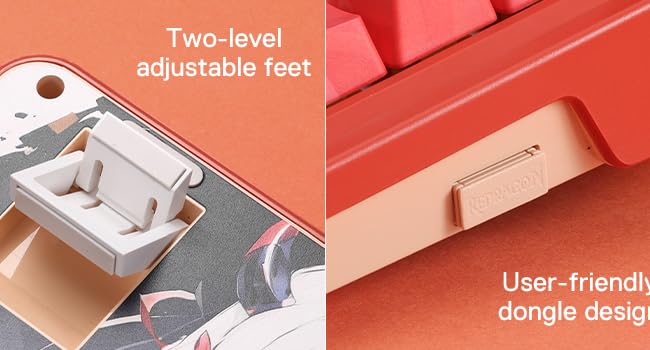
Image: Close-up of the Redragon K673 PRO SE keyboard's underside, showing the two-level adjustable feet and the user-friendly dongle storage design.
Operating Instructions
1. Dedicated Knob Control
The multi-function knob (located on the top right) allows for quick adjustments:
- Rotate: Adjusts backlight brightness or media volume.
- Press: Switches between backlight modes or mutes/unmutes audio.
- Long Press (3s): Toggles between backlight brightness control and media volume control.
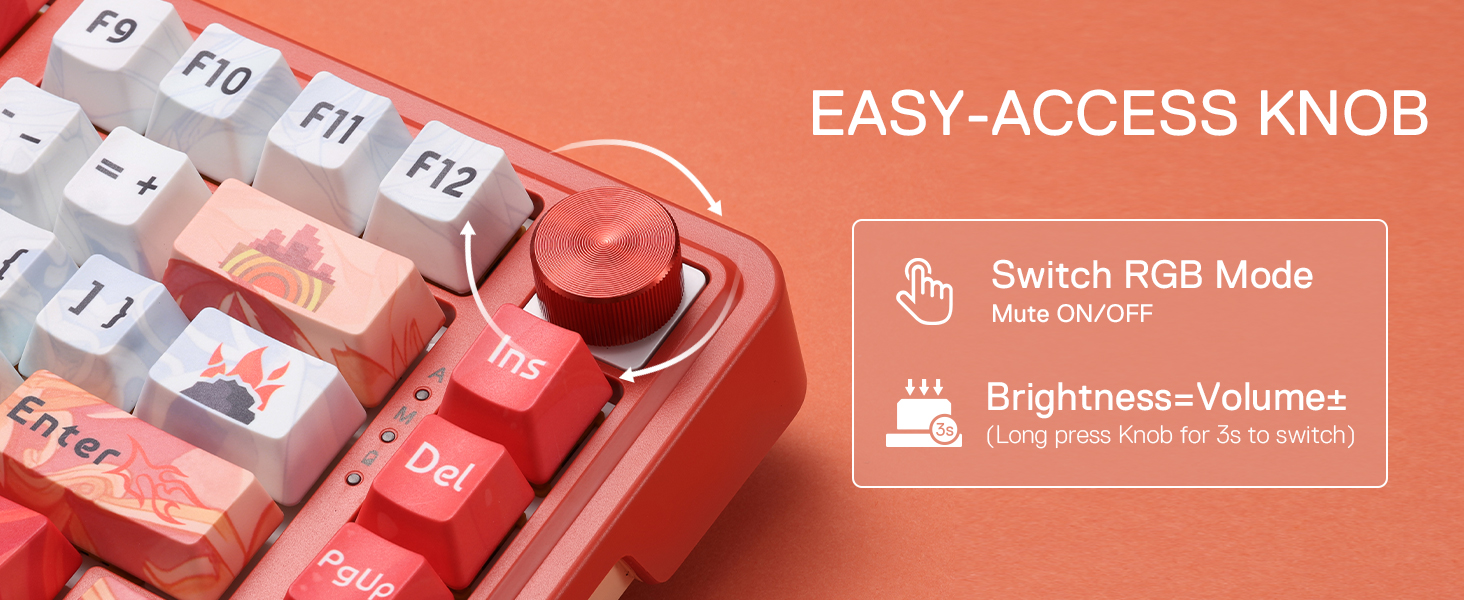
Image: The dedicated knob on the Redragon K673 PRO SE keyboard, illustrating its functions for switching RGB modes, muting, and adjusting brightness/volume.
2. RGB Backlight Control
Customize your keyboard's RGB lighting effects:
- FN + Up/Down Arrow: Adjusts 5 brightness levels.
- FN + Left/Right Arrow: Adjusts 5 speed levels for dynamic effects.
- FN + INS: Switches between 18 preset backlight modes.
- FN + Backspace: Turns off the backlight.
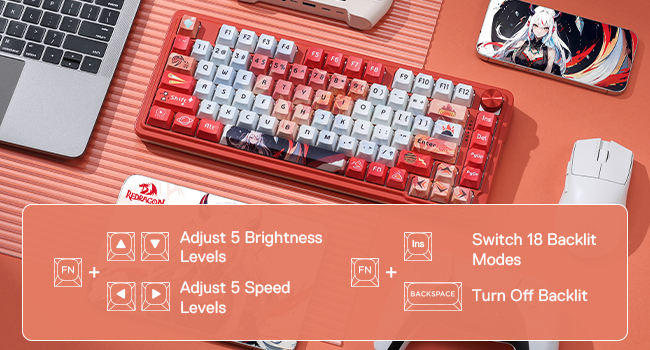
Image: The Redragon K673 PRO SE keyboard displaying various RGB backlight modes and key combinations for adjusting brightness, speed, and switching modes.
3. Battery Status Check
To check the remaining battery life, press FN + ALT. The LCD screen will display the battery percentage.
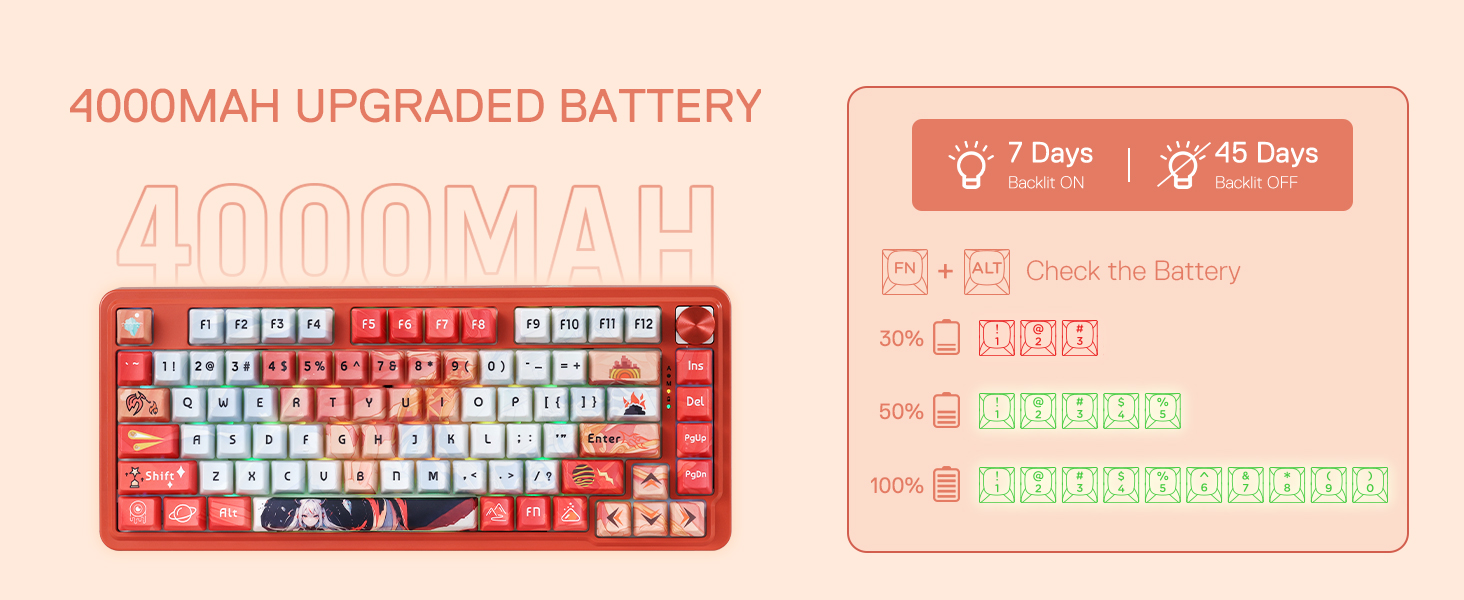
Image: The Redragon K673 PRO SE keyboard's LCD screen showing battery life percentage and estimated usage time with backlight on/off.
4. Key Combinations (FN Key)
The FN key can be combined with other keys for various functions:
| Windows O.S. | MAC O.S. |
|---|---|
| FN+F1: Screen brightness - | F1: Screen brightness - / FN+F1 = F1 |
| FN+F2: Screen brightness + | F2: Screen brightness + / FN+F2 = F2 |
| FN+F3: Multiple windows | F3: Multiple task / FN+F3 = F3 |
| FN+F4: Speech recognition (Win10 or newer) | F4: Siri / FN+F4 = F4 |
| FN+F5: Show desktop | F5: Show desktop / FN+F5 = F5 |
| FN+F6: Search | F6: Search / FN+F6 = F6 |
| FN+F7: Pre track | F7: Pre track / FN+F7 = F7 |
| FN+F8: Play / Pause | F8: Play / Pause / FN+F8 = F8 |
| FN+F9: Next track | F9: Next track / FN+F9 = F9 |
| FN+F10: Mute | F10: Mute / FN+F10 = F10 |
| FN+F11: Volume down | F11: Volume down / FN+F11 = F11 |
| FN+F12: Volume up | F12: Volume up / FN+F12 = F12 |
Maintenance
1. Cleaning the Keyboard
To clean your keyboard, gently wipe the surface with a soft, damp cloth. Avoid using harsh chemicals or abrasive materials. For deeper cleaning, use the provided keycap puller to remove keycaps and clean underneath with compressed air or a small brush.
2. Hot-Swappable Switches
The K673 PRO SE features hot-swappable sockets compatible with 3/5-pin switches, allowing you to easily change switches without soldering. Use the provided switch puller to remove and replace switches.
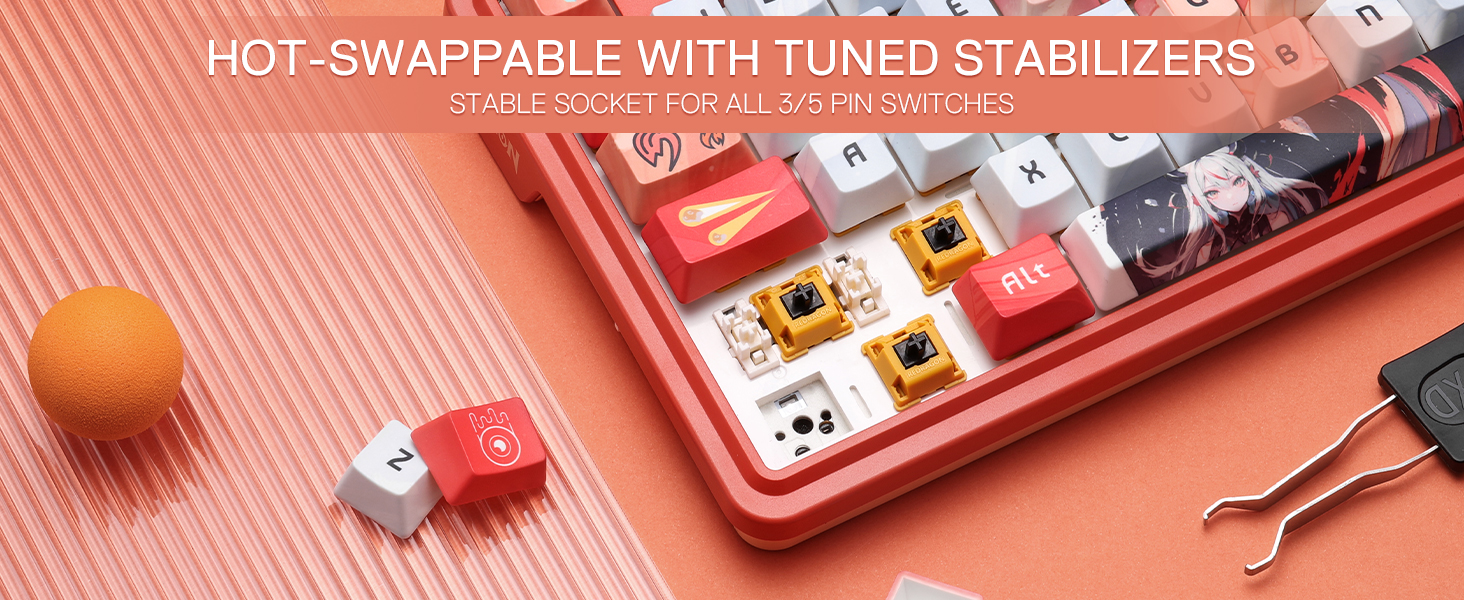
Image: The Redragon K673 PRO SE keyboard showcasing its hot-swappable sockets, allowing for easy replacement of 3/5-pin switches.
To replace a switch:
- Use the keycap puller to gently remove the desired keycap.
- Use the switch puller to grip the top and bottom clips of the switch and pull it straight up.
- Align the pins of the new switch with the holes on the PCB and press firmly until it clicks into place.
- Reattach the keycap.
Troubleshooting
- Keyboard not responding:
Check if the USB cable is securely connected or if the wireless dongle is properly inserted. Ensure the keyboard is charged. Try connecting to a different USB port or computer.
- Spill on keyboard:
Immediately unplug the keyboard. Wipe off excess liquid and place the keyboard in a well-ventilated area to dry completely before reconnecting.
- Reset to factory settings:
Press and hold FN + ESC for 3 seconds.
Specifications
| Brand | Redragon |
| Model Number | K673 SE |
| Layout | 75% (81 Keys) |
| Connectivity | USB-C Wired, 2.4GHz Wireless, Bluetooth (BT 3.0/5.0) |
| Switch Type | Hi-Fi Custom Linear Switch (Hot-Swappable 3/5-pin) |
| Keycaps | 5-sided Dye-Sub PBT |
| Noise Dampening | 5-Layer (PO foam, IXPE switch foam, PET sound pad, bottom socket foam, silicone bottom pad, silicone gasket) |
| Battery | 4000mAh Lithium Polymer |
| Backlighting | RGB |
| Dedicated Controls | Multi-function Knob |
| Compatible Devices | PC, Laptop, Tablet, Gaming Console |
| Dimensions (LxWxH) | 13.78 x 1.34 x 4.96 inches |
| Item Weight | 1.1 pounds |
Warranty and Support
For warranty information, technical support, or to purchase replacement parts, please visit the official Redragon website or contact their customer service. Keep your purchase receipt for warranty claims.
Official Redragon Website: Redragon Store