
Introduction
This manual provides comprehensive instructions for the Redragon K707 PRO GB 80% Gasket RGB Gaming Keyboard. Please read this manual thoroughly before using the product to ensure proper operation and maintenance. The K707 PRO GB is a high-performance mechanical keyboard designed for gaming and productivity, featuring a gasket-mounted structure, multi-mode connectivity, and extensive customization options.
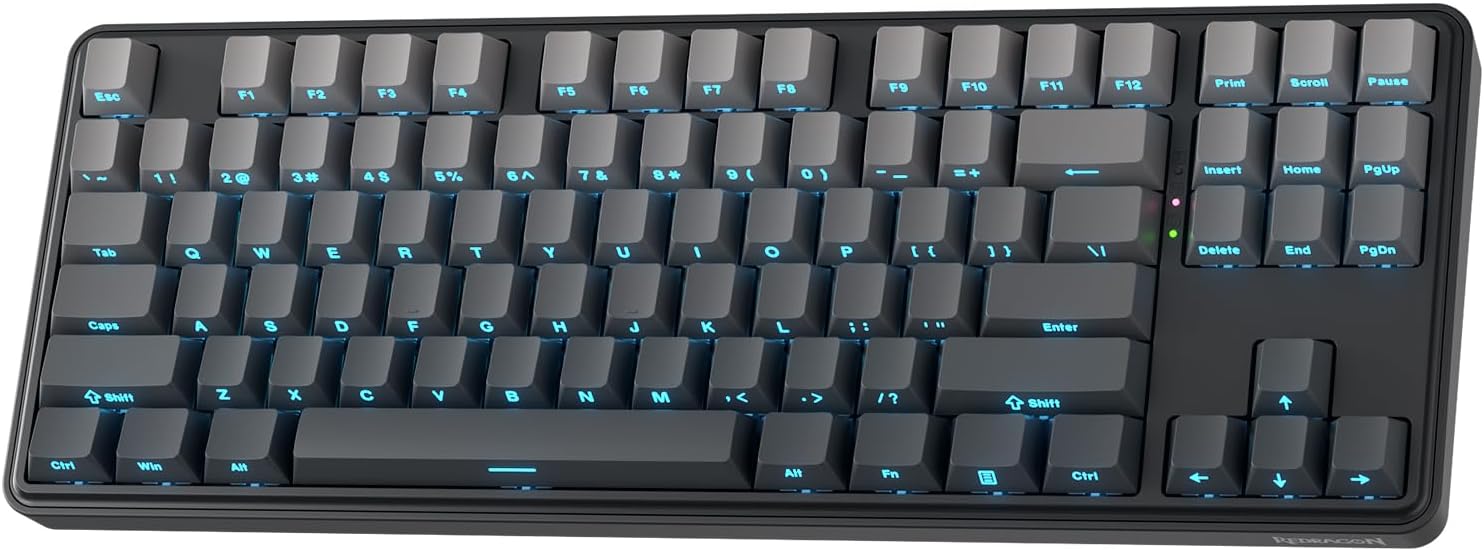
Figure 1: Redragon K707 PRO GB Gaming Keyboard.
Key Features
- Gasket-Mounted Design: The keyboard features a gasket structure that provides a softer, more cushioned typing feel and reduces internal vibrations and noise.
- Tri-Mode Connectivity: Seamlessly switch between USB-C wired, 2.4Ghz wireless, and Bluetooth 3.0/5.0 connections for versatile use across multiple devices.
- 5-Layer Noise Dampening: Equipped with multiple layers of sound-absorbing materials, including PO foam, IXPE switch foam, PET sound pad, bottom socket foam, and silicone bottom pad, to deliver a quiet and satisfying typing experience.
- Custom Mint Mambo Switches: Pre-lubed linear switches offer a smooth and consistent keystroke. The hot-swappable sockets support both 3-pin and 5-pin switches, allowing for easy customization.
- 80% TKL Layout: A compact tenkeyless design with 87 keys, optimizing desk space while retaining essential keys for gaming and daily tasks.
- PBT Gradient Keycaps & South-Facing LEDs: Durable PBT keycaps with a gradient design and side-printed legends. South-facing LEDs ensure vibrant and unobstructed RGB lighting.
- Pro Software Support: Advanced software allows for macro programming, key remapping, and extensive RGB lighting customization.

Figure 2: Overview of Redragon K707 PRO GB Key Features.

Figure 3: TKL Layout and Gasket Design for Enhanced Typing Comfort.

Figure 4: Internal Structure with 5-Layer Noise Dampening and Gasket Mounting.

Figure 5: Custom Mint Mambo Switch Specifications.

Figure 6: Gradient Side Printed Keycaps and South-Facing LED Illumination.

Figure 7: Tri-Mode Connection Options.

Figure 8: Pro Software Interface for Customization.
Setup and Connection
Initial Charging
Before first use, it is recommended to fully charge the keyboard. Connect the provided USB-C cable to the keyboard's USB-C port and the other end to a powered USB port (e.g., computer, USB wall adapter). The charging indicator light will show charging status.
2.4Ghz Wireless Connection
- Locate the 2.4Ghz USB receiver, usually stored in a compartment on the keyboard.
- Plug the USB receiver into an available USB port on your computer.
- Set the keyboard's connection switch (usually on the back or side) to the 2.4Ghz wireless mode.
- The keyboard should automatically connect. If not, press Fn + 4 to activate 2.4Ghz pairing mode.
Bluetooth Connection
- Set the keyboard's connection switch to Bluetooth mode.
- Press and hold Fn + 1, Fn + 2, or Fn + 3 for 3-5 seconds to enter pairing mode for one of the three Bluetooth channels. The indicator light will flash rapidly.
- On your device (computer, tablet, smartphone), open Bluetooth settings and search for new devices.
- Select "Redragon K707 PRO GB" from the list of available devices.
- Once paired, the indicator light on the keyboard will stop flashing and remain solid.
USB-C Wired Connection
- Connect the provided USB-C cable to the keyboard's USB-C port.
- Connect the other end of the USB-C cable to a USB port on your computer.
- Set the keyboard's connection switch to wired mode. The keyboard will function immediately.
Operating Modes and Functions
Switching Modes
Use the physical switch on the keyboard to toggle between 2.4Ghz wireless, Bluetooth, and wired modes. For Bluetooth, use Fn + 1/2/3 to switch between paired devices.
Function Key Combinations (Fn Key)
The Fn key provides access to various multimedia and system functions. Refer to the keycap legends for specific combinations. Common functions include:
- Fn + F1-F12: Multimedia controls (e.g., volume, play/pause, stop).
- Fn + Win: Lock/Unlock Windows key.
- Fn + Backspace: Delete (if applicable).
- Fn + Right Shift: Cycle through RGB lighting effects.
- Fn + Up/Down Arrow: Adjust backlight brightness.
- Fn + Left/Right Arrow: Adjust backlight speed/direction.
Customization and Software
The Redragon K707 PRO GB keyboard supports advanced customization through its dedicated software. This software allows you to:
- Macro Editing: Create and assign complex macros to any key.
- Key Redefinition: Remap individual keys to perform different functions.
- RGB Backlight Customization: Choose from 18 pre-set lighting modes, adjust colors, effects, and create custom lighting profiles.
- Music Rhythm Effect: Synchronize lighting effects with audio playback.
The software can be downloaded from the official Redragon website. Refer to the software's built-in help or the Redragon website for detailed instructions on using these advanced features.
Maintenance
Cleaning the Keyboard
- Disconnect the keyboard from your computer before cleaning.
- Use a soft, lint-free cloth slightly dampened with water or a mild cleaning solution to wipe down the keycaps and chassis.
- For dust and debris between keycaps, use compressed air.
- Avoid using harsh chemicals or abrasive materials.
Keycap and Switch Replacement
The K707 PRO GB features hot-swappable switches, allowing for easy replacement without soldering. Use the provided keycap puller and switch puller tools.
- Gently pull the keycap straight up using the keycap puller.
- Insert the switch puller around the top and bottom clips of the switch and gently squeeze while pulling the switch straight up.
- Align the pins of the new switch with the holes on the PCB and press down firmly until it clicks into place. Ensure pins are not bent.
- Press the keycap onto the new switch until it is secure.
Troubleshooting
| Problem | Possible Solution |
|---|---|
| Keyboard not responding (Wireless) |
|
| RGB lighting not working or incorrect |
|
| Specific keys not responding |
|
| Keyboard disconnects frequently |
|
Specifications
| Attribute | Detail |
|---|---|
| Model Number | K707 PRO GB |
| Keyboard Type | 80% TKL Wireless Gasket Gaming Keyboard |
| Number of Keys | 87 |
| Connectivity Technology | 2.4Ghz, BT (Bluetooth), USB-C |
| Switch Type | Custom Mint Mambo Linear Switch (Hot-Swappable) |
| Keycap Material | PBT |
| Lighting | RGB Backlight (South-Facing LEDs) |
| Noise Dampening | 5-Layer System |
| Compatible Devices | Laptop, Gaming Console, PC |
| Item Weight | 2.48 pounds |
| Package Dimensions | 16.22 x 10.47 x 2.48 inches |
| Power Source | Wired / Battery (1 Lithium Polymer battery required) |
Warranty and Support
Redragon products come with a limited warranty. For detailed warranty information, technical support, driver downloads, and frequently asked questions, please visit the official Redragon website or contact Redragon customer service. Keep your proof of purchase for warranty claims.
Redragon Official Website: www.redragonshop.com


