
Introduction
The T'nB FMCT09 Bluetooth FM Transmitter is designed to enhance your in-car audio experience. It allows you to stream music from your smartphone and manage calls directly through your vehicle's speakers, even if your car lacks built-in USB ports or Bluetooth connectivity. This device plugs into your car's cigarette lighter socket, providing a versatile solution for audio playback and charging.
Product Overview
The FMCT09 offers multiple connection options and charging capabilities. Familiarize yourself with its components for optimal use.
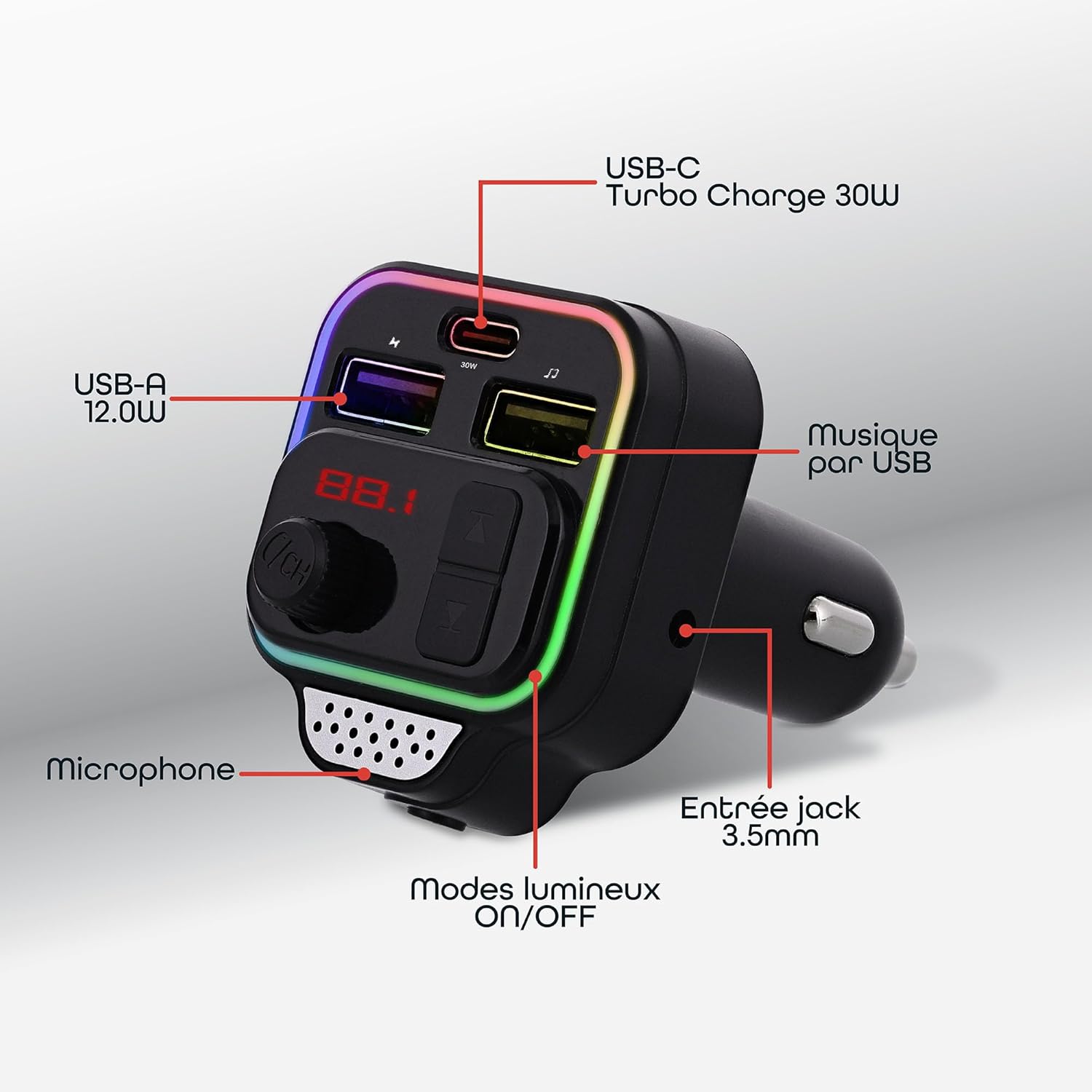
Image: Overview of the T'nB FMCT09 Bluetooth FM Transmitter, highlighting its various ports and controls including USB-C, USB-A, music via USB, microphone, 3.5mm jack input, and luminous modes.
The FMCT09 supports three primary connection modes:

Image: The T'nB FMCT09 illustrating its three connection modes: Bluetooth for wireless pairing, USB-A for media playback or charging, and a 3.5mm jack cable for auxiliary audio input.
- Bluetooth Connectivity: For wireless audio streaming and hands-free calls.
- USB-A Ports: Two USB-A ports, one for music playback and one for QC3.0 18W charging.
- USB-C Port: For 30W Turbo Charging.
- 3.5mm Jack Input: For wired audio connection.
- Microphone: Integrated for hands-free calling.
- Control Buttons: For managing music, calls, and volume.
- Luminous Outline: Customizable LED lighting modes.
Setup Instructions
- Power On: Insert the FMCT09 into your vehicle's 12V cigarette lighter socket. The device will power on automatically.
- Set FM Frequency:
Adjust your car radio to an unused FM frequency. Then, synchronize the FMCT09 to the same frequency. This ensures clear audio transmission.
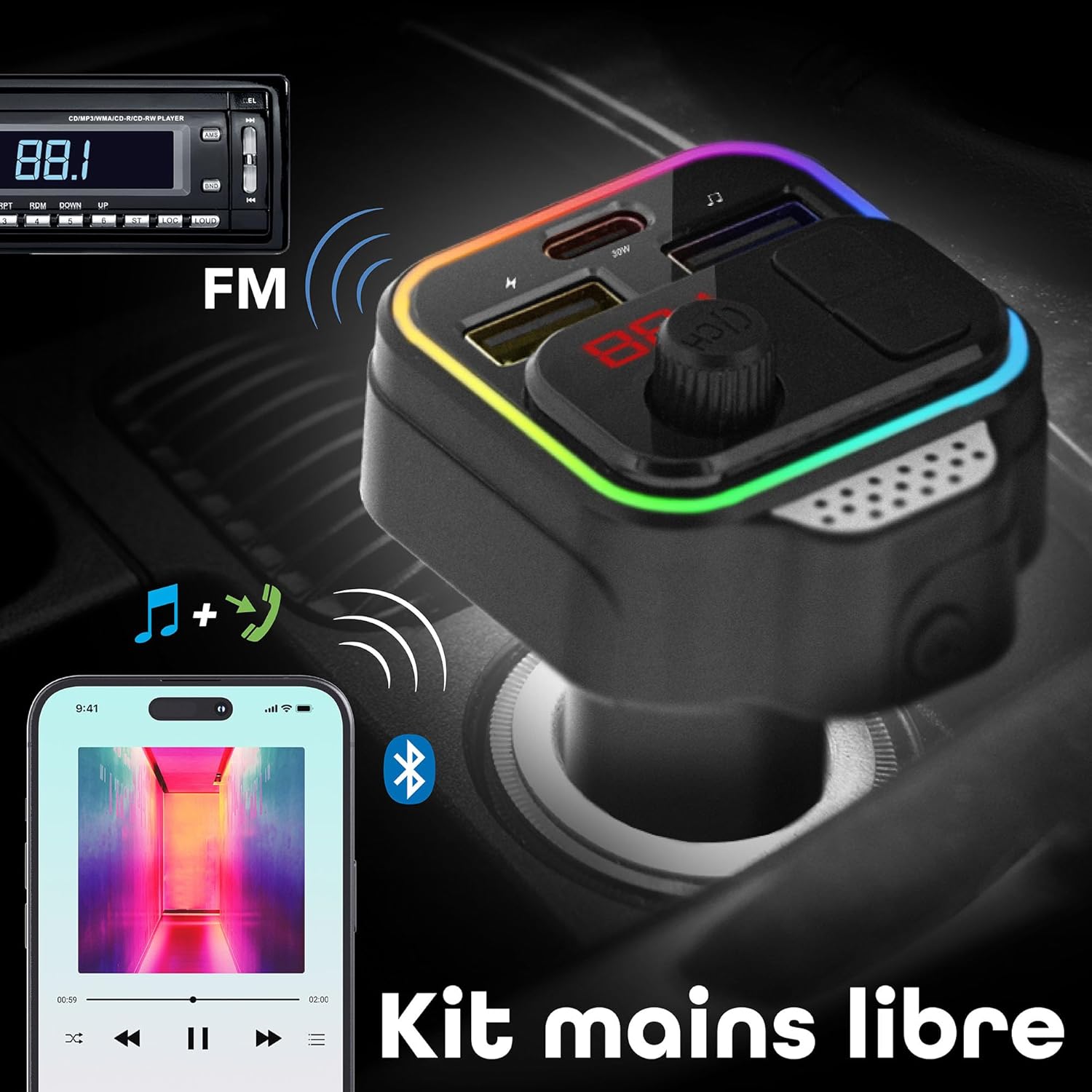
Image: Illustration showing the T'nB FMCT09 displaying an FM frequency (88.1) and a car radio tuned to the same frequency, indicating successful synchronization for audio transmission.
- Pair via Bluetooth:
Activate the Bluetooth function on your mobile device. Search for "FMCT09" in the list of available devices and select it to pair. A confirmation sound will indicate successful pairing.

Image: A smartphone screen showing "FMCT09" as a discoverable Bluetooth device, with a hand selecting it for pairing, demonstrating the Bluetooth connection process.
- Alternative Connections:
- USB Stick: Insert a USB stick containing audio files into the designated USB-A port for music playback.
- 3.5mm Jack Cable: Connect your audio device to the FMCT09 using a 3.5mm jack cable.
Operating Instructions
Music Playback
- Once connected via Bluetooth, USB stick, or jack cable, your music will play through your car's speakers.
- Use the integrated buttons on the FMCT09 to control playback (play/pause, next/previous track).
- Adjust the volume using the dedicated volume button on the device or your car radio.
Hands-Free Calling
- When a call comes in, the music will automatically pause.
- Press the designated button on the FMCT09 to answer or end a call.
- The integrated microphone allows for clear communication.
- The device supports Siri function for voice commands during your travels.

Image: A visual representation of the T'nB FMCT09 facilitating both music streaming from a smartphone and hands-free call management through the car's audio system.
Charging Devices
- The FMCT09 features two charging ports:
- USB-A (QC3.0): Provides 18W fast charging.
- USB-C: Offers 30W Turbo Charging.
- You can charge up to two devices simultaneously while using the FM transmitter's other functions.

Image: The T'nB FMCT09 connected to two charging cables, demonstrating its ability to charge two devices simultaneously via its USB-A (12W) and USB-C (30W Turbo Charge) ports.
Advanced Features and Controls
- Volume Adjustment: Easily adjust the volume using the dedicated control button.
- Battery Voltage Display: The device displays your car battery's voltage.
- Echo and Noise Suppression: Integrated technology provides an optimized audio experience.
- AD2P Function & Hi-Fi Stereo: Ensures high-quality stereo audio transmission.
- Siri Function: Facilitates voice commands for convenience during your travels.

Image: A detailed view of the T'nB FMCT09 highlighting features such as easy volume adjustment, battery voltage display, remote microphone, and Siri function for enhanced user interaction.
Luminous Modes
- The device features a luminous outline. Cycle through the available light modes: OFF, RED, GREEN, BLUE, APPLE GREEN, PURPLE, SKY BLUE.
Features
- Premium Bluetooth FM Transmitter with integrated hands-free kit.
- Multiple connection options: Bluetooth, 3.5mm jack cable, USB stick.
- Dual charging ports: 1x USB-A QC3.0 (18W) and 1x USB-C (30W Turbo Charge).
- Allows full product functionality while charging mobile devices.
- Integrated buttons for music and call management.
- Automatic radio station search function.
- Adjustable music volume.
- Customizable luminous outline with multiple color modes.
- Echo and noise suppression technology for optimized audio experience.
- AD2P function and superior Hi-Fi stereo quality.
- Siri function support for voice commands.
- Battery voltage display.
Specifications
| Brand | T'nB |
| Model Name | FMCT09 |
| Color | Black |
| Connectivity Technology | Bluetooth, Aux, USB |
| Wireless Communication Standard | Bluetooth |
| Compatible Devices | Smartphone, Tablet, Laptop, Car Stereo System |
| Power Source | Cigarette Lighter Powered |
| Media Type | USB Stick, Bluetooth |
| USB-A Output | QC3.0 18W |
| USB-C Output | 30W Turbo Charge |

Image: Diagram showing the approximate dimensions of the T'nB FMCT09 Bluetooth FM Transmitter: 8cm (height), 5cm (width), and 4.5cm (depth).
Safety Information
Please read and follow these safety guidelines to ensure safe operation and prevent damage to the device or injury.
- Keep out of reach of children.
- Do not use while sleeping.
- Do not expose to extreme temperatures.
- Do not throw into flames.
- Do not use if damaged.
- Avoid interference with other electronic devices.
Troubleshooting
If you encounter issues with your T'nB FMCT09, please refer to the following common solutions:
- No Power: Ensure the device is securely plugged into the cigarette lighter socket and that the vehicle's power outlet is functional.
- Poor Audio Quality/Static:
- Adjust your car radio and the FMCT09 to a different, unused FM frequency to avoid interference.
- Ensure the volume on both the FMCT09 and your car radio is set appropriately.
- Check for strong local radio stations that might be interfering with your chosen frequency.
- Bluetooth Pairing Issues:
- Make sure Bluetooth is enabled on your mobile device.
- Ensure the FMCT09 is in pairing mode (usually indicated by a flashing light).
- Delete "FMCT09" from your device's Bluetooth history and try pairing again.
- Restart both your mobile device and the FMCT09.
- Charging Not Working:
- Verify that the charging cable is properly connected to both the FMCT09 and your device.
- Try a different charging cable or device to rule out cable/device issues.
- Ensure the vehicle's power outlet is providing power.
Maintenance
To ensure the longevity and optimal performance of your FMCT09, follow these simple maintenance tips:
- Keep the device clean by wiping it with a soft, dry cloth.
- Avoid using harsh chemicals or abrasive cleaners.
- Store the device in a cool, dry place when not in use.
- Do not expose it to direct sunlight or extreme temperatures for extended periods.
Warranty and Support
The T'nB FMCT09 Bluetooth FM Transmitter comes with a 2-year manufacturer's warranty.
For technical support, warranty claims, or further assistance, please contact T'nB customer service through their official website or the retailer where you purchased the product.


