
1. Introduction
The Gre SWGA60 is an advanced, all-in-one connected salt chlorinator and pH controller designed for automatic pool water treatment. This system naturally generates chlorine from salt, effectively disinfecting your pool water by eliminating bacteria, algae, and fungi. It is suitable for pools up to 60 cubic meters and offers a safe, chemical-free alternative to traditional chlorine treatments. The integrated pH regulator and peristaltic pump ensure optimal water balance, while its connectivity allows for remote management via the Fluidra app.
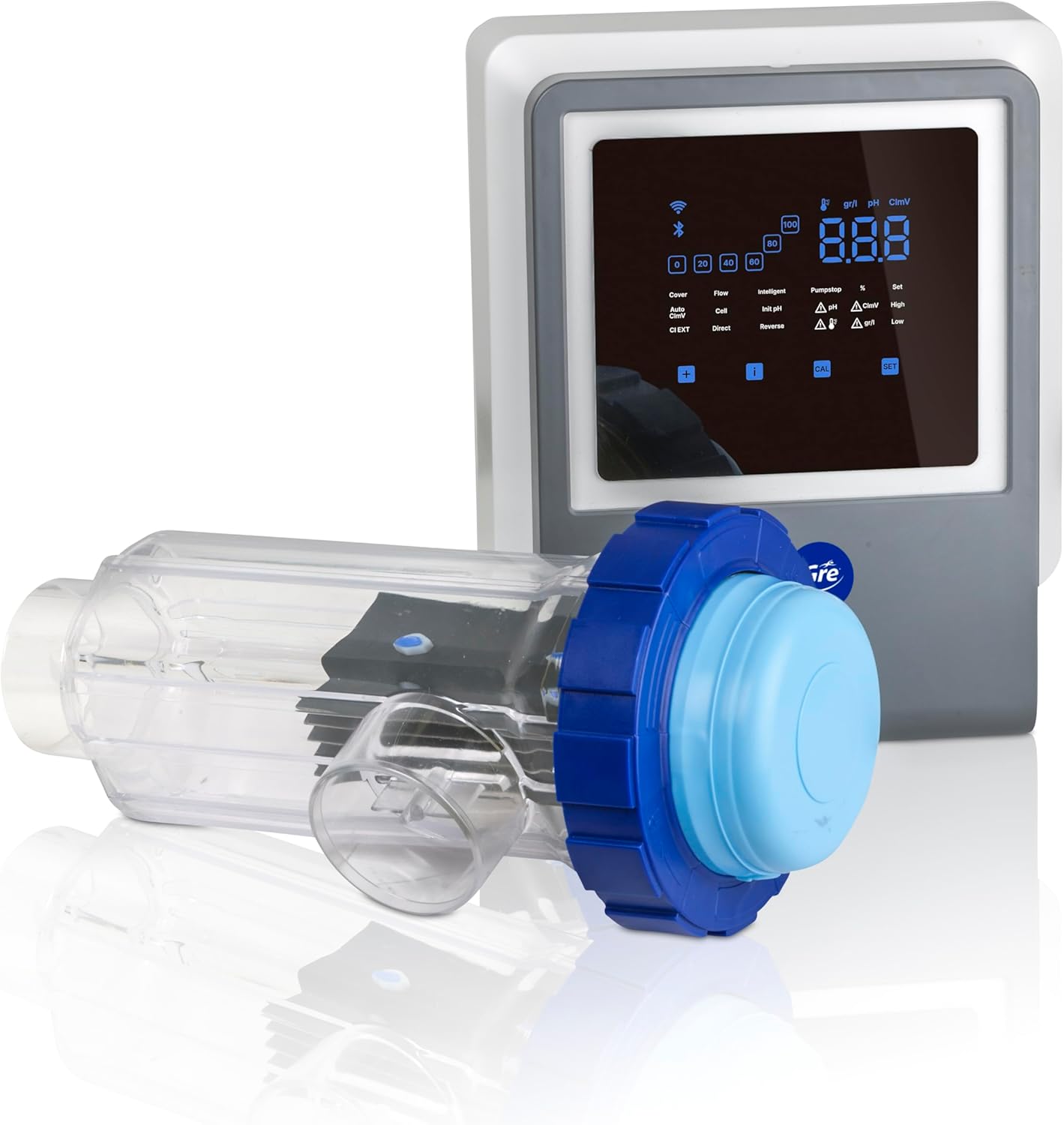
Figure 1.1: The Gre SWGA60 unit, showing the main control panel and the transparent electrolysis cell. This system is designed for automatic pool water disinfection and pH regulation.
2. Safety Information
Please read and understand all safety instructions before installing, operating, or performing maintenance on the Gre SWGA60. Failure to follow these instructions could result in serious injury or property damage.
- Electrical Safety: Ensure the unit is connected to a properly grounded electrical outlet. Disconnect power before performing any service or maintenance.
- Chemical Handling: Although the system reduces the need for chemical handling, always exercise caution when adding salt to the pool. Avoid direct contact with concentrated salt solutions.
- Installation: Installation should be performed by a qualified professional or in accordance with local electrical and plumbing codes.
- Children and Pets: Keep the unit and all pool chemicals out of reach of children and pets.
- Water Quality: Regularly test pool water parameters (salt level, pH, chlorine) to ensure safe and effective operation.
3. Setup and Installation
The Gre SWGA60 is designed for quick and easy installation. Follow these general steps for proper setup. Refer to the detailed installation guide provided with your product for specific plumbing and electrical connections.
- Mounting the Control Panel: Choose a suitable location for the control panel, away from direct sunlight and excessive moisture, but accessible for operation. Securely mount the panel to a vertical surface.
- Installing the Electrolysis Cell: Integrate the electrolysis cell into your pool's filtration return line after the filter and heater (if applicable). Ensure proper water flow direction as indicated on the cell.
- pH Probe Installation: Install the pH probe into the designated port on the system, ensuring it is correctly calibrated according to the instructions.
- Electrical Connection: Connect the control panel to a dedicated, grounded power supply. Ensure all electrical connections comply with local regulations.
- Adding Salt to the Pool: Calculate the required amount of salt based on your pool volume and the recommended salt concentration (typically 3-5 g/L). Distribute the salt evenly across the pool surface and allow it to dissolve completely before starting the system.
- Initial Configuration: Power on the unit. The intuitive interface will guide you through the initial setup, including setting pool volume and desired chlorine production levels.
- App Connection: Download the Fluidra app and follow the instructions to connect your SWGA60 unit for remote control and monitoring.

Figure 3.1: The Gre SWGA60 control panel, featuring a digital display for monitoring parameters like chlorine level and water temperature, and buttons for mode selection and settings adjustment.
4. Operating Instructions
The Gre SWGA60 offers an intuitive interface and remote control capabilities for easy operation.
4.1 Control Panel Overview
The control panel provides real-time information and allows for direct adjustments. Key indicators include chlorine level, pH, and water temperature. Use the navigation buttons to access menus and modify settings.
4.2 Operating Modes
The system features 5 distinct operating modes to optimize performance based on pool conditions and needs:
- Standard Mode: Default operation for continuous disinfection and pH regulation.
- Boost Mode: Increases chlorine production for a set period, ideal for heavy use or after rain.
- Cover Mode: Reduces chlorine production when the pool is covered, saving energy and preventing over-chlorination.
- Slave Mode: Allows the unit to be controlled by an external automation system.
- Biopool Mode: An optimized mode for energy efficiency and maintaining ideal water quality with minimal intervention.
4.3 Fluidra App Control
The Fluidra app provides comprehensive remote control and monitoring capabilities.
- Monitor current chlorine levels, pH, and temperature.
- Adjust chlorine production settings.
- Switch between operating modes.
- Receive alerts and notifications regarding system status or water imbalances.
5. Maintenance
Regular maintenance ensures the longevity and efficient operation of your Gre SWGA60 system.
- Cell Cleaning: Periodically inspect the electrolysis cell for scale buildup. Clean the cell using a diluted acid solution (e.g., muriatic acid) as per the detailed instructions in your product manual. Always wear appropriate personal protective equipment.
- pH Probe Calibration: Calibrate the pH probe regularly (e.g., monthly) using buffer solutions to ensure accurate pH readings and regulation.
- Water Testing: Continuously monitor pool water parameters, including salt level, pH, and free chlorine, using a reliable test kit. Adjust settings as needed.
- Winterization: Follow specific winterization procedures for your region to protect the unit from freezing temperatures. This typically involves draining the cell and storing the control panel indoors.
6. Troubleshooting
If you encounter issues with your Gre SWGA60, consult the following common troubleshooting tips. For persistent problems, contact customer support.
| Problem | Possible Cause | Solution |
|---|---|---|
| Low Chlorine Production | Low salt level, dirty cell, low water flow, incorrect settings. | Test salt level and add salt if necessary. Clean the electrolysis cell. Check pump and filter for proper flow. Verify chlorine production settings. |
| pH Imbalance | Uncalibrated pH probe, chemical imbalance in pool water. | Calibrate the pH probe. Test pool water pH and adjust manually if needed, then allow the system to re-regulate. |
| Unit Not Responding | Power supply issue, loose connection, system error. | Check power connection and circuit breaker. Ensure all cables are securely connected. Restart the unit. |
7. Specifications
- Model: SWGA60
- Brand: Gre
- Chlorine Production: 12 grams per hour
- Recommended Pool Volume: Up to 60 m³
- Dimensions (L x W x H): 40.5 x 30 x 16.5 cm
- Weight: 8.35 Kilograms
- Energy Type: AC/DC
- Features: Integrated pH regulator, peristaltic pump, connected (Fluidra app compatible)
- Benefits: Kills bacteria, kills algae
- Country of Origin: Spain
8. Warranty and Support
For warranty information, please refer to the documentation included with your purchase or visit the official Gre website. For technical support, troubleshooting assistance, or to inquire about spare parts, please contact Gre customer service.
Online Resources:
- Visit the Gre official website for product information and support.
- Download the Fluidra app for remote control and monitoring.


