1. Introduction
The AVXANKTG EAPDX-63V AE is a multi-functional Din Rail mounted protection device designed to safeguard electrical circuits and connected equipment from voltage and current anomalies. It integrates overvoltage, undervoltage, and overcurrent protection into a single unit, featuring an adjustable display for real-time monitoring and parameter configuration.
This manual provides essential information for the safe installation, operation, and maintenance of your EAPDX-63V AE device. Please read it thoroughly before installation and keep it for future reference.
2. Safety Information
WARNING: Electrical installation and maintenance should only be performed by qualified personnel. Failure to follow these instructions may result in electric shock, fire, or serious injury.
- Ensure the main power supply is disconnected before installing or servicing the device.
- Verify all wiring connections are secure and correct according to the wiring diagram.
- Do not operate the device if it is damaged or appears to be malfunctioning.
- This device is designed for indoor use in a dry environment. Avoid exposure to moisture or extreme temperatures.
- Do not exceed the specified rated voltage and current limits.
3. Product Features
- 3-in-1 Protection: Combines overvoltage, undervoltage, and overcurrent protection.
- Adjustable Parameters: User-configurable settings for voltage and current thresholds, and reconnection time.
- Digital Display: Real-time display of voltage (V), current (A), and accumulated energy consumption (KWh).
- Din Rail Mounting: Easy installation on standard 35mm Din Rails.
- Automatic Reconnection: Automatically restores power after fault conditions clear and the set reconnection time elapses.
4. Specifications
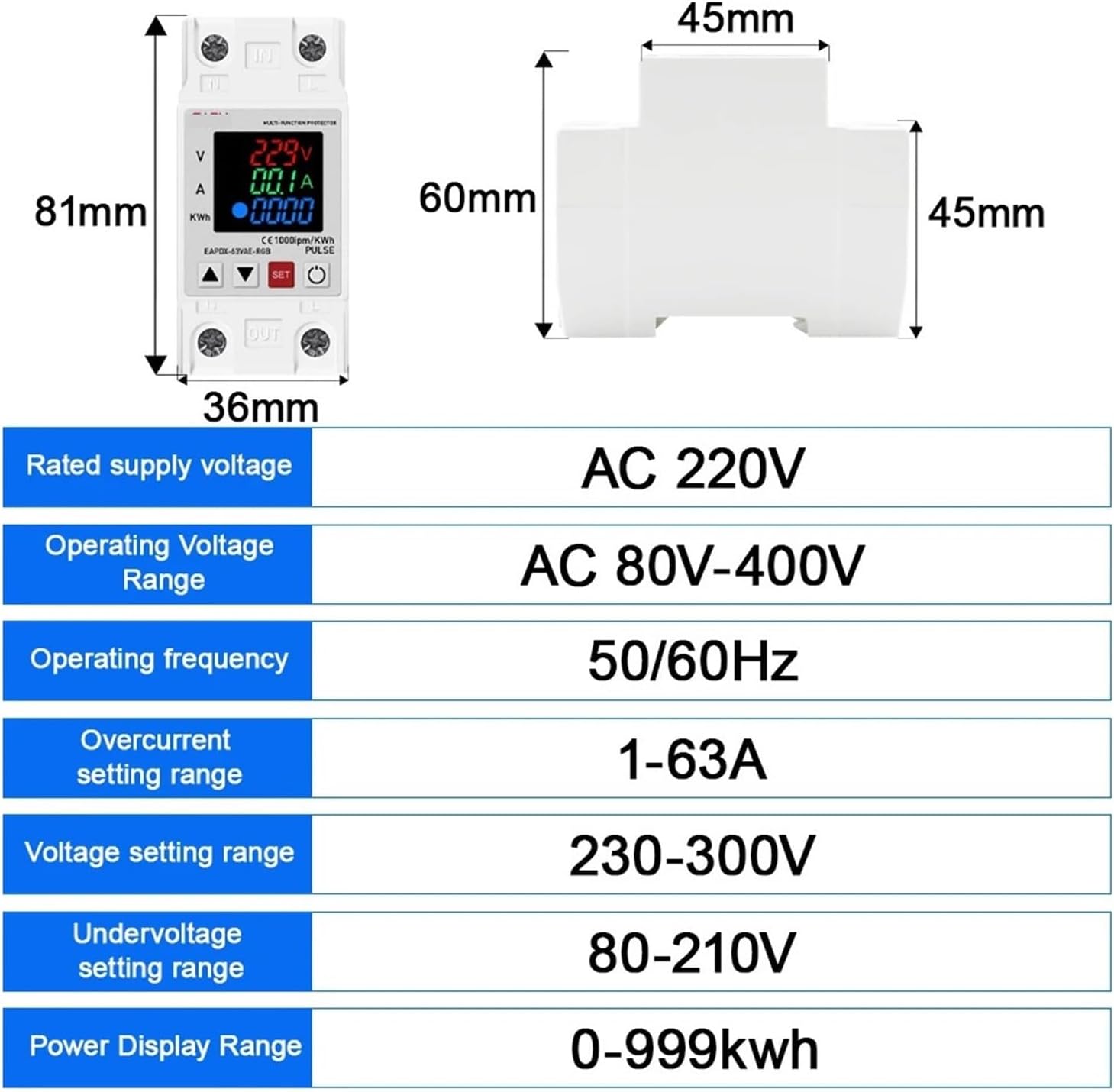
Image 1: Device dimensions and key specifications. This image illustrates the physical dimensions of the protection device and summarizes its main electrical parameters.
| Parameter | Value |
|---|---|
| Rated Supply Voltage | AC 220V |
| Operating Voltage Range | AC 80V-400V |
| Operating Frequency | 50/60Hz |
| Overcurrent Setting Range | 1A-63A (Adjustable) |
| Overvoltage Setting Range | 230V-300V (Adjustable) |
| Undervoltage Setting Range | 80V-210V (Adjustable) |
| Reconnection Time | 1s-600s (Adjustable) |
| Power Display Range | 0-999 KWh |
| Voltage Measurement Tolerance | ±2% |
| Dimensions (H x W x D) | 81mm x 36mm x 60mm |
| Mounting | 35mm Din Rail |
5. Installation and Setup
5.1 Mounting
The EAPDX-63V AE is designed for standard 35mm Din Rail mounting. Ensure the Din Rail is securely installed within an appropriate electrical enclosure.

Image 2: Side view of the device, highlighting the Din Rail mounting mechanism. This view shows the clip used to secure the device onto a standard Din Rail.
5.2 Wiring
Refer to the diagram on the device for correct wiring. The device has clearly marked 'IN' (input) and 'OUT' (output) terminals, along with 'N' (neutral) and 'L' (live) connections.
- Connect the incoming AC 220V power supply to the 'IN' terminals (L for Live, N for Neutral).
- Connect the load (equipment to be protected) to the 'OUT' terminals (L for Live, N for Neutral).
- Ensure all wire connections are tight and properly insulated.

Image 3: Front view of the protection device, showing the display, control buttons, and input/output terminals. The 'IN' terminals are at the top, and 'OUT' terminals are at the bottom.
6. Operation
6.1 Display Overview
The device features a digital display that shows:
- V: Real-time voltage (Volts)
- A: Real-time current (Amperes)
- KWh: Accumulated energy consumption (Kilowatt-hours)
6.2 Control Buttons
The device has four buttons for operation and setting adjustments:
- ▲ (Up Arrow): Used to increase values during setting.
- ▼ (Down Arrow): Used to decrease values during setting.
- SET: Enters/exits setting mode and confirms parameter changes.
- ⏻ (Power/Reset): Manually turns the output on/off or resets fault conditions.
7. Settings Adjustment
To adjust protection parameters:
- Press and hold the SET button for approximately 3 seconds to enter the setting mode. The display will show the first adjustable parameter.
- Use the ▲ (Up) and ▼ (Down) buttons to adjust the value of the displayed parameter.
- Press the SET button briefly to move to the next parameter.
- Repeat steps 2 and 3 for all desired parameters:
- Overvoltage Protection (OV): Range 230V-300V
- Undervoltage Protection (UV): Range 80V-210V
- Overcurrent Protection (OC): Range 1A-63A
- Reconnection Time (RT): Range 1s-600s
- After adjusting the last parameter, press the SET button again to save the changes and exit the setting mode. If no button is pressed for a period, the device will automatically exit setting mode without saving changes.
8. Troubleshooting
| Problem | Possible Cause | Solution |
|---|---|---|
| Device does not power on | No input power; incorrect wiring | Check main power supply; verify wiring connections. |
| Device trips frequently | Protection parameters set too low/high; unstable power supply; faulty load | Adjust protection thresholds; check power quality; inspect connected load for faults. |
| Display shows error code | Internal fault; specific protection triggered | Refer to device specific error codes (if available, not detailed in current info); try power cycling; if persistent, contact support. |
| Output remains off after fault clears | Reconnection time not elapsed; manual reset required | Wait for reconnection time; press the Power/Reset button. |
9. Maintenance
The EAPDX-63V AE is designed for minimal maintenance. However, periodic checks are recommended:
- Ensure the device and its connections are free from dust and debris.
- Periodically check wiring connections for tightness.
- Inspect the device for any signs of physical damage or overheating.
- Clean the display with a soft, dry cloth if necessary. Do not use abrasive cleaners or solvents.
10. Warranty and Support
For warranty information and technical support, please refer to the documentation provided with your purchase or contact your retailer. Keep your purchase receipt as proof of purchase.


