
Motocaddy TR24M1XDMU
Motocaddy M1 DHC Electric Golf Caddy User Manual
Model: M1 DHC (TR24M1XDMU)
Introduction
Thank you for choosing the Motocaddy M1 DHC Electric Golf Caddy. This manual provides essential information for the safe and efficient operation, maintenance, and troubleshooting of your new electric golf caddy. Please read this manual thoroughly before first use and keep it for future reference.
The Motocaddy M1 DHC is designed to enhance your golfing experience with its advanced features, including Automatic Downhill Control (DHC), a compact folding mechanism, and an intuitive LCD screen. Its robust aluminum construction ensures durability and reliable performance on the course.
Safety Information
Always observe the following safety precautions to prevent injury or damage to the product:
- Ensure all components are securely assembled before each use.
- Do not operate the caddy on excessively steep slopes or unstable terrain.
- Keep hands and clothing clear of moving parts, especially wheels and folding mechanisms.
- Always engage the electronic parking brake when stopped on an incline.
- Do not overload the caddy beyond its intended capacity.
- Store the caddy in a dry, cool place away from direct sunlight and extreme temperatures.
- Use only the provided battery and charger.
Package Contents
Verify that all items are present in the package:
- Motocaddy M1 DHC Electric Golf Caddy
- Long-lasting Battery
- Battery Charger
- Cell Phone Device Cradle
- Drink Holder
- Umbrella Holder
- Scorecard Holder
- USB Charging Cable

Image: Overview of the Motocaddy M1 DHC Electric Golf Caddy highlighting key features such as adjustable bag supports, electronic parking brake, LCD screen, USB port, adjustable handle height, cable-free Lithium battery, super-fast compact folding, auto-open stand, Automatic Downhill Control (DHC), High Power 28V system, all-terrain tires, and battery auto-disconnect.
Setup
1. Unfolding the Caddy
- Place the folded caddy on a flat surface.
- Release the main folding latch (refer to diagram for location).
- Gently lift the handle until the caddy fully extends and locks into place. The auto-open stand will deploy automatically.
- Ensure all locking mechanisms are engaged before proceeding.

Image: The Motocaddy M1 DHC Electric Golf Caddy in its compact folded state, showing approximate dimensions of 18.5 inches in width and 25.5 inches in height, and a weight of 23 pounds.
2. Battery Installation and Charging
- Locate the battery compartment on the caddy frame.
- Insert the battery into the compartment. The Click ‘N’ Connect system ensures easy and secure placement.
- Connect the battery to the caddy's power port.
- For initial use, fully charge the battery using the provided charger. Connect the charger to the battery and then to a standard wall outlet. The charger indicator light will show charging status.
- A full charge typically takes several hours. Disconnect the charger once charging is complete.
3. Adjusting Handle Height and Bag Supports
- The handle height can be adjusted to suit your preference. Locate the adjustment mechanism near the base of the handle and secure it at the desired height.
- Adjust the upper and lower bag supports to securely hold your golf bag. Ensure the bag is centered and stable.
Operating Instructions
1. Powering On/Off
- To power on, press and hold the main power button on the handle until the LCD screen illuminates.
- To power off, press and hold the main power button again until the screen turns off.
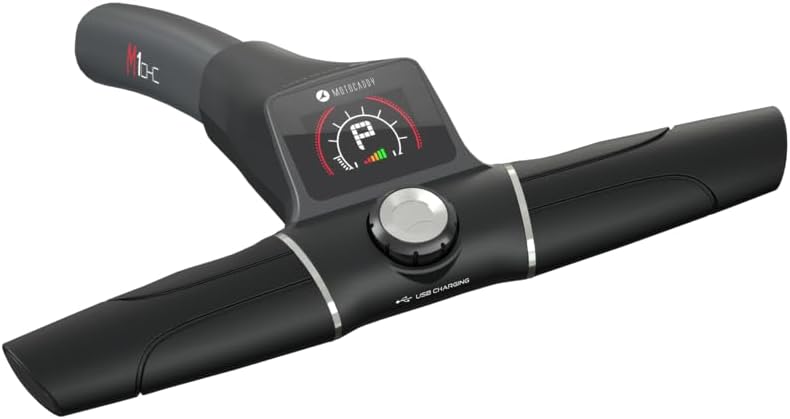
Image: A detailed view of the Motocaddy M1 DHC's handle, showcasing the high-resolution LCD screen, central control dial, and USB charging port. The screen displays battery level and speed settings.
2. Speed Control
- Use the control dial on the handle to adjust the caddy's speed. The M1 DHC offers 9 speed settings.
- Rotate the dial clockwise to increase speed and counter-clockwise to decrease speed.
- The current speed setting will be displayed on the LCD screen.
3. Automatic Downhill Control (DHC)
- The DHC feature automatically maintains a consistent speed when descending slopes, preventing the caddy from running away.
- This feature is always active when the caddy is powered on.
4. Electronic Parking Brake
- To engage the electronic parking brake, press the designated brake button on the handle (refer to diagram).
- The brake is essential for securing the caddy on inclines or when stationary.
- Press the button again to disengage the brake.
5. Distance Control Function
- The M1 DHC allows you to send the caddy a set distance.
- Consult the LCD screen interface for options to set specific distances (e.g., 15, 30, 45 yards).
- Once a distance is selected, the caddy will travel that distance and then stop automatically.
6. USB Charging Port
- A USB charging port is integrated into the handle for convenient charging of your mobile devices during your round.
- Connect your device using the provided USB charging cable.
Maintenance
1. Cleaning
- After each use, wipe down the caddy frame and wheels with a damp cloth to remove dirt and debris.
- Avoid using abrasive cleaners or solvents that could damage the finish.
- Ensure the caddy is dry before folding and storing.
2. Battery Care
- Always fully charge the battery after each use, even if only used for a short period.
- Store the battery in a cool, dry place. If storing for extended periods, charge the battery every 4-6 weeks to maintain its health.
- Do not expose the battery to extreme temperatures.
3. Wheel and Axle Inspection
- Periodically check the wheels and axles for any signs of wear or damage.
- Remove any grass, mud, or debris that may have accumulated around the wheels to ensure smooth operation.

Image: A close-up view of the Motocaddy M1 DHC's all-terrain wheel, showcasing its durable tread pattern designed for various golf course conditions.
Troubleshooting
| Problem | Possible Cause | Solution |
|---|---|---|
| Caddy does not power on. | Battery not connected or discharged. | Ensure battery is securely connected. Charge the battery fully. |
| Caddy stops unexpectedly. | Low battery charge; Obstruction in wheels. | Recharge battery. Check wheels for debris and clear if necessary. |
| Caddy not maintaining speed on downhill. | Electronic parking brake engaged; System malfunction. | Disengage parking brake. If issue persists, contact support. |
| LCD screen is blank or flickering. | Loose connection; Software issue. | Check battery connection. Power cycle the caddy. If issue persists, contact support. |
Specifications
- Model Name: M1 DHC
- Part Number: TR24M1XDMU
- Color: Black
- Material: Aluminum
- Item Weight: 16 Pounds (Caddy only, without battery/accessories)
- Package Weight: 16 Pounds (This seems to be an error in source data, likely refers to caddy weight)
- Folded Dimensions (Approx.): 25.5 inches (Height) x 18.5 inches (Width)
- Motor: Powerful 230W motor
- Speed Settings: 9
- Features: Automatic Downhill Control (DHC), Electronic Parking Brake, LCD Screen, USB Charging Port, Click ‘N’ Connect Battery System, Adjustable Handle Height, Adjustable Bag Supports, All-Terrain Tires.
Warranty and Support
Warranty Information
The Motocaddy M1 DHC Electric Golf Caddy comes with a 24-month warranty from the date of purchase. This warranty covers manufacturing defects in materials and workmanship under normal use. It does not cover damage caused by misuse, accidents, unauthorized modifications, or normal wear and tear.
Please retain your proof of purchase for warranty claims.
Customer Support
For technical assistance, warranty claims, or spare parts, please contact Motocaddy customer support. Refer to the official Motocaddy website for the most up-to-date contact information.
Website: www.motocaddy.com
When contacting support, please have your model name (M1 DHC) and part number (TR24M1XDMU) ready.
Related documentsTR24M1XDMU


Ask a question about this manual
Ask about setup, troubleshooting, compatibility, parts, safety, or missing instructions. Manuals+ will review the question and use this page’s manual context to help answer it.