
Motocaddy M5 GPS DHC (TR24M5GDMU)
Motocaddy M5 GPS DHC Electric Golf Caddy User Manual
Model: M5 GPS DHC (TR24M5GDMU)
Introduction
Welcome to the user manual for your Motocaddy M5 GPS DHC Electric Golf Caddy. This manual provides essential information for the setup, operation, maintenance, and troubleshooting of your new electric golf caddy. Please read this manual thoroughly before using the product to ensure safe and optimal performance. The Motocaddy M5 GPS DHC is designed to enhance your golfing experience with integrated GPS, Downhill Control (DHC) technology, and smart connectivity features.
Product Overview and Features
The Motocaddy M5 GPS DHC is an advanced electric golf caddy equipped with a range of features to assist you on the golf course. Key components and functionalities are highlighted below.
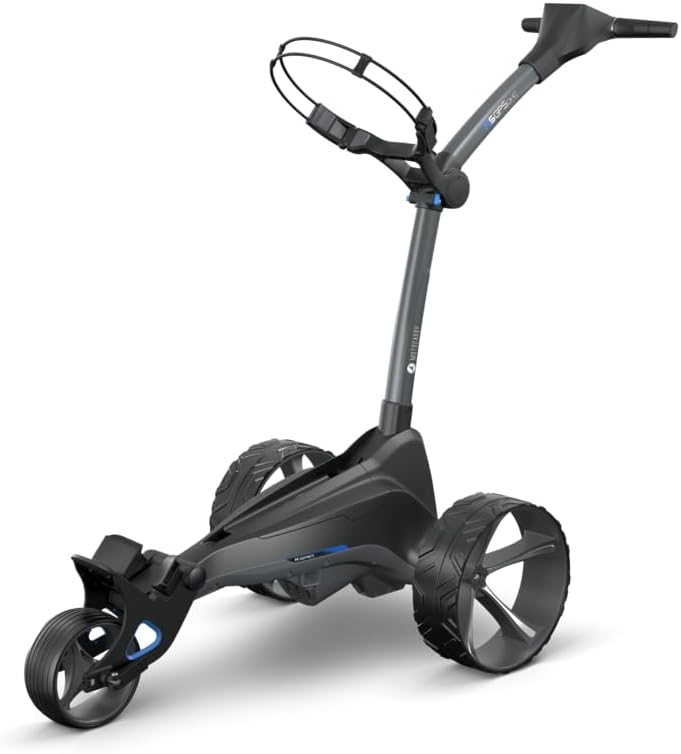
Figure 1: Front view of the Motocaddy M5 GPS DHC Electric Golf Caddy. This image displays the overall design of the caddy, including its three wheels, main frame, and handle with the integrated GPS screen.
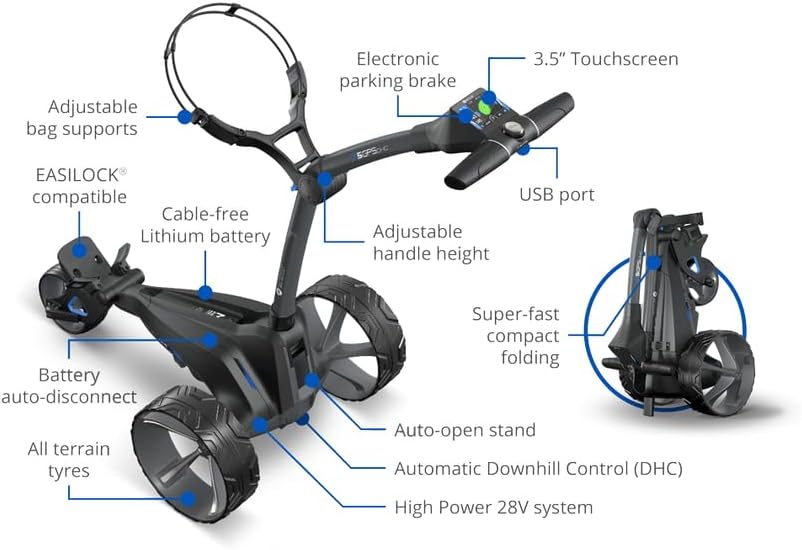
Figure 2: Detailed diagram highlighting key features of the Motocaddy M5 GPS DHC. Labels include adjustable bag supports, EASILOCK® compatibility, cable-free Lithium battery, adjustable handle height, electronic parking brake, 3.5" touchscreen, USB port, super-fast compact folding, auto-open stand, Automatic Downhill Control (DHC), High Power 28V system, all-terrain tires, and battery auto-disconnect.
Key Features:
- 3.5" LCD Touchscreen GPS: Pre-loaded with over 40,000 courses, offering accurate shot measurement, real-time updates, advanced analytics, and dynamic green view.
- Smart Connectivity: Bluetooth connectivity for smartphone notifications (calls, texts, emails, app alerts) directly on the touchscreen. Built-in WiFi for course and system updates.
- Downhill Control (DHC): Dual Motor System ensures constant speed on downhill slopes, providing stability and control on varied terrain.
- Electronic Parking Brake: Maintains stability on steep slopes.
- Compact Folding Design: Simple and super-fast folding mechanism for easy storage and transportation.
- Click 'N' Connect Battery System: Innovative cable-free lithium battery for quick removal and replacement.
- Adjustable Handle Height: Customizable for user comfort.
- USB Charging Port: Convenient for charging mobile devices.
- All-Terrain Tires: Designed for optimal performance across various course conditions.

Figure 3: Close-up view of the Motocaddy M5 GPS DHC's 3.5" LCD touchscreen and surrounding controls. The screen displays golf course information including distances, hazard information, and shot tracking. Other features shown include the electronic parking brake, USB device charging port, and the compact folding mechanism.
Setup
Unfolding the Caddy:
- Place the caddy on a flat, stable surface.
- Release the folding latches (refer to Figure 2 for location).
- Gently lift the handle until the frame locks into its open position. Ensure all locking mechanisms are securely engaged.
- Adjust the handle height to your preferred position using the adjustment mechanism.
Battery Installation and Charging:
- The M5 GPS DHC uses a Click 'N' Connect cable-free lithium battery.
- Ensure the battery is fully charged before first use. Connect the provided charger to the battery and a power outlet. The charging indicator will show the charging status.
- To install, slide the fully charged battery into the designated battery tray until it clicks securely into place. The cable-free design ensures automatic connection.
- To remove, press the release button and slide the battery out.
Attaching Accessories:
The M5 GPS DHC comes with several accessories including a cell phone device cradle, drink holder, umbrella holder, and scorecard holder. Attach these to the designated ports on the caddy's handle or frame as per their individual instructions.
Operating Instructions
Powering On/Off:
- To power on, press and hold the main power button located near the touchscreen until the screen illuminates.
- To power off, press and hold the main power button until the screen shuts down.
Using the Touchscreen GPS:
- Upon powering on, the caddy will automatically search for GPS signal and pre-loaded courses. Select your desired course from the list.
- The 3.5" LCD touchscreen displays front, middle, and back distances to the green, hazard information, and allows for shot distance and score tracking.
- Use the touchscreen to navigate menus, select holes, and access various features like dynamic green view and drag & drop pin positioning.
- Built-in WiFi allows for quick course and system updates. Connect to a local WiFi network via the caddy's settings.

Figure 4: Top-down view of the Motocaddy M5 GPS DHC handle, showcasing the integrated 3.5" touchscreen display and central control knob. The USB charging port is also visible.
Speed Control and Downhill Control (DHC):
- Adjust the caddy's speed using the control knob or touchscreen interface.
- The DHC system automatically maintains a constant speed when descending hills, preventing the caddy from running away. This feature is always active when the caddy is in motion on a decline.
- To engage the electronic parking brake, press the designated button on the handle (refer to Figure 2). This will hold the caddy stationary on slopes.
Smart Connectivity (Bluetooth):
- Pair your smartphone with the caddy via Bluetooth through the settings menu on the touchscreen.
- Once paired, you will receive notifications for calls, texts, emails, and other app alerts directly on the caddy's display.
Maintenance
- Cleaning: Regularly wipe down the caddy frame and wheels with a damp cloth to remove dirt and debris. Avoid using abrasive cleaners or solvents. Ensure the touchscreen is clean for optimal responsiveness.
- Battery Care: Always fully charge the battery after each use. Store the battery in a cool, dry place when not in use. Do not expose the battery to extreme temperatures.
- Storage: When storing the caddy for extended periods, ensure the battery is removed and stored separately. Fold the caddy into its compact form (refer to Figure 5) and store in a dry, protected area.
- Wheel Inspection: Periodically check the wheels for any signs of wear or damage. Ensure they rotate freely and are clear of obstructions.
Troubleshooting
| Problem | Possible Cause | Solution |
|---|---|---|
| Caddy does not power on. | Battery not installed correctly or discharged. | Ensure battery is fully charged and securely seated in the Click 'N' Connect tray. |
| GPS not acquiring signal. | Poor satellite reception or outdated course data. | Move to an open area. Connect to WiFi and update course data via the caddy's settings. |
| Caddy not moving smoothly. | Obstruction in wheels or low battery. | Check wheels for debris. Ensure battery is adequately charged. |
| Touchscreen unresponsive. | Screen is dirty or temporary software glitch. | Clean the screen with a soft cloth. Try restarting the caddy. |
If you encounter issues not listed here, or if solutions do not resolve the problem, please contact Motocaddy customer support.
Specifications
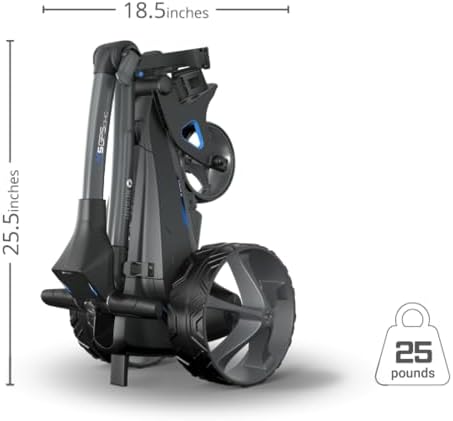
Figure 5: Dimensions of the Motocaddy M5 GPS DHC in its folded, compact state. The image indicates a height of 25.5 inches and a width of 18.5 inches, with a weight of 25 pounds.
| Attribute | Detail |
|---|---|
| Model Name | M5 GPS DHC |
| Part Number | TR24M5GDMU |
| Item Weight | 16 Pounds (Note: Product specifications list 16 lbs, while an image indicates 25 lbs for the folded caddy. Please refer to official product documentation for precise weight.) |
| Material | Aluminum |
| Color | Black |
| Item Package Dimensions (L x W x H) | 36 x 14 x 12 inches |
| Suggested Users | Unisex-adult |
| Included Components | Push cart, remote, cell phone device cradle, drink holder, umbrella holder, scorecard holder, USB charging cable, long-lasting battery and charger. |
Warranty and Support
Warranty Information:
The Motocaddy M5 GPS DHC Electric Golf Caddy comes with a 2-year warranty. Please retain your proof of purchase for warranty claims. For detailed terms and conditions, refer to the warranty card included with your product or visit the official Motocaddy website.
Customer Support:
For technical assistance, spare parts, or any inquiries regarding your Motocaddy M5 GPS DHC, please contact Motocaddy customer support directly. Contact information can typically be found on the official Motocaddy website or on the packaging materials.
Official Motocaddy Website: www.motocaddy.com
Related documentsM5 GPS DHC (TR24M5GDMU)


Ask a question about this manual
Ask about setup, troubleshooting, compatibility, parts, safety, or missing instructions. Manuals+ will review the question and use this page’s manual context to help answer it.