
Introduction
This manual provides detailed instructions for the Totum PAW Patrol Craft Set 2 in 1. This kit allows you to engage in two distinct creative activities: making 3D cards with mosaic stickers and crafting and painting plaster pendants featuring your favorite PAW Patrol characters. Please read all instructions carefully before beginning to ensure a safe and enjoyable crafting experience.
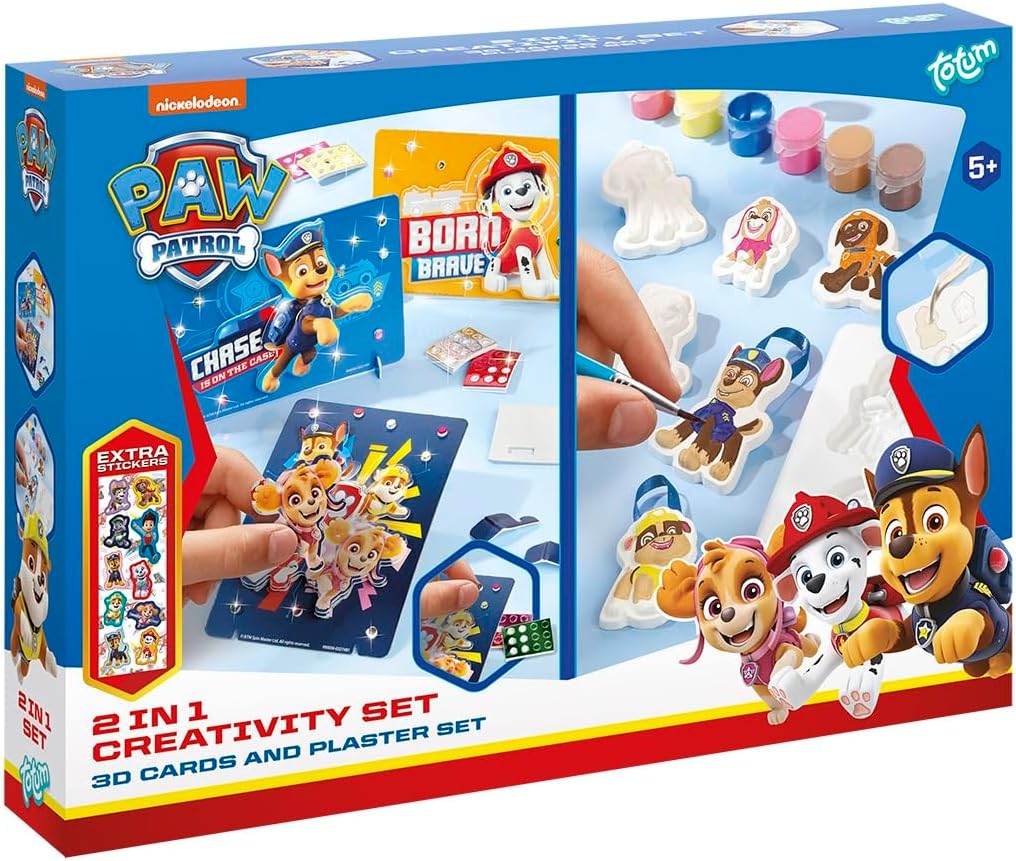
Image: The Totum PAW Patrol Craft Set 2 in 1 box, illustrating both the 3D card making and plaster pendant activities.
What's Included:
- Plaster material
- Plaster molds (6 PAW Patrol characters)
- 6 colors of paint
- Paintbrush
- Pendant hangers (for plaster figures)
- 3D cards
- Mosaic stickers
- Instructions (this manual)
Safety Information
This craft set is recommended for children aged 5 years and older. Adult supervision is advised, especially during the plaster mixing and painting stages. Keep all materials out of reach of very young children. Do not ingest plaster or paint. Wash hands thoroughly after use.
Setup
- Prepare Your Workspace: Choose a clean, flat surface that can be easily cleaned. Cover the surface with newspaper or a protective mat to prevent spills or stains.
- Gather Materials: Ensure all components listed in the 'What's Included' section are present.
- Wear Appropriate Clothing: It is advisable to wear old clothes or an apron to protect against paint or plaster stains.
Operating Instructions: Plaster Making Kit
Step 1: Prepare the Plaster

Image: Components for the plaster making activity, showing the plaster powder bag, character molds, paint pots, and a paintbrush.
- Carefully open the plaster powder bag.
- In a separate mixing container (not included), gradually add water to the plaster powder while stirring. Aim for a smooth, thick consistency, similar to pancake batter. Avoid making it too watery.
- Mix thoroughly to remove any lumps.
Step 2: Pour into Molds
- Carefully pour the mixed plaster into the PAW Patrol character molds. Fill each mold completely to the top.
- Gently tap the mold on your workspace a few times to release any air bubbles and ensure the plaster settles evenly.
Step 3: Drying and Demolding
- Allow the plaster to dry completely. This can take several hours, depending on humidity and temperature. The plaster will feel hard and dry to the touch when ready.
- Once dry, carefully flex the mold to release the plaster figures. Be gentle to avoid breaking the delicate parts.
Step 4: Painting the Pendants

Image: Six finished and painted PAW Patrol plaster pendants, each with a blue ribbon for hanging.
- Use the provided paintbrush and 6 colors of paint to decorate your PAW Patrol plaster figures.
- Allow the paint to dry thoroughly before handling or adding the pendant hangers.
Step 5: Adding Hangers

Image: A pair of hands holding several small, painted PAW Patrol plaster figures, showcasing their size and detail.
- Once the paint is dry, insert the provided pendant hangers into the designated holes at the top of each plaster figure.
- Your PAW Patrol pendants are now ready to be displayed or given as gifts.
Operating Instructions: 3D Cards and Mosaic Stickers
Step 1: Select a Card

Image: A collection of PAW Patrol themed 3D cards, featuring different characters and designs, ready for decoration.
- Choose one of the luxurious 3D cards you wish to decorate.
Step 2: Apply Mosaic Stickers

Image: A sheet of mosaic stickers featuring various PAW Patrol characters, designed for decorating the 3D cards.
- Peel off the mosaic stickers from the provided sheet.
- Carefully place the stickers onto the designated areas of the 3D card. Press firmly to ensure good adhesion.
- You can follow the patterns on the cards or create your own unique designs.
Step 3: Display Your Creation

Image: Four completed PAW Patrol 3D cards, each standing upright on a small display stand, showcasing the finished mosaic designs.
- Once all stickers are applied, your 3D card is complete.
- These cards can be displayed using the included stands (if applicable) or given to friends and family.
Maintenance
- Cleaning Tools: Wash the paintbrush thoroughly with water immediately after use to prevent paint from drying on the bristles.
- Storage: Store any unused plaster powder, paints, and stickers in their original packaging in a cool, dry place away from direct sunlight. Keep finished plaster figures and cards away from moisture to preserve their quality.
Troubleshooting
- Plaster not setting: Ensure the correct water-to-plaster ratio was used. Too much water can prevent proper setting. Allow ample drying time in a well-ventilated area.
- Plaster figures breaking during demolding: Ensure the plaster is completely dry and hard before attempting to remove it from the mold. Flex the mold gently rather than pulling forcefully.
- Stickers not adhering: Ensure the card surface is clean and dry before applying stickers. Press firmly on each sticker to secure it.
Specifications
| Feature | Detail |
|---|---|
| Brand | Totum |
| Model Number | B0DJL71CSC |
| Age Range (Description) | Kid (5+ years) |
| Color | Blue and Red (packaging/theme) |
| Theme | Cartoon (PAW Patrol) |
| Item Dimensions (L x W x H) | 12.99 x 10.24 x 2.36 inches |
| Item Weight | 0.42 Kilograms |
| Number of Pieces | 12 (approximate, referring to main components) |
| Material Type | Plaster, Mosaic Stickers |
| Paint Type | Acrylic |
Warranty and Support
For any questions, concerns, or issues regarding your Totum PAW Patrol Craft Set, please contact the manufacturer directly through their official website or the retailer from whom the product was purchased. Please retain your proof of purchase for any warranty claims.
