
Introduction
This manual provides essential information for the safe and efficient operation of your Acekool DFL 50ED Dehumidifier. Please read these instructions thoroughly before using the appliance and retain them for future reference. This dehumidifier is designed to remove excess moisture from indoor air, helping to create a more comfortable and healthy environment in spaces up to 4,500 square feet.
Important Safety Instructions
To reduce the risk of fire, electric shock, or injury, always follow these basic precautions:
- Read all instructions before using the appliance.
- Ensure the power supply matches the voltage specified on the rating label.
- Do not operate the dehumidifier with a damaged cord or plug.
- Always place the unit on a level, stable surface to prevent tipping.
- Maintain at least 8 inches (20 cm) of clearance around the unit for proper airflow.
- Do not insert objects into the air inlet or outlet.
- Unplug the appliance before cleaning or performing any maintenance.
- Do not use the dehumidifier in areas where flammable liquids or gases are stored.
- Keep children and pets away from the appliance during operation.
Product Overview
Familiarize yourself with the components of your Acekool DFL 50ED Dehumidifier.
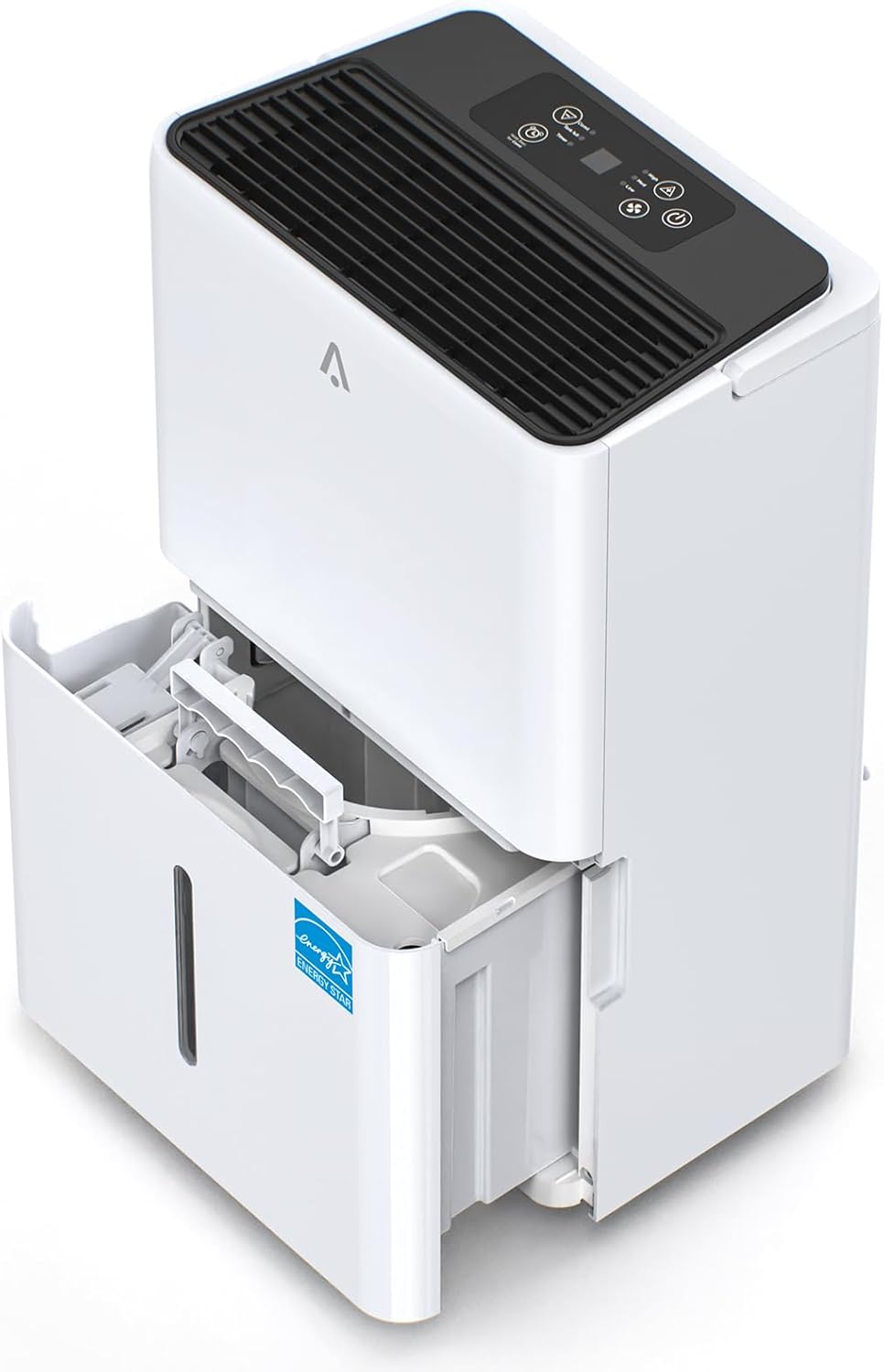
Figure 1: Acekool DFL 50ED Dehumidifier with its water collection tank partially extended.

Figure 2: Key features including dimensions (15.4"L x 10.6"W x 24.1"H), 2.18 Gallon water tank, washable filter, and drain hose connection.

Figure 3: Detailed views of the hidden handle, continuous drain hose, 360-degree movable wheels, and the drainage outlet.
Control Panel
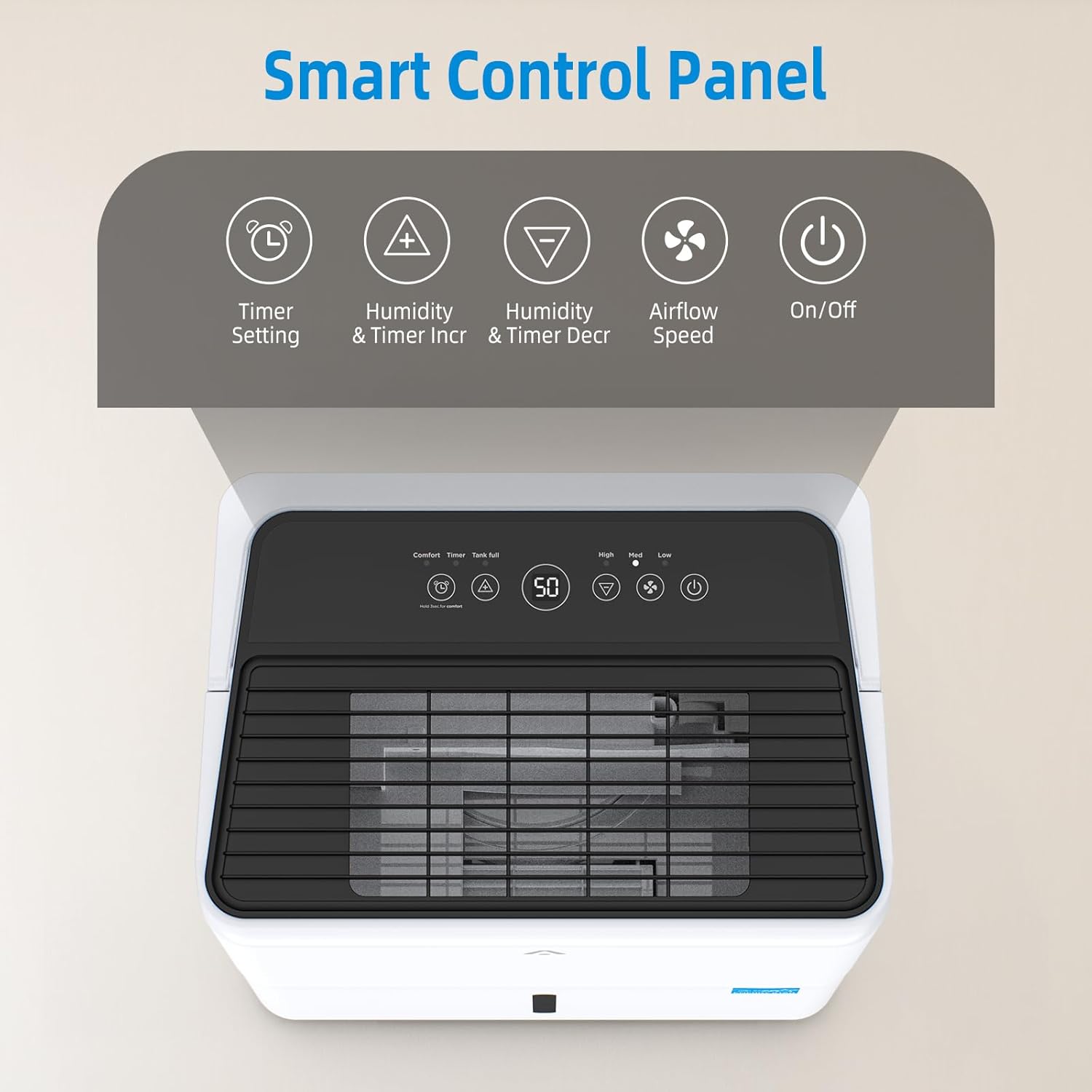
Figure 4: The smart control panel located on the top of the unit.

Figure 5: Detailed functions of the control panel buttons, including Timer Setting, Humidity/Timer Increment, Humidity/Timer Decrement, Airflow Speed, and On/Off.
- Power Button: Turns the unit On or Off.
- Timer Button: Sets the auto-on or auto-off timer.
- Humidity Increase/Decrease Buttons: Adjusts the desired humidity level.
- Fan Speed Button: Selects between High, Medium, and Low fan speeds.
- Comfort Mode: Hold the Timer button for 3 seconds to enter/exit Comfort mode, which automatically sets humidity to an optimal level.
- Tank Full Indicator: Illuminates when the water tank is full and requires emptying.
Setup
- Placement: Place the dehumidifier on a firm, level surface in an area where the temperature will not fall below 41°F (5°C). Ensure there is at least 8 inches (20 cm) of air space on all sides of the unit for proper air circulation. Avoid placing it near heat sources or in direct sunlight.
- Power Connection: Plug the power cord into a grounded electrical outlet.
- Drainage Options: Your dehumidifier offers two drainage methods:
- Manual Emptying: The unit will collect water in the 8.3L (2.18 Gallon) removable water tank. When the tank is full, the unit will automatically shut off, and an indicator light will flash. Empty the tank and reinsert it properly to resume operation.
- Continuous Drainage: For extended operation without manual emptying, attach the included 16.4-foot drain hose to the continuous drainage outlet on the back of the unit. Ensure the hose is sloped downwards to allow gravity to drain water into a suitable floor drain or larger container.
Operating Instructions
- Power On/Off: Press the Power button to turn the dehumidifier on or off.
- Setting Desired Humidity: Use the Humidity Increase or Decrease buttons to set your desired humidity level, ranging from 35% to 85% relative humidity (RH). The unit will operate until the set humidity is reached, then cycle on and off to maintain it. A recommended range for comfort is 45% to 55% RH.
- Fan Speed: Press the Fan Speed button to cycle through High, Medium, and Low fan speeds. Higher speeds remove moisture faster but may produce more noise. The unit operates at approximately 49 dB for quiet performance.
- Timer Function: Press the Timer button to set an auto-on or auto-off time from 1 to 24 hours. Use the Humidity Increase/Decrease buttons to adjust the time.
- Comfort Mode: Press and hold the Timer button for 3 seconds to activate Comfort Mode. In this mode, the dehumidifier automatically adjusts its operation to maintain an optimal humidity level for comfort. Hold the button again for 3 seconds to exit.
- Auto Defrost: The unit features an Auto Defrost function that automatically activates when frost builds up on the evaporator coils, ensuring efficient operation in cooler environments and extending the unit's lifespan.
- Dry Clothes Function: This mode is designed to assist in drying clothes by continuously operating at a high fan speed to remove moisture from the air.
- Automatic Shutdown Protection: When the water tank is full, the dehumidifier will automatically shut off. An alarm will sound, and the "Tank Full" indicator light will flash. The unit will not resume operation until the water tank is emptied and correctly reinserted.

Figure 6: The dehumidifier's control panel displaying the 'Tank full' warning, indicating automatic shutdown protection.
Maintenance
Regular maintenance ensures optimal performance and longevity of your dehumidifier.
- Emptying the Water Tank: When the "Tank Full" indicator illuminates, carefully remove the water tank from the front of the unit. Dispose of the collected water and slide the tank back into place until it clicks securely.
- Cleaning the Air Filter: The washable, detachable filter should be cleaned every two weeks or more frequently depending on usage and air quality.
- Turn off and unplug the dehumidifier.
- Remove the filter from its slot (refer to Figure 2 for location).
- Wash the filter with warm, soapy water. Rinse thoroughly.
- Allow the filter to air dry completely before reinserting it into the unit. Do not use a dryer or direct heat.
- Cleaning the Exterior: Wipe the exterior of the unit with a soft, damp cloth. Do not use harsh chemicals or abrasive cleaners.
- Storage: If storing the unit for an extended period, ensure the water tank is empty and clean, and the filter is clean and dry. Coil the power cord neatly and store the unit in an upright position in a cool, dry place.
Troubleshooting
Review the following common issues and their solutions before contacting customer support.
| Problem | Possible Cause | Solution |
|---|---|---|
| Dehumidifier does not turn on. | No power; Water tank full or improperly inserted; Temperature too low. | Check power cord connection; Empty and reinsert water tank correctly; Ensure room temperature is above 41°F (5°C). |
| Unit runs but does not collect water. | Humidity setting too high; Room temperature too low; Air filter clogged; Air inlet/outlet blocked. | Lower the desired humidity setting; Ensure room temperature is adequate; Clean the air filter; Clear any obstructions around the unit. |
| Unit is noisy. | Unit not on a level surface; Air filter clogged; Fan obstruction. | Place on a firm, level surface; Clean the air filter; Check for any foreign objects near the fan. |
| Water leaks from the unit. | Water tank improperly seated; Continuous drain hose not connected securely or clogged. | Ensure water tank is fully inserted; Check continuous drain hose for secure connection and clear any blockages. |
Specifications
Technical details for the Acekool DFL 50ED Dehumidifier.
| Feature | Specification |
|---|---|
| Brand | Acekool |
| Model Name | DFL 50ED |
| Floor Area Coverage | Up to 4500 Square Feet |
| Moisture Removal Capacity | 50 Pints/Day (65℉, 60% RH) |
| Water Tank Capacity | 8.3 Liters (2.18 Gallons) |
| Product Dimensions (D x W x H) | 17.09" x 12.91" x 25.67" |
| Item Weight | 42.9 Pounds |
| Special Feature | Portable, Intelligent Humidity Control, Auto Defrost, Dry Clothes Function, 24H Timer |
| Energy Efficiency | ENERGY STAR Certified |
| UPC | 198723318578 |
Warranty and Customer Support
For warranty information or technical assistance, please refer to the warranty card included with your product or visit the official Acekool website. You may also contact Acekool customer support directly for further assistance.