1. Introduction and Safety Information
This manual provides essential instructions for the safe operation, setup, maintenance, and troubleshooting of your Haxiaoer HXC550D Plasma Cutter. Please read this manual thoroughly before operating the machine to ensure proper use and to prevent injury or damage.
Important Safety Precautions:
- Always wear appropriate personal protective equipment (PPE), including welding helmet, gloves, and protective clothing.
- Ensure proper ventilation to avoid inhaling fumes.
- Do not operate the machine in damp or wet conditions.
- Keep children and unauthorized personnel away from the work area.
- Disconnect power before performing any maintenance or changing consumables.
- Use only genuine Haxiaoer replacement parts and consumables.
2. Product Overview and Features

Image: The Haxiaoer HXC550D plasma cutter in operation, showcasing its main features including the non-touch pilot arc, smart fan, 2T/4T function, and high-frequency sensor for efficient metal cutting.
The Haxiaoer HXC550D is a 240V, 55 Amp non-touch pilot arc plasma cutter designed for efficient cutting of conductive metals. It features an advanced LED display and air sensor technology for precise control.
Key Features:
- Non-Touch Pilot Arc: Enables cutting from any point on the metal surface, ideal for rusty, painted, or rough materials. Suitable for standard steel, stainless steel, aluminum, copper, brass, and titanium.
- LED Display: Updated interface centrally displays parameters like voltage and current, allowing for easy adjustment and monitoring without removing your helmet.
- 2T/4T Automatic Cutting Function: Provides hands-free operation for improved cutting experience and reduced user fatigue.
- Air Sensor Technology: Ensures precise air pressure and gas flow control. Supports pre-cut gas detection for proper gas circulation and features a 2-15 second post-flow to extend machine life.
- 55 Amp Output: Utilizes updated low-frequency MCU technology for a constant 55A current, capable of cutting metal up to 10mm thick with a maximum cutting capacity of 18mm.
Included Components (Packing List):

Image: The Haxiaoer HXC550D plasma cutter with its complete set of accessories, including the ground clamp, air filter, AG60 cutting torch, gas hose, and torch consumables, neatly arranged for inspection.
- 1 x HXC550D Plasma Cutter
- 1 x Ground Clamp
- 1 x Air Filter
- 1 x AG60 Cutting Torch (5 meters)
- 1 x Gas Hose
- 2 x Torch Consumables (additional)
- 1 x Instruction Manual
- Mounting Bracket (for torch)
3. Setup Instructions
- Unpacking: Carefully remove all components from the packaging. Inspect for any damage during transit.
- Power Connection: Connect the plasma cutter to a suitable 240V power supply. Ensure the power outlet is properly grounded and rated for the machine's current draw.
- Air Compressor Connection:
- Attach the air filter to the designated air inlet on the plasma cutter.
- Connect the gas hose from the air filter to your air compressor. Ensure all connections are secure and leak-free.
- Set the air compressor output pressure according to the recommended settings for your cutting application (refer to the "Operating Instructions" section). The air sensor technology will assist in maintaining optimal flow.
- Torch and Ground Clamp Connection:
- Connect the AG60 cutting torch to the front panel of the plasma cutter. Ensure it is securely fastened.
- Connect the ground clamp cable to the designated terminal on the plasma cutter.
- Attach the ground clamp firmly to the workpiece or work table, ensuring good electrical contact.
- Initial Check: Before powering on, double-check all connections and ensure the work area is clear and safe.
4. Operating Instructions
Follow these steps for safe and effective operation of your Haxiaoer HXC550D Plasma Cutter.
4.1 Powering On and Display Overview
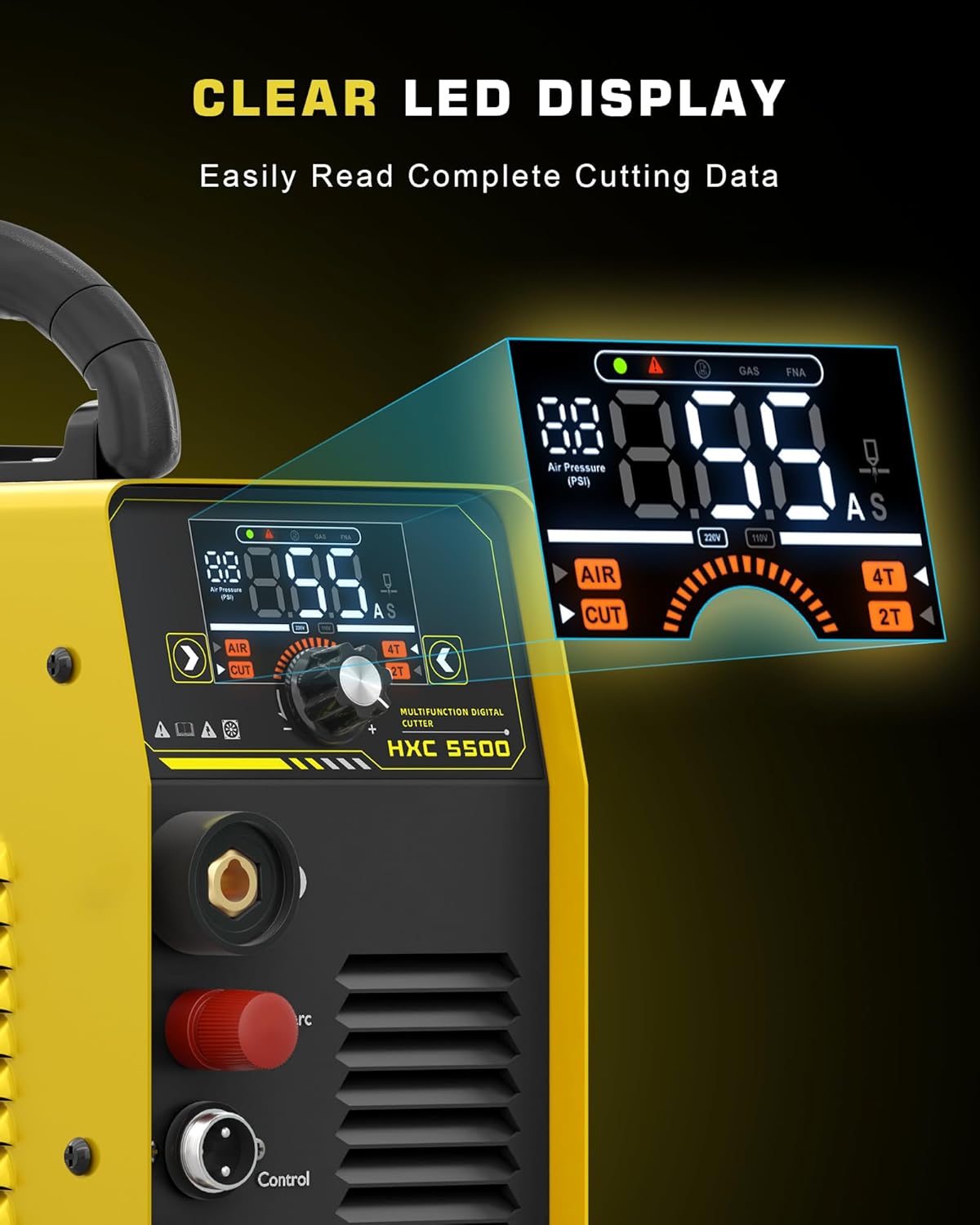
Image: A detailed view of the HXC550D's LED display, showing digital readouts for air pressure, current (Amps), and voltage, along with indicators for 2T/4T modes and gas flow.
- Turn on the main power switch on the plasma cutter.
- The LED display will illuminate, showing current settings for voltage, current (Amps), and air pressure.
- Adjust the current (Amps) using the control knob on the front panel according to the material thickness and type. The display provides real-time feedback.
4.2 Non-Touch Pilot Arc Operation

Image: The HXC550D plasma cutter in operation, showcasing its non-touch pilot arc capability on different metal surfaces, including rusted steel, painted steel, stainless steel, and aluminum, with examples of cut thicknesses.
- The non-touch pilot arc allows you to start cutting without direct contact between the torch tip and the workpiece.
- This feature is particularly useful for cutting painted, rusted, or uneven surfaces, as it eliminates the need for surface preparation.
- Simply position the torch approximately 1-2mm above the workpiece and press the trigger to initiate the pilot arc.
4.3 2T/4T Cutting Function

Image: A close-up of the HXC550D's control panel, specifically showing the selector switch for 2T (Two-Touch) and 4T (Four-Touch) cutting modes, indicating user control over torch operation.
- 2T (Two-Touch) Mode: Press and hold the torch trigger to start cutting. Release the trigger to stop cutting. This mode is suitable for short cuts.
- 4T (Four-Touch) Mode: Press and release the torch trigger to start cutting. The arc will remain active. Press and release the trigger again to stop cutting. This mode is ideal for long cuts, reducing hand fatigue.
- Select the desired mode using the 2T/4T switch on the control panel.
4.4 Cutting Procedure

Image: A Haxiaoer HXC550D plasma cutter actively cutting a thick metal plate, generating bright sparks and molten metal, demonstrating its 55 Amp cutting capability.
- Ensure the workpiece is clean and the ground clamp is securely attached.
- Adjust the cutting current (Amps) based on the material type and thickness.
- Position the torch tip correctly (1-2mm above for non-touch pilot arc).
- Press the torch trigger to initiate the arc. Move the torch steadily along the desired cut line. Maintain a consistent travel speed for a clean cut.
- Observe the cut quality. Adjust current or travel speed as needed.
- After cutting, the machine will engage a post-flow of gas for 2-15 seconds to cool the torch and extend its lifespan.
5. Maintenance
Regular maintenance ensures the longevity and optimal performance of your plasma cutter.
5.1 Daily Maintenance:
- Inspect the torch consumables (electrode, nozzle, shield cup) for wear and replace if necessary.
- Check the ground clamp and cables for damage or loose connections.
- Empty any water from the air filter/regulator bowl.
- Clean the exterior of the machine to prevent dust and debris buildup.
5.2 Periodic Maintenance:
- Inspect the internal components for dust accumulation. Use compressed air to gently clean the interior if needed (ensure power is disconnected).
- Check all electrical connections for tightness.
- Examine the gas hose for cracks or leaks.
Note: Always disconnect the power supply before performing any maintenance procedures.
6. Troubleshooting
This section provides solutions to common issues you might encounter.
| Problem | Possible Cause | Solution |
|---|---|---|
| No power to the machine. | Power cord disconnected, circuit breaker tripped, faulty power switch. | Check power cord connection. Reset circuit breaker. Contact support if switch is faulty. |
| Pilot arc does not ignite. | Insufficient air pressure, worn consumables, poor ground connection, torch not connected properly. | Check air pressure and compressor. Replace torch consumables. Ensure ground clamp is secure. Reconnect torch. |
| Poor cut quality (rough, dross). | Incorrect cutting speed, wrong current setting, worn consumables, improper air pressure. | Adjust cutting speed. Verify current setting for material. Replace consumables. Check air pressure. |
| Machine overheats and shuts down. | Exceeded duty cycle, blocked ventilation, high ambient temperature. | Allow machine to cool down. Ensure clear ventilation. Operate in a cooler environment. |
If you encounter problems not listed here or if solutions do not resolve the issue, please contact Haxiaoer customer support.
7. Specifications
| Parameter | Value |
|---|---|
| Model Number | HXC550D |
| Brand | Haxiaoer |
| Input Voltage | 240V |
| Output Current | 55 Amp (Constant) |
| Max Cutting Thickness | 18 mm |
| Clean Cut Thickness | 10 mm |
| Product Dimensions (L x W x H) | 31 x 12.99 x 22 cm |
| Item Weight | 6.8 kg |
| Material | Iron |
| Power Source Type | DC |
| Torch Type | AG60 (5-meter cable) |
8. Warranty and Support
Haxiaoer products are manufactured to high-quality standards. For warranty information or technical support, please refer to the warranty card included with your product or contact Haxiaoer customer service directly.
If you encounter any issues with your HXC550D plasma cutter, please do not hesitate to contact us. Our support team is ready to assist you.
Contact Information: Please refer to the official Haxiaoer website or your purchase documentation for the most up-to-date contact details.