
1. Introduction
This manual provides comprehensive instructions for the DOYO Wireless Gaming Guitar Controller, model KT602. It covers product features, setup procedures, operational guidelines, maintenance tips, and troubleshooting information. Please read this manual thoroughly before using the product to ensure proper function and longevity.
2. Product Overview
2.1 Components
- Wireless Guitar Controller
- USB Wireless Receiver (Dongle)
- Adjustable Shoulder Strap
2.2 Features
- Wireless Connectivity: Utilizes 2.4G RF technology for stable wireless connections up to 7 meters.
- Multi-Platform Compatibility: Supports PS4, PS3, and PC (Windows 10/11).
- Detachable Neck: Allows for easy assembly, disassembly, and storage.
- Ergonomic Design: Lightweight and durable construction with responsive fret buttons.
- Power Management: Operates on 4 AA batteries with an easy-to-use power switch.

Image 2.2.1: Labeled diagram of the DOYO Wireless Gaming Guitar Controller and its USB receiver. Key components such as the strum bar, fret buttons, game mode button, power switch, and battery compartment are indicated.

Image 2.2.2: Illustration of the detachable guitar neck mechanism for compact storage and the adjustable guitar strap for user comfort.
3. Setup
3.1 Battery Installation
- Locate the battery compartment on the back of the guitar controller.
- Open the battery compartment cover.
- Insert 4 AA batteries, ensuring correct polarity (+/-).
- Close the battery compartment cover securely.
3.2 Connecting the USB Receiver
- Plug the USB wireless receiver into an available USB port on your PS4, PS3, or PC.
- Turn on the guitar controller using the power switch.
- The controller should automatically connect to the receiver. No manual pairing is typically required.

Image 3.2.1: Illustration of the wireless connection setup for the PS4 console, showing the guitar controller, USB receiver, and PS4 unit.

Image 3.2.2: Illustration of the wireless connection setup for the PS3 console, showing the guitar controller, USB receiver, and PS3 unit.

Image 3.2.3: Illustration of the wireless connection setup for a PC, showing the guitar controller, USB receiver, and various PC setups (desktop, laptop, iMac).
4. Operating Instructions
4.1 Game Compatibility
The DOYO Wireless Gaming Guitar Controller is compatible with various music rhythm games across different platforms:
- PS4: Supports Guitar Hero Live. Note: Not compatible with Rock Band 4.
- PS3: Compatible with Guitar Hero III: Legends of Rock and Guitar Hero: World Tour.
- PC (Windows 10/11): Works with Fortnite Festival and Clone Hero.
The controller also supports a 2-player mode for compatible games.
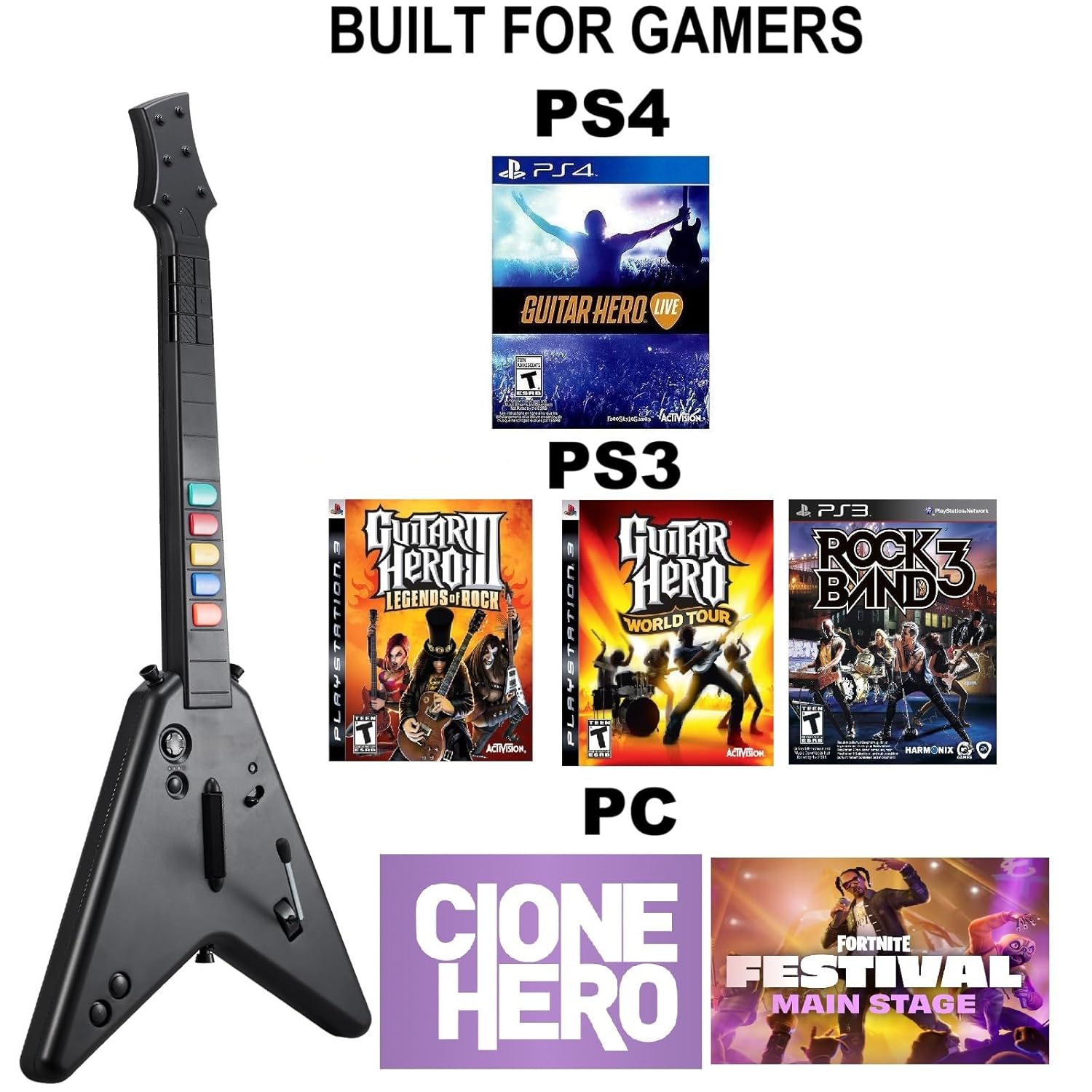
Image 4.1.1: Overview of game compatibility across PS4 (Guitar Hero Live), PS3 (Guitar Hero III, Guitar Hero World Tour, Rock Band 3), and PC (Clone Hero, Fortnite Festival).
4.2 PC Specific Notes
When connected to a PC running Windows 10 or Windows 11, the guitar controller automatically activates a keyboard and mouse mode for game input. Windows 7 is not supported.
5. Power Management
The guitar controller is powered by 4 AA batteries. To conserve battery life, always turn off the controller using the power switch when not in use. Replace batteries when performance degrades.
6. Maintenance
To maintain your DOYO Wireless Gaming Guitar Controller:
- Keep the controller clean by wiping it with a soft, dry cloth.
- Avoid exposing the controller to extreme temperatures, moisture, or direct sunlight.
- Store the controller in a safe place when not in use, ideally disassembled to prevent damage.
- Remove batteries if the controller will not be used for an extended period to prevent leakage.
7. Troubleshooting
- Controller Not Connecting:
- Ensure the USB receiver is securely plugged into the console/PC.
- Verify that the guitar controller is powered on and has fresh batteries.
- Try plugging the USB receiver into a different USB port.
- Restart the console/PC and the guitar controller.
- Buttons Unresponsive or Lagging:
- Check battery levels and replace if necessary.
- Ensure the controller is within the 7-meter operating range of the USB receiver.
- Minimize interference from other wireless devices.
- PC Mouse/Keyboard Interference:
- On PC, the guitar controller may emulate keyboard and mouse inputs. If your mouse or keyboard becomes unresponsive, temporarily disconnect the USB receiver or power off the guitar controller when not actively playing. Reconnecting the mouse/keyboard or restarting the PC may resolve the issue.
8. Specifications
| Model Number | KT602 |
| Connectivity | 2.4G RF Wireless |
| Operating Range | Up to 7 meters |
| Power Source | 4 x AA Batteries |
| Compatible Platforms | PS4, PS3, PC (Windows 10/11) |
| Item Weight | 2.86 pounds (approx. 1.3 kg) |
| Package Dimensions | 18.15 x 15.16 x 3.27 inches (approx. 46.1 x 38.5 x 8.3 cm) |
9. Warranty and Support
For warranty information or technical support, please refer to the product packaging or contact DOYO customer service directly through their official website or the retailer where the product was purchased.
