
1. Introduction
Thank you for choosing the Vtopek 10.26" 4K Portable Carplay Android Auto Display. This device integrates wireless Apple CarPlay and Android Auto functionalities with advanced camera features, enhancing your driving experience with smart navigation, entertainment, and safety. This manual provides detailed instructions for installation, operation, and maintenance of your new device.

Figure 1: Vtopek 10.26" 4K Portable Carplay Android Auto Display
2. Package Contents
Please verify that all items are present in the package:
- 1x Vtopek 10.26" Carplay Display
- 1x 1080p Rear Camera
- 1x 64GB SD Card
- 1x Power Cord (for cigarette lighter)
- 1x AUX Cable
- 1x Display Stand
- 1x Long Suction Cup Mount
- 1x 10m Extension Cable (for rear camera)
- 1x User Manual
3. Setup and Installation
The Vtopek Carplay Display is designed for easy, plug-and-play installation without requiring modifications to your vehicle. It is compatible with most 7-36V vehicles.
3.1 Mounting the Display
The device includes both a suction cup mount and an adhesive mount, offering flexible placement options on your dashboard or windshield. The exclusive bracket design ensures stability and prevents slippage during driving.
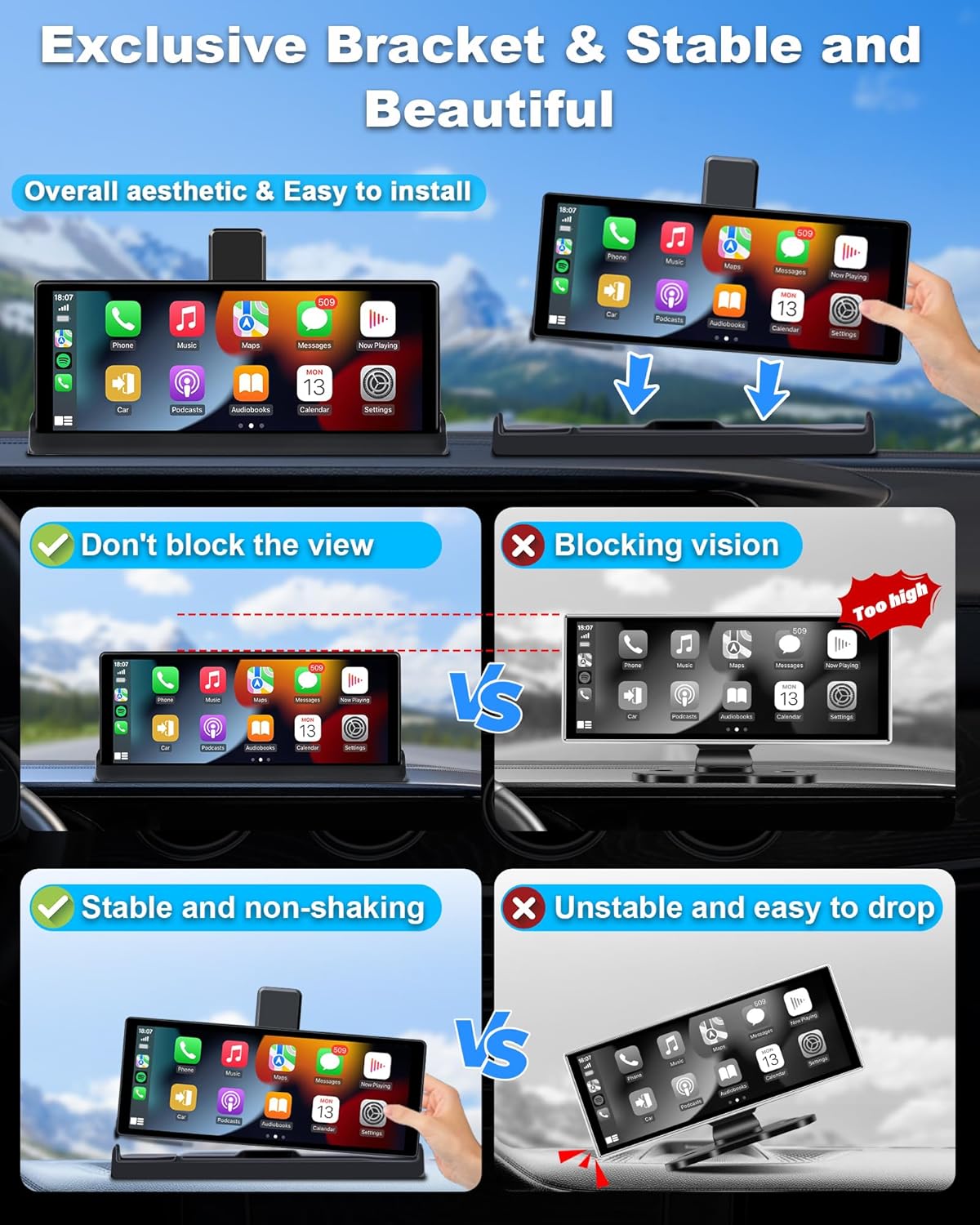
Figure 2: Stable Mounting with Exclusive Bracket
3.2 Connecting the Device
- Connect the Type-C cable to the display unit.
- Plug the other end of the power cord into your car's cigarette lighter interface.
- (Optional) Rear Camera Installation: Connect the 1080p rear camera using the provided 10m extension cable. This typically involves routing the cable to the rear of the vehicle and connecting the camera near the license plate or rear window. Professional installation may be recommended for the rear camera.
- (Optional) AUX Connection: For enhanced audio quality, connect the AUX cable from the display to your car's AUX input.

Figure 3: Basic Installation Steps
4. Operating Instructions
4.1 Wireless Apple CarPlay & Android Auto
The display supports wireless Apple CarPlay and Android Auto, allowing seamless integration with your smartphone for navigation, music, calls, and messages.
- For Wireless CarPlay: Requires an iPhone with iOS 6 or later. Ensure your iPhone's CarPlay system and voice control (Siri) are enabled.
- For Wireless Android Auto: Requires a phone that supports 5 GHz Wi-Fi and runs Android 11 or higher. Ensure the Android Auto app is updated to the latest version.
Note on Compatibility: Not all Android phones are fully compatible. Specifically, some Samsung Note and S series, Huawei Series (e.g., P30, Mate 20, Mate 30, P40), Xiaomi Series (e.g., 12 Pro, 11 lite), Oppo Series (e.g., Reno 2, Reno2 Z, A16S), and Galaxy A20 (SM-A205G) models may not support wireless CarPlay or Android Auto. Please verify your phone's compatibility before use.

Figure 4: Wireless CarPlay and Android Auto Interface

Figure 5: CarPlay and Android Auto Compatibility Details
4.2 Voice Control (Siri/Google Assistant)
Utilize intelligent voice control for hands-free operation, enhancing driving safety. Simply activate Siri or Google Assistant to:
- Make or answer calls
- Play music
- Get navigation directions
- Send messages

Figure 6: Voice Control for Safer Driving
4.3 Mirror Link (Apple AirPlay & Android Cast)
The Mirror Link function allows you to cast your smartphone screen directly onto the display. This is useful for viewing navigation maps, photos, or other content. Please note that streaming services like Netflix, YouTubeTV, and Paramount+ are not supported via Mirror Link.
4.4 Camera Functions (Dash Cam & Rear Camera)
The device features a 4K front camera and a 1080p rear camera for comprehensive recording and parking assistance.
- 4K Front Camera: Records in 4K resolution, capturing clear and detailed footage. It features a 350° rotatable lens, allowing you to record the front, side windows, or even the interior of your car, including rear-seat passengers.
- 1080p Rear Camera: Provides a clear view for parking and reversing. It includes WDR (Wide Dynamic Range) for improved night vision and a 140° wide-angle lens to reduce blind spots. Adjustable parking lines assist with precise maneuvering.
- Loop Recording: Ensures continuous recording by overwriting the oldest files when the memory card is full.
- G-Sensor: Automatically detects sudden movements or collisions and locks the current video file to prevent it from being overwritten.
- Wi-Fi Connectivity: Connect to the device via Wi-Fi to preview, playback, and download recorded files in real-time using a dedicated mobile application. The included 64GB TF card provides ample storage.

Figure 7: 4K Front Camera Recording Capabilities

Figure 8: High-Quality Front and Rear Cameras
4.5 Audio Output Options
The device offers multiple ways to output audio to your car's sound system:
- Bluetooth to Car Speaker: Connect the display to your car's original speakers via Bluetooth for clear and stable audio. The dual Bluetooth technology allows simultaneous connection to the display and your car's speakers.
- AUX Cable Input: Use the provided AUX cable to connect the display directly to your car's AUX input for a wired audio connection.
- FM Transmitter: Transmit audio wirelessly to your car's FM radio by tuning both devices to the same FM frequency.
- Built-in Speaker: The display has an integrated speaker for basic audio output.
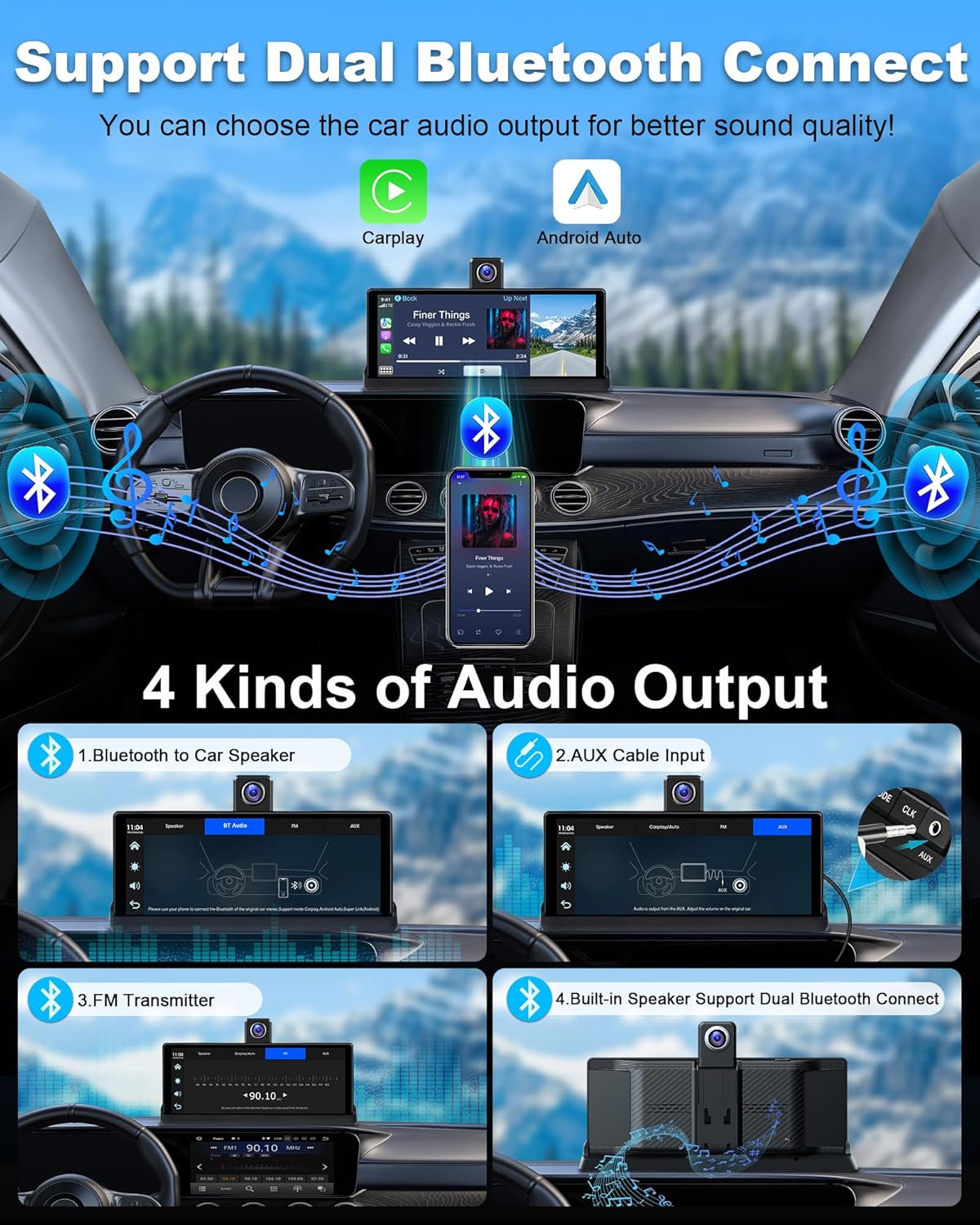
Figure 9: Audio Output Options
5. Maintenance
To ensure the longevity and optimal performance of your Vtopek Carplay Display, follow these maintenance guidelines:
- Cleaning: Use a soft, dry cloth to clean the screen and exterior. Avoid abrasive cleaners or solvents that could damage the surface.
- Temperature: Avoid exposing the device to extreme temperatures, both hot and cold, as this can affect its electronic components.
- Cable Management: Ensure all cables are securely connected and not pinched or tangled, which could lead to damage or intermittent connections.
- Software Updates: Periodically check for any available software updates for the device or its companion application to ensure optimal performance and access to new features.
6. Troubleshooting
If you encounter issues with your Vtopek Carplay Display, refer to the following common troubleshooting steps:
- Device Not Powering On:
- Ensure the power cord is securely plugged into both the display and the car's cigarette lighter.
- Check if the car's cigarette lighter socket is functioning (e.g., by testing with another device).
- Verify your car's voltage is within the 7-36V range.
- Wireless CarPlay/Android Auto Disconnections:
- Ensure your smartphone's Wi-Fi and Bluetooth are enabled and connected to the display.
- Check for any interference from other wireless devices.
- Restart both the display and your smartphone.
- Verify your phone's compatibility (refer to section 4.1).
- No Audio Output:
- Check the selected audio output method (Bluetooth, AUX, FM Transmitter).
- If using Bluetooth, ensure the display is paired with your car's audio system.
- If using AUX, ensure the cable is properly connected and your car's audio input is set to AUX.
- If using FM Transmitter, ensure both the display and car radio are tuned to the same clear FM frequency.
- Adjust the volume on both the display and your car's audio system.
- Camera Not Recording/Displaying:
- Ensure the SD card is properly inserted and not full.
- Check the camera connections.
- Format the SD card through the device settings if issues persist (this will erase all data).
- Issues with Viidure App (as reported in a review):
- Ensure your phone has a stable Wi-Fi connection to the device.
- Check for app updates on your smartphone's app store.
- Try reinstalling the application.
If these steps do not resolve the issue, please contact customer support.
7. Specifications
| Brand | Vtopek |
| Model Number | T337S |
| Screen Size | 10.26 Inches |
| Color | Black |
| Connectivity Technology | Bluetooth, Wi-Fi |
| Special Features | App Control, Voice Control, G-sensor, Night Vision, Integrated Wi-Fi |
| Compatible Devices | Smartphone |
| Video Recording Resolution | 2160p (4K) |
| Field of View | 140 Degrees |
| Mounting Type | Dashboard Mount |
| Included Components | 10.26" Carplay Screen, 1080p Rear Camera, 64GB SD Card, Power Cable, AUX Cable, Display Stand, Suction Cup Mount, 10m Extension Cable, User Manual |
8. Warranty and Support
The Vtopek Carplay Display comes with a 1-Year Warranty. For any technical issues or support inquiries, please contact our customer service team. Free technical support is available.
Customer Service Email: jenny@jansite.cn


