
1. Introduction
This manual provides instructions for the Cydewhoale W10811364 Refrigerator Electronic Control Board. This component is designed to manage essential refrigerator functions, including cooling cycles and defrost times. It is a replacement part compatible with various refrigerator models from brands such as Whirlpool, Maytag, KitchenAid, and Kenmore.
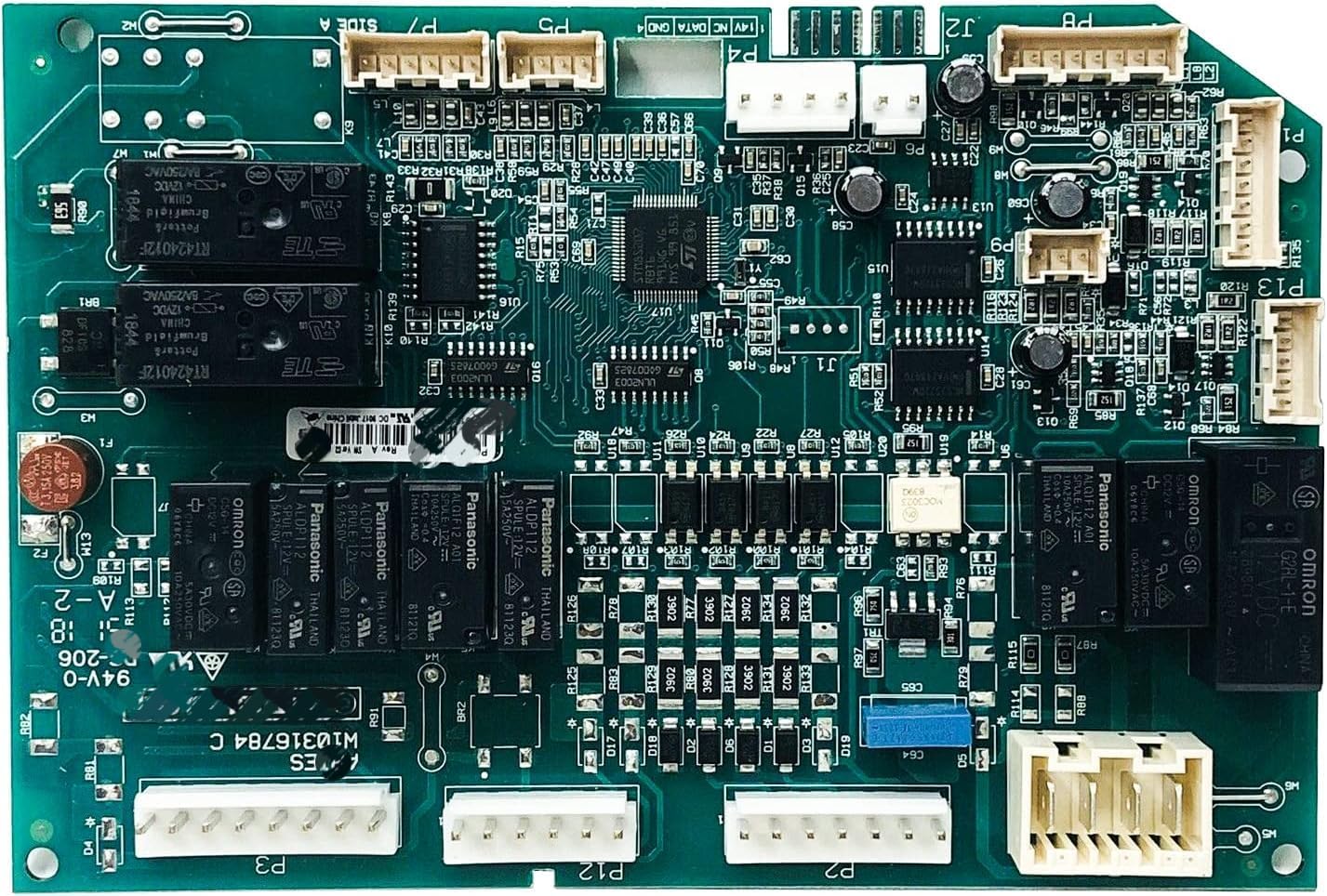
Figure 1: Top view of the W10811364 Refrigerator Electronic Control Board, showing various electronic components and connectors.
2. Safety Information
Before attempting any installation or repair, observe the following safety precautions:
- Disconnect Power: Always unplug the refrigerator from its power source before installing or servicing any parts. Failure to do so can result in electric shock or serious injury.
- Food Storage: Safely store any perishable food items that could deteriorate while the refrigerator's power is off.
- Wear Protective Gear: Wear work gloves to protect your hands from sharp edges or components during installation.
- Professional Assistance: If you are unsure about any step of the installation process, consult a qualified appliance technician.
3. Compatible Models
The W10811364 Electronic Control Board is compatible with various refrigerator models. A partial list of compatible models includes:
- Whirlpool, Maytag, KitchenAid, Kenmore refrigerators
- MFX2976D, KRFF507EW, WRX986SI, WRX988SI, KRF757SD, WRF757SD
- 59672382413, 59672383413, 59672389413
- JFX2897DRM02, JFX2897DRP02
- KRFF507EBL01, KRFF507ESS01, KRFF507EWH01, KRFF707EBS00, KRFF707ESS01
- MFT2776DEE02, MFT2776DEH02, MFT2776DEM02, FT2776FEZ00, MFT2776FEZ01, MFT2778EEZ01
- MFX2676FRZ00, FX2876DRE02, MFX2876DRH02, MFX2876DRM02
- WRF757SDEE01, WRF757SDEH01, WRF757SDEM01, WRF767SDEM01, WRF997SDDM02
- WRX986SIHV00, WRX986SIHZ00, WRX986SIHZ01, WRX988SIBE03, WRX988SIBH03, WRX988SIBM03
Always verify compatibility with your specific refrigerator model number before installation.
4. Installation
The following steps outline the general procedure for replacing the electronic control board. Specific steps may vary depending on your refrigerator model. Always refer to your appliance's service manual for detailed instructions.
- Disconnect Power: Unplug the refrigerator from the electrical outlet.
- Access the Control Board: Locate the existing electronic control board. This is typically found at the back of the refrigerator, behind an access panel. You may need a screwdriver to remove the panel.
- Document Connections: Before disconnecting any wires, take clear photos or make a diagram of all wire connections to the old control board. This will assist in correctly connecting the new board.
- Disconnect Wires: Carefully disconnect all wire harnesses and connectors from the old control board.
- Remove Old Board: Unscrew or unclip the old control board from its mounting brackets.
- Install New Board: Position the new W10811364 control board in place and secure it with screws or clips.
- Reconnect Wires: Using your photos or diagram, carefully reconnect all wire harnesses and connectors to the new control board. Ensure all connections are secure.
- Replace Access Panel: Reattach the access panel to the refrigerator.
- Restore Power: Plug the refrigerator back into the electrical outlet.
- Test Operation: Monitor the refrigerator's operation to ensure proper function, including cooling and defrost cycles.

Figure 2: Back view of the W10811364 Refrigerator Electronic Control Board, showing the circuit traces and mounting points.
5. Operation
The W10811364 Electronic Control Board is the central processing unit for your refrigerator's core functions. Once installed and powered, it automatically manages:
- Cooling Cycles: Regulates the compressor and fan operations to maintain desired temperatures in the fresh food and freezer compartments.
- Defrost Times: Initiates and controls the automatic defrost cycles to prevent ice buildup on the evaporator coils, ensuring efficient cooling.
- Component Control: Sends signals to various components such as the ice maker, water dispenser, and temperature sensors to ensure coordinated operation.
The board operates continuously to maintain optimal performance and food preservation.
6. Maintenance
The electronic control board itself requires no routine maintenance. However, to ensure its longevity and proper function, consider the following:
- Stable Power Supply: Ensure your refrigerator is connected to a stable power source. Power surges can potentially damage electronic components. Consider using a surge protector.
- Clean Environment: Keep the area around the refrigerator, especially where the control board is located, clean and free of dust and debris to prevent overheating or interference.
- Avoid Moisture: Protect the control board from moisture or spills, which can cause short circuits and damage.
7. Troubleshooting
If your refrigerator experiences issues after replacing the control board, consider the following common troubleshooting steps:
7.1 Refrigerator Not Cooling or Defrosting
- Power Check: Ensure the refrigerator is properly plugged in and receiving power. Check the circuit breaker.
- Connections: Verify that all wire harnesses and connectors to the control board are securely attached. Loose connections can prevent proper operation.
- Temperature Settings: Confirm that the refrigerator's temperature settings are correctly adjusted.
7.2 Ice Maker Not Operating
Some users have reported issues with the ice maker not operating after replacing the control board, even if other functions appear normal. If this occurs:
- Verify Ice Maker Connection: Double-check the specific wiring connection for the ice maker on the control board. Ensure it is correctly seated.
- Ice Maker Functionality: Confirm the ice maker unit itself is not faulty. If possible, test the ice maker with a known working control board or test the power supply to the ice maker.
- Board Compatibility: While the W10811364 is a replacement, ensure it is the exact correct part number for your specific refrigerator model, especially if your model has unique ice maker configurations.
7.3 Intermittent Operation or Random Shutdowns
- Power Cycling: If the refrigerator randomly shuts down, try unplugging it for 5-10 minutes and then plugging it back in to reset the control board.
- Environmental Factors: Ensure the refrigerator is in an environment with adequate ventilation and not exposed to extreme temperatures.
- Professional Diagnosis: If issues persist, it may indicate a more complex problem with the control board or other refrigerator components, requiring professional diagnosis.
8. Specifications
| Feature | Specification |
|---|---|
| Part Number | W10811364 |
| Brand | Cydewhoale |
| Product Dimensions (D x W x H) | 4.2" x 6.8" x 2.1" |
| Voltage | 115 Volts |
| Power Source | Corded Electric |
| Included Components | Main board |
| Manufacturer | Xinrui |
9. Warranty Information
This Cydewhoale W10811364 Refrigerator Electronic Control Board comes with a 1-year warranty from the date of purchase. This warranty covers defects in materials and workmanship under normal use. For warranty claims or further details, please contact the manufacturer or your point of purchase.
10. Customer Support
For technical assistance, troubleshooting guidance beyond this manual, or to inquire about replacement parts, please contact Cydewhoale customer support. Have your product model number (W10811364) and refrigerator model information ready when contacting support to ensure efficient service.