
Portronics POR-2803
Portronics Cardfinder Item Finder User Manual
Model: POR-2803
Introduction
This manual provides detailed instructions for the setup, operation, and maintenance of your Portronics Cardfinder Item Finder (Model POR-2803). This MFi Certified Bluetooth tracker is designed exclusively for iOS devices, allowing you to locate your valuables using the Apple Find My app.

Image: A hand holding the Portronics Cardfinder, emphasizing its ultra-slim 2mm profile.
Setup and Pairing
Follow these steps to pair your Portronics Cardfinder with your iOS device:
- Activate the Cardfinder: Press the button on the Cardfinder. The device will beep, indicating it is ready for pairing.
- Open Apple Find My App: On your iOS device, open the "Find My" app and ensure Bluetooth is enabled.
- Add New Item: In the Find My app, navigate to the "Items" tab and tap the "+" icon to add a new item. Select "Add Other Item".
- Connect: The app will detect the "Smart Card". Tap "Connect".
- Name Your Item: Follow the on-screen prompts to name your Cardfinder (e.g., "My Wallet", "Keys").
- Confirm Setup: Press "Agree" to link the Cardfinder to your Apple ID and complete the setup process.
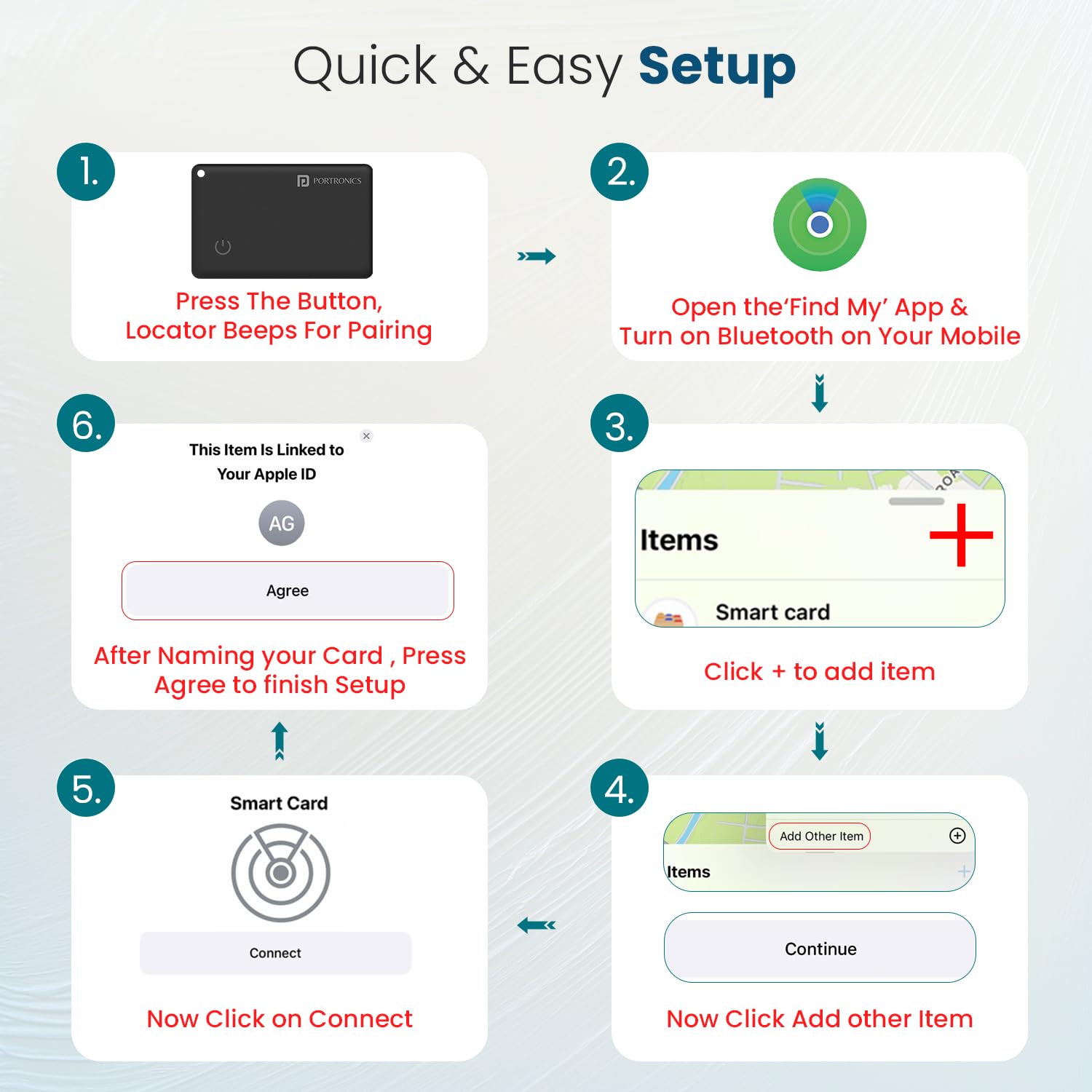
Image: A visual guide showing the six steps for quick and easy setup of the Portronics Cardfinder with the Apple Find My app.
Operating Instructions
The Portronics Cardfinder can be used to track various personal items:

Image: Four panels illustrating the versatility of the Cardfinder, showing it placed in a wallet, a handbag, attached to luggage, and on a child's backpack.
Locating Your Item
Once paired, you can locate your Cardfinder using the Apple Find My app.
- View on Map: Open the Find My app. Your Cardfinder's last known location will be displayed on the map.
- Play Sound: If your item is nearby, tap "Play Sound" in the Find My app. The Cardfinder will emit an audible alert for up to 20 meters, helping you pinpoint its exact location.

Image: An iPhone displaying the "Play Sound" feature within the Find My app, with sound waves indicating the Cardfinder's alert to help locate a nearby item.
Left-Behind Alerts
The Cardfinder can notify you if you leave your item behind.
- Receive Notifications: If your Cardfinder goes out of Bluetooth range from your iOS device, you will receive a "Left Behind" notification on your iPhone. This helps prevent accidental loss.

Image: A wallet containing the Cardfinder, with an iPhone displaying a "Time Sensitive" notification indicating the item has been left behind.
Shared Tracking
The Apple Find My app allows you to share the location of your Cardfinder with up to five other people.
- Share Item: In the Find My app, select your Cardfinder and choose the option to "Share This Item". You can then add contacts to share its location.

Image: Two iPhones displaying the Apple Find My app interface, illustrating the shared tracking feature for multiple users to view an item's location.
Charging and Battery Life
The Portronics Cardfinder features a rechargeable battery.
- Charging: Use the provided charging cable to recharge the device. A full charge takes approximately 3 hours.
- Battery Life: A single full charge can provide up to 6 months of usage.

Image: The Portronics Cardfinder connected to its magnetic charging cable, illustrating its rechargeable feature.
Maintenance
- Cleaning: Wipe the device with a soft, dry cloth. Avoid using harsh chemicals or abrasive materials.
- Storage: Store the Cardfinder in a cool, dry place when not in use for extended periods.
- Water Resistance: The device is not waterproof. Avoid exposure to water or excessive moisture.
Troubleshooting
| Issue | Possible Solution |
|---|---|
| Device not pairing |
|
| No sound from Cardfinder |
|
| Inaccurate location |
|
| Battery drains quickly |
|
Specifications
- Model Number: POR-2803
- Product Dimensions: 11 x 1.5 x 8.3 cm
- Item Weight: 41 g
- Battery: 1 Lithium Polymer (included)
- Charging Time: Approximately 3 hours
- Battery Life: Up to 6 months on a single charge
- Connectivity: Bluetooth
- Special Features: Fast Charging, MFi Certified
- Compatibility: iOS devices only (Apple Find My app)
- Color: Black
- Material: ABS Plastic
- What's in the Box: 1N Card Finder, 1N Documentation, 1N Charging Cable
Warranty Information
The Portronics Cardfinder comes with a 1 Year Warranty from the date of purchase. Please retain your purchase receipt for warranty claims. The warranty covers manufacturing defects. It does not cover damage caused by misuse, accidents, unauthorized repairs, or normal wear and tear.
Customer Support
For any assistance, technical support, or warranty inquiries, please contact Portronics customer service:
- Email: help@portronics.com
- Phone: +91 9555-245-245
- Manufacturer: Portronics Digital Pvt. Ltd.
- Address: First Floor Property No D 8 Upper Basement Sector 8 Noida Uttar Pradesh 201301
Ask a question about this manual
Ask about setup, troubleshooting, compatibility, parts, safety, or missing instructions. Manuals+ will review the question and use this page’s manual context to help answer it.