
WIWU SW01 Pro Lite
WIWU SW01 Pro Lite Smart Watch User Manual
Model: SW01 Pro Lite
Introduction
This manual provides detailed instructions for the setup, operation, and maintenance of your WIWU SW01 Pro Lite Smart Watch. This device is designed to offer comprehensive fitness tracking and smart notification features, compatible with both Android and iOS devices. Please read this manual thoroughly to ensure proper use and to maximize your experience with the product.
What's in the Box
Upon opening the package, verify that all the following items are included:
- WIWU SW01 Pro Lite Smart Watch
- Charging Cable
- User Manual (this document)
Product Overview
The WIWU SW01 Pro Lite is a versatile smart sports watch featuring a 2.01-inch display. It is equipped with advanced sensors for fitness tracking and smart chips for efficient performance.

Image: WIWU SW01 Pro Lite Smart Sports Watches.
Key Features:
- Fitness Tracking: Monitors heart rate, steps, calories burned, sleep duration, and stress levels.
- Multi-Sport Modes: Supports various sports activities for detailed performance analysis.
- Smart Notifications: Receive alerts for calls, messages, and app notifications directly on your wrist.
- Compatibility: Seamlessly integrates with Android and iOS smartphones.
- Touch Screen: Full touch screen for easy navigation.
- Long Battery Life: Designed for extended use between charges.
Internal Components and Sensors:
The watch incorporates smart chips for fast computing and smooth operation, handling complex application switching and data processing efficiently.

Image: Smart chips for superfast computing.
The rear of the watch houses the optical sensors responsible for heart rate monitoring and other health metrics.

Image: Back of the smartwatch with sensors.
The display interface provides real-time fitness data, such as workout progress and activity counts.
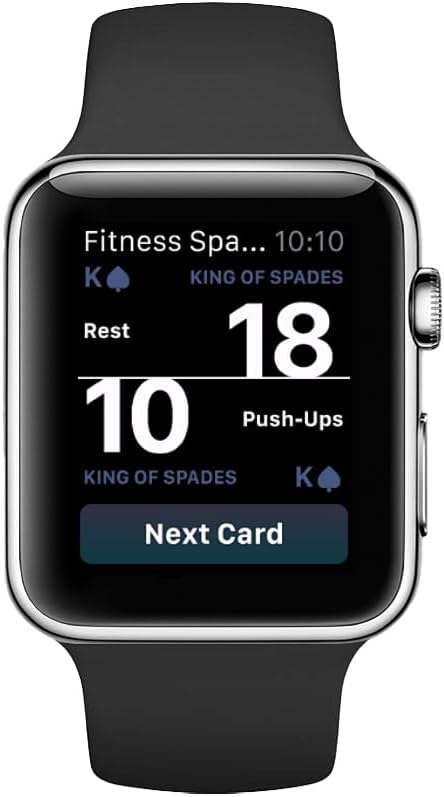
Image: Fitness tracking display on the smartwatch.
Setup
1. Charging the Smart Watch
- Connect the charging cable to the charging contacts on the back of the watch.
- Plug the USB end of the cable into a standard USB power adapter (not included) or a computer's USB port.
- The watch display will indicate charging status. Ensure the watch is fully charged before first use. A full charge typically takes approximately 2 hours.
2. Installing the Companion App
To unlock the full functionality of your smart watch, you need to install the dedicated companion application on your smartphone. Search for the official WIWU app in your device's app store (Google Play Store for Android or Apple App Store for iOS).
- For Android: Open the Google Play Store, search for "WIWU" (or the specific app name if provided in packaging), and install.
- For iOS: Open the Apple App Store, search for "WIWU" (or the specific app name if provided in packaging), and install.
Follow the on-screen instructions within the app to create an account and set up your profile.
3. Pairing with Your Smartphone
- Ensure Bluetooth is enabled on your smartphone.
- Open the WIWU companion app on your smartphone.
- Navigate to the "Device" or "Add Device" section within the app.
- The app will search for available devices. Select "SW01 Pro Lite" from the list.
- Confirm the pairing request on both your smartphone and the smart watch if prompted.
- Once paired, the watch will synchronize data with the app.
Operating Instructions
Basic Navigation
- Touch Screen: Swipe left, right, up, or down to navigate through menus and screens. Tap to select an option.
- Side Button: Typically used to wake the screen, return to the home screen, or access the app list. Refer to the on-screen prompts for specific functions.
Accessing Features
- Heart Rate Monitoring: Swipe to the heart rate screen or select the heart rate app. Ensure the watch is snug on your wrist for accurate readings.
- Step Counter: Steps are automatically tracked throughout the day. View your daily step count on the main watch face or in the activity summary.
- Sports Modes: Access the sports mode menu to select specific activities like running, cycling, or walking. The watch will track relevant metrics for your chosen activity.
- Sleep Tracking: Wear the watch to bed for automatic sleep analysis. Data will be available in the companion app.
- Notifications: When paired, notifications from your smartphone will appear on the watch screen. Swipe down from the top of the screen (or as per watch UI) to view recent notifications.
Maintenance
Cleaning the Watch
- Wipe the watch screen and body with a soft, lint-free cloth.
- For stubborn dirt, slightly dampen the cloth with water. Avoid using harsh chemicals or abrasive materials.
- Clean the charging contacts regularly to ensure proper charging.
Battery Care
- Avoid fully discharging the battery frequently.
- Charge the watch regularly, even if not in daily use, to maintain battery health.
- Store the watch in a cool, dry place when not in use for extended periods.
Water Resistance
The WIWU SW01 Pro Lite Smart Watch is designed with a certain level of water resistance. However, it is not suitable for diving or high-pressure water activities. Avoid prolonged submersion and exposure to hot water or steam. Always dry the watch thoroughly after exposure to water.
Troubleshooting
Watch Not Turning On
- Ensure the watch is fully charged. Connect it to the charger for at least 30 minutes.
- Press and hold the side button for 10-15 seconds to attempt a forced restart.
Cannot Pair with Smartphone
- Verify Bluetooth is enabled on your smartphone and the watch.
- Ensure the watch is within Bluetooth range of your smartphone (typically 10 meters).
- Restart both your smartphone and the smart watch.
- Clear the Bluetooth cache on your smartphone (Android) or forget the device in Bluetooth settings (iOS) and try pairing again.
- Make sure the companion app is updated to the latest version.
Inaccurate Readings (Heart Rate, Steps)
- Ensure the watch is worn snugly on your wrist, about one finger's width above your wrist bone.
- Clean the optical sensors on the back of the watch.
- Avoid excessive movement or vibrations during heart rate measurements.
Short Battery Life
- Reduce screen brightness.
- Disable unnecessary notifications.
- Limit continuous heart rate monitoring if not required.
- Ensure the watch firmware and companion app are up to date.
Specifications
| Feature | Detail |
|---|---|
| Brand | WIWU |
| Model Name | SW01 Pro Lite |
| Model Number | 6976975615003 |
| Screen Size | 1.95 inches |
| Shape | Rectangular |
| Color | Black |
| Compatible Devices | Smartphone, Tablet (Android & iOS) |
| Band Material Type | Silicone |
| Human Interface Input | Touchscreen |
| Meter Type | Heart Rate Monitor, Step Counter, Calorie Tracker, Sleep Duration Monitor, Stress Monitor |
| Battery Cell Composition | Lithium Ion |
| Item Weight | 230 grams |
| Manufacturer | Dongguan Wiwu Technology Co., Ltd. |
Warranty and Support
The WIWU SW01 Pro Lite Smart Watch comes with a standard warranty. For detailed warranty terms and conditions, please refer to the documentation included with your purchase or visit the official WIWU website.
For technical support, troubleshooting assistance, or further inquiries, please contact WIWU customer service or visit the official brand store:
Ask a question about this manual
Ask about setup, troubleshooting, compatibility, parts, safety, or missing instructions. Manuals+ will review the question and use this page’s manual context to help answer it.