
1. Introduction
The Longer B1 40W Laser Engraver is a high-performance laser cutting and engraving machine designed for various materials including wood and metal. It features a powerful 48000mW output laser module, an auto air assist system, and a large engraving area of 17.72"x17.32". This manual provides essential information for safe and effective use of your device.
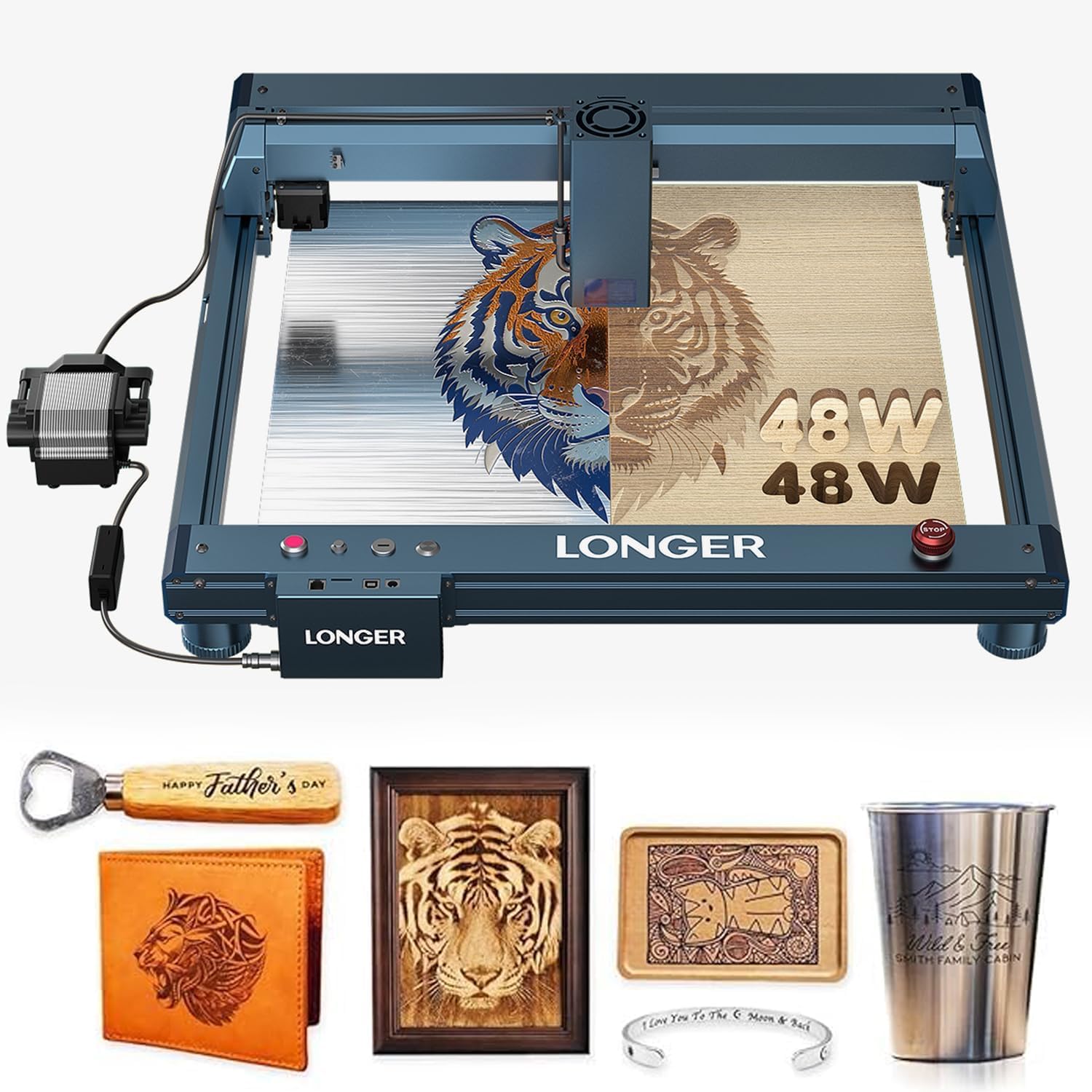
Figure 1.1: Overview of the Longer B1 40W Laser Engraver.
Key Features
- Top Engraving and Cutting Capacity: The laser module consists of eight 6000mW diode lasers, providing cutting capabilities for materials such as 20mm plywood, 25mm paulownia wood, 10mm acrylic in a single pass, and up to 40mm plywood, 50mm acrylic board, or 0.15mm stainless steel board with multiple passes.
- High-Speed Performance: Achieves a cutting speed of 36,000 millimeters per minute, enhancing productivity.
- Large Working Area: Offers a 450 x 440 millimeters (17.72" x 17.32") engraving area.
- Colorful Engraving: Capable of directly engraving colorful patterns on mirrored stainless steel.
- Precision and Quality Enhancement: Includes an air-assist pump, controlled by LightBurn software, to improve cutting precision and quality by removing smoke and debris.

Figure 1.2: The Longer B1 40W supports colorful engraving on mirrored stainless steel.
2. Safety Features
The Longer B1 40W Laser Engraver is equipped with multiple safety features to ensure user protection during operation. Always prioritize safety and follow all guidelines.
- Move/Flame/Offline/Motionless Detection: The machine will stop immediately if it detects unexpected movement, flame, goes offline, or remains motionless for an extended period.
- Security Lock: A newly upgraded safety lock prevents unauthorized use, especially by children.
- Eye Protection: The laser module features panoramic light filtering glass that blocks blue light and filters 97% of ultraviolet light. Always wear appropriate laser safety goggles.
- Emergency Stop: An easily accessible emergency stop button is provided for immediate shutdown.
- Zero Reset: Ensures the laser head returns to a safe home position.
- X and Y Axis Limit Switches: Prevents the laser head from moving beyond the working area.

Figure 2.1: Visual representation of key safety features including flame detection, position movement protection, safety lock, and limit switches.

Figure 2.2: The laser module is equipped with panoramic light filtering glass for eye protection.
3. Setup
This section guides you through the initial assembly and setup of your Longer B1 40W Laser Engraver.
3.1 Unboxing and Initial Assembly
Carefully unpack all components and ensure all parts listed in the packing list are present. Refer to the unboxing video for a visual guide.
Video 3.1: Detailed unboxing and initial assembly steps for the Longer B1 40W Laser Engraver.
3.2 Laser Module Installation
Attach the laser module to the X-axis frame as shown in the following videos. Ensure it is securely fastened.
Video 3.2: Step-by-step guide for installing the laser head.
Video 3.3: Comprehensive video demonstrating the laser module installation process.
4. Operation
This section covers the general operating procedures for your Longer B1 40W Laser Engraver.
4.1 General Operating Steps
Familiarize yourself with the basic workflow for engraving and cutting tasks.
Video 4.1: Introduction to the machine and general operation steps.
Video 4.2: Beginner tutorial for the Laser B1 Series, covering essential operating procedures.
4.2 Software and Connectivity
The Longer B1 40W supports LaserGRBL (for Windows XP/7/8/10) and LightBurn (for Windows, macOS, and Linux). Connectivity options include USB, TF card, Wi-Fi, and a dedicated mobile application.

Figure 4.1: Supported software (LaserGRBL, LightBurn) and connection methods (Wi-Fi, USB, App, TF card).
4.3 Using the Mobile Application
The LaserBurn APP allows you to control the engraver from your mobile phone. Its functions include WiFi network distribution, motion control, drawing creation, preview, engraving parameter settings, work information display, SD card file engraving, engraving history, and a material library.

Figure 4.2: Interface of the LaserBurn APP for mobile control.
4.4 Air Assist Function
The integrated air-assist pump helps to remove smoke and debris during cutting and engraving, resulting in cleaner edges and improved quality. This feature is controlled via the LightBurn software.

Figure 4.3: Comparison of engraving results with and without air assist, demonstrating cleaner surfaces with air assist.
4.5 Engraving and Cutting Examples
The Longer B1 40W is capable of producing intricate designs on various materials.
Wood Engraving
Metal Engraving
Acrylic Cutting
5. Maintenance
Regular maintenance ensures optimal performance and longevity of your laser engraver.
- Cleaning the Lens: Periodically clean the laser lens with a soft, lint-free cloth and lens cleaning solution to maintain laser beam quality.
- Cleaning the Work Area: Remove debris and dust from the engraving area and honeycomb panel after each use to prevent fire hazards and ensure clear cuts.
- Lubrication: Apply a small amount of lubricant to the guide rails and lead screws every few months to ensure smooth movement of the laser head.
- Firmware Updates: Check the official Longer website for any available firmware updates to improve performance and add new features.
6. Troubleshooting
This section provides solutions to common issues you might encounter.
6.1 Common Issues and Solutions
| Problem | Possible Cause | Solution |
|---|---|---|
| Laser not firing | Loose cable connection, emergency stop engaged, software error, laser module fault. | Check all cable connections. Disengage emergency stop button. Restart software and machine. Contact support if issue persists. |
| Poor engraving/cutting quality | Incorrect power/speed settings, dirty lens, material not flat, air assist off. | Adjust power/speed settings in software. Clean laser lens. Ensure material is flat and secured. Activate air assist. |
| Machine not connecting to PC/App | Incorrect USB driver, Wi-Fi issue, wrong port selected. | Install correct USB drivers. Verify Wi-Fi connection. Select correct COM port in software. |
| Unexpected stops during operation | Safety feature triggered (flame, movement), loose connection, power interruption. | Check for obstructions or flames. Secure all connections. Ensure stable power supply. |
If you encounter issues not listed here or require further assistance, please contact Longer's customer support team.
7. Specifications
Detailed technical specifications for the Longer B1 40W Laser Engraver.
| Feature | Detail |
|---|---|
| Model Number | B1 40W |
| Product Dimensions | 29.21 x 21.93 x 4.88 inches |
| Item Weight | 19.5 pounds |
| Laser Output Power | 40W (48000mW) |
| Engraving Area | 17.72" x 17.32" (450 x 440 mm) |
| Engraving Speed | Up to 36,000 mm/min |
| Connectivity | USB, TF Card, Wi-Fi, Mobile App |
| Supported Software | LaserGRBL, LightBurn |
| Manufacturer | Longer |
| Date First Available | March 26, 2025 |
8. Warranty and Support
Longer is committed to providing excellent customer service and support for your B1 40W Laser Engraver.
8.1 Technical Support
Lifetime technical support is provided. For any questions or issues, please contact Longer's customer support team. They offer 24-hour professional customer service.
8.2 Returns and Warranty
The product comes with a return policy of 30 days for refund or replacement. Specific warranty details are typically provided with the product packaging or can be obtained by contacting customer support.

Figure 8.1: Longer provides strong after-sales support.


