
Acer AR40GR2841FDFL, AR32NSV53HDFL
Acer Advanced I Series (40-inch) and N Series (32-inch) Smart LED Google TV User Manual
Models: AR40GR2841FDFL (40-inch), AR32NSV53HDFL (32-inch)
1. Introduction
This manual provides essential information for the safe and efficient operation of your Acer Advanced I Series (40-inch) Full HD Smart LED Google TV and Acer Advanced N Series (32-inch) HD LED TV. Please read this manual thoroughly before using your television and retain it for future reference.
2. Safety Information
Always follow basic safety precautions when using this television to reduce the risk of fire, electric shock, and injury. Keep the television away from moisture and heat sources. Ensure proper ventilation. Do not attempt to service the product yourself. Refer all servicing to qualified service personnel.
3. Product Overview
The Acer Advanced I Series and N Series Smart LED Google TVs offer a rich viewing experience with smart features and robust connectivity. The I Series features a 40-inch Full HD display, while the N Series provides a 32-inch HD display, both designed for immersive entertainment.
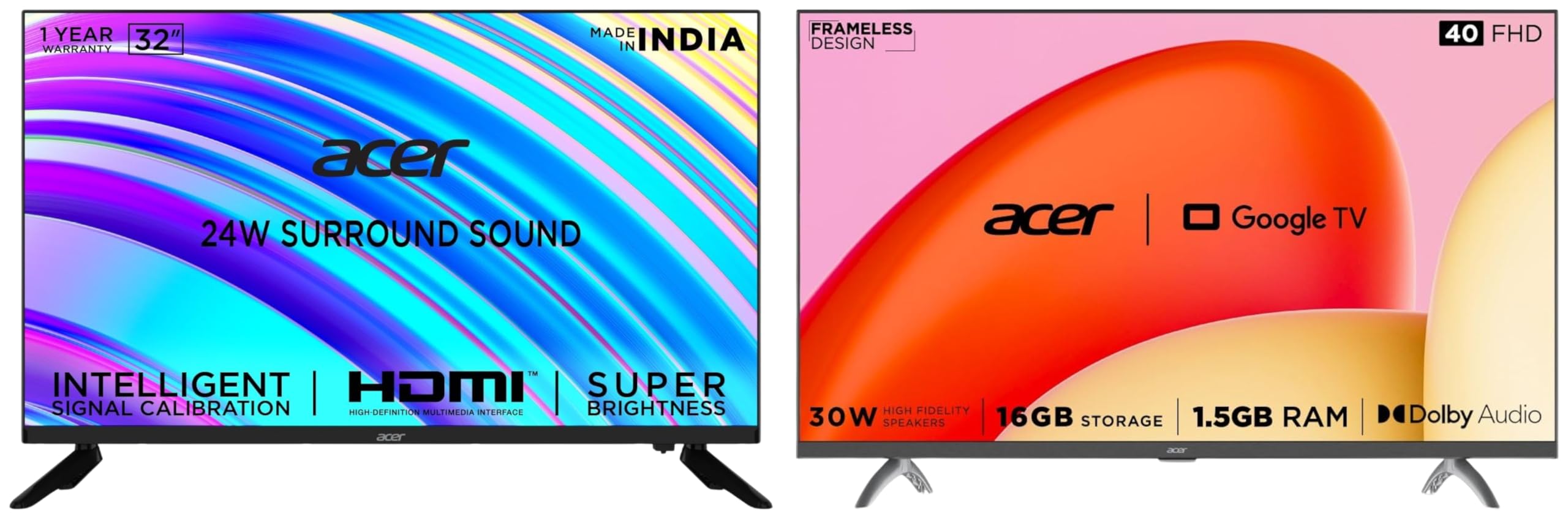
Image: Acer Advanced I Series (left) and N Series (right) televisions highlighting their respective features.
Key Features (40-inch Advanced I Series - AR40GR2841FDFL)
- Resolution: Full HD (1920 x 1080)
- Refresh Rate: 60 Hertz
- Viewing Angle: 178 Degree wide viewing angle
- Sound Output: 30 Watts with Dolby Audio
- Sound Modes: 5 modes (Stadium, Standard, Movie, Music, Speech)
- Connectivity: 2 HDMI ports, 2 USB ports, 2-Way Bluetooth 5.0, Dual Band Wi-Fi
- Smart Features: Google TV, Google Assistant, Chromecast built-in, Voice-enabled Smart Remote, Hotkeys for Netflix, Prime Video, YouTube, Disney+Hotstar, 1.5GB RAM, 16GB Storage, 64bit Quad Core Processor
Key Features (32-inch Advanced N Series - AR32NSV53HDFL)
- Resolution: HD (1366 x 768)
- Viewing Angle: 178 Degree wide viewing angle
- Design: Frameless Design
- Sound Output: 24 Watts High Fidelity Speakers with Virtual Surround Sound
- Connectivity: 3 HDMI (1.4 x 3) ports, 2 USB ports
4. Setup
4.1 Unpacking and Initial Inspection
Carefully remove the television from its packaging. Check for any damage during transit. Ensure all accessories are present.
4.2 Mounting Options
Your Acer TV supports both table mount and wall mount installations. For wall mounting, ensure you use a VESA compatible bracket (200 x 200 mm) and follow the bracket manufacturer's instructions carefully. For table mounting, attach the provided stands securely to the base of the television.
4.3 Connecting Power
Connect the power cord to the TV's power input and then to a 220 VAC 50 Hz power outlet. Do not power on the TV until all other connections are made.
5. Connectivity
Your Acer Smart LED Google TV offers various connectivity options for external devices.
5.1 HDMI Ports
- 40-inch Model: 2 HDMI ports for connecting set-top boxes, Blu-ray players, gaming consoles, or other HDMI-enabled devices.
- 32-inch Model: 3 HDMI (1.4 x 3) ports for connecting personal computers, laptops, set-top boxes, Blu-ray players, or gaming consoles.
5.2 USB Ports
- Both models feature 2 USB ports to connect hard drives or other USB devices for media playback.
5.3 Wireless Connectivity
- Wi-Fi: Dual Band Wi-Fi for internet access and streaming (40-inch model).
- Bluetooth: 2-Way Bluetooth 5.0 for connecting wireless accessories like headphones or speakers (40-inch model).
- Screen Mirroring: Google Cast technology for mirroring content from mobile devices to the TV.
6. Operating Your Smart TV
6.1 Google TV Interface
Your TV runs on the Google TV operating system, providing personalized content recommendations, a watchlist feature, and individual user profiles. Navigate the interface using the voice-enabled Smart Remote.
6.2 Voice Control with Google Assistant
Press the Google Assistant button on your remote to use voice commands for searching content, controlling smart home devices, and more.
6.3 Built-in Chromecast
Easily cast movies, shows, photos, and more from your phone or tablet directly to your TV using the built-in Chromecast feature.
6.4 Quick Access Hotkeys
The remote control includes dedicated hotkeys for quick access to popular streaming services such as Netflix, Prime Video, YouTube, and Disney+Hotstar.
7. Audio and Video Settings
7.1 Picture Modes (40-inch Model)
The 40-inch model offers 5 distinct picture modes to optimize your viewing experience based on content. Adjust these settings via the TV menu.
7.2 Sound Features
- 40-inch Model: Enjoy 30 Watts Sound Output with Dolby Audio and select from 5 sound modes: Stadium, Standard, Movie, Music, Speech.
- 32-inch Model: Features 24 Watts High Fidelity Speakers with Virtual Surround Sound for an immersive audio experience.
8. Specifications
| Feature | 40-inch Advanced I Series (AR40GR2841FDFL) | 32-inch Advanced N Series (AR32NSV53HDFL) |
|---|---|---|
| Screen Size | 100 cm (40 inches) | 80 cm (32 inches) |
| Resolution | Full HD (1920 x 1080) | HD (1366 x 768) |
| Refresh Rate | 60 Hertz | 60 Hertz |
| Viewing Angle | 178 Degrees | 178 Degrees |
| Sound Output | 30 Watts, Dolby Audio | 24 Watts, Virtual Surround Sound |
| HDMI Ports | 2 | 3 (1.4 x 3) |
| USB Ports | 2 | 2 |
| Bluetooth | 5.0 (2-Way) | N/A |
| Wi-Fi | Dual Band | N/A |
| Operating System | Google TV | Google TV |
| RAM | 1.5GB | N/A |
| Storage | 16GB | N/A |
| Processor | 64bit Quad Core | N/A |
| VESA Mount | 200 x 200 mm | 200 x 200 mm |
| Power Supply | 220 VAC 50 Hz | 220 VAC 50 Hz |
9. Care and Maintenance
To ensure the longevity of your television, clean the screen and exterior with a soft, dry cloth. Do not use abrasive cleaners or solvents. Disconnect the power cord before cleaning. Avoid blocking ventilation openings.
10. Troubleshooting
10.1 No Power
- Ensure the power cord is securely connected to both the TV and the power outlet.
- Check if the power outlet is functioning by plugging in another device.
10.2 No Picture or Sound
- Verify that the correct input source is selected (e.g., HDMI 1, HDMI 2).
- Check all cable connections (HDMI, USB) are secure.
- Ensure the volume is not muted or set to minimum.
10.3 Remote Control Not Working
- Replace the batteries in the remote control.
- Ensure there are no obstructions between the remote and the TV's IR sensor.
- For Bluetooth remotes, ensure it is properly paired with the TV.
11. Product Video
Video: An overview of the Acer 100 cm (40 inches) and 80 cm (32 inches) Smart LED Google TVs, highlighting key features such as Full HD/HD resolution, 60Hz refresh rate, 178-degree viewing angle, 30W/24W sound output with Dolby Audio/Virtual Surround Sound, 2-Way Bluetooth 5.0, Dual Band Wi-Fi, Chromecast built-in, and quick access hotkeys for streaming services. This video provides a visual summary of the product's capabilities and design, including its frameless display.
12. Warranty and Support
Your Acer television comes with a standard brand warranty. For detailed warranty terms and conditions, please refer to the warranty card included with your product or visit the official Acer support website. For technical assistance or customer service, please contact Acer customer support.
For further information, visit the product detail page on Amazon.in.
Related documentsAR40GR2841FDFL, AR32NSV53HDFL


Ask a question about this manual
Ask about setup, troubleshooting, compatibility, parts, safety, or missing instructions. Manuals+ will review the question and use this page’s manual context to help answer it.