
1. Introduction
Thank you for choosing the Mirana Super Car. This remote and app-controlled racing car features a 1:12 scale design, dual motors for high speed, a built-in Bluetooth speaker, and convenient USB Type-C recharging. Please read this manual carefully before operating the product to ensure safe and optimal performance.
2. Safety Information
- Recommended for ages 3 years and above.
- Adult supervision is recommended during operation.
- Do not operate the car near water or in wet conditions.
- Avoid operating the car in crowded areas or near obstacles that could cause damage or injury.
- Do not attempt to modify or disassemble the car or its components.
- Use only the provided charging cable and battery.
3. What's in the Box
The Mirana Super Car package includes the following components:
- Mirana Super Car (1 unit)
- Remote Control (1 unit)
- Lithium-Ion Battery (pre-installed)
- USB Type-C Charging Cable (1 unit)
- Product Manual (1 unit)
4. Product Overview
The Mirana Super Car is engineered for performance and user experience. Key features include:
- Streamlined Car Body: Designed for aerodynamics and speed.
- Soft Rubber Wheels: Provides enhanced grip and stability for various terrains.
- Dual Motor System: Delivers high torque for powerful acceleration.
- 1.5x Nitro Speed Boost: Engage for temporary increased speed.
- Built-in Bluetooth Speaker: Play music or engine sounds directly from the car.
- USB Type-C Rechargeable: Convenient and fast charging.
- Dual Control: Operate via the included remote control or a dedicated mobile application.

Image: Mirana Super Car highlighting its streamlined body, soft rubber wheels, and decorative stickers.

Image: Visual representation of key features including C-Type USB Charging, Powerful Dual Motor, Streamlined Car Body, and Proportional Remote.

Image: Close-up view of the Mirana Super Car's built-in Bluetooth speaker.
5. Setup
5.1 Charging the Car Battery
- Locate the C-Type USB Charging Port on the underside of the car.
- Connect the provided USB Type-C charging cable to the car's port.
- Connect the other end of the USB cable to a compatible USB power source (e.g., computer, wall adapter).
- The battery indicator light will show charging status. Charge until the indicator shows a full charge.
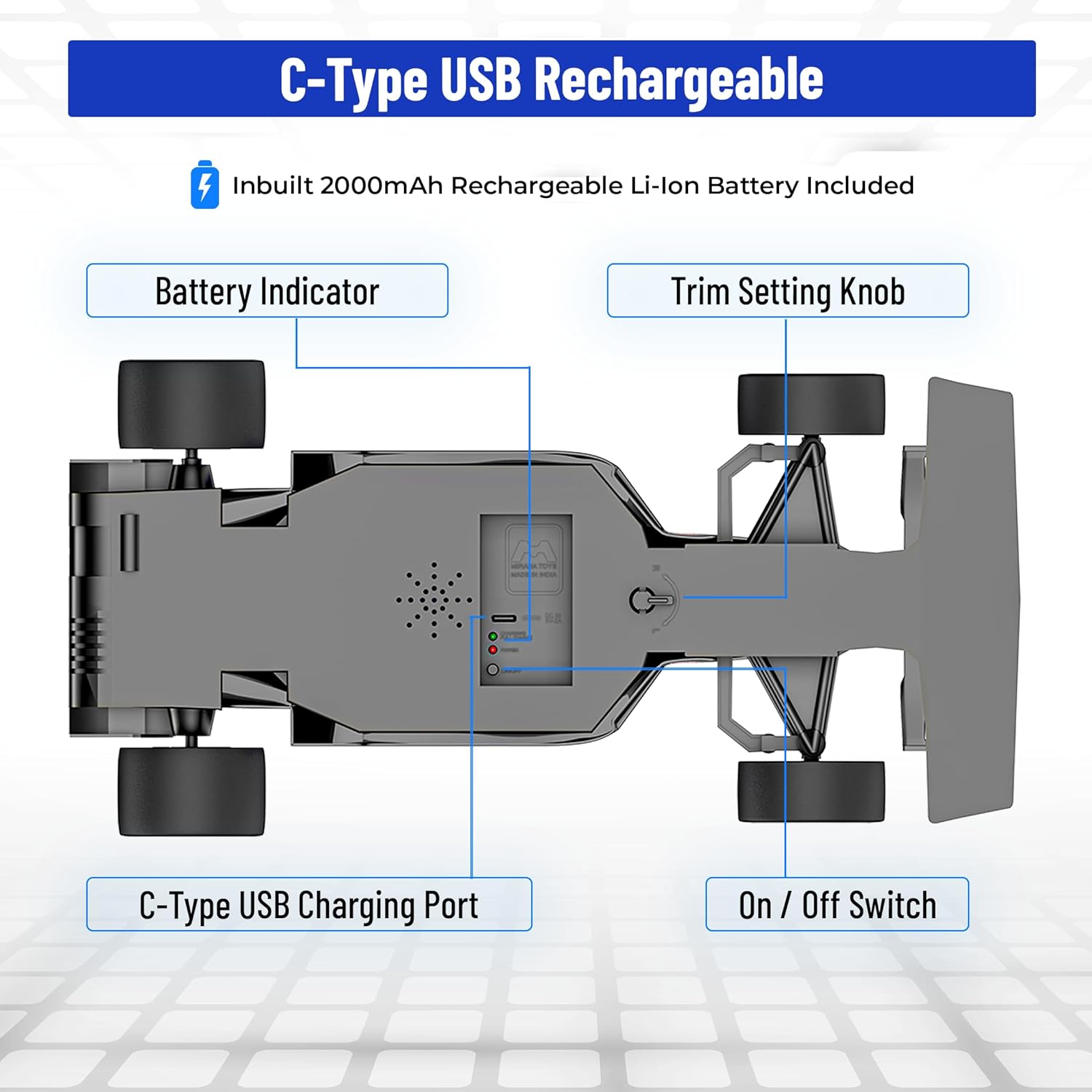
Image: Underside view of the car, indicating the C-Type USB Charging Port, Battery Indicator, Trim Setting Knob, and On/Off Switch.
5.2 Remote Control Battery Installation
The remote control requires batteries (not specified in product data, assume standard AA/AAA for typical RC toys, but user manual should specify). Open the battery compartment on the back of the remote and insert the required batteries, observing polarity.
5.3 App Installation and Pairing
- Scan the QR code provided on the product packaging or search for the Mirana app in your device's app store.
- Install the application on your mobile device.
- Turn on the Mirana Super Car using the On/Off switch.
- Open the Mirana app on your device and follow the on-screen instructions to pair the car via Bluetooth.
6. Operating the Mirana Super Car
6.1 Remote Control Operation
The remote control allows for precise handling of the Mirana Super Car.

Image: Remote Control layout with labeled functions.
- Forward / Backward: Controls the car's movement direction.
- Turn Left / Right: Steers the car.
- Speed Boost: Activates the 1.5x Nitro Speed Boost.
- Horn: Activates the car's horn sound.
- Engine Sound Toggle: Turns engine sounds on or off.
- Stunt Previous / Left Maneuver: Initiates specific stunt actions or left maneuvers.
- Stunt Next / Right Maneuver: Initiates specific stunt actions or right maneuvers.
- Indicator Light: Shows remote status.
6.2 App Control Operation
The Mirana app provides an alternative and enhanced control experience.
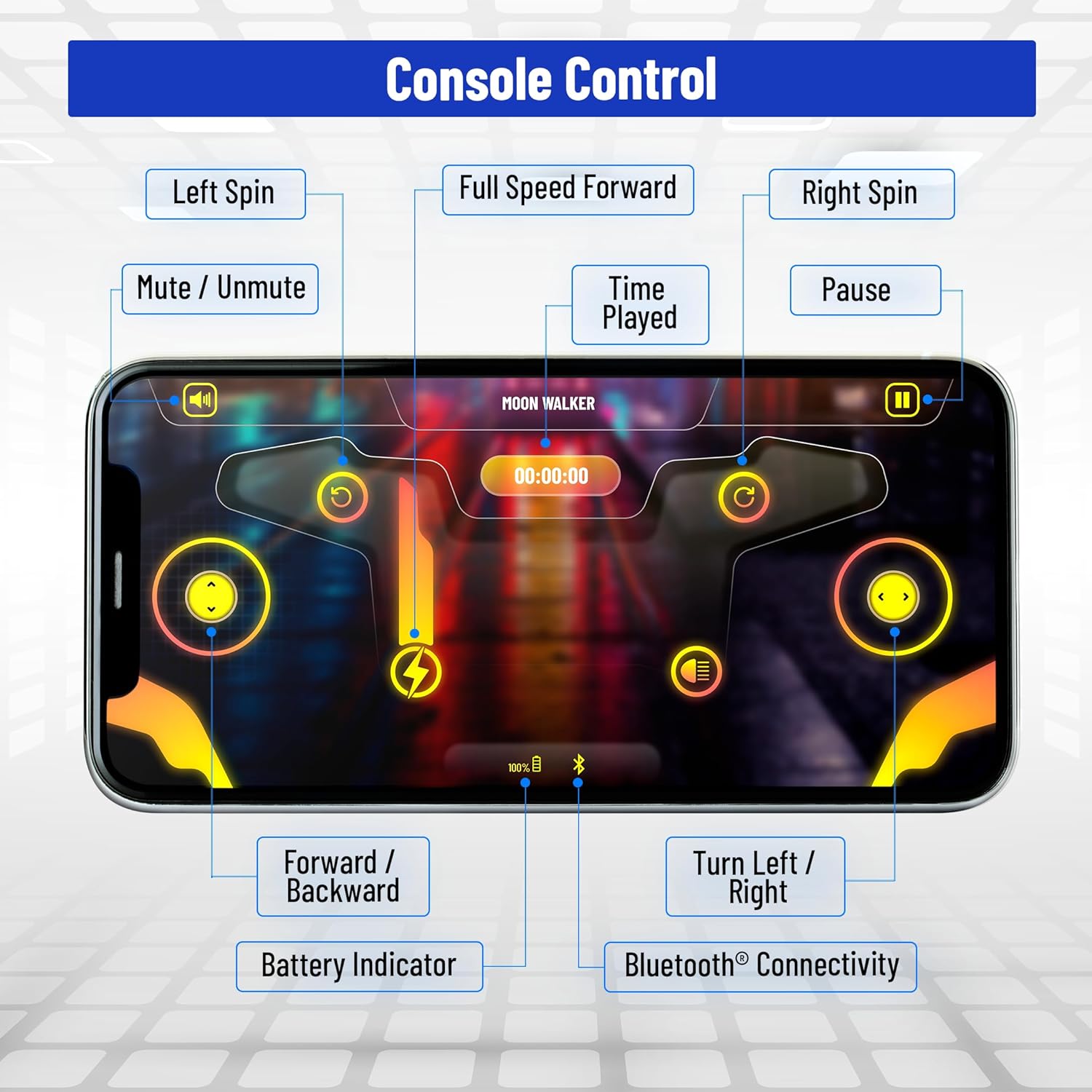
Image: Mirana App Console with labeled control functions.
- Left Spin / Right Spin: Executes rotational maneuvers.
- Full Speed Forward: Drives the car at maximum speed.
- Mute / Unmute: Controls the car's sound output.
- Time Played: Displays the duration of play.
- Pause: Temporarily stops car movement.
- Forward / Backward: Controls the car's movement direction.
- Turn Left / Right: Steers the car.
- Battery Indicator: Shows the car's current battery level.
- Bluetooth Connectivity: Indicates connection status.
6.3 Gearbox Selector
The car features a gearbox selector to switch between slow and high-speed modes. This allows for adaptable driving based on skill level or terrain. Refer to the car's underside diagram for the selector's location.

Image: Mirana Super Car demonstrating the 1.5x Nitro Speed Boost.
7. Maintenance
- Cleaning: Use a soft, dry cloth to clean the car. Do not use water or chemical cleaners.
- Storage: Store the car in a cool, dry place away from direct sunlight when not in use.
- Battery Care: Fully charge the battery before long-term storage. Recharge periodically if stored for extended periods to maintain battery health.
- Wheel Alignment: If the car does not drive straight, use the trim setting knob on the underside of the car to adjust wheel alignment.
8. Troubleshooting
| Problem | Possible Cause | Solution |
|---|---|---|
| Car does not respond to remote/app. | Low battery in car or remote; not paired; car/remote off. | Charge car battery; replace remote batteries; ensure both are ON; re-pair remote/app. |
| Car moves slowly or inconsistently. | Low car battery; debris in wheels; gearbox in slow mode. | Recharge car battery; clean wheels; switch gearbox to high-speed mode. |
| Bluetooth speaker not connecting. | Bluetooth not enabled on device; car not in pairing mode; interference. | Ensure Bluetooth is on; restart car and device; try pairing in a different location. |
| Car does not drive straight. | Wheel alignment issue. | Adjust the trim setting knob on the underside of the car. |
9. Specifications
| Feature | Detail |
|---|---|
| Model Number | ACS |
| Scale | 1:12 Scale |
| Battery Type | Lithium-Ion (included) |
| Charging | USB Type-C Rechargeable |
| Control Method | Remote & App Controlled |
| Motors | Dual Motor |
| Material Type(s) | Acrylonitrile Butadiene Styrene (ABS), Alloy Steel, Metal, Rubber |
| Product Dimensions | 32 x 16 x 8 cm |
| Item Weight | 470 g |
| Manufacturer Recommended Age | 36 months - 11 years |
| Country of Origin | India |
10. Warranty and Support
For any product-related queries, support, or warranty information, please contact Mirana Innovations Private Limited:
- Email: support@miranatoys.com
- WhatsApp: https://wa.me/message/QBYXO2LBW6R3A1
- Toll Free: 1800-210-695
Please retain your purchase receipt for warranty claims.