
1. Product Overview
The Krups Genio S KP-440E is a compact and elegant coffee machine designed for preparing a variety of hot and cold beverages using the Nescafé Dolce Gusto capsule system. It features a 15-bar pressure pump and 1500W power for optimal extraction, ensuring a perfect cup every time. Its intuitive controls and smart features enhance the user experience.

Image 1.1: The Krups Genio S coffee machine with a freshly prepared latte, showcasing its sleek silver design and the clear water tank.
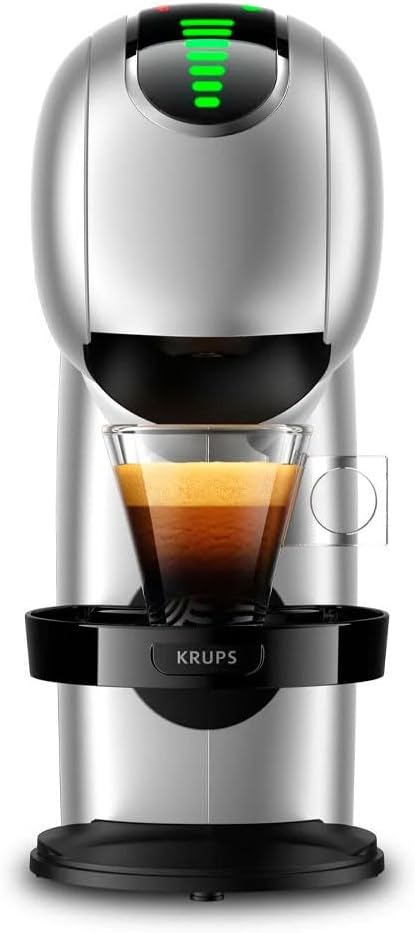
Image 1.2: Front view of the Krups Genio S coffee machine, highlighting the dispensing area and a cup of espresso.
2. Setup
2.1 Unpacking
- Carefully remove all packaging materials from the coffee machine and its components.
- Ensure all parts are present: coffee machine, water tank, drip tray, and power cord.
2.2 Placement
- Place the machine on a stable, flat, and dry surface.
- Ensure adequate ventilation around the machine.
- Keep the machine away from heat sources and direct sunlight.
2.3 Filling the Water Tank
- Remove the 0.8-liter water tank from the back of the machine.
- Fill the tank with fresh, cold drinking water up to the MAX level indicator.
- Replace the water tank securely onto the machine.

Image 2.1: Rear view of the coffee machine, illustrating the removable water tank and the power cord connection.
2.4 First Use / Rinsing Cycle
- Plug the power cord into a suitable electrical outlet (220 Volts).
- Place an empty cup or container on the drip tray.
- Without inserting a capsule, select the maximum water volume and run a hot water cycle to rinse the internal system. Repeat this process twice.
- Discard the water from the cup. The machine is now ready for use.
3. Operating Instructions
3.1 Powering On/Off
- Press the power button (usually located on the top or side) to turn the machine on. The indicator lights will illuminate.
- The machine will preheat for a short period. Once ready, the indicator light will turn solid green.
- To turn off, press the power button again. The machine will automatically shut off after a period of inactivity to save energy.
3.2 Inserting a Capsule
- Lift the locking handle on the top of the machine.
- Pull out the capsule holder.
- Insert a Nescafé Dolce Gusto capsule into the holder, ensuring it is seated correctly.
- Push the capsule holder back into the machine and lower the locking handle until it clicks into place.

Image 3.1: A hand demonstrating the correct way to insert a Nescafé Dolce Gusto capsule into the machine's capsule holder.
3.3 Selecting Beverage Volume and Temperature
- The machine features customizable controls, often indicated by a touch interface.
- Adjust the desired water volume using the selection lever or touch controls according to the capsule's recommendation or your preference.
- For temperature control, use the dedicated buttons or touch options to select hot or cold water, or to adjust the temperature for hot beverages.
- The XL function allows for larger cup sizes.

Image 3.2: A finger interacting with the touch control panel of the Krups Genio S, showing the illuminated indicators.
3.4 Brewing Your Beverage
- Place your cup on the adjustable drip tray.
- Once the volume and temperature are set, press the start button (usually indicated by a hot or cold water icon).
- The machine will begin brewing. The flow will stop automatically once the selected volume is dispensed.
- For an intense flavor, utilize the Espresso Boost function if available on your model.
3.5 After Brewing
- Lift the locking handle and remove the used capsule from the holder. Dispose of the capsule responsibly.
- Rinse the capsule holder if necessary.
- Lower the locking handle.
4. Maintenance
Regular maintenance ensures the longevity and optimal performance of your coffee machine.
4.1 Cleaning the Water Tank
- Empty and rinse the water tank daily with fresh water.
- For a more thorough cleaning, use a mild detergent and a soft brush. Rinse thoroughly to remove all soap residue.
4.2 Cleaning the Drip Tray and Capsule Holder
- Empty and clean the drip tray regularly to prevent overflow and maintain hygiene.
- The drip tray and capsule holder can be washed with warm soapy water.
- Important: The machine components are NOT dishwasher safe.
4.3 Descaling
- The frequency of descaling depends on water hardness and usage. Refer to the manufacturer's descaling instructions or use a suitable descaling solution for coffee machines.
- Follow the descaling product's instructions carefully.
- After descaling, run several rinsing cycles with fresh water to ensure all descaling solution is removed.
4.4 Exterior Cleaning
- Wipe the exterior of the machine with a soft, damp cloth.
- Do not use abrasive cleaners or solvents.
5. Troubleshooting
If you encounter issues with your Krups Genio S KP-440E, please refer to the following common problems and solutions:
- Machine does not turn on: Ensure the power cord is securely plugged into a working electrical outlet. Check the power switch.
- No water flow: Check if the water tank is filled and correctly positioned. Ensure the capsule is inserted properly and the locking handle is down. The machine may need descaling.
- Coffee is cold or not hot enough: Ensure the machine has completed its preheating cycle. Check if the temperature setting is correctly selected for hot beverages.
- Water leaking: Ensure the water tank is correctly seated and not damaged. Check the capsule holder for proper insertion and ensure the capsule is not damaged.
- Unusual noise: This can sometimes occur during the initial pump priming or descaling process. If persistent or excessively loud, contact customer support.
If the problem persists after attempting these solutions, please contact Krups customer support for further assistance.
6. Specifications
| Feature | Detail |
|---|---|
| Brand | KRUPS |
| Model Number | KP-440E (8432322519588) |
| Dimensions (L x W x H) | 8 x 19.5 x 14 cm |
| Item Weight | 2.75 Kilograms |
| Color | Silver |
| Material | Stainless Steel |
| Coffee Maker Type | Espresso Machine (Capsule System) |
| Water Tank Capacity | 0.8 Liters |
| Operating Mode | Semi-automatic |
| Voltage | 220 Volts |
| Special Features | Espresso Boost Function, Customizable Controls |
| Specific Uses | Iced Coffee, Cappuccino, Espresso |
| Dishwasher Safe | No |
| Country of Origin | Portugal |
7. Warranty and Support
Your Krups Genio S KP-440E coffee machine is covered by a manufacturer's warranty. Please refer to the warranty card included with your product for specific terms and conditions, including the warranty period and coverage details.
7.1 Customer Support
For technical assistance, troubleshooting beyond this manual, or warranty claims, please contact Krups customer support. Contact information can typically be found on the official Krups website or in the product packaging.
When contacting support, please have your product model number (KP-440E) and serial number (if applicable) ready.


