
1. Introduction
Thank you for choosing the Ruitoo Electric Scooter M5 Pro. This manual provides essential information for the safe operation, assembly, maintenance, and troubleshooting of your new electric scooter. Please read this manual thoroughly before your first ride to ensure optimal performance and safety.
2. Safety Information
Your safety is paramount. Always wear a helmet and appropriate protective gear (knee pads, elbow pads) when riding. Adhere to local traffic laws and regulations. This scooter is designed for adults and can support up to 264 lbs.
- UL2272 Certified Battery: The 48V/20.8Ah battery is UL2272 certified, ensuring safety and reliability.
- Dual Braking System: Equipped with front and rear dual disc brakes with ABS for enhanced stopping power.
- 360° Safety Lighting: Features a comprehensive lighting system including a front light, brake light, and turn signals for maximum visibility, especially during night rides.
- Tire Safety: The 11-inch front and 10-inch rear off-road vacuum tires provide stability and grip on various terrains. Regularly check tire pressure.
- Environmental Conditions: Avoid riding in heavy rain, snow, or extreme temperatures.
3. Package Contents
Upon unpacking, please verify that all items listed below are present and in good condition:
- 1 x Ruitoo Electric Scooter M5 Pro
- 1 x Charger
- 1 x Installation Tools
- 1 x User Manual
- 1 x Seat
- 1 x Rear Storage Box

Image: Ruitoo M5 Pro Electric Scooter with its accessories, including the seat, rear storage box, charger, and installation tools.
4. Setup and Assembly
Your Ruitoo M5 Pro Electric Scooter comes partially assembled. Follow these steps to complete the setup:
- Unboxing and Initial Setup: Carefully remove the scooter and all components from the packaging. Unfold the scooter by lifting the handlebar stem until it locks into place.
- Handlebar Installation: Secure the handlebars to the stem using the provided tools. Ensure all screws are tightened properly.
- Seat and Rear Storage Box Installation: Attach the seat and rear storage box to the designated mounting points on the scooter.
- Charging: Before first use, fully charge the scooter's battery using the provided charger. The charging time is approximately 8 hours.
Video: This video demonstrates the unboxing and initial assembly process of the electric scooter, including unfolding the main frame and attaching the handlebars.
Video: This video shows the unboxing of the Ruitoo M5 Pro, highlighting the components and the initial steps to prepare the scooter for use.
Video: This video demonstrates the installation of the seat and rear storage box on the M5 Pro electric scooter.
5. Operating Instructions
Familiarize yourself with the scooter's controls and features before riding.
- Power On/Off: Use the key to turn on the scooter. Long press the power button on the LCD display to power on/off.
- Smart LCD Display: The intuitive LCD display shows real-time data such as speed, battery level, and riding mode.
- Speed Modes: The M5 Pro offers 3 speed modes for various riding conditions:
- Eco Mode (approx. 10 mph)
- Drive Mode (approx. 20 mph)
- Sport Mode (up to 34 mph)
- Speed Limit Adjustment: The scooter may have a default speed limit. Refer to the video below for instructions on how to adjust or unlock the speed limit.
- Lighting System: Activate the front light, brake light, and turn signals as needed for visibility.
- Braking: Use the front and rear disc brakes for controlled stopping. The ABS system assists in preventing wheel lock-up.
- Riding Modes: The scooter supports two-way riding modes, with or without the seat.

Image: The colorful LCD display of the M5 Pro, indicating speed, battery level, distance, light status, and cruise control.
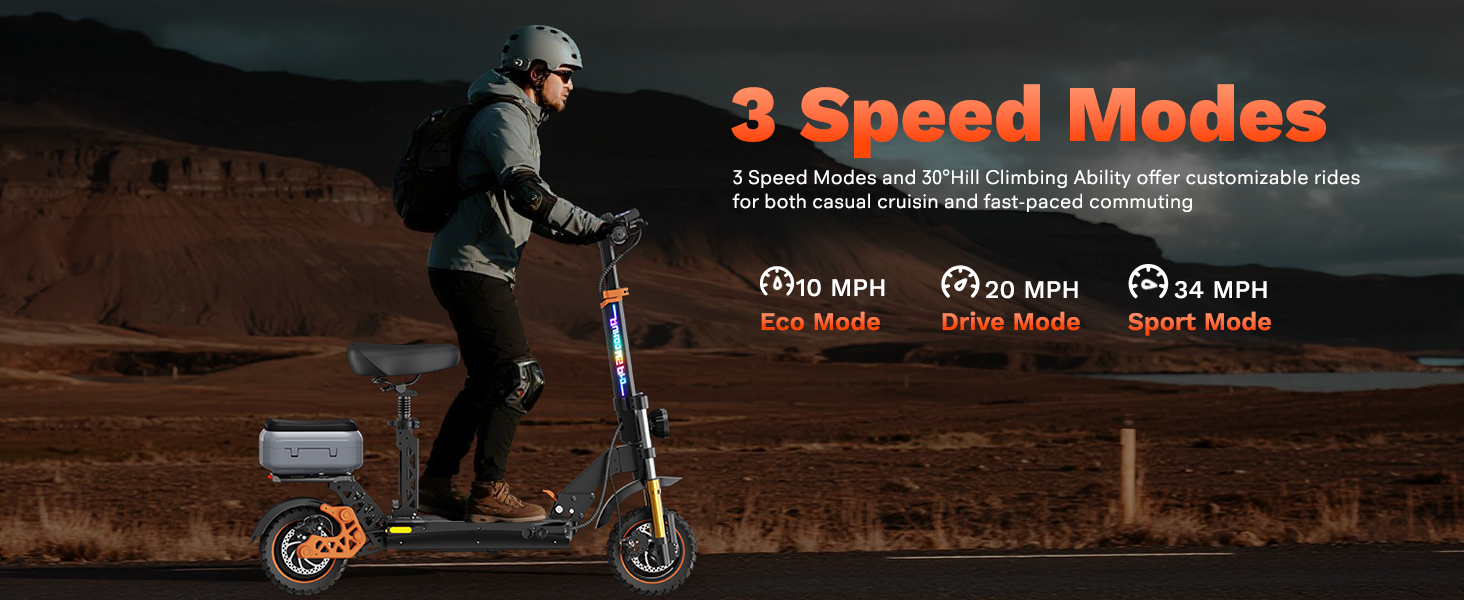
Image: Illustration of the three speed modes (Eco, Drive, Sport) and their respective maximum speeds on the M5 Pro scooter.
Video: This video demonstrates how to change the speed settings and unlock the speed limit on the Ruitoo M5 Pro electric scooter.

Image: The M5 Pro electric scooter can be ridden standing or with the optional seat installed, offering versatile riding modes.
Video: This video showcases the electric scooter being ridden both on-road and off-road, demonstrating its versatility and performance with the seat installed.
Video: This video highlights the riding experience of the electric scooter for adults, focusing on its features and comfort with the seat.
6. Maintenance
Regular maintenance ensures the longevity and safe operation of your scooter.
- Battery Care: Charge the battery regularly, even if not in use, to maintain its health. Avoid completely draining the battery.
- Tire Maintenance: Check tire pressure before each ride. Ensure tires are free from punctures or excessive wear.
- Brake System: Periodically inspect brake pads and cables for wear and proper function. Adjust as needed.
- Cleaning: Clean the scooter with a damp cloth. Avoid using high-pressure water jets directly on electronic components.
- Storage: Store the scooter in a dry, cool place away from direct sunlight and extreme temperatures.
7. Troubleshooting
If you encounter issues with your scooter, refer to the following common problems and solutions:
- Scooter Not Turning On: Ensure the battery is charged and properly connected. Check if the key is fully inserted and turned.
- Loss of Power/Reduced Range: This may indicate a low battery charge or a degraded battery. Ensure full charge before riding.
- Brakes Not Responsive: Inspect brake cables for tension and ensure brake pads are not excessively worn. Adjust or replace as necessary.
- Unusual Noises: Check for loose components, especially around the wheels and suspension.
For persistent issues, please contact customer support.
8. Specifications
| Feature | Specification |
|---|---|
| Brand | Ruitoo |
| Model Name | M5 Pro Electric Scooter |
| Motor Power | Dual 1000W (Peak 2000W total) |
| Top Speed | 34 Mph |
| Max Range | 50 Miles |
| Battery | 48V/20.8Ah Lithium Battery (UL2272 Certified) |
| Charging Time | 8 Hours |
| Weight Limit | 264 Pounds |
| Product Dimensions | 50.4"L x 23.6"W x 41.7"H |
| Item Weight | 90 Pounds |
| Wheel Size | 11 Inches (Front), 10 Inches (Rear) |
| Suspension Type | Dual Suspension Hydraulic Shock Absorber |
| Brake Style | Front Braking, Rear Braking (ABS) |
| Special Features | Adjustable Handlebar Height, Digital Display, Dual Braking System, Foldable, Replaceable Battery |
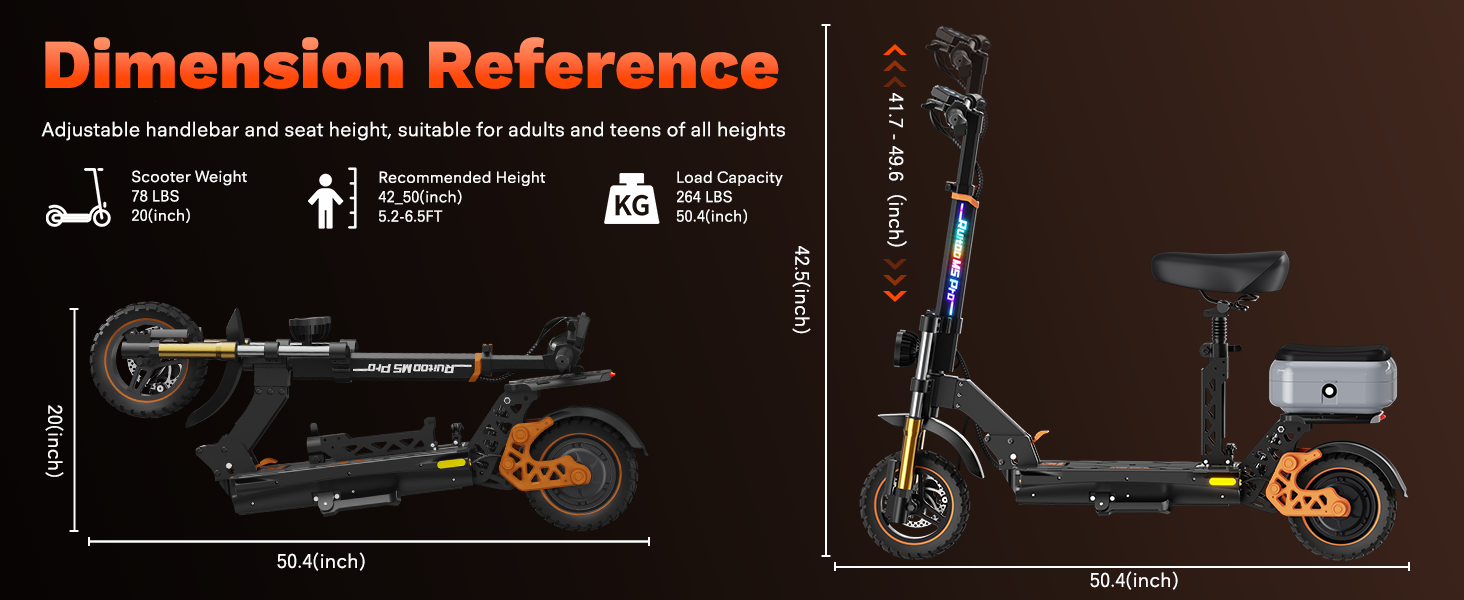
Image: Dimension reference for the M5 Pro electric scooter, showing both folded and unfolded measurements.
9. Warranty and Support
The Ruitoo Electric Scooter M5 Pro comes with a 1-year warranty for different components. For any questions, technical support, or warranty claims, please contact the seller, Dreams Trading Inc., directly through your purchase platform.
We are committed to providing reliable customer support and ensuring your satisfaction.
