
1. Introduction and Safety Information
This manual provides essential instructions for the safe operation, setup, and maintenance of your Team Associated SR27 Datsun 240Z RTR NiMH Combo. Please read this entire manual carefully before operating the product to ensure proper function and to prevent damage or injury.
Safety Guidelines
WARNING: Read the ENTIRE instruction manual to become familiar with the features of the product before operating. Failure to operate the product correctly can result in damage to the product, personal property and cause serious injury. This is a sophisticated hobby product. It must be operated with caution and common sense and requires some basic mechanical ability. Failure to operate this Product in a safe and responsible manner could result in injury or damage to the product or other property. This product is not intended for use by children without direct adult supervision. Do not use with incompatible components or alter this product in any way outside of the instructions provided by Horizon Hobby, LLC. The product manual contains instructions for safety, operation and maintenance. It is essential to read and follow all the instructions and warnings in the manual, prior to assembly, setup or use, in order to operate correctly and avoid damage or serious injury.
2. Product Overview
The Team Associated SR27 Datsun 240Z RTR NiMH Combo is a ready-to-run remote control car designed for hobby enthusiasts. It features a detailed Datsun 240Z body and a robust chassis.
Key Features
- Adjustable Front And Rear Body Mounts
- Highly Detailed Wheels With Specific Offsets
- Integrated Electronic Speed Control
- Adjustable Gear Ratio Options
- Metric Hardware Used Throughout
What's in the Box
- SR27 Datsun 240Z RTR NiMH Combo, Red
- NiMH Battery
- Charger
- 2.4GHz Radio Transmitter
- Instruction Manual


3. Setup
Before operating your SR27 Datsun 240Z, follow these steps to ensure it is properly prepared.
3.1 Battery Charging
- Connect the included NiMH battery to the provided charger.
- Plug the charger into a suitable power outlet.
- Allow the battery to charge fully. Refer to the charger's specific instructions for charging indicators and times.
- Always supervise batteries during charging and never charge damaged batteries.
3.2 Installing Batteries
- Remove the body clips and carefully lift the Datsun 240Z body off the chassis.
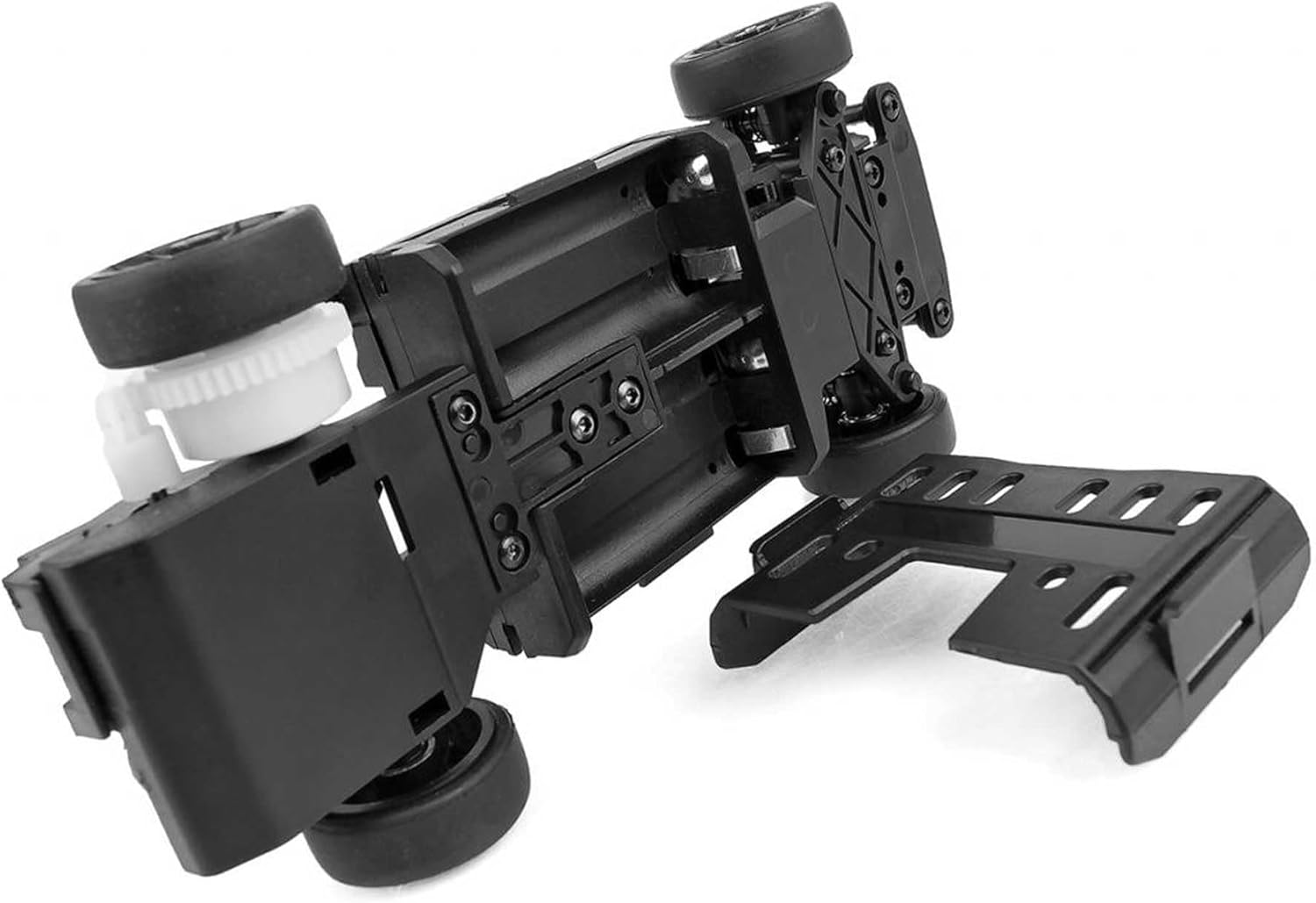
- Locate the battery compartment on the chassis.
- Insert the fully charged NiMH battery into the compartment and secure it if necessary.
- Connect the battery to the Electronic Speed Control (ESC) power lead. Ensure correct polarity.
- Install 4 AA batteries (not included) into the radio transmitter, observing polarity markings.

3.3 Transmitter and Receiver Binding
Your RTR vehicle typically comes pre-bound. If re-binding is necessary, refer to the separate radio system manual for detailed instructions. Generally, this involves powering on the receiver with the bind plug inserted, then powering on the transmitter while holding the bind button.
3.4 Initial Checks
- Ensure all connections are secure.
- Verify steering response: Turn the steering wheel on the transmitter; the front wheels should turn accordingly.
- Verify throttle response: Gently pull the throttle trigger; the motor should respond.
- Check for any obstructions to moving parts.
4. Operating Instructions
Operating your Team Associated SR27 Datsun 240Z is straightforward. Always operate in a safe, open area, away from people, pets, and obstacles.
4.1 Starting the Vehicle
- Turn on the transmitter first.
- Then, turn on the vehicle's power switch (located on the ESC or chassis).
- Place the vehicle on the ground.
4.2 Basic Controls
- Steering Wheel: Turn left or right to control the direction of the front wheels.
- Throttle Trigger: Pull to accelerate forward. Push forward to brake or reverse.
4.3 Driving Tips
- Start slowly to get accustomed to the controls.
- Avoid driving in wet conditions or through deep puddles unless the vehicle is specifically rated as waterproof.
- Monitor battery life. Performance will decrease as the battery drains.
- Always turn off the vehicle first, then the transmitter, when finished operating.
5. Maintenance
Regular maintenance will extend the life and performance of your RC vehicle.
5.1 Cleaning
- After each use, clean dirt and debris from the chassis, wheels, and body using a soft brush or compressed air.
- Avoid using water or harsh chemicals directly on electronic components.
5.2 Component Inspection
- Regularly check all screws and fasteners for tightness.
- Inspect suspension components, steering linkages, and drive shafts for damage or wear.
- Check the motor and ESC for excessive heat buildup after operation.
- Examine tires for wear and ensure they are securely mounted.

5.3 Battery Care
- Store NiMH batteries in a cool, dry place.
- Do not overcharge or over-discharge NiMH batteries.
- Disconnect the battery from the vehicle when not in use.
6. Troubleshooting
This section addresses common issues you might encounter with your SR27 Datsun 240Z.
| Problem | Possible Cause | Solution |
|---|---|---|
| Vehicle does not respond to throttle or steering. |
|
|
| Poor steering response or vehicle pulls to one side. |
|
|
| Motor runs but wheels do not turn. |
|
|
7. Specifications
Detailed technical specifications for the Team Associated SR27 Datsun 240Z RTR NiMH Combo.
| Specification | Detail |
|---|---|
| Brand Name | Team Associated |
| Model Name | SR27 Datsun 240Z RTR NiMH Combo, Red |
| Model Number | ASC20191C |
| ASIN | B0DJDLMDCC |
| GTIN (UPC) | 784695983526 |
| Age Range Description | Ages 14+ |
| Included Components | SR27 Datsun 240Z RTR NiMH Combo, Red |
| Number of Items | 1 |
| Item Type Name | Car |
| Manufacturer | Horizon Hobby |
| Power Source | Battery Powered |
| Additional Features | Adjustable |
| Operation Mode | Remote Control |
| Battery Description | Nickel-Metal Hydride (NiMH) |
| Toy Vehicle Form | Car |
| Color | Multi (Red body) |
| Theme | RC Hobby |
| Item Weight | 1.6 pounds |
| Item Dimensions (L x W x H) | 11.5 x 7.9 x 4 inches |
| Material Type | Plastic |
8. Warranty and Support
For warranty information, technical support, or replacement parts, please contact Team Associated or Horizon Hobby directly. Refer to their official website for the most current contact details and warranty policies.
Note: Product specifications and features are subject to change without notice.