
Introduction
The AlphaTheta HP-TX01 is a dedicated transmitter designed for professional wireless DJ headphones, enabling ultra-low latency sound transfer. It connects to any DJ mixer equipped with a PHONE or 3.5 mm stereo mini jack monitor output, providing a seamless wireless audio experience. This compact and lightweight device is engineered for portability and reliable performance in professional DJ environments.
Safety Information
Please read all safety instructions before using the AlphaTheta HP-TX01 transmitter. Keep this manual for future reference.
- Do not expose the device to rain, moisture, or extreme temperatures.
- Avoid dropping or subjecting the device to strong impacts.
- Use only the provided USB-C charging cable or a compatible certified cable.
- Do not attempt to disassemble or modify the unit. Refer all servicing to qualified personnel.
- Keep out of reach of children.
Package Contents
Verify that all items are present in the package:
- AlphaTheta HP-TX01 Transmitter Unit
- USB-C Charging Cable
- User Manual (this document)
Product Overview
Familiarize yourself with the components of your HP-TX01 transmitter.
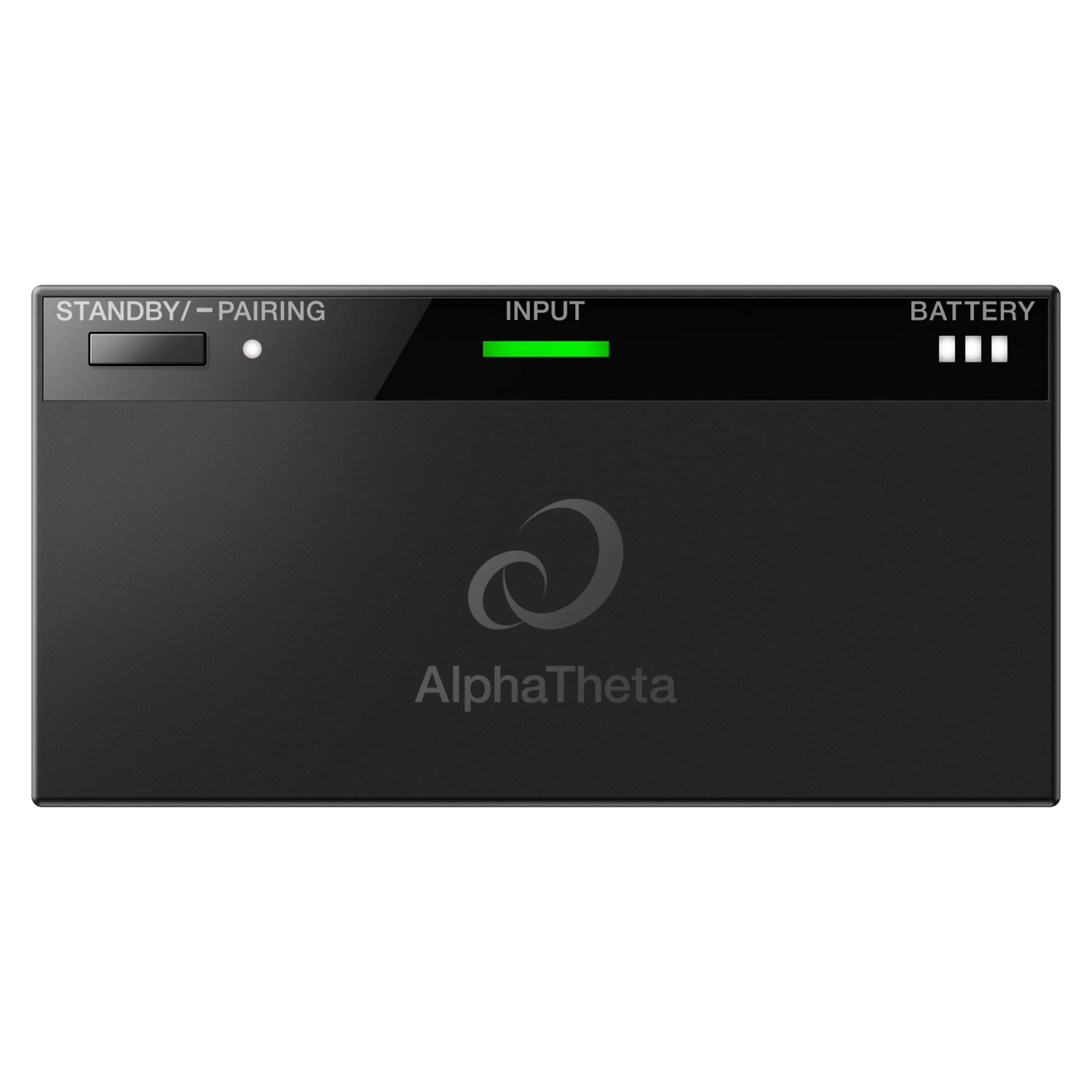
Figure 1: Top View of HP-TX01 Transmitter. This image displays the top surface of the AlphaTheta HP-TX01 transmitter, highlighting the STANDBY/PAIRING button, the INPUT indicator light, and the BATTERY level indicator.

Figure 2: Rear View of HP-TX01 Transmitter. This image shows the rear panel of the transmitter, featuring the 3.5mm audio INPUT jack and the DC 5V USB-C charging port.
Controls and Indicators:
- STANDBY/PAIRING Button: Used to power on/off the device and initiate pairing with compatible headphones.
- INPUT Indicator: Illuminates to show an active audio input signal.
- BATTERY Indicator: Displays the current battery charge level.
- INPUT Jack (3.5mm): Connects to the audio output of a DJ mixer.
- DC 5V (USB-C) Port: Used for charging the transmitter's internal battery.
Setup
1. Charging the Transmitter
- Connect the supplied USB-C charging cable to the DC 5V port on the transmitter.
- Connect the other end of the USB-C cable to a USB power adapter (not included) or a powered USB port.
- The BATTERY indicator will show charging status. Charge fully before first use.
2. Connecting to a DJ Mixer
- Ensure your DJ mixer is powered off or its monitor output volume is set to minimum.
- Connect a 3.5mm stereo audio cable (not included) from the PHONE or 3.5 mm stereo mini jack monitor output of your DJ mixer to the INPUT jack on the HP-TX01 transmitter.
- Power on your DJ mixer and adjust the monitor output volume as needed.

Figure 3: Transmitter Connected to DJ Mixer. This image illustrates the HP-TX01 transmitter connected to a DJ mixer, with a pair of professional DJ headphones positioned next to it, demonstrating a typical setup.
Operating Instructions
1. Powering On/Off
- To Power On: Press and hold the STANDBY/PAIRING button for approximately 2 seconds until the indicators light up.
- To Power Off: Press and hold the STANDBY/PAIRING button for approximately 3 seconds until the indicators turn off.
2. Pairing with Headphones
The HP-TX01 transmitter is designed to work with compatible AlphaTheta professional wireless DJ headphones (e.g., HDJ-F10) using SonicLink technology.
- Ensure the transmitter is powered on.
- Place your compatible AlphaTheta wireless DJ headphones into pairing mode (refer to your headphone's user manual for specific instructions).
- On the HP-TX01 transmitter, press and hold the STANDBY/PAIRING button for approximately 5 seconds until the STANDBY/PAIRING indicator begins to flash rapidly. This indicates the transmitter is in pairing mode.
- Once the headphones and transmitter successfully pair, the STANDBY/PAIRING indicator on the transmitter will change to a solid light, and the headphones will indicate a successful connection.
Note: The HP-TX01 is specifically designed for AlphaTheta professional wireless DJ headphones. Compatibility with other brands or models is not guaranteed.
3. Audio Transmission
- After successful pairing and connection to a DJ mixer, audio from the mixer will be wirelessly transmitted to your headphones.
- The INPUT indicator on the transmitter will illuminate when an audio signal is detected.
- Adjust the volume directly on your connected headphones.
Maintenance
Cleaning
- Wipe the exterior of the transmitter with a soft, dry cloth.
- Do not use abrasive cleaners, waxes, or solvents.
- Ensure no liquids enter the ports or openings.
Storage
- Store the transmitter in a cool, dry place away from direct sunlight and extreme temperatures.
- If storing for an extended period, charge the battery periodically to maintain its health.
Troubleshooting
| Problem | Possible Cause | Solution |
|---|---|---|
| No power | Battery is depleted. | Charge the transmitter using the USB-C cable. |
| No audio output to headphones |
|
|
| Poor audio quality / Dropouts |
|
|
| Transmitter not pairing |
|
|
Specifications
| Model Number | HP-TX01 |
| Brand | AlphaTheta |
| Connectivity Technology | Wireless (SonicLink) |
| Input Jack | 3.5 mm Stereo Mini Jack |
| Charging Port | USB-C (DC 5V) |
| Item Weight | 10.08 ounces (approximately 285.8 grams) |
| Enclosure Material | Plastic |
| Specific Uses For Product | Professional DJing |
Warranty Information
The AlphaTheta HP-TX01 Transmitter comes with a 2-Year Manufacturer Warranty. This warranty covers defects in materials and workmanship under normal use. Please retain your proof of purchase for warranty claims. For full terms and conditions, please refer to the official AlphaTheta website or contact customer support.
Support
For further assistance, technical support, or warranty inquiries, please visit the official AlphaTheta website or contact their customer service department.
- Official Website: www.alphatheta.com
- Customer Service: Refer to the contact section on the official website for phone numbers or email support.


