
1. Introduction
This manual provides essential information for the safe and efficient operation of your Toshiba 24WV3463DAZ 24-inch HD Ready Smart TV. Please read it thoroughly before using the television and retain it for future reference.

Image 1.1: Front view of the Toshiba 24WV3463DAZ Smart TV, showcasing the VIDAA operating system interface with popular streaming applications like Netflix, YouTube, Disney+, and Prime Video.
The Toshiba 24WV3463DAZ is a 24-inch HD Ready LED Smart TV featuring HDR10, HLG, and TRU Resolution for enhanced picture quality. It includes a triple tuner for DVB-C, DVB-T2, and DVB-S2 reception, and runs on the VIDAA operating system, providing access to a wide range of streaming services and smart functionalities.
2. Safety Information
Always observe the following safety precautions to prevent electric shock, fire, or injury:
- Do not expose the TV to rain or moisture.
- Do not open the TV casing; refer all servicing to qualified personnel.
- Ensure proper ventilation around the TV.
- Use only the power cord supplied with the TV.
- Keep batteries out of reach of children.
- Unplug the TV during lightning storms or when unused for long periods.
3. Package Contents
Verify that all items are present in the packaging:
- Toshiba 24WV3463DAZ 24-inch HD Ready Smart TV
- TV Stand
- Remote Control
- AAA Batteries (x2)
- Power Cord
- Quick Start Guide (this manual)
4. Setup
4.1 Attaching the Stand
Carefully place the TV face down on a soft, clean surface. Attach the stand to the bottom of the TV using the provided screws. Ensure the stand is securely fastened before placing the TV upright.
4.2 Wall Mounting (Optional)
If wall mounting, remove the stand. The TV supports VESA M4 75x75 mounting. Consult a professional for wall mounting installation.

Image 4.1: Dimensional diagram of the Toshiba 24WV3463DAZ TV, indicating a 24-inch (60 cm) screen, overall width of 55.3 cm, height with stand of 36.2 cm, height without stand of 33.3 cm, and VESA M4 75x75 mounting compatibility.
4.3 Initial Power On and First-Time Setup
- Connect the power cord to the TV and a power outlet.
- Press the power button on the remote control or TV.
- Follow the on-screen instructions to select your language, country, and network settings.
- Perform a channel scan for DVB-C, DVB-T2, or DVB-S2 signals.
5. Connections
Your TV offers various connection options for external devices:

Image 5.1: Rear view of the TV's connection panel, illustrating ports for 2x HDMI, 1x USB, LAN (Ethernet), Antenna (RF/F), Headphones, CI Slot, and Digital Audio Output.
- HDMI (x2): Connect Blu-ray players, game consoles, or other HDMI-enabled devices. Supports CEC (Consumer Electronics Control) and ARC (Audio Return Channel) on one port.
- USB (x1): Connect USB storage devices for media playback.
- LAN (Ethernet): For a wired internet connection.
- Antenna (RF/F): Connect your terrestrial (DVB-T2) or cable (DVB-C) antenna.
- Satellite (F-Type): Connect your satellite dish for DVB-S2 reception.
- Headphones: Connect headphones for private listening.
- CI Slot: For Conditional Access Modules (CAM) to decrypt encrypted channels.
- Digital Audio Output (Optical): Connect to an external sound system for digital audio.
- Wi-Fi: For wireless internet connection.
6. Operating the TV
6.1 Remote Control Functions
The remote control provides access to all TV functions. Insert the two AAA batteries into the remote control, ensuring correct polarity.
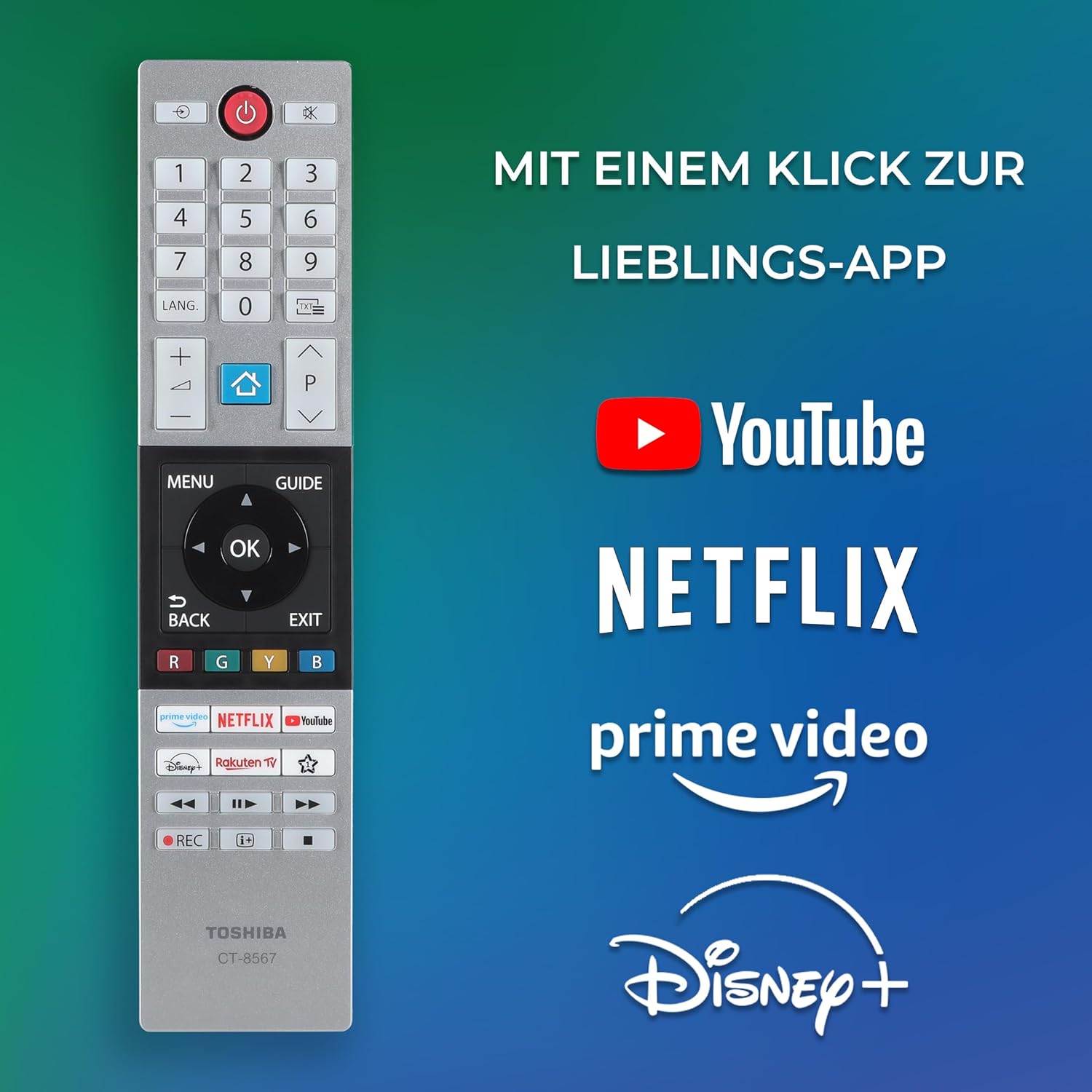
Image 6.1: The Toshiba remote control, highlighting quick access buttons for YouTube, Netflix, Prime Video, and Disney+.
- Power Button: Turns the TV on/off.
- Number Buttons: Select channels directly.
- Volume +/-: Adjust the volume level.
- Channel +/-: Change channels.
- Home Button: Access the VIDAA Smart TV home screen.
- Navigation Buttons (Up/Down/Left/Right/OK): Navigate menus and confirm selections.
- Back/Exit: Return to the previous screen or exit a menu.
- App Buttons: Direct access to streaming applications (e.g., Netflix, YouTube).
6.2 Picture Settings
Access the picture settings menu to adjust brightness, contrast, color, and other display options. The TV features TRU Resolution and HDR10/HLG support for optimized image quality.

Image 6.2: Illustration of TRU Micro Dimming technology, which enhances contrast by optimizing black levels and precisely calculating brightness for each display area.
6.3 Optimal Viewing Distance
For the best viewing experience, consider the recommended seating distance based on screen size and resolution:
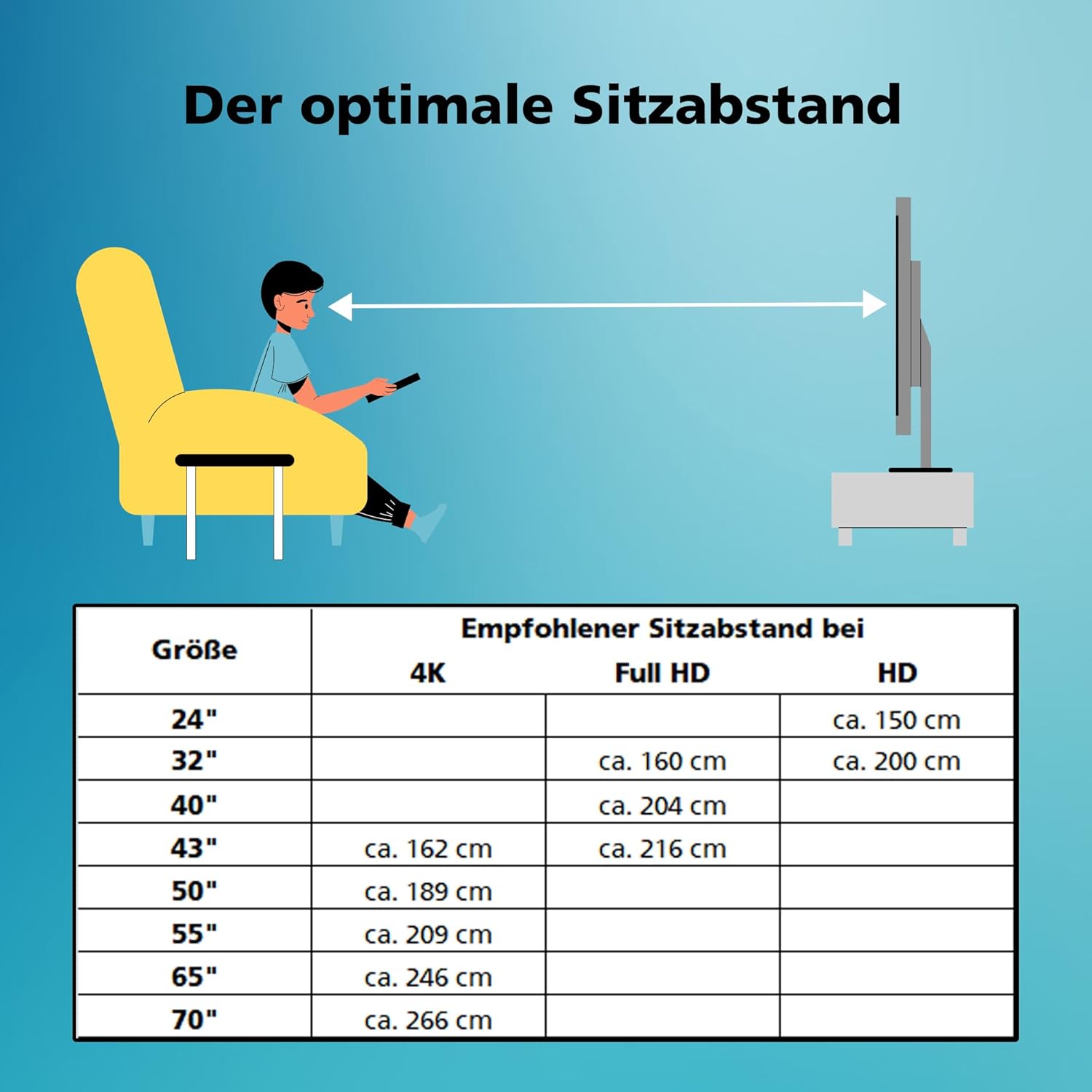
Image 6.3: A chart detailing optimal seating distances for various TV sizes (24" to 70") and resolutions (4K, Full HD, HD). For a 24" HD TV, the recommended distance is approximately 150 cm.
7. Smart TV Features (VIDAA OS)
Your Toshiba TV runs on the VIDAA operating system, offering a smart and intuitive user experience.

Image 7.1: The VIDAA Smart TV platform banner, showcasing its user-friendly interface and a selection of available applications.
7.1 Accessing Apps
From the Home screen, you can access pre-installed applications like Netflix, Prime Video, Disney+, YouTube, and more. You can also download additional apps from the VIDAA App Store.
7.2 Voice Control (VIDAA Voice)
The TV supports VIDAA Voice, allowing you to control certain functions using voice commands when connected to compatible Alexa-enabled smart speakers (sold separately). This enables changing channels, adjusting volume, and opening applications hands-free.

Image 7.2: A user interacting with the TV using voice commands, demonstrating the integration of VIDAA Voice with Alexa-compatible devices for direct access to streaming services.
8. Troubleshooting
Refer to this section for common issues and their solutions.
| Problem | Possible Cause | Solution |
|---|---|---|
| No power | Power cord disconnected; no power from outlet. | Check power cord connection; test outlet with another device. |
| No picture, but sound is present | Incorrect input source; backlight issue. | Press the "Source" button on the remote to select the correct input. Contact support if the issue persists. |
| No sound, but picture is present | Volume muted or too low; incorrect audio output setting. | Unmute or increase volume. Check audio output settings in the TV menu. |
| Remote control not working | Batteries depleted or incorrectly inserted; obstruction. | Replace batteries; ensure correct polarity. Remove any obstructions between remote and TV. |
| Cannot connect to Wi-Fi | Incorrect password; router issue; TV too far from router. | Verify Wi-Fi password. Restart router. Move TV closer to router or use a wired LAN connection. |
9. Specifications
| Feature | Detail |
|---|---|
| Model Number | 24WV3463DAZ |
| Screen Size | 24 Inches (60 cm) |
| Display Technology | LED |
| Resolution | 768p (HD Ready) |
| Refresh Rate | 50 Hz |
| Operating System | VIDAA |
| Special Features | VIDAA TV, HDR10, HLG, TRU Resolution, TRU Micro Dimming |
| Connectivity | 2x HDMI, 1x USB, Wi-Fi, LAN (Ethernet) |
| Tuner Type | Triple Tuner (DVB-C, DVB-T2, DVB-S2) |
| Audio Output | Digital Optical, Headphone Jack |
| VESA Compatibility | M4 75x75 |
| Dimensions (with stand) | 13.2P x 55.3W x 36.2H cm |
| Energy Efficiency Class | E |
| Power Consumption (SDR) | 16 kWh/1000h |
| Power Consumption (HDR) | 28 kWh/1000h |

Image 9.1: The EU Energy Label for the Toshiba 24WV3463DAZ, indicating an energy efficiency class E, SDR power consumption of 16 kWh/1000h, and HDR power consumption of 28 kWh/1000h. More details can be found at eprel.ec.europa.eu/qr/1960543.
10. Maintenance
10.1 Cleaning the TV
Before cleaning, unplug the TV from the power outlet. Use a soft, dry cloth to wipe the screen and cabinet. Do not use liquid cleaners or aerosol sprays directly on the TV.
10.2 Software Updates
The TV may receive software updates to improve performance and add new features. Ensure your TV is connected to the internet to receive these updates automatically or check for them manually in the settings menu.
11. Warranty and Support
Your Toshiba TV comes with a manufacturer's warranty. Please refer to the warranty card included in your package for specific terms and conditions. Spare parts availability is guaranteed for 7 years.
For technical support or service inquiries, please contact Toshiba customer service. Contact information can typically be found on the Toshiba website or in your warranty documentation.


