
Introduction
The Meliconi Solar TV is an innovative universal remote control designed for compatibility with a wide range of television brands and models. This remote stands out for its eco-friendly design, featuring both solar and USB charging capabilities, thereby eliminating the need for disposable batteries. It integrates advanced functions to provide a comprehensive and intuitive control experience for your television.
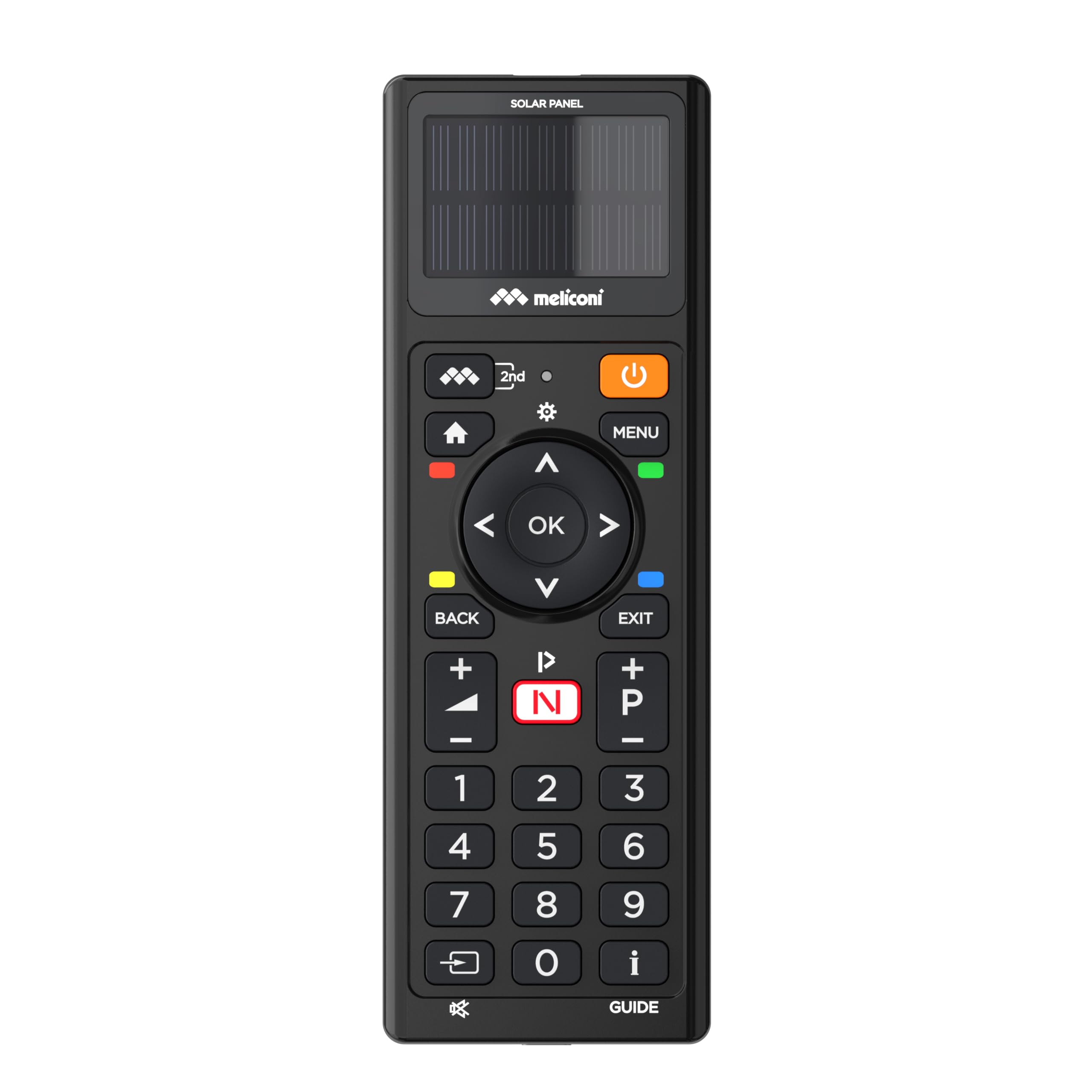
Front view of the Meliconi Solar TV Universal Remote Control, showcasing its sleek design and button layout.
Setup
Before initial use, ensure the remote control is adequately charged. The Meliconi Solar TV remote can be charged via its integrated solar panel or through a USB cable.
1. Charging the Remote Control
- Solar Charging: Place the remote control with its solar panel facing a light source. The integrated solar panel will continuously charge the internal supercapacitor.
- USB Charging: For faster charging or in low-light conditions, connect the remote control to a USB power source using the provided USB cable. A 10-minute USB charge provides approximately two months of use.

Side view of the remote control, highlighting the solar panel for eco-friendly charging.
2. Initial TV Setup
The Meliconi Solar TV remote offers multiple methods for programming to your television:
- Direct Code Entry: Refer to the included code list. Find your TV brand and model, then enter the corresponding code using the remote's number buttons.
- Automatic Search: This method scans for compatible codes automatically. Follow the instructions in the quick start guide to initiate the automatic search.
- Manual Search: If direct code entry or automatic search is unsuccessful, you can perform a manual search by systematically trying codes for your TV brand.
- Learning Mode: The remote features a 'Learning' function, allowing it to copy specific commands directly from your original TV remote control. This is useful for functions not covered by pre-programmed codes.
3. Child Protection Mode
The remote includes a Child Protection Mode to block non-essential buttons, preventing accidental changes to settings or channels. Consult the full manual for activation and deactivation steps.
Operating
The Meliconi Solar TV remote provides all essential infrared functions for controlling your television. The button layout is designed for intuitive use.
- Power Button: Located at the top, typically orange, to turn the TV on/off.
- Number Buttons (0-9): For direct channel selection.
- Volume Control (+/-): Adjusts the TV volume.
- Channel Control (P+/P-): Changes TV channels.
- Navigation Pad (OK, Up, Down, Left, Right): Used for menu navigation and selection.
- Menu Button: Accesses the TV's main menu.
- Back/Exit Buttons: Returns to the previous screen or exits a menu.
- App Buttons: Dedicated buttons for popular streaming services (e.g., Netflix, Prime Video) if supported by your TV and programmed.

A user holding the Meliconi Solar TV remote control, demonstrating its use with a television.
Maintenance
To ensure the longevity and optimal performance of your Meliconi Solar TV remote control, follow these maintenance guidelines:
- Cleaning: Use a soft, dry cloth to clean the remote control. Avoid abrasive cleaners or solvents that could damage the surface or solar panel.
- Charging: Regularly expose the solar panel to light to maintain charge. For extended periods of non-use, a full USB charge is recommended.
- Storage: Store the remote in a cool, dry place away from direct sunlight or extreme temperatures when not in use.
- Supercapacitor: The remote uses a rechargeable supercapacitor instead of traditional batteries. This component is designed for long life and does not require replacement under normal use.
Troubleshooting
If you encounter issues with your Meliconi Solar TV remote control, try the following troubleshooting steps:
- Remote Not Responding: Ensure the remote is sufficiently charged. Try charging via USB for 10 minutes. Check the ON/OFF switch on the back of the remote to ensure it is in the 'ON' position.
- Specific Functions Not Working: If certain buttons do not work, the remote may not be correctly programmed for your TV model. Try re-programming using a different code or the learning function.
- Interference: Ensure there are no obstructions between the remote control and your TV's infrared receiver.
- Reset: If problems persist, a factory reset might resolve the issue. Refer to the full instruction manual for specific reset procedures.

Back of the remote control, showing the ON/OFF switch and product identification details.
Specifications
| Feature | Specification |
|---|---|
| Brand | Meliconi |
| Model | 800508 |
| Model Name | Solar TV |
| Compatible Devices | Television |
| Connectivity Technology | Infrared |
| Special Feature | Rechargeable (Solar & USB) |
| Battery Type | Rechargeable Supercapacitor |
| Batteries Required | No (Internal Supercapacitor) |
| Color | Black |
| Item Weight | 150 g |
| Number of Buttons | 20 |
| Max Supported Devices | 1 |
Warranty and Support
Meliconi offers comprehensive support and assistance for its products. For detailed information regarding warranty, access to programming guides, additional instructions, or video tutorials, please visit the official Meliconi website or contact their customer service directly. This support aims to facilitate the use and maximize the functionality of your remote control.
For further assistance, please refer to the contact information provided in the product packaging or on the Meliconi official website.
