
WHILL 13-21000-0
WHILL Model R 3-Wheel Mobility Scooter User Manual
Model: 13-21000-0
Introduction
This manual provides essential information for the safe and effective operation, maintenance, and care of your WHILL Model R 3-Wheel Mobility Scooter. Please read this manual thoroughly before using your scooter and retain it for future reference.
The WHILL Model R is designed for enhanced mobility, featuring a 3-wheel configuration with independent suspension and stabilizer technology for superior stability and comfort. It is water-resistant with an IPX5 rating, suitable for splashes and light rain. The scooter offers a 12-mile range on a single charge and is airline-friendly. Smart connectivity via a smartphone app allows for monitoring battery life and adjusting speed settings.
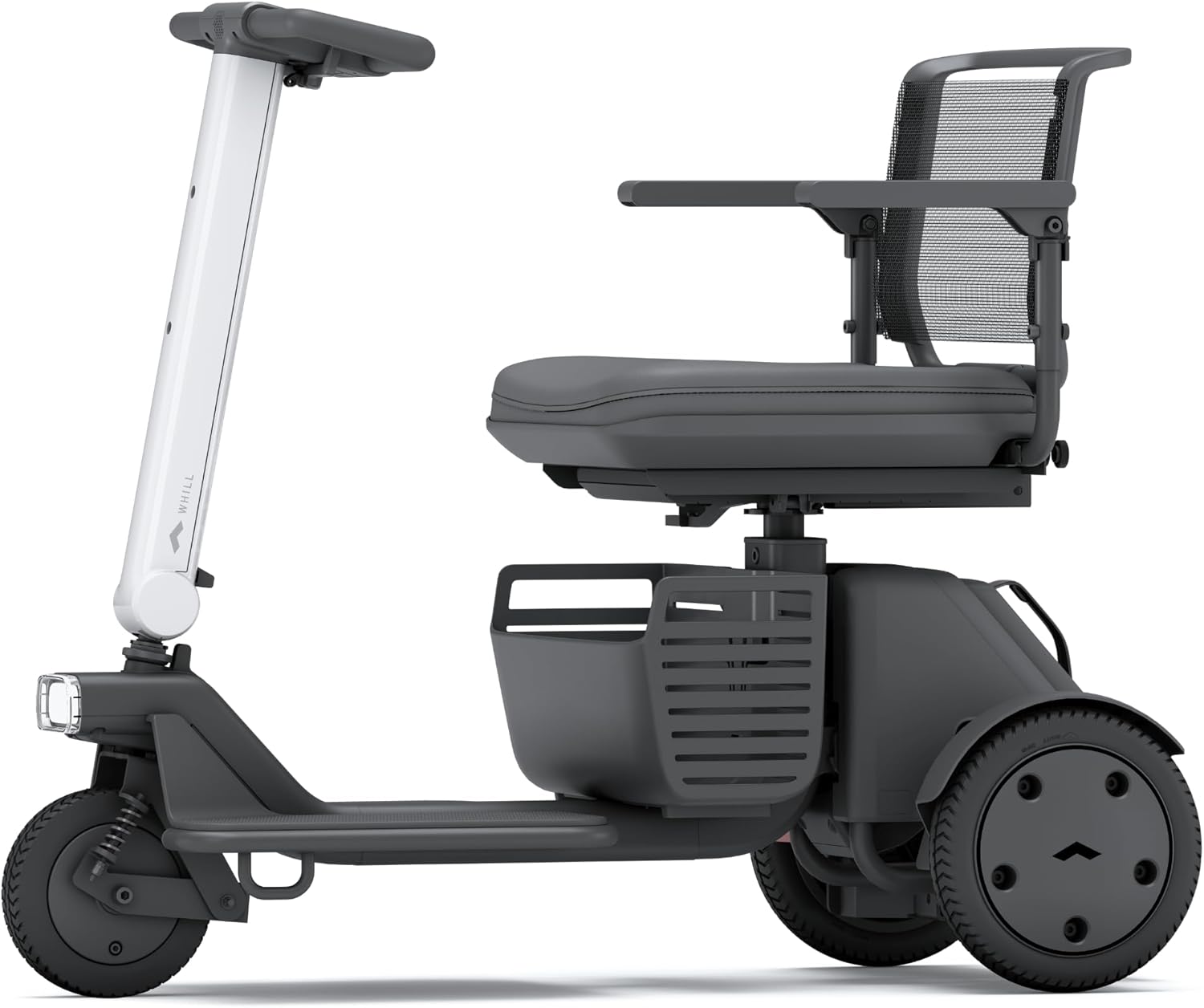
Image: The WHILL Model R 3-Wheel Mobility Scooter, showcasing its sleek design and compact form.
Setup and Assembly
The WHILL Model R is designed for easy assembly and disassembly, making it convenient for transport and storage. Follow these steps for initial setup:
- Unpacking: Carefully remove all components from the packaging. Ensure all parts are present according to the packing list.
- Main Body Assembly: Connect the main body sections. The scooter is designed to disassemble into several parts for portability.
- Seat Installation: Securely attach the seat to the main body. Ensure it clicks into place or is fastened according to the specific mechanism.
- Battery Installation: Insert the LG li-ion battery into its designated compartment. Ensure it is fully seated and locked.
- Initial Charge: Before first use, fully charge the battery. Refer to the "Charging the Battery" section for detailed instructions.
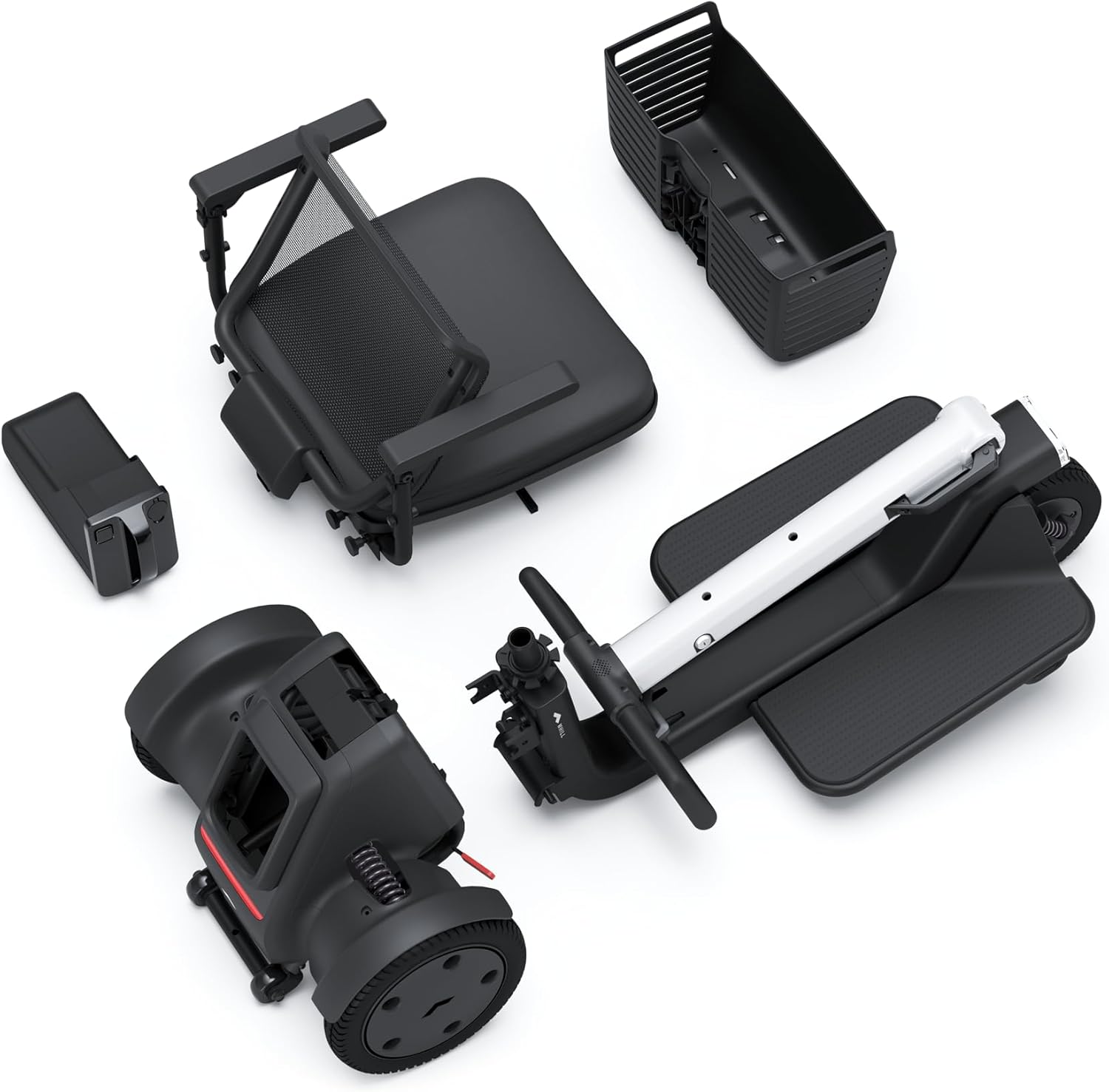
Image: Disassembled components of the WHILL Model R, illustrating its modular design for portability.
For quick disassembly and convenient storage, the Model R can be broken down into smaller parts in under 10 seconds, making it easy to load into a car trunk or store in compact spaces.

Image: The WHILL Model R being swiftly disassembled and stored in a car trunk, highlighting its portability.
Operating Instructions
Controls and Display
The WHILL Model R features an intuitive control panel with a wide LED display for easy monitoring of key information.

Image: The control panel of the WHILL Model R, featuring a clear LED display and accessible buttons for operation.
- Power On/Off: Use the designated power button to turn the scooter on or off.
- Speed Adjustment: Adjust your speed using the +/- buttons on the control panel. The LED display will show your current speed setting.
- Directional Control: Use the ergonomic handlebars to steer the scooter. The 90-degree rotating front wheel allows for precise maneuvering in tight spaces.
- Horn and Lights: Activate the horn or turn on the headlights using the respective buttons.
Driving and Maneuvering
The WHILL Model R is designed for smooth and stable rides in various environments.
- Tight Spaces: The scooter's small turning radius (35.8 inches / 97 cm) and dual-motor technology, which allows rear wheels to spin in opposite directions, enable effortless navigation in confined areas like cafes, stores, and elevators.
- Stability: Independent suspension and stabilizer technology provide exceptional stability and comfort, even on uneven surfaces.
- Safety Sensor: A built-in safety sensor automatically adjusts speed during turns, slowing down to enhance safety and control.
Video: Demonstrates the WHILL Model R 3-Wheel Mobility Scooter's maneuverability, stability, and ease of use in various urban and indoor settings.
Smartphone App Connectivity
Enhance your experience by connecting your WHILL Model R to the dedicated smartphone app.
- Battery Monitoring: Check your current battery life and remaining range directly from the app.
- Speed Settings: Adjust and customize speed settings to suit your preferences and environment.
- Drive Modes: Select from three available drive modes for a personalized driving experience.
- Lock/Unlock: Secure your scooter by locking it via the app.

Image: The WHILL App interface, displaying battery status and control options for the scooter.
Maintenance
Charging the Battery
The WHILL Model R is equipped with an LG li-ion battery, offering up to 12 miles of range on a single charge.
- Battery Removal: The portable, lightweight battery can be easily removed for convenient charging indoors.
- Charging Port: Locate the charging port on the scooter or directly on the battery if removed.
- Charging Indicator: Monitor the charging status via the LED display on the scooter or the WHILL app.

Image: A USB charging port on the WHILL Model R, indicating charging capabilities.
General Care
- Cleaning: Wipe down the scooter with a damp cloth. Avoid using harsh chemicals or abrasive cleaners.
- Water Resistance: The IPX5 rating protects against splashes and light rain. Avoid submerging the scooter or exposing it to heavy downpours.
- Storage: When not in use for extended periods, store the scooter in a dry, temperate environment. Ensure the battery is partially charged (around 50%) before storage.
Troubleshooting
This section addresses common issues you might encounter with your WHILL Model R. For problems not listed here, please contact customer support.
| Problem | Possible Cause | Solution |
|---|---|---|
| Scooter does not power on. | Battery is depleted or not properly installed. | Ensure battery is fully charged and correctly seated. Check power button. |
| Reduced range or power. | Low battery charge; battery degradation; heavy load; rough terrain. | Fully charge the battery. Reduce load. Avoid steep inclines or rough surfaces if possible. Consider battery replacement if degradation is significant. |
| Unusual noises during operation. | Loose components; obstruction; motor issue. | Inspect for loose parts or obstructions. If noise persists, contact customer support. |
| App not connecting to scooter. | Bluetooth disabled; scooter not powered on; app issue. | Ensure scooter is on and Bluetooth is enabled on your smartphone. Restart the app and scooter. |
Specifications
Detailed technical specifications for the WHILL Model R 3-Wheel Mobility Scooter.
- Model Number: 13-21000-0
- Dimensions (L x W x H): 43.7" x 21.1" x 34.2" (1110 mm x 535 mm x 895 mm)
- Item Weight: 115.1 Pounds
- Weight Capacity: 325 Pounds
- Seat Width: 17 Inches (432 mm)
- Driving Range: Up to 12 miles on a single charge
- Top Speed: 5 mph
- Turning Radius: 35.8 inches (97 cm)
- Water Resistance: IPX5 (protected against low-pressure water jets from any direction)
- Battery: LG 6 LB Li-ion battery, FAA compliant for air travel
- Disassembly Time: Less than 10 seconds
- Frame Material: High-strength aluminum

Image: Dimensional overview of the WHILL Model R, providing key measurements for planning and usage.
Warranty and Support
For warranty information, please refer to the documentation included with your purchase or visit the official WHILL website. For technical support, service, or parts inquiries, please contact WHILL customer service.
Manufacturer: WHILL
Online Support: Visit the WHILL Store on Amazon
Related documents13-21000-0


Ask a question about this manual
Ask about setup, troubleshooting, compatibility, parts, safety, or missing instructions. Manuals+ will review the question and use this page’s manual context to help answer it.